

Comparison
Protectli V1410 vs VP2420e
Which Vault Fits Your Firewall?
Choose the right Protectli Vault: compare fixed and replaceable RAM, NVMe and SATA storage, firmware warnings, firewall releases and a complete order checklist.
By thisPING EditorialUpdated November 3, 20268 min read
On this page · Quick picks
For a dedicated firewall whose planned services fit 8GB RAM, choose the Protectli V1410; choose the VP2420e when you need replaceable memory, with support up to 32GB. Both have four 2.5GbE ports, so the useful distinction is fixed versus replaceable RAM and NVMe versus SATA storage. Choose your firewall software and services first; the port rating alone does not establish firewall throughput.
Quick picks
- Dedicated appliance: V1410. Pick it when the fixed memory ceiling is acceptable and you want NVMe storage. Its USB-C console also makes it the more convenient choice for a Mac maintenance laptop.
- Memory flexibility: VP2420e. Pick it for a replaceable memory module or an additional internal SATA drive. Confirm the delivery date before building a migration around an order.
For the software decision, start with pfSense vs OPNsense. If the plan is to consolidate applications on the firewall box, also consider our mini PCs for home servers before deciding which machine should host them.
V1410 vs VP2420e at a glance
These are hardware capabilities, not a promise about which optional parts arrive installed. The V1410 page, VP2420e page, V-series overview and VP-series overview establish the differences.
Compare specifications and all conditions
Processor
- Protectli V1410
- Intel N5105, quad core
- Protectli VP2420e
- Intel Celeron J6412, quad core
Ethernet
- Protectli V1410
- Four 2.5GbE RJ45 ports; I226-V
- Protectli VP2420e
- Four 2.5GbE RJ45 ports; current US table says I226-V; revision caveat below
Memory
- Protectli V1410
- 8GB LPDDR4, soldered; cannot upgrade
- Protectli VP2420e
- One DDR4-3200 SO-DIMM, up to 32GB; choose installed capacity
Built-in eMMC
- Protectli V1410
- 32GB
- Protectli VP2420e
- None
Main SSD slot
- Protectli V1410
- M.2 2280 NVMe; PCIe Gen 3
- Protectli VP2420e
- M.2 2280 SATA; NVMe unsupported
Additional drive choice
- Protectli V1410
- Add an NVMe SSD to the onboard eMMC
- Protectli VP2420e
- Optional internal 2.5-inch SATA SSD alongside M.2 SATA
Firmware choice
- Protectli V1410
- AMI or coreboot; UEFI boot
- Protectli VP2420e
- AMI or coreboot; UEFI boot
Serial console
- Protectli V1410
- USB-C
- Protectli VP2420e
- Micro-USB
Maintenance laptop
- Protectli V1410
- Console works with Mac, Windows and Linux
- Protectli VP2420e
- No Mac serial support; Windows needs the linked Fintek driver
Listed included items
- Protectli V1410
- 12V screw-in power supply, USB console cable, quick-start guide
- Protectli VP2420e
- 12V supply, VESA kit, serial cable, internal SATA data/power cables, quick-start guide
Full comparison table
Swipe to compare. Row labels stay visible.
| Decision | Protectli V1410 | Protectli VP2420e |
|---|---|---|
| Processor | Intel N5105, quad core | Intel Celeron J6412, quad core |
| Ethernet | Four 2.5GbE RJ45 ports; I226-V | Four 2.5GbE RJ45 ports; current US table says I226-V; revision caveat below |
| Memory | 8GB LPDDR4, soldered; cannot upgrade | One DDR4-3200 SO-DIMM, up to 32GB; choose installed capacity |
| Built-in eMMC | 32GB | None |
| Main SSD slot | M.2 2280 NVMe; PCIe Gen 3 | M.2 2280 SATA; NVMe unsupported |
| Additional drive choice | Add an NVMe SSD to the onboard eMMC | Optional internal 2.5-inch SATA SSD alongside M.2 SATA |
| Firmware choice | AMI or coreboot; UEFI boot | AMI or coreboot; UEFI boot |
| Serial console | USB-C | Micro-USB |
| Maintenance laptop | Console works with Mac, Windows and Linux | No Mac serial support; Windows needs the linked Fintek driver |
| Listed included items | 12V screw-in power supply, USB console cable, quick-start guide | 12V supply, VESA kit, serial cable, internal SATA data/power cables, quick-start guide |
Scroll horizontally to see every column
| Decision | Protectli V1410 | Protectli VP2420e |
|---|---|---|
| Processor | Intel N5105, quad core | Intel Celeron J6412, quad core |
| Ethernet | Four 2.5GbE RJ45 ports; I226-V | Four 2.5GbE RJ45 ports; current US table says I226-V; revision caveat below |
| Memory | 8GB LPDDR4, soldered; cannot upgrade | One DDR4-3200 SO-DIMM, up to 32GB; choose installed capacity |
| Built-in eMMC | 32GB | None |
| Main SSD slot | M.2 2280 NVMe; PCIe Gen 3 | M.2 2280 SATA; NVMe unsupported |
| Additional drive choice | Add an NVMe SSD to the onboard eMMC | Optional internal 2.5-inch SATA SSD alongside M.2 SATA |
| Firmware choice | AMI or coreboot; UEFI boot | AMI or coreboot; UEFI boot |
| Serial console | USB-C | Micro-USB |
| Maintenance laptop | Console works with Mac, Windows and Linux | No Mac serial support; Windows needs the linked Fintek driver |
| Listed included items | 12V screw-in power supply, USB console cable, quick-start guide | 12V supply, VESA kit, serial cable, internal SATA data/power cables, quick-start guide |
Best for a dedicated firewall: Protectli V1410
The V1410 is our simpler dedicated-appliance pick because its memory configuration is settled. Protectli specifies 8GB soldered RAM and 32GB onboard eMMC, with an optional NVMe SSD. You cannot solve a later memory shortage by fitting a larger module.
Put the operating system on an SSD. Protectli recommends NVMe rather than eMMC for demanding operating systems and requires NVMe for its OS preinstallation service. OPNsense's recommended hardware specification lists 8GB RAM and a 120GB SSD; meeting those capacity figures does not prove performance for your workload.
Our reference US order is the fixed-memory V1410 with a 500GB NVMe SSD, AMI firmware and the appropriate wall cord, without an OS preinstall. That is a selection from the configurator, not a separately named bundle. Choose preinstallation if useful, but confirm the release and destination drive.
The other practical advantage is recovery access: Protectli's console guide says the V-series USB-C console works with Mac, Windows and Linux. A Mac owner should weigh that against the VP2420e's serial limitation before placing an order.
Configure the V1410 at Protectli
Best for replaceable memory: Protectli VP2420e
The VP2420e suits a buyer who wants to change memory later. Its single DDR4 SO-DIMM socket supports up to 32GB. There is no spare memory socket: increasing capacity means replacing the installed module. Buy the capacity your planned services require, rather than treating the maximum as included RAM.
Our reference US configuration selects 8GB RAM, a 120GB M.2 SATA SSD and AMI firmware, plus the appropriate wall cord, without an OS preinstall. An internal 2.5-inch SATA SSD is a separate option; Protectli lists the SATA cables and mounting bracket as included. Neither a drive bay nor its cables means an SSD is included.
Its storage interface is the main buying trap. Protectli explicitly says the main M.2 slot is SATA and does not support NVMe. An unused NVMe drive from another computer is therefore not a reason to choose this model.
- Yes: V1410: M.2 2280 NVMe is the documented storage interface
- No: VP2420e: an NVMe drive is unsupported in the main M.2 storage slot
- Partly: VP2420e: choose M.2 SATA, or configure the separate internal SATA drive
Configure the VP2420e at Protectli
Catch the old-stock name and conflicting specifications
VP2420 and VP2420e are different order names. Protectli's replacement notice says the VP2420 has been replaced by the VP2420e, with eMMC removed. The original product page lists 16GB eMMC; do not transfer that specification to the replacement.
There are genuine documentation conflicts. The VP2420e US specification table says I226-V, while the older hardware overview describes I225-V for VP2420; Protectli's NIC guide lists either chip for that family. Ask which controller the actual unit contains, especially for old stock. The EU VP2420e page still carries a VP2420 table with eMMC, and the US and EU pages contain an NVMe preinstallation sentence despite their explicit SATA-only storage specification. Get the order's drive interface confirmed.
Photos need the same care. The VP2420e gallery uses a front image whose filename identifies VP2410, alongside VP2420 images. Shared imagery does not establish the shipped model. Check the written SKU, memory, SSD and NIC revision; do not identify the appliance from its enclosure photo.
Check the firewall release and BIOS together
Protectli's BIOS table lists UEFI only for both AMI and coreboot on the V1XXX and VP2420 families. The replacement notice establishes the VP2420e's hardware relationship; older compatibility rows still naming VP2420 are not a separate certification for every new release on the replacement.
OPNsense: both checked US configurators offer 25.7. The installation guide's older compatibility table explicitly marks 24.7 as tested with AMI UEFI and coreboot for V1XXX and VP2420. Treat the current preinstall option and the older test table as different evidence. Confirm the release you will actually install instead of choosing an obsolete image just to match an old table.
pfSense CE: Protectli's installation article calls 2.7.2 its newest release tested across every Vault and reports no known compatibility issues with 2.8.0, with a coreboot console-output caveat. That wording does not establish the latest pfSense release or blanket qualification of later versions. Check the target release before the migration.
Protectli's coreboot policy targets serious vulnerabilities and feature requests; it says images may not accompany every minor upstream update. This is the published commitment, rather than a dated support term.
Plan WAN, LAN, management and recovery
Write down interface assignments before moving cables. Protectli's pfSense instructions suggest port 1 / igc0 for WAN and port 2 / igc1 for LAN on these families. Its OPNsense preinstallation table reverses those roles: port 1 / igc0 is LAN and port 2 / igc1 is WAN. Check the installed configuration rather than assuming both firewalls use the same socket order.
The following is a suggested connection plan, not a factory assignment:
Internet handoff
Connect the modem or ONT to the interface assigned as WAN.
Home network
Connect the assigned LAN interface to your switch or access point.
Optional networks
Consider a separate management connection and a guest connection on the remaining interfaces; configure and verify their firewall rules.
Recovery laptop
Use the dedicated USB serial console, or prepare a monitor and keyboard, before changing the working network.
Serial access is separate from Ethernet management. For the VP2420 family, Protectli directs Windows users to its Fintek console-driver instructions and says Mac serial support is unavailable. Match the installer's VGA or serial output to your recovery method; Protectli documents that choice in both firewall installation guides.
For indoor patch leads, the Cable Matters Cat6 160001 is an RJ45 option. Select the needed length and color. It does not replace the Vault's USB console cable.
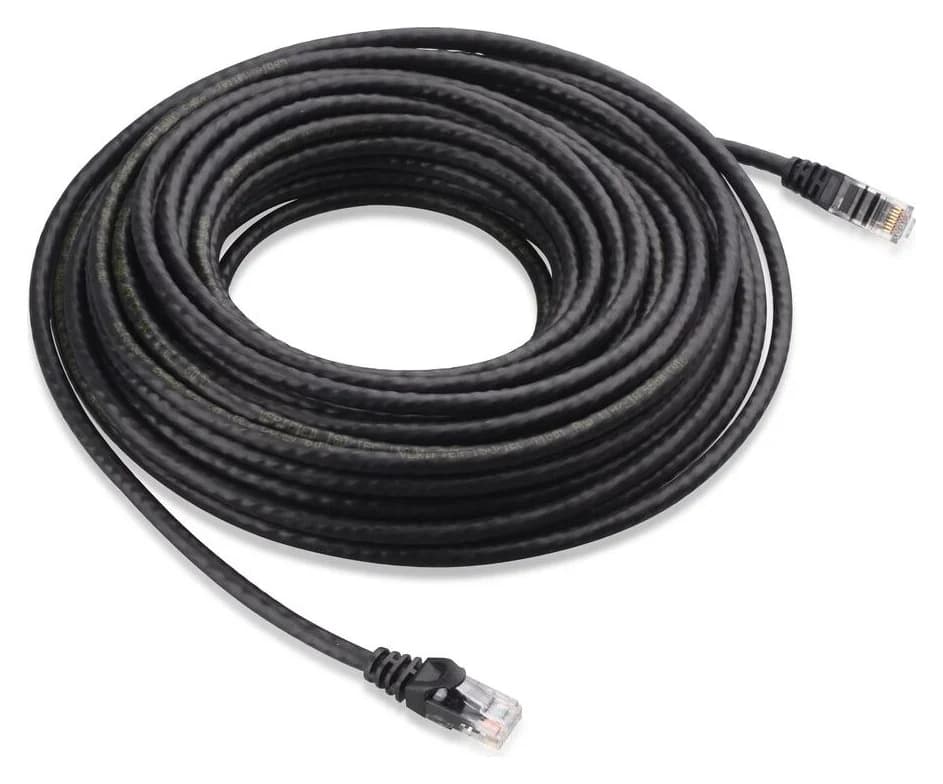
Cable Matters
An indoor unshielded Cat6 Ethernet patch cable with bare-copper conductors and snagless boots.
Check package and model options
Buying guide: finish the whole order
Before checkout, record the exact model, installed RAM, SSD interface and capacity, BIOS choice and wall-cord region. For the V1410, acknowledge the permanent memory ceiling and select NVMe for a preinstalled OS. For the VP2420e, select memory and boot storage explicitly; there is no onboard eMMC fallback.
Check included parts against the table above, and confirm whether mounting hardware or a second drive is actually selected. Keep Wi-Fi and cellular add-ons separate from the firewall decision. Protectli says its M.2 Wi-Fi module does not work with pfSense or OPNsense; use an external access point for this suggested setup rather than assuming an optional radio makes the Vault a supported wireless router.
Finally, write a migration plan: save the current firewall configuration, prepare the selected installer and console connection, identify WAN and LAN, and keep the working router available until the new configuration is verified. Request performance evidence matching your intended services if throughput is the deciding factor. Four fast Ethernet sockets are not a workload benchmark.
How we choose
These picks are based on official product pages, US configurator data, hardware overviews, installation documents and firmware bulletins. We prioritize memory serviceability, the exact storage interface and a usable recovery connection. OPNsense's hardware guidance supplies a capacity reference, not a performance prediction. We have not physically evaluated these appliances. Full editorial method: How we choose.
Verdict
Choose the V1410 for a dedicated firewall when its fixed memory fits, especially if a Mac is your recovery laptop. Choose the VP2420e for replaceable RAM and the additional SATA drive option. Before ordering either, settle the SSD, firmware, exact firewall release and console plan; before buying old stock, check the full model suffix.
Frequently asked questions
Can you upgrade the RAM in the Protectli V1410?
No. The V1410 has 8GB of LPDDR4 soldered to its motherboard, so its memory capacity is fixed. Choose the VP2420e if replaceable memory matters: it has a single DDR4 SO-DIMM socket supporting up to 32GB. An upgrade means replacing that module, rather than adding a second stick beside it.
What is the difference between Protectli VP2420 and VP2420e?
Protectli says the VP2420e replaces the VP2420 and removes its onboard eMMC storage; the remaining hardware and design are the same. The original VP2420 product page specifies 16GB eMMC, while the VP2420e has none. Check the full model suffix and selected RAM and SSD before accepting an old-stock listing or a substitution.
Does the Protectli VP2420e support NVMe SSDs?
Its main M.2 storage slot takes SATA SSDs, and Protectli explicitly says NVMe drives are unsupported. The V1410 takes M.2 2280 NVMe storage instead. Do not buy from an M.2 description alone: confirm both the drive's form factor and interface, then check the selected drive against the exact Vault model.
Should I choose a V1410 or VP2420e for OPNsense?
Choose the V1410 when a fixed 8GB memory ceiling fits your planned services, or the VP2420e when you want replaceable RAM. Both US configurators offer OPNsense 25.7, but Protectli's older installation table names 24.7 for the V1XXX and VP2420 families. Confirm the intended release, firmware and SSD together before moving your working firewall.
Related guides
Buying guide · Homelab Hardware
Docker Home Server: Choose Hardware and Run Your First Service
Start a Docker home server on an existing PC or mini PC. Run FreshRSS with persistent storage, private access, and a backup, restore and update rollback plan.
Best picks · Homelab Hardware
Best Firewall Routers for Home: Wired Gateways and Wi-Fi Kits
Choose a wired home firewall by management workload, ports and supported software, then complete the order with compatible Wi-Fi, switching, power and cables.
Buying guide · Homelab Hardware
Home Server Hardware for a DIY NAS: A Complete Four-Drive Build
Choose DIY NAS hardware with a complete four-drive parts list, case and PSU clearances, SATA and PCIe checks, boot storage, cooling, and a clear recovery plan.