Skip to content

TP-Link · Network Adapters

RE605X AX1800 Wi-Fi Range Extender

Model RE605X

We may earn a commission. How we earn.

Find on Amazon

Opens Amazon search results for this model.

Works with

  • Any Wi-Fi router or wireless access point (standard Wi-Fi bridging); OneMesh smart roaming requires a TP-Link OneMesh router
  • TP-Link Tether app on Android and iOS for setup and management

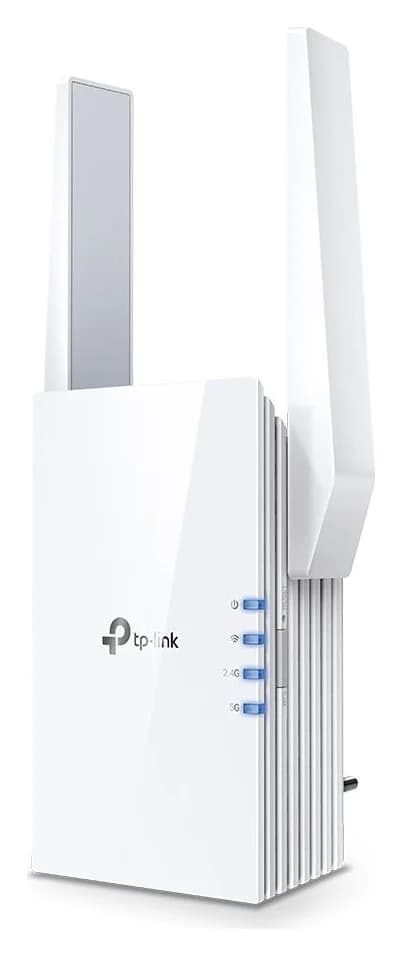
An AX1800 Wi-Fi 6 plug-in range extender from TP-Link with one Gigabit Ethernet port, two external antennas.

  • Wi-Fi 6
  • 1 Gbps port

At a glance

The numbers that matter

Wi-Fi standard

Wi-Fi 6

Fastest wired port

1 Gbps

Link rate of its quickest Ethernet or SFP socket, in gigabits per second.

Size

W 2.9 × D 1.8 × H 4.9 in · 74 × 46 × 125 mm

Bars place the recorded value between zero and the highest value among the 27 network adapters in this catalog. Specifications, not a ranking.

Features

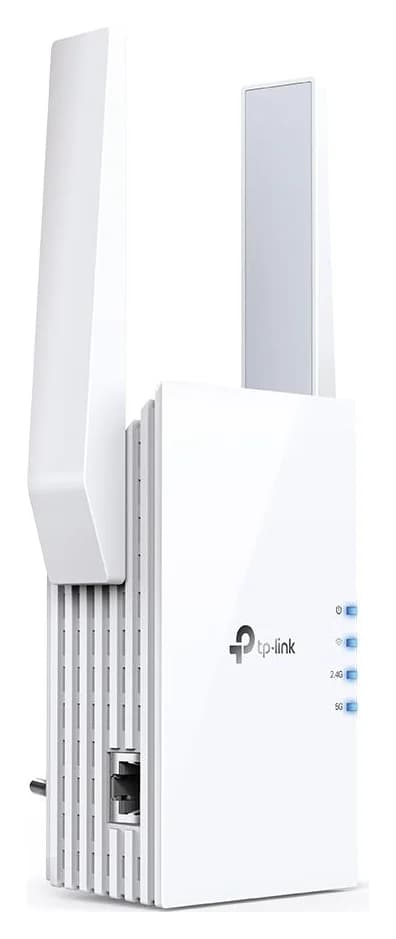
TP-Link RE605X AX1800 Wi-Fi 6 range extender shown from the side with its Ethernet port on a white background

Side

Access Point mode turns any wired Ethernet connection into a dual-band Wi-Fi 6 access point through the Gigabit port

Is it for you?

An AX1800 Wi-Fi 6 plug-in range extender from TP-Link with one Gigabit Ethernet port, two external antennas, OneMesh smart roaming and a built-in access point mode for extending any Wi-Fi router.

Choose it if these matter

  • OneMesh smart roaming with a compatible TP-Link router gives seamless whole-home coverage under one Wi-Fi name
  • One-touch WPS pairing and setup through the TP-Link Tether app (Android/iOS)

Skip it if these rule it out

  • Single Gigabit Ethernet port; wired backhaul to a router tops out below the AX1800 wireless rate
  • Smart Roaming (802.11k/v) requires client devices that support the 802.11k/v standard
  • No USB port and no media-sharing features; it is a pure range extender

Good for: Apartments · Budget · Streaming · Gaming

Which version should you buy?

Selected package: RE605X V2.40, US version, single unit.

Selected package

Bundles and accessories

Watch out

  • RE605X is Wi-Fi 6 (AX1800); the older RE605X naming is reused across hardware versions V1 and V2.40 with the same specs.
  • It has no Wi-Fi 6GHz band and no USB port.

Compare with similar models

SpecificationThis oneRE605X AX1800 Wi-Fi Range ExtenderArcher T9UH AC1900 High Gain Wireless USB AdapterTP-Link TL-PA9020P KIT
Works withAny Wi-Fi router or wireless access point (standard Wi-Fi bridging); OneMesh smart roaming requires a TP-Link OneMesh router, TP-Link Tether app on Android and iOS for setup and managementWindows 11/10/8.1/8/7/XP, Mac OS 10.9-10.13 and Linux PCs with a USB 3.0 port, Works with any 802.11a/b/g/n/ac router; beamforming needs a beamforming-capable routerHomePlug AV and AV2 adapters, Windows, macOS and Linux (no software needed for basic use)
Wi-Fi standardWi-Fi 6Wi-Fi 5 (802.11ac)Not recorded
Fastest wired port1 Gbps5 Gbps1 Gbps
Best forApartments, Budget, Streaming, GamingGaming, Streaming, BudgetApartments, Streaming, Budget
OpenViewView
Full specifications (14)
Wi-Fi class
AX1800: 1201 Mbps at 5 GHz plus 574 Mbps at 2.4 GHz (combined theoretical maximum, not real-world throughput)
Wireless standards
IEEE 802.11a/n/ac/ax at 5 GHz, IEEE 802.11b/g/n/ax at 2.4 GHz
Bands
Dual band, 2.4 GHz and 5 GHz
Antennas
2 external antennas
Interface
1x Gigabit Ethernet port
Working modes
Range extender or access point (creates a new Wi-Fi network from the Ethernet port)
Buttons
WPS button, reset button
Mesh technology
TP-Link OneMesh; smart roaming (802.11k/v) keeps clients on the fastest available signal
Wireless security
64/128-bit WEP, WPA/WPA2-PSK, WPA3
Wireless functions
Enable/disable wireless radio, DFS (with latest firmware and hardware version), access control, LED control, power schedule, Wi-Fi coverage adjustment
Input power
100-240V~50/60Hz, max 10W
Dimensions (W x D x H)
2.9 x 1.8 x 4.9 in (74.0 x 46 x 124.8 mm)
Package content
Wi-Fi range extender RE605X, quick installation guide
Environment
Operating 0-40 C (32-104 F); storage -40 to 70 C

Downloads & support

Setup: No drivers needed: it sets up via the WPS button or the TP-Link Tether app on Android/iOS.

Links go to the manufacturer’s official pages, so you always get the latest, genuine files.

Sources: TP-Link specifications · tp-link.com. Photos: TP-Link · static.tp-link.com. Specifications checked November 9, 2026. Spotted an error? Tell us.

TP-Link RE605X AX1800 Wi-Fi Range ExtenderWe may earn a commissionFind on Amazon