

Comparison
ASUS ZenWiFi BQ16 Pro vs BT10
Which Mesh Pack Fits Your Wiring?
Choose ASUS ZenWiFi BQ16 Pro or BT10 for your wiring: compare US packs, radio bands, ports left after backhaul, AiMesh limits and the kit you need to order.
By thisPING EditorialUpdated November 3, 20269 min read
On this page · Quick picks
Choose the ASUS ZenWiFi BT10 two-pack if you can wire the nodes together; choose the BQ16 Pro two-pack if the link between them must be wireless. Both have two 10G Ethernet ports per unit, but BQ16 Pro adds a second 6 GHz radio for dedicated wireless backhaul.
Official documentation checked November 2, 2026. Recommendations are based on specifications and connection planning.
Quick picks
Compare specifications and all conditions
Ethernet between rooms
- Our pick
- BT10(W-2-PK)
- Why
- Two units with the same dual-10G port arrangement as BQ16 Pro.
A wireless link between the main unit and remote node
- Our pick
- BQ16 Pro(W-2-PK)
- Why
- Dual 6 GHz radios make the extra radio useful for backhaul.
One weak area in an existing ASUS mesh
- Our pick
- Keep the working router; consider a matching one-pack first
- Why
- Ordinary AiMesh expansion and MLO backhaul have different compatibility requirements.
Full comparison table
Swipe to compare. Row labels stay visible.
| Your situation | Our pick | Why |
|---|---|---|
| Ethernet between rooms | BT10(W-2-PK) | Two units with the same dual-10G port arrangement as BQ16 Pro. |
| A wireless link between the main unit and remote node | BQ16 Pro(W-2-PK) | Dual 6 GHz radios make the extra radio useful for backhaul. |
| One weak area in an existing ASUS mesh | Keep the working router; consider a matching one-pack first | Ordinary AiMesh expansion and MLO backhaul have different compatibility requirements. |
Scroll horizontally to see every column
| Your situation | Our pick | Why |
|---|---|---|
| Ethernet between rooms | BT10(W-2-PK) | Two units with the same dual-10G port arrangement as BQ16 Pro. |
| A wireless link between the main unit and remote node | BQ16 Pro(W-2-PK) | Dual 6 GHz radios make the extra radio useful for backhaul. |
| One weak area in an existing ASUS mesh | Keep the working router; consider a matching one-pack first | Ordinary AiMesh expansion and MLO backhaul have different compatibility requirements. |
For other brands and tiers, start with our best mesh Wi-Fi systems.
Compare the exact US hardware
Hardware is per unit, from the BQ16 Pro US sheet and BT10 US sheet. Coverage is ASUS’s two-pack claim.
BQ16 Pro
- Wi-Fi class
- BE30000, quad-band Wi-Fi 7
- Radios
- 2.4 GHz + 5 GHz + 6 GHz-1 + 6 GHz-2
- Transmit/receive configuration
- 4×4 on all four radios
All specifications
- Maximum channel width
- 320 MHz on 6 GHz
- 10G sockets
- One WAN/LAN + one LAN
- 1G sockets
- One WAN/LAN + two LAN
- ASUS two-pack coverage claim
- Up to 8,000 sq ft
BT10
- Wi-Fi class
- BE18000, tri-band Wi-Fi 7
- Radios
- 2.4 GHz + 5 GHz + 6 GHz
- Transmit/receive configuration
- 2×2 at 2.4 GHz; 4×4 at 5 and 6 GHz
All specifications
- Maximum channel width
- 320 MHz on 6 GHz
- 10G sockets
- One WAN/LAN + one LAN
- 1G sockets
- One WAN/LAN
- ASUS two-pack coverage claim
- Up to 6,000 sq ft
Full comparison table
Swipe to compare. Row labels stay visible.
| Specification | BQ16 Pro | BT10 |
|---|---|---|
| Wi-Fi class | BE30000, quad-band Wi-Fi 7 | BE18000, tri-band Wi-Fi 7 |
| Radios | 2.4 GHz + 5 GHz + 6 GHz-1 + 6 GHz-2 | 2.4 GHz + 5 GHz + 6 GHz |
| Transmit/receive configuration | 4×4 on all four radios | 2×2 at 2.4 GHz; 4×4 at 5 and 6 GHz |
| Maximum channel width | 320 MHz on 6 GHz | 320 MHz on 6 GHz |
| 10G sockets | One WAN/LAN + one LAN | One WAN/LAN + one LAN |
| 1G sockets | One WAN/LAN + two LAN | One WAN/LAN |
| ASUS two-pack coverage claim | Up to 8,000 sq ft | Up to 6,000 sq ft |
Scroll horizontally to see every column
| Specification | BQ16 Pro | BT10 |
|---|---|---|
| Wi-Fi class | BE30000, quad-band Wi-Fi 7 | BE18000, tri-band Wi-Fi 7 |
| Radios | 2.4 GHz + 5 GHz + 6 GHz-1 + 6 GHz-2 | 2.4 GHz + 5 GHz + 6 GHz |
| Transmit/receive configuration | 4×4 on all four radios | 2×2 at 2.4 GHz; 4×4 at 5 and 6 GHz |
| Maximum channel width | 320 MHz on 6 GHz | 320 MHz on 6 GHz |
| 10G sockets | One WAN/LAN + one LAN | One WAN/LAN + one LAN |
| 1G sockets | One WAN/LAN + two LAN | One WAN/LAN |
| ASUS two-pack coverage claim | Up to 8,000 sq ft | Up to 6,000 sq ft |
The BE classes add each band’s maximum theoretical rate; they are not one device’s speed or measured internet throughput. Both sheets list up to 5,764 Mbps on 5 GHz and 11,529 Mbps on each 6 GHz radio. BQ16 Pro’s extra radio does not make every connected device faster.
ASUS ZenWiFi BT10: our pick for Ethernet backhaul
Order BT10(W-2-PK) for a fresh two-location installation. Its two 10G ports let the main unit take internet on one and send Ethernet backhaul through the other. ASUS explicitly positions BT10 for homes with wired backhaul.
With both 10G ports occupied, only the main unit’s 1G WAN/LAN socket remains. Plan a switch for a fast NAS or additional 10G branches. See BT10 at ASUS.
ASUS ZenWiFi BQ16 Pro: our pick for a wireless pair
Order BQ16 Pro(W-2-PK) when pulling Ethernet is impractical: its second 6 GHz radio supports dedicated wireless backhaul. BT10 also supports wireless Smart AiMesh; our preference is based on radio allocation, without a measured throughput winner.
BQ16 Pro adds two dedicated gigabit LAN sockets per unit for more wired devices, without adding another 10G socket. See BQ16 Pro at ASUS.
Two layouts for the same house
Wireless backhaul
Client MLO modes and bands depend on the device.
Tap a label to explore. You can also hover or use your keyboard.
Modem or ONT
The internet handoff connects to the main unit.
Sources: 1: The main router uses its WAN for internet; the other unit is an AiMesh node.- WAN cable
Main ASUS unit
Use a matching BQ16 Pro pair or BT10 pair for MLO backhaul.
Sources: 1: The main router uses its WAN for internet; the other unit is an AiMesh node., 3: ASUS limits MLO backhaul to the same model and the first node. - Wireless backhaul
Remote ASUS node
BQ16 Pro adds a second 6 GHz radio for dedicated backhaul. Both models support Smart AiMesh.
Sources: 2: BQ16 Pro has dual 6 GHz bands for dedicated wireless backhaul; ASUS positions BT10 for wired backhaul., 4: BT10 also supports wireless Smart AiMesh backhaul.
Source notes4 references
The main router uses its WAN for internet; the other unit is an AiMesh node.
dlcdnets.asus.com — source for The main router uses its WAN for internet; the other unit is an AiMesh node.2 Use a network cable to connect your optical modem to either WAN/LAN1 port or 10G WAN/LAN2 port of ZenWiFi BT10 with the “Main Unit” sticker. This ZenWiFi BT10 will be the AiMesh router, and the other ZenWiFi BT10 will be the AiMesh node.
BQ16 Pro has dual 6 GHz bands for dedicated wireless backhaul; ASUS positions BT10 for wired backhaul.
press.asus.com — source for BQ16 Pro has dual 6 GHz bands for dedicated wireless backhaul; ASUS positions BT10 for wired backhaul.The ZenWiFi BQ16 Pro further takes advantage of dual 6 GHz bands, unleashing the full potential of WiFi 7 with dedicated 6 GHz wireless backhaul. For smart homes with wired Ethernet, the ZenWiFi BT10 is the ideal mesh solution with a dedicated wired backhaul.
ASUS limits MLO backhaul to the same model and the first node.
www.asus.com — source for ASUS limits MLO backhaul to the same model and the first node.In an AiMesh system, if there are multiple WiFi 7 nodes, only the first node can use MLO Backhaul, and MLO Backhaul only supports the same model .
BT10 also supports wireless Smart AiMesh backhaul.
www.asus.com — source for BT10 also supports wireless Smart AiMesh backhaul.Smart AiMesh backhaul intelligently leverages WiFi 7 Multi-Link Operation, automatically aggregating or switching across multiple bands for optimized performance and low latency.
ASUS’s quick-start guides identify a yellow LED as a weak inter-node signal. Move the node closer before changing hardware.
Ethernet backhaul
For both kits, use main 10G LAN → node 10G WAN/LAN, with internet on the main 10G WAN/LAN. These are rated port speeds, not a promise of application throughput. ASUS’s wired-backhaul instructions specify LAN-to-WAN wiring.
Tap a label to explore. You can also hover or use your keyboard.
Modem or ONT
This example uses the main unit’s 10G WAN/LAN port for internet.
Sources: 1: BQ16 Pro has one 10G WAN/LAN and one 10G LAN port per unit., 2: BT10 has one 10G WAN/LAN and one 10G LAN port per unit.- Internet → 10G WAN/LAN
Main ASUS unit
Its 10G LAN port feeds the node. Both main-unit 10G sockets are occupied.
Sources: 1: BQ16 Pro has one 10G WAN/LAN and one 10G LAN port per unit., 2: BT10 has one 10G WAN/LAN and one 10G LAN port per unit., 3: ASUS connects wired backhaul from the main router’s LAN to the node’s WAN. - 10G LAN → 10G WAN/LAN
Remote ASUS node
The node’s other 10G LAN port remains available for a wired device.
Sources: 1: BQ16 Pro has one 10G WAN/LAN and one 10G LAN port per unit., 2: BT10 has one 10G WAN/LAN and one 10G LAN port per unit., 3: ASUS connects wired backhaul from the main router’s LAN to the node’s WAN.
Source notes3 references
BQ16 Pro has one 10G WAN/LAN and one 10G LAN port per unit.
www.asus.com — source for BQ16 Pro has one 10G WAN/LAN and one 10G LAN port per unit.10G WAN/LAN x 1, 10G LAN x 1, 1G WAN/LANx 1, 1G LAN x2, USB 3.0
BT10 has one 10G WAN/LAN and one 10G LAN port per unit.
www.asus.com — source for BT10 has one 10G WAN/LAN and one 10G LAN port per unit.10G WAN/LAN x 1 10G LAN x 1 1G WAN/LAN x 1 USB 3.0 x1
ASUS connects wired backhaul from the main router’s LAN to the node’s WAN.
www.asus.com — source for ASUS connects wired backhaul from the main router’s LAN to the node’s WAN.Plug one end of the cable into the LAN port of the AiMesh router and the other end into the WAN port of the AiMesh node.
With every node wired, enable AiMesh → System Settings → Ethernet Backhaul Mode after connecting the cables. For a mixed wired/wireless installation, use each node’s Backhaul Connection Priority instead; ASUS says Ethernet first can fall back to wireless. Do not enable the all-wired mode while leaving a node without an Ethernet uplink.
Count the sockets left after WAN and backhaul
Counts assume internet on the main 10G WAN/LAN, unused WAN/LAN sockets configured for LAN, and no switch, Dual WAN or wired clients. This is inventory arithmetic. Both quick-start guides allow wireless-node WAN/LAN sockets to serve LAN.
Wireless backhaul: main
- Free BQ16 Pro sockets
- 1× 10G + 3× 1G
- Free BT10 sockets
- 1× 10G + 1× 1G
Wireless backhaul: node
- Free BQ16 Pro sockets
- 2× 10G + 3× 1G
- Free BT10 sockets
- 2× 10G + 1× 1G
10G Ethernet backhaul: main
- Free BQ16 Pro sockets
- 3× 1G; no free 10G
- Free BT10 sockets
- 1× 1G; no free 10G
10G Ethernet backhaul: node
- Free BQ16 Pro sockets
- 1× 10G + 3× 1G
- Free BT10 sockets
- 1× 10G + 1× 1G
Full comparison table
Swipe to compare. Row labels stay visible.
| Connection and location | Free BQ16 Pro sockets | Free BT10 sockets |
|---|---|---|
| Wireless backhaul: main | 1× 10G + 3× 1G | 1× 10G + 1× 1G |
| Wireless backhaul: node | 2× 10G + 3× 1G | 2× 10G + 1× 1G |
| 10G Ethernet backhaul: main | 3× 1G; no free 10G | 1× 1G; no free 10G |
| 10G Ethernet backhaul: node | 1× 10G + 3× 1G | 1× 10G + 1× 1G |
Scroll horizontally to see every column
| Connection and location | Free BQ16 Pro sockets | Free BT10 sockets |
|---|---|---|
| Wireless backhaul: main | 1× 10G + 3× 1G | 1× 10G + 1× 1G |
| Wireless backhaul: node | 2× 10G + 3× 1G | 2× 10G + 1× 1G |
| 10G Ethernet backhaul: main | 3× 1G; no free 10G | 1× 1G; no free 10G |
| 10G Ethernet backhaul: node | 1× 10G + 3× 1G | 1× 10G + 1× 1G |
On a gigabit internet handoff, using the 1G WAN/LAN for WAN instead can free the main 10G WAN/LAN socket for LAN. That choice limits the internet link to gigabit. For additional 10G branches, put a suitable switch after the main router, on its LAN side; see multi-gig switches.
AiMesh expansion, software and support
Existing AiMesh-compatible ASUS routers can join either system. However, ASUS’s MLO FAQ says MLO backhaul supports only the same model and only the first node. A mixed BQ16 Pro/BT10 mesh is therefore not a documented MLO-backhaul pair. A larger pack does not give every node MLO backhaul.
ASUS also warns that enabling MLO on the primary stops a node without MLO from broadcasting 6 GHz. Put the highest-specification router in charge, check the older model’s support, and follow ASUS’s compatibility guidance before replacing working equipment. For troublesome legacy devices, ASUS recommends its IoT network.
Both models list AiProtection Pro, parental controls, WireGuard and VPN Fusion. Smart Home Master provides IoT, children’s and VPN networks; ASUS describes its parental controls as subscription-free. Those features alone do not justify stepping up to BQ16 Pro.
Both BQ16 Pro firmware and BT10 firmware pages list an update dated October 21, 2026. That is current support evidence, not a future-support promise.
ASUS’s regional update policy lists BT10 and non-Pro BQ16 through December 31, 2028 in the UK. The reviewed documents establish no US-specific minimum; that UK entry does not establish support duration for US BQ16 Pro.
Buying guide: check the suffix and the whole kit
BQ16 is different from BQ16 Pro. ASUS’s non-Pro specifications list BE25000 with two 5 GHz radios and one 6 GHz radio; Pro is BE30000 with two 6 GHz radios. A shortened shop title is insufficient identification.
ASUS’s US specifications name these packs. Two-pack guides establish one router plus one node, totaling two units.
BQ16 Pro(W-1-PK) / BT10(W-1-PK)
- Units total
- 1
- Powered locations to plan
- One; standalone router or AiMesh addition
BQ16 Pro(W-2-PK) / BT10(W-2-PK)
- Units total
- 2
- Powered locations to plan
- Two; main router and remote node
BT10(W-3-PK)
- Units total
- 3
- Powered locations to plan
- Three; main router and two nodes
Full comparison table
Swipe to compare. Row labels stay visible.
| Exact pack | Units total | Powered locations to plan |
|---|---|---|
| BQ16 Pro(W-1-PK) / BT10(W-1-PK) | 1 | One; standalone router or AiMesh addition |
| BQ16 Pro(W-2-PK) / BT10(W-2-PK) | 2 | Two; main router and remote node |
| BT10(W-3-PK) | 3 | Three; main router and two nodes |
Scroll horizontally to see every column
| Exact pack | Units total | Powered locations to plan |
|---|---|---|
| BQ16 Pro(W-1-PK) / BT10(W-1-PK) | 1 | One; standalone router or AiMesh addition |
| BQ16 Pro(W-2-PK) / BT10(W-2-PK) | 2 | Two; main router and remote node |
| BT10(W-3-PK) | 3 | Three; main router and two nodes |
Adapter-count limitation: ASUS lists a power adapter, RJ45 cable and documentation without per-pack quantities. Require a matching adapter per unit—two for either recommended two-pack—and confirm the supplied count. ASUS instructs owners to use the supplied adapter; do not assume interchangeability.
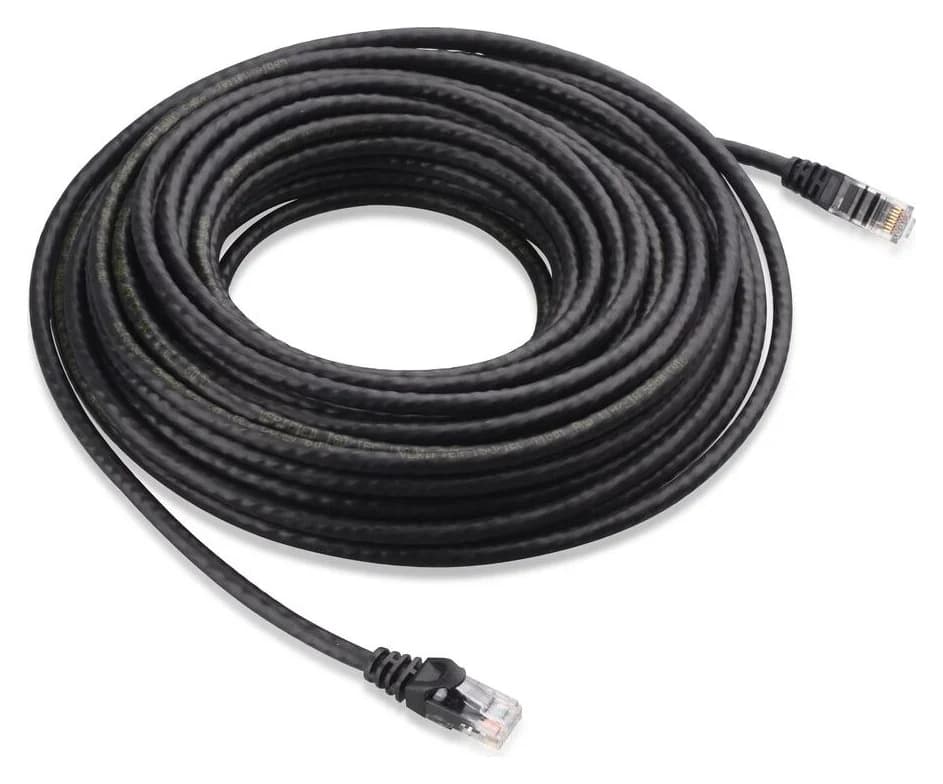
For a wired pair, plan the WAN lead and the full LAN-to-node cable route, including patch leads at wall sockets. An included RJ45 cable does not establish the length or capability of your installed wiring. For a short indoor patch connection, the existing Cable Matters Cat6 pick is a single lead; measure the route and verify the negotiated link speed.
Cable Matters
An indoor unshielded Cat6 Ethernet patch cable with bare-copper conductors and snagless boots.
Check package and model options
Match the identity
Confirm US region, the full model name and the pack suffix.
Complete the connections
Allow an outlet and matching adapter per unit, plus the required cable route and switch connections.
Check expansion
Confirm ordinary AiMesh compatibility separately from matching-model MLO backhaul.
How we choose
We compare official US radio specifications, packs, port arithmetic, AiMesh restrictions and support documents, without physical performance measurements. Coverage figures are manufacturer claims. Conflicting port lists and unitemized adapter quantities remain explicit.
Verdict
Buy the BT10 two-pack for a wired pair or the BQ16 Pro two-pack for its extra wireless-backhaul radio. Keep a working AiMesh setup when a compatible single-unit addition meets the need. Choose the node count and connection plan before comparing BE classes.
Frequently asked questions
Is BQ16 Pro better than BT10 with Ethernet backhaul?
For a home with Ethernet between nodes, BT10 is our default pick because both models have two 10G ports per unit. BQ16 Pro adds another 6 GHz radio and more gigabit sockets. Those may matter for your devices, but the specification sheets do not establish a faster wired-backhaul or wall-penetration winner.
Are ASUS ZenWiFi BQ16 and BQ16 Pro the same?
No. ASUS specifies BQ16 Pro as BE30000 with two 6 GHz radios and one 5 GHz radio. The non-Pro BQ16 is BE25000 with two 5 GHz radios and one 6 GHz radio. Both also include 2.4 GHz. Read the full model suffix and region before choosing a pack; the radio configurations are different.
Can I mix BQ16 Pro, BT10 and older ASUS AiMesh routers?
ASUS allows existing AiMesh routers to join a Wi-Fi 7 mesh, but its MLO backhaul FAQ limits that feature to matching models and the first node. Mixing BQ16 Pro and BT10 therefore does not establish MLO backhaul support. ASUS also warns that a node without MLO will not broadcast 6 GHz when MLO is enabled on the primary router.
Does a two-pack mean two nodes plus a router?
No. The ASUS quick-start guides describe two units total: one main router and one AiMesh node. A single pack has one unit and needs another compatible ASUS router to form a mesh. Plan a matching power adapter for every unit. ASUS lists adapters and an Ethernet cable in package contents without itemizing their quantities by pack.
Related guides
Buying guide · Mesh Wi-Fi Systems
How to Set Up Mesh Wi-Fi: Place Nodes, Choose Modes and Verify
Set up mesh Wi-Fi with the right router or AP mode, sensible node placement and a room-by-room check. Includes eero and ASUS instructions and a gift checklist.
Comparison · Mesh Wi-Fi Systems
eero Pro 7 vs ASUS ZenWiFi BT10: Simple Mesh or Local Controls?
Choose eero Pro 7 for app-led mesh or ASUS ZenWiFi BT10 for local controls. Compare equal packs, subscriptions, spare ports and complete wired-backhaul orders.
Comparison · Mesh Wi-Fi Systems
eero Max 7 vs Deco BE85: Which 10G Mesh Kit Should You Buy?
Choose eero Max 7 or Deco BE85 by US revision, equal node counts, ports left after 10G backhaul, subscriptions and the cables needed for a complete mesh kit.