

Comparison
UGREEN DH4300 Plus vs DXP4800 Plus
Which Four-Bay NAS Should You Buy?
UGREEN DH4300 Plus vs DXP4800 Plus: compare apps, RAM, networking and the same drive basket, with usable capacity, backup and exact-model buying checks.
By thisPING EditorialUpdated November 3, 20269 min read1 pick
On this page · Our picks at a glance
Our picks at a glance
- 1
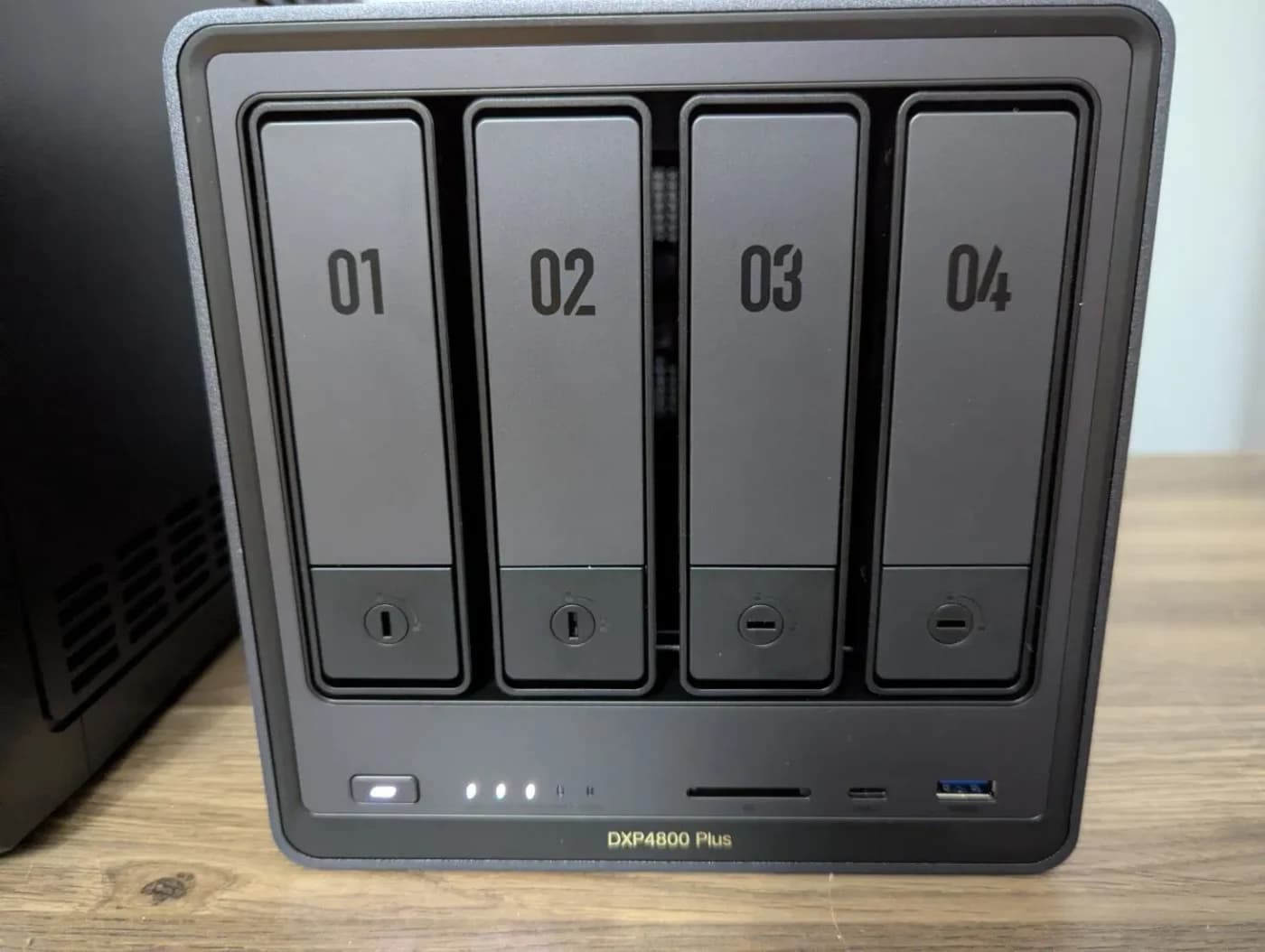
Choose for: Best for applications and expansion
Check before buying: The 10GbE port needs 10G gear on the other end to pay off
Choose the UGREEN DH4300 Plus for household files, photo backup and light compatible containers when its fixed memory and 2.5GbE connection meet your needs. Choose the UGREEN DXP4800 Plus when you need virtual machines, expandable memory, M.2 SSD storage or a 10GbE connection. Both have four SATA bays: with the same disks and RAID layout, the upgrade buys different computing and connectivity resources, not more HDD capacity (UGREEN's model comparison).
For household backup with a smaller drive plan, also consider the two-bay UGREEN NASync DXP2800 in Quick picks below.
Quick picks
Compare specifications and all conditions
Family backup, shared folders and direct-play media
- Compared model or alternative
- DH4300 Plus
- Reason to choose it
- Four SATA bays and Docker support without paying for expansion you will not use
Virtual machines, growing application workloads or SSD storage
- Compared model or alternative
- DXP4800 Plus
- Reason to choose it
- Expandable RAM, M.2 slots and the Intel platform
Large transfers to a suitably equipped workstation
- Compared model or alternative
- DXP4800 Plus
- Reason to choose it
- A 10GbE port, provided the rest of the connection supports it
Household backup and shared files when two SATA bays suffice
- Compared model or alternative
- Also consider: DXP2800
- Reason to choose it
- Intel N100, expandable DDR5, M.2 slots and 2.5GbE in a smaller diskless NAS
Full comparison table
Swipe to compare. Row labels stay visible.
| Your job | Compared model or alternative | Reason to choose it |
|---|---|---|
| Family backup, shared folders and direct-play media | DH4300 Plus | Four SATA bays and Docker support without paying for expansion you will not use |
| Virtual machines, growing application workloads or SSD storage | DXP4800 Plus | Expandable RAM, M.2 slots and the Intel platform |
| Large transfers to a suitably equipped workstation | DXP4800 Plus | A 10GbE port, provided the rest of the connection supports it |
| Household backup and shared files when two SATA bays suffice | Also consider: DXP2800 | Intel N100, expandable DDR5, M.2 slots and 2.5GbE in a smaller diskless NAS |
Scroll horizontally to see every column
| Your job | Compared model or alternative | Reason to choose it |
|---|---|---|
| Family backup, shared folders and direct-play media | DH4300 Plus | Four SATA bays and Docker support without paying for expansion you will not use |
| Virtual machines, growing application workloads or SSD storage | DXP4800 Plus | Expandable RAM, M.2 slots and the Intel platform |
| Large transfers to a suitably equipped workstation | DXP4800 Plus | A 10GbE port, provided the rest of the connection supports it |
| Household backup and shared files when two SATA bays suffice | Also consider: DXP2800 | Intel N100, expandable DDR5, M.2 slots and 2.5GbE in a smaller diskless NAS |
For the compared four-bay models, our buying rule is: choose the DH when it satisfies every documented requirement and its complete basket costs less; step up for a named resource you need.
The UGREEN NASync DXP2800 is an alternative for household backup and shared files when its smaller drive layout meets your needs. It has an Intel N100, 8GB DDR5 expandable to 16GB, two SATA bays, two M.2 NVMe slots for SSD caching or a separate SSD pool, and one 2.5GbE port. Storage drives are bought separately.

UGREEN
A two-bay NAS with an Intel N100, 8 GB DDR5, a 2.5GbE port, two M.2 NVMe slots and 4K HDMI output.
Check package and model options
- 2.5 Gbps port
- 2 bays
The DXP2800 cannot hold the four HDDs in the matched basket below and has no 10GbE port. Its M.2 slots do not turn it into a four-SATA-bay enclosure. Keep the DH4300 Plus or DXP4800 Plus on your shortlist if that HDD layout is a requirement, and check the DXP2800's own exact-drive compatibility results before ordering it. The capacity worksheet below continues to compare only the two named four-bay models.
Hardware comparison: what changes between DH and DXP?
The DH4300 Plus page supplies the specifications below, including an embedded comparison column explicitly labeled DXP4800 Plus.
Processor
- DH4300 Plus
- Rockchip ARM, A76+A55, eight cores
- DXP4800 Plus
- Intel Pentium Gold 8505, five cores and six threads
Installed RAM
- DH4300 Plus
- 8GB LPDDR4X, fixed
- DXP4800 Plus
- 8GB DDR5, expandable to 64GB
SATA bays
- DH4300 Plus
- Four; storage disks bought separately
- DXP4800 Plus
- Four; storage disks bought separately
M.2 NVMe slots
- DH4300 Plus
- None
- DXP4800 Plus
- Two, for SSD caching or SSD storage
Ethernet
- DH4300 Plus
- One 2.5GbE port
- DXP4800 Plus
- One 10GbE plus one 2.5GbE port
Docker
- DH4300 Plus
- Yes; use compatible ARM containers
- DXP4800 Plus
- Yes; check the image and workload
Virtual machines
- DH4300 Plus
- Unsupported
- DXP4800 Plus
- Supported; size memory and storage for the guest
HDMI output
- DH4300 Plus
- 4K at 60Hz
- DXP4800 Plus
- 4K at 60Hz
USB-C connection
- DH4300 Plus
- 5Gbps
- DXP4800 Plus
- 10Gbps
Storage modes
- DH4300 Plus
- Basic, JBOD, RAID 0, 1, 5, 6 and 10
- DXP4800 Plus
- Basic, JBOD, RAID 0, 1, 5, 6 and 10
Full comparison table
Swipe to compare. Row labels stay visible.
| Resource | DH4300 Plus | DXP4800 Plus |
|---|---|---|
| Processor | Rockchip ARM, A76+A55, eight cores | Intel Pentium Gold 8505, five cores and six threads |
| Installed RAM | 8GB LPDDR4X, fixed | 8GB DDR5, expandable to 64GB |
| SATA bays | Four; storage disks bought separately | Four; storage disks bought separately |
| M.2 NVMe slots | None | Two, for SSD caching or SSD storage |
| Ethernet | One 2.5GbE port | One 10GbE plus one 2.5GbE port |
| Docker | Yes; use compatible ARM containers | Yes; check the image and workload |
| Virtual machines | Unsupported | Supported; size memory and storage for the guest |
| HDMI output | 4K at 60Hz | 4K at 60Hz |
| USB-C connection | 5Gbps | 10Gbps |
| Storage modes | Basic, JBOD, RAID 0, 1, 5, 6 and 10 | Basic, JBOD, RAID 0, 1, 5, 6 and 10 |
Scroll horizontally to see every column
| Resource | DH4300 Plus | DXP4800 Plus |
|---|---|---|
| Processor | Rockchip ARM, A76+A55, eight cores | Intel Pentium Gold 8505, five cores and six threads |
| Installed RAM | 8GB LPDDR4X, fixed | 8GB DDR5, expandable to 64GB |
| SATA bays | Four; storage disks bought separately | Four; storage disks bought separately |
| M.2 NVMe slots | None | Two, for SSD caching or SSD storage |
| Ethernet | One 2.5GbE port | One 10GbE plus one 2.5GbE port |
| Docker | Yes; use compatible ARM containers | Yes; check the image and workload |
| Virtual machines | Unsupported | Supported; size memory and storage for the guest |
| HDMI output | 4K at 60Hz | 4K at 60Hz |
| USB-C connection | 5Gbps | 10Gbps |
| Storage modes | Basic, JBOD, RAID 0, 1, 5, 6 and 10 | Basic, JBOD, RAID 0, 1, 5, 6 and 10 |
Best for household backup: UGREEN DH4300 Plus
Among the compared four-bay enclosures, the DH4300 Plus is our default recommendation for a storage-first household. UGREEN documents automatic photo backup, family file sharing, four SATA bays and Docker support. Its important limits are fixed 8GB memory, no M.2 slots and no virtual machines; accepting those limits at purchase is the decision that matters.
For Plex or Jellyfin, UGREEN recommends planning around direct playback. It explicitly says this model lacks Intel Quick Sync and warns that codec conversion, subtitle burn-in, available bandwidth and simultaneous streams affect performance. Choose it when your playback devices can handle your files; do not buy it on a promise of demanding remote transcoding.
The official package description includes the NAS, power adapter, Ethernet cable, screws, screwdriver and manual. Order the data disks separately. Check the DH4300 Plus configuration at UGREEN.
Best for applications and expansion: UGREEN DXP4800 Plus
Buy the DXP4800 Plus when you can name the extra resource your workload needs: virtual machines, memory expansion, M.2 SSD storage or 10GbE. UGREEN specifies the Pentium Gold 8505, 8GB DDR5 expandable to 64GB, two M.2 NVMe slots and separate 10GbE and 2.5GbE ports.
The SSD slots can serve caching or SSD storage. Decide which role you need before shopping, and budget for an independent backup alongside it. For applications, write down where persistent data, configuration and backups will live before installing containers.
Start with the supplied memory unless your requirements justify more. Check the complete module or SSD part number against UGREEN's compatibility list; DDR generation or physical fit alone does not verify a component. No aftermarket memory or SSD kit is assumed in our order.
Check the DXP4800 Plus configuration at UGREEN.
Choose the cheaper tier unless this worksheet says otherwise
List each application, its supported CPU architecture, memory requirement and storage requirement. UGREEN says the DH's ARM processor suits lightweight compatible containers and identifies broader x86 compatibility as a reason to choose DXP. A Docker checkbox does not verify your particular image.
For media, check whether your actual client can play the codec and subtitles directly. UGREEN describes the DXP4800 Plus as an option for hardware-assisted transcoding, but we have no measured stream count for either model.
- Yes: Choose DXP4800 Plus if virtual machines are required
- Yes: Choose DXP4800 Plus if you need expandable memory or M.2 storage
- Yes: Choose DXP4800 Plus if your planned wired connection needs 10GbE
- Partly: Docker alone: DH4300 Plus supports it; verify the application's ARM image and resource needs
- Partly: Household backup and direct playback: DH4300 Plus is our starting choice
Same capacity, same drive order
Our matched basket uses four WD Red Plus 8TB WD80EFPX drives in either enclosure. WD's selected-model specifications identify an 8TB, 3.5-inch SATA CMR NAS drive with 256MB cache. Match WD80EFPX on every drive; the family name and capacity alone are insufficient.
These are calculated decimal capacities, using the drive's nominal size, UGREEN's supported layouts and WD's RAID definitions. Formatting and system overhead reduce available space.
Four 8TB drives, RAID 5
- Raw capacity
- 32TB
- Capacity before overhead
- About 24TB
- Drive-failure tolerance
- One drive
Four 8TB drives, RAID 6
- Raw capacity
- 32TB
- Capacity before overhead
- About 16TB
- Drive-failure tolerance
- Two drives
Two 8TB drives, RAID 1
- Raw capacity
- 16TB
- Capacity before overhead
- About 8TB
- Drive-failure tolerance
- One drive
Full comparison table
Swipe to compare. Row labels stay visible.
| Identical disks in either enclosure | Raw capacity | Capacity before overhead | Drive-failure tolerance |
|---|---|---|---|
| Four 8TB drives, RAID 5 | 32TB | About 24TB | One drive |
| Four 8TB drives, RAID 6 | 32TB | About 16TB | Two drives |
| Two 8TB drives, RAID 1 | 16TB | About 8TB | One drive |
Scroll horizontally to see every column
| Identical disks in either enclosure | Raw capacity | Capacity before overhead | Drive-failure tolerance |
|---|---|---|---|
| Four 8TB drives, RAID 5 | 32TB | About 24TB | One drive |
| Four 8TB drives, RAID 6 | 32TB | About 16TB | Two drives |
| Two 8TB drives, RAID 1 | 16TB | About 8TB | One drive |
For the matched RAID 5 build, order one chosen enclosure and four individual WD80EFPX drives. Choose RAID 6 instead if its extra failure tolerance matters more than capacity. Add the same backup equipment to both baskets before comparing totals.
After a RAID 5 member fails, its one-drive failure tolerance is used up until redundancy is restored. Keep the independent backup current before rebuilding.
Check the exact WD80EFPX specifications at WD. For other capacities, use our NAS hard-drive guide.
Count the complete network path
Write down NAS → switch → computer adapter → computer storage. Our inference from the port specifications is straightforward: the DXP's 10GbE port is useful only when the path and workload can use it. Include the switch port, workstation adapter and suitable cabling in that basket; a faster NAS port alone does not upgrade the connection.
Keep the DH if its 2.5GbE port meets the job. Choose the DXP for the faster path or its application resources, and treat port rates as link capabilities, not measured file-copy speeds. Do not budget around adding the DXP's two Ethernet port rates together. Our multi-gig switch guide helps with the next purchase.
Backup kit, expansion and recovery
RAID still counts as one copy of your data, as WD explains. Treat the independent backup as part of either NAS order.
For a concrete independent backup order, add one WD My Book 26TB, WDBBGB0260HBK-NESN, plus access to a supported backup computer. WD lists the 26TB model with a USB-A cable, AC adapter, exFAT formatting and Windows/macOS compatibility. Our proposed workflow is a plain-file copy through that computer, followed by opening the copied files with the NAS disconnected. This avoids assuming direct-USB certification or proprietary backup-package portability.
Size the destination for selected files, growth and retained older copies. A 26TB label does not guarantee room for a completely full 24TB pool plus extensive history. Reduce the protected selection or choose a larger independent destination when the retention plan will not fit. Microsoft documents Robocopy's source/destination copying and mirror options; avoid mirroring deletions if recovering deleted files is the goal.
For staged growth, UGREEN specifically documents Basic → RAID 1 → RAID 5 on the DH4300 Plus. It says JBOD and RAID 0 cannot migrate to RAID 5. Back up before migration or rebuilding. That within-model path does not establish a supported disk transplant into the DXP; plan a verified file copy or restore and obtain exact migration instructions first.
Confirm the disk basket
Match the enclosure and each complete HDD part number against the maker's compatibility results.
Create the independent copy
Connect the backup drive to the supported computer and copy the selected NAS files using your chosen retention plan.
Prove recovery
Disconnect the NAS and open sample backup files on the computer; keep an additional copy elsewhere for irreplaceable data.
Expand after verification
Back up first and follow the documented migration path for your exact enclosure.
Black Friday and Cyber Monday: identify the actual bundle
Compare the complete basket: enclosure, identical disks, independent backup and any required network equipment. A sale label does not change the requirements above.
DH4300 Plus standalone
- Verification cue
- US page SKU 65651; ARM processor, fixed memory, single 2.5GbE port
DXP4800 Plus standalone
- Verification cue
- Embedded US variant SKU 35260US; Pentium Gold 8505 and 10GbE plus 2.5GbE
DXP4800 without “Plus”
- Verification cue
- Do not substitute it for the specified Plus configuration; verify its own processor and ports
Full comparison table
Swipe to compare. Row labels stay visible.
| Listing identity to match | Verification cue |
|---|---|
| DH4300 Plus standalone | US page SKU 65651; ARM processor, fixed memory, single 2.5GbE port |
| DXP4800 Plus standalone | Embedded US variant SKU 35260US; Pentium Gold 8505 and 10GbE plus 2.5GbE |
| DXP4800 without “Plus” | Do not substitute it for the specified Plus configuration; verify its own processor and ports |
Scroll horizontally to see every column
| Listing identity to match | Verification cue |
|---|---|
| DH4300 Plus standalone | US page SKU 65651; ARM processor, fixed memory, single 2.5GbE port |
| DXP4800 Plus standalone | Embedded US variant SKU 35260US; Pentium Gold 8505 and 10GbE plus 2.5GbE |
| DXP4800 without “Plus” | Do not substitute it for the specified Plus configuration; verify its own processor and ports |
The DH product page separately offers UPS2000 and UPS3000 bundles. Its standalone package already includes a power adapter; backup power and another copy of your files are separate purchasing decisions. Confirm region, condition and the exact included items. Both enclosures are diskless, regardless of maximum-capacity headlines.
How we choose
We matched manufacturer-documented requirements to household backup, applications and networking, then held the HDD basket constant. Sources checked November 2, 2026 include UGREEN's US DH product page and embedded DXP comparison, its compatibility guidance, WD's exact-model specifications and Microsoft's copy-tool documentation. The comparison reflects those documents; transfer and transcoding performance have not been independently measured.
The DXP2800 alternative fits the household-backup job only when two SATA bays meet the storage plan; it is not a replacement for the four-drive configuration compared here.
The accessible official evidence did not establish drive-model certification or automatic migration between these enclosures. Confirm those points before ordering for an existing array. For broader choices, see best NAS for home.
Verdict
Buy the DH4300 Plus when household backup and compatible lightweight applications cover your needs. Buy the DXP4800 Plus for a documented need for virtual machines, expandable memory, M.2 storage or 10GbE. Keep the drive capacity and independent backup equivalent, then choose the complete order that meets your requirements.
For household backup and shared files when two SATA bays suffice, also consider the UGREEN NASync DXP2800. Allow for its smaller HDD layout and 2.5GbE connection, buy compatible drives separately and keep an independent backup. The four-drive capacity calculations above do not apply to this alternative.
Frequently asked questions
Does the UGREEN DH4300 Plus support Docker?
Yes. UGREEN explicitly supports Docker on the DH4300 Plus, but its ARM processor and fixed 8GB LPDDR4X memory require suitable container images and a realistic workload. It does not support virtual machines or M.2 NVMe drives. Choose the DXP4800 Plus when virtual machines, memory expansion, SSD storage or broader x86 application compatibility are requirements. Docker support alone is not a reason to reject the DH4300 Plus.
How much usable capacity do four 8TB drives provide?
Our calculated configuration gives both NAS models the same 32TB raw capacity. RAID 5 provides about 24TB before formatting and system overhead, with tolerance for one drive failure. RAID 6 provides about 16TB and tolerates two drive failures. The DXP4800 Plus adds application, SSD and network resources; its extra features do not increase the usable capacity of the same four-drive HDD array.
Can I upgrade DH4300 Plus RAM or add an NVMe SSD later?
No. UGREEN lists fixed 8GB LPDDR4X memory and no M.2 slots for the DH4300 Plus. The DXP4800 Plus includes 8GB DDR5, supports expansion to 64GB and has two M.2 NVMe slots. Decide whether you need those resources before choosing the enclosure, then check exact memory and SSD part numbers in UGREEN's model-specific compatibility list. This guide does not assume any unverified upgrade kit.
Can I move the disks from a DH4300 Plus into a DXP4800 Plus?
Do not plan a purchase around an assumed drive transplant. UGREEN documents capacity expansion within the DH4300 Plus, but that does not establish automatic migration between these two architectures. Our recommendation is to maintain a verified independent backup, plan a file copy or restore, and obtain model-specific migration instructions before moving existing array members. Include application settings and container data in that recovery plan.
Related guides
Comparison · NAS
UGREEN DXP6800 Pro vs DXP8800 Plus: Buy Six Bays or Eight?
Choose the right UGREEN NAS with equal-capacity drive plans, RAID expansion limits, exact US model checks, network advice, and a separate backup shopping list.
Best picks · NAS
Best All-Flash NVMe NAS: Choose the Enclosure, SSDs and Network Kit
Choose an all-flash NVMe NAS with compatible SSDs, realistic network limits, usable RAID capacity and a separate backup plan. Compare F8 SSD Plus and Flashstor.
Best picks · NAS
Best NAS for Plex: Match Your Clients, Media and Transcoding Needs
Choose a Plex NAS for Direct Play, hardware transcoding or separate compute. Compare compatibility, avoid model traps and plan drives, backup and networking.