

Best picks
Best NAS for Home in 2026: Backups, Photos and Plex
Synology and UGREEN NAS picks chosen by job: phone and computer backups, photo libraries and Plex or Jellyfin, plus the CMR drives and the RAID maths.
By thisPING EditorialUpdated November 2, 202611 min read2 picks

Our picks at a glance
For backing up phones and computers, the Synology DS225+ is the NAS to start with: two bays, a 2.5GbE port, Synology's DSM software and an Intel processor with Quick Sync Video. For Plex or Jellyfin, the UGREEN NASync DXP2800 pairs an Intel N100 with 8 GB of DDR5; for four bays, get the Synology DS425+, or the UGREEN DXP4800 Plus if you want 10GbE. Specs checked November 1, 2026.
A NAS (network-attached storage) is a small always-on computer full of drives that every device at home can reach. Choose it by the job it will do, then by bays, network speed and processor.
Quick picks
| Pick | Best for | Bays | Processor (graphics) | RAM (max) | Network | Warranty |
|---|---|---|---|---|---|---|
| Synology DS225+ | Backups and photos | 2 | Celeron J4125 (UHD 600, Quick Sync) | 2 GB (6 GB) | 2.5GbE + 1GbE | 3 years |
| Synology DS425+ | Four bays | 4 + 2 M.2 | Celeron J4125 (UHD 600, Quick Sync) | 2 GB (6 GB) | 2.5GbE + 1GbE | 3 years |
| UGREEN DXP2800 | Plex and Jellyfin | 2 + 2 M.2 | N100 (UHD, Quick Sync) | 8 GB DDR5 (16 GB) | 2.5GbE | 2 years |
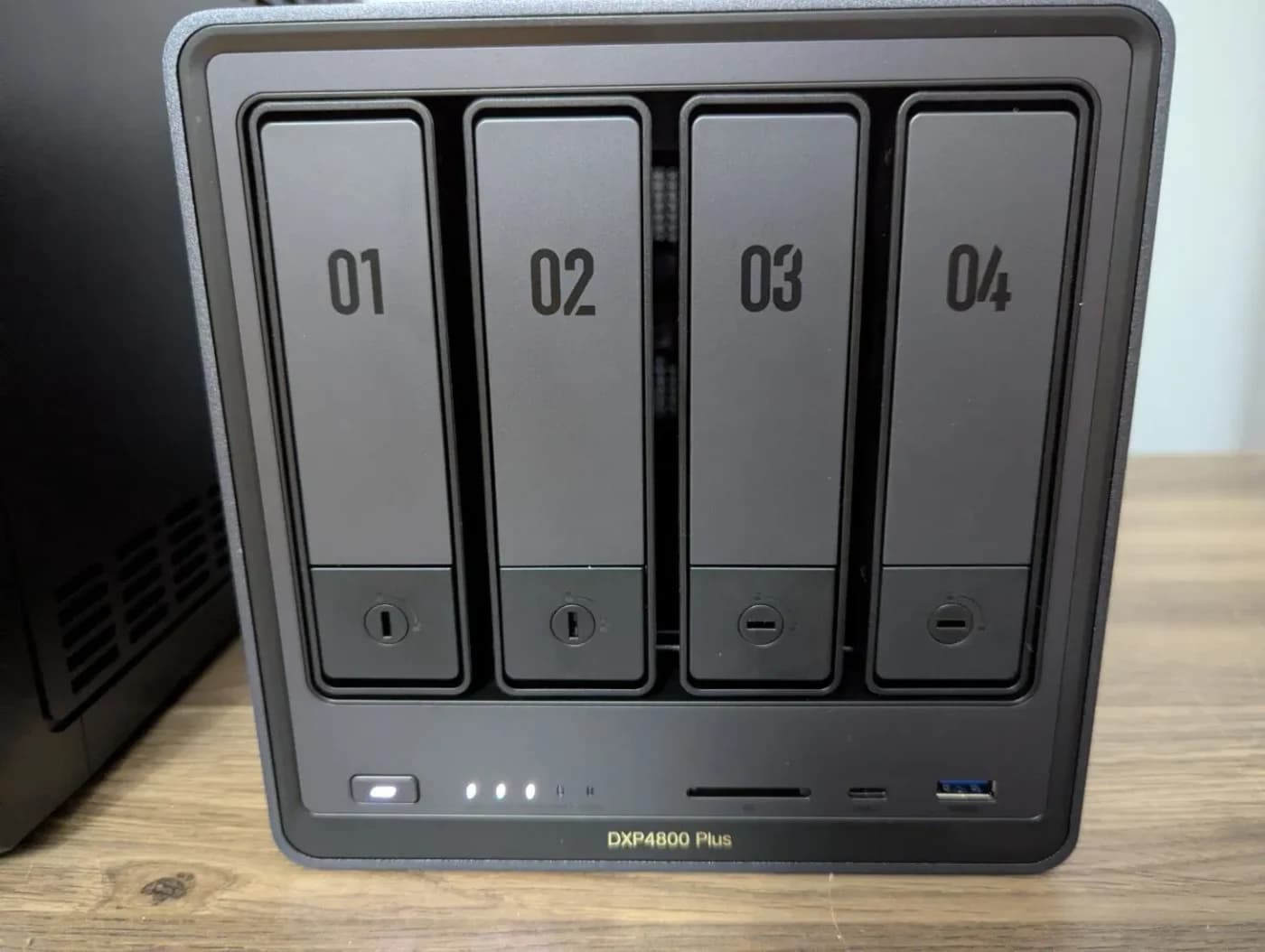
| UGREEN DXP4800 Plus | 10GbE and power users | 4 + 2 M.2 | Pentium Gold 8505 (UHD, Quick Sync) | 8 GB DDR5 (64 GB) | 10GbE + 2.5GbE | 2 years |
| Synology DS925+ | ECC memory, expansion | 4 + 2 M.2 | Ryzen V1500B (no graphics) | 4 GB ECC (32 GB) | 2x 2.5GbE | 3 years |
Processor graphics and Quick Sync are from Intel's and AMD's spec pages; everything else is from Synology's and UGREEN's product pages, linked below.
Choose by job
- Yes: Phone photo backup: a photo app and enough RAM. Synology says object recognition in Synology Photos needs at least 4 GB, and the DS225+ and DS425+ ship with 2 GB
- Yes: Mac and PC backups: Synology documents Time Machine backups to its NAS, and its spec lists backup tools for PCs
- Partly: Plex or Jellyfin: needs an Intel processor with Quick Sync for hardware transcoding; Plex makes that a Plex Pass feature
- No: Hardware transcoding on the DS925+: AMD's spec lists no integrated graphics for its Ryzen V1500B
The iGPU trap for Plex and Jellyfin
Transcoding converts a video on the fly when a TV or phone can't play the original file. Plex's hardware acceleration "uses Intel Quick Sync Video for decoding and encoding" and "is a premium feature and requires an active Plex Pass subscription" (Plex). Jellyfin documents hardware acceleration on Intel integrated graphics through QSV (Jellyfin).
Tap a label to explore. You can also hover or use your keyboard.
Video conversion needed?Plex · client compatibility, quality, subtitles
Check the client’s supported container, bitrate, codecs and resolution, and the requested quality. An incompatible selected subtitle stream can require burn-in and a full video transcode.
Sources: 1: Direct Play requires a compatible container, bitrate, codecs and resolution; device documentation supplies those capabilities., 5: An incompatible selected subtitle stream can require subtitle burn-in and a full video transcode., 6: Plex converts video to a compatible format or different quality in real time.File or container?Video can stay unchanged
A compatible file can use Direct Play; compatible tracks in another container can use Direct Stream. Audio-only conversion can also leave the video untouched.
Sources: 1: Direct Play requires a compatible container, bitrate, codecs and resolution; device documentation supplies those capabilities., 2: Direct Play sends the file unchanged., 3: Direct Stream can repackage compatible tracks into another container rather than convert their video., 4: Audio-only transcoding can retain the original video track.Direct PlayOriginal file sent unchanged
Plex sends the compatible media file directly to the device without changing it.
Outcome
Sources: 2: Direct Play sends the file unchanged.Direct StreamCompatible tracks in another container
Plex extracts compatible tracks and repackages them into a container the device can play. The compatible video need not be converted.
Outcome
Sources: 3: Direct Stream can repackage compatible tracks into another container rather than convert their video., 4: Audio-only transcoding can retain the original video track.Video must changeDifferent format, quality or subtitle burn-in
Plex converts video to a compatible format or different quality in real time. Check the hardware path for this NAS and media.
Sources: 5: An incompatible selected subtitle stream can require subtitle burn-in and a full video transcode., 6: Plex converts video to a compatible format or different quality in real time., 10: For NAS devices, Plex recommends checking its NAS Compatibility sheet for hardware acceleration support.Hardware path ready?Exact NAS support · Plex Pass · enabled setting
Check the Plex NAS Compatibility sheet, supported hardware such as Intel Quick Sync Video, and the “Use hardware acceleration when available” setting. An active Plex Pass is generally required, with device-specific exceptions.
Sources: 7: Plex hardware-accelerated streaming generally requires an active Plex Pass subscription., 8: Plex supports multiple hardware acceleration engines, so Quick Sync is an example rather than the only possible route., 9: Intel Quick Sync Video is a supported decoding and encoding route., 10: For NAS devices, Plex recommends checking its NAS Compatibility sheet for hardware acceleration support., 11: Hardware acceleration must be enabled in Plex settings., 12: Plex lists special devices for which an active Plex Pass is not required for hardware acceleration.Hardware accelerationSupported decoding and encoding
Plex supports several hardware acceleration engines. Intel Quick Sync Video is one supported route for decoding and encoding.
Outcome
Sources: 8: Plex supports multiple hardware acceleration engines, so Quick Sync is an example rather than the only possible route., 9: Intel Quick Sync Video is a supported decoding and encoding route.Software fallbackDecoding and / or encoding
Plex uses software decoding when hardware decoding is incompatible with the video. It uses software encoding when hardware encoding is unavailable.
Outcome
Sources: 13: Unsupported video decoding falls back to software., 14: Unavailable hardware encoding falls back to software encoding.Plex only: check the exact NAS, client and media. Intel Quick Sync Video is one supported hardware route; some devices have Plex Pass exceptions.
Source notes14 references
Direct Play requires a compatible container, bitrate, codecs and resolution; device documentation supplies those capabilities.
support.plex.tv — source for Direct Play requires a compatible container, bitrate, codecs and resolution; device documentation supplies those capabilities.Media can be Direct Played on a device if the source media is compatible with the client’s playback capabilities, meaning that the source media: Is stored in a compatible file container Is encoded in a compatible bitrate Is encoded with compatible codecs Is a compatible resolution
Direct Play sends the file unchanged.
support.plex.tv — source for Direct Play sends the file unchanged.When a media item is Direct Played on an App, the file is sent directly to the device without being changed.
Direct Stream can repackage compatible tracks into another container rather than convert their video.
support.plex.tv — source for Direct Stream can repackage compatible tracks into another container rather than convert their video.The video and audio tracks are extracted from the original file; The streams are saved back into a compatible file container; and The Plex Media Server repackages the content on-the-fly before streaming it.
Audio-only transcoding can retain the original video track.
support.plex.tv — source for Audio-only transcoding can retain the original video track.The original Video track will not be touched; and The transcoded audio track is sent with the unaltered video track to your device.
An incompatible selected subtitle stream can require subtitle burn-in and a full video transcode.
support.plex.tv — source for An incompatible selected subtitle stream can require subtitle burn-in and a full video transcode.if a subtitle stream is selected and is not compatible with the Plex App, then the Server will “burn in” the subtitle text within the video. This requires a full transcode of the video stream.
Plex converts video to a compatible format or different quality in real time.
support.plex.tv — source for Plex converts video to a compatible format or different quality in real time.Plex Media Server often needs to convert the video to a different quality or a compatible format. Converting the video (transcoding) happens automatically, in real-time, while you’re playing it.
Plex hardware-accelerated streaming generally requires an active Plex Pass subscription.
support.plex.tv — source for Plex hardware-accelerated streaming generally requires an active Plex Pass subscription.Hardware-accelerated streaming is a premium feature and requires an active Plex Pass subscription.
Plex supports multiple hardware acceleration engines, so Quick Sync is an example rather than the only possible route.
support.plex.tv — source for Plex supports multiple hardware acceleration engines, so Quick Sync is an example rather than the only possible route.Plex Media Server supports several different hardware acceleration engines.
Intel Quick Sync Video is a supported decoding and encoding route.
support.plex.tv — source for Intel Quick Sync Video is a supported decoding and encoding route.Plex Media Server’s hardware acceleration uses Intel Quick Sync Video for decoding and encoding
For NAS devices, Plex recommends checking its NAS Compatibility sheet for hardware acceleration support.
support.plex.tv — source for For NAS devices, Plex recommends checking its NAS Compatibility sheet for hardware acceleration support.The easiest way to know if a particular NAS device supports hardware-accelerated streaming (based on Intel Quick Sync Video) is to check the NAS Compatibility sheet .
Hardware acceleration must be enabled in Plex settings.
support.plex.tv — source for Hardware acceleration must be enabled in Plex settings.Turn on Use hardware acceleration when available .
Plex lists special devices for which an active Plex Pass is not required for hardware acceleration.
support.plex.tv — source for Plex lists special devices for which an active Plex Pass is not required for hardware acceleration.Some specific devices make use of Hardware-Accelerated Streaming by default. These are special cases, in that an active Plex Pass subscription is not required for the functionality.
Unsupported video decoding falls back to software.
support.plex.tv — source for Unsupported video decoding falls back to software.When hardware-accelerated decoding is not compatible with a video file, Plex Media Server will automatically use normal software decoding.
Unavailable hardware encoding falls back to software encoding.
support.plex.tv — source for Unavailable hardware encoding falls back to software encoding.When hardware-accelerated encoding is not available, Plex Media Server will automatically use normal software encoding.
Intel lists Quick Sync Video for the Celeron J4125, the N100 and the Pentium Gold 8505. The trap is the DS925+: AMD's V1000 product brief lists its Ryzen V1500B with zero GPU compute units. It's a strong NAS for files, backups and virtual machines, but not for transcoding.
Synology's drive rules in 2026
Synology announced in October 2025 that "2025 model-year DiskStation Plus, Value, and J Series running DSM 7.3 will support installation and storage pool creation with third-party drives," with one exception: "Creation of M.2 based storage pool and cache still requires drives on the HCL" (Synology). The DS225+, DS425+ and DS925+ all launched in 2025. Synology still recommends drives from its compatibility list. UGREEN sells its NAS diskless and says there's no drive vendor lock-in.
RAID and how much space you get
Synology's RAID overview sums it up: RAID 1 writes identical data to every drive in the pool (with two drives: one drive's worth of space, and either can fail), RAID 5 needs three or more drives and keeps one drive's worth of parity, and RAID 6 keeps two. Synology's own SHR-1 handles mixed drive sizes and is "recommended for beginner users."
Source: Synology's RAID types table
RAID keeps the NAS running when a drive fails; it doesn't protect against deletion, ransomware or a fire, so keep a second copy elsewhere.
Best for backups and photos: Synology DS225+
The DS225+ does the core home jobs with the least power and noise of the Synology picks. Synology's DS225+ specs list an Intel Celeron J4125 (four cores, up to 2.7 GHz), two bays for 3.5-inch drives or 2.5-inch SSDs, one 2.5GbE and one 1GbE port, 2 GB of RAM expandable to 6 GB, 16.98 W in use, 19.6 dB(A) and a 3-year warranty.
The trade-offs: 2 GB of RAM is thin (add memory for Synology Photos' object recognition), there are no M.2 slots, and two drives in RAID 1 give you half the raw capacity.
Best four-bay NAS: Synology DS425+
The DS425+ is the DS225+ with room to grow: four bays plus two M.2 2280 NVMe slots, the same J4125 and RAM (2 GB, up to 6 GB), and the same 2.5GbE plus 1GbE ports (Synology). Four 8 TB drives in RAID 5 give about 24 TB usable. Synology lists 28.25 W in use and 21.6 dB(A). M.2 pools and cache need drives from Synology's list.
Best for Plex and Jellyfin: UGREEN NASync DXP2800
The DXP2800 has the most media headroom of the two-bay picks. UGREEN's DXP2800 page lists an Intel N100, 8 GB of DDR5 (up to 16 GB), two bays plus two M.2 NVMe slots for cache or an SSD pool, a 2.5GbE port and HDMI out at 4K 60 Hz. It runs UGREEN's UGOS, and UGREEN says noise stays between 29 and 34 dB in quiet mode.
UGREEN
UGREEN NASync DXP2800 2-Bay NAS
A two-bay NAS with an Intel N100, 8 GB DDR5, a 2.5GbE port, two M.2 NVMe slots and 4K HDMI output.
Comes in 3 versions: see which to buy
- 2.5 Gbps port
- 2 bays
The trade-offs: one network port, and a 2-year warranty against Synology's three.
Best for 10GbE: UGREEN NASync DXP4800 Plus
The DXP4800 Plus adds what the others lack: a 10GbE port next to a 2.5GbE port, and memory that grows to 64 GB (UGREEN). It has four bays, two M.2 NVMe slots, an Intel Pentium Gold 8505 (five cores) with Quick Sync and 4K HDMI out. The 10GbE port only pays off with 10G on the other end, such as a router or switch with a 10G port; the eero Max 7 in our eero comparison has two.
UGREEN
UGREEN NASync DXP4800 Plus 4-Bay NAS
A four-bay NAS with an Intel Pentium Gold 8505, 8 GB DDR5, one 10GbE and one 2.5GbE port, and two M.2 NVMe slots.
Comes in 5 versions: see which to buy
- 10 Gbps port
- 4 bays
Best for ECC and expansion: Synology DS925+
The DS925+ is the pick for a file server that should keep growing: 4 GB of ECC memory (up to 32 GB), two 2.5GbE ports, four bays plus two M.2 slots, and up to nine drives with Synology's DX525 expansion unit (Synology). It draws the most power of the Synology picks, 37.91 W in use, and as covered above it has no integrated graphics for transcoding. Synology also sells a DS925neo+ on the same platform with non-ECC memory, so check the exact model.
The drive: WD Red Plus 8 TB (WD80EFPX)
For any of these, a CMR NAS drive is the safe choice. WD says WD Red Plus "uses CMR (Conventional Magnetic Recording), which provides consistent write performance, better handling of RAID rebuilds," and calls it a better fit for NAS than drive-managed SMR drives (WD). The 8 TB model spins at 5640 RPM with up to 215 MB/s, a 256 MB cache, a 180 TB/year workload rating and a 3-year warranty, and WD rates the line for NAS systems with up to eight bays. Check your NAS maker's compatibility list before buying.
Network speed
A 2.5GbE NAS port helps only if the router or switch port it plugs into is 2.5G too; on a gigabit port it runs at gigabit. Our Wi-Fi 7 router picks list each router's multi-gig LAN ports. If the NAS has to live far from the router and there's coax in the walls, a pair of MoCA 2.5 adapters can carry the link: see MoCA vs powerline.
How we choose
We haven't lab-tested these NAS units or drives. Picks come from Synology's, UGREEN's and WD's spec pages, Intel's and AMD's processor pages for graphics and Quick Sync, Synology's DSM 7.3 drive policy and RAID documentation, and Plex's and Jellyfin's hardware-transcoding pages, all checked November 1, 2026. Noise and power figures are the makers' own. Our method: How we choose.
Verdict
Start with the Synology DS225+ for phone and computer backups, and add RAM if you'll use Synology Photos' object recognition. Pick the UGREEN DXP2800 for Plex or Jellyfin, the Synology DS425+ for four bays, and the UGREEN DXP4800 Plus for 10GbE. Choose the Synology DS925+ for ECC memory and expansion, knowing it can't hardware-transcode. Fill any of them with CMR NAS drives such as the WD Red Plus.
Frequently asked questions
Which NAS is best for Plex?
One with an Intel processor that supports Quick Sync Video, because Plex's hardware-accelerated streaming uses Quick Sync (and needs a Plex Pass subscription). Intel lists Quick Sync for the UGREEN DXP2800's N100, the DXP4800 Plus's Pentium Gold 8505 and the Synology DS225+ and DS425+'s Celeron J4125. The Synology DS925+'s AMD Ryzen V1500B has no integrated graphics, so it can't hardware-transcode.
Can I use any hard drive in a Synology NAS?
On Synology's 2025 Plus models with DSM 7.3, such as the DS225+, DS425+ and DS925+, you can install third-party hard drives and 2.5-inch SATA SSDs and build storage pools on them, although Synology still recommends drives from its compatibility list. M.2 storage pools and cache still require drives on Synology's list.
RAID 1 or RAID 5?
With two drives, RAID 1 (or Synology's SHR-1) mirrors them: usable space equals one drive, and either drive can fail. With three or more drives, RAID 5 keeps one drive's worth of parity, so four 8 TB drives give about 24 TB and still survive one failure. Synology recommends SHR for beginners, and SHR also handles mixed drive sizes. Neither replaces a backup.