

Comparison
MoCA vs Powerline in 2026: Wired Internet Without New Cables
MoCA uses your TV coax, powerline uses your power outlets. Which one fits your home, the filter, splitter and outlet rules that trip people up, and what to buy.
By thisPING EditorialUpdated November 2, 202612 min read1 picks
Our picks at a glance
If your rooms have TV coax outlets, use MoCA 2.5: the ScreenBeam ECB7250 turns a coax outlet into a 2.5 Gbps Ethernet port (you need at least two, unless your modem, router or gateway has MoCA built in), enough for a gaming PC or a mesh node's wired backhaul. If you have no coax, powerline uses your power outlets instead, and the TP-Link TL-PA9020P KIT is the kit to get, with two gigabit ports per adapter. Specs and maker guidance checked November 1, 2026.
Both give you a wired connection without running new Ethernet cable. The deciding question is simply which wiring you already have, then a few installation rules that each technology brings with it.
MoCA vs powerline at a glance
| MoCA 2.5 | Powerline (HomePlug AV2) | |
|---|---|---|
| Uses | Coax TV outlets | Power outlets on the same electrical circuit |
| Rated speed | 2.5 Gbps MAC throughput (MoCA Alliance) | Up to 2000 Mbps physical-layer rate ("AV2000") |
| Ethernet on our picks | 2.5 Gbps | 1 Gbps (two per adapter) |
| Weak or no link | On coax shared with satellite TV (won't work) | Different circuits (TP-Link FAQ); separate panels or phases (its explainer) |
| Install traps | PoE filter, splitters, coax type | Power strips and surge protectors, motor appliances, chargers |
Source: ScreenBeam, goCoax and TP-Link product pages
Choose by the wiring you have
Coax outlets in the rooms you need
Use MoCA. goCoax says a MoCA network needs at least two MoCA devices: one near the router, one at the far end. A MoCA-enabled router or cable modem can be one of them; ScreenBeam says its adapter works with most.
No usable coax, but power outlets
Use powerline, with at least two adapters. TP-Link's setup FAQ says adapters on different electrical circuits cannot communicate, while its powerline explainer says signals usually cross breakers but separate panels or phases can weaken or block them. Same-circuit outlets are the safe bet.
Coax shared with satellite TV
MoCA won't work on that coax. Use powerline or Ethernet.
Both coax and outlets
Prefer MoCA: the adapters here have 2.5 Gbps ports, while powerline runs over wiring whose electrical noise, TP-Link says, can affect performance.
Tap a label to explore. You can also hover or use your keyboard.
Which wiring connects rooms?Choose one adapter layout
MoCA needs a connected coax system; powerline uses wall outlets. These paths show the ScreenBeam ECB7250 and TP-Link TL-PA9020P KIT examples.
Sources: 1: The ECB7250 is a MoCA 2.5 adapter with a 2.5 Gigabit Ethernet port., 4: Connected coax is required; two adapters are needed unless a modem, router or gateway already has MoCA., 6: TP-Link describes a network with at least two powerline units on the same electrical circuit; this is the setup guidance used here., 10: The powerline model used for the rate comparison is TP-Link TL-PA9020P KIT.MoCA source adapterRouter LAN → ECB7250 Ethernet
Connect the adapter’s Ethernet port to router LAN and its Coax In port to the coax outlet. Power the adapter.
Sources: 2: The source adapter Ethernet port connects to router/switch LAN, its coax port to the wall outlet, and it needs power.Connected coax wiringSame coax system in both rooms
The coax outlets must belong to the same connected coax system. This ScreenBeam kit cannot share that coax with satellite TV.
Sources: 4: Connected coax is required; two adapters are needed unless a modem, router or gateway already has MoCA., 5: The ScreenBeam kit is incompatible with satellite TV coax networks., 13: ScreenBeam warns that modem frequencies can conflict and directs users to their ISP., 14: ScreenBeam calls for provider involvement with an entry-point MoCA filter., 15: goCoax warns not to install a filter oneself with DOCSIS 3.1 or 4.0, so the diagram must not prescribe a universal filter installation.Remote MoCA adapter2.5 Gigabit Ethernet port → device
Connect and power the remote ECB7250 at the coax outlet, then connect its Ethernet port to the device. The port rating is separate from the performance of the home’s coax wiring.
Outcome
Sources: 1: The ECB7250 is a MoCA 2.5 adapter with a 2.5 Gigabit Ethernet port., 3: At the remote end, the second adapter connects to the coax outlet, needs power and connects to the end device over Ethernet., 4: Connected coax is required; two adapters are needed unless a modem, router or gateway already has MoCA.Powerline source adapterRouter LAN → adapter Ethernet
Connect a powerline adapter to router LAN using Ethernet. Plug it directly into a wall outlet, without a power strip, extension cord or surge protector.
Sources: 7: Connect the source powerline adapter to router LAN by Ethernet., 9: Powerline adapters plug directly into the wall, without power strips, extension cords or surge protectors.Same electrical circuitTP-Link setup guidance
TP-Link’s setup guidance calls for at least two units connected to the same electrical circuit. The wall wiring carries the link between the adapters.
Sources: 6: TP-Link describes a network with at least two powerline units on the same electrical circuit; this is the setup guidance used here., 9: Powerline adapters plug directly into the wall, without power strips, extension cords or surge protectors.Remote powerline adapterWall outlet → adapter → Ethernet device
Plug the second adapter directly into the remote room’s wall outlet. Connect the device by Ethernet for this wired example.
Sources: 8: The remote powerline adapter goes directly into a wall outlet and connects to the end device., 10: The powerline model used for the rate comparison is TP-Link TL-PA9020P KIT., 11: Its physical-layer rate is up to 2000 Mbps and Ethernet supports 10/100/1000 Mbps.Read the rate labelAV2000 physical layer ≠ Ethernet rate
TL-PA9020P KIT: physical layer up to 2000 Mbps; Ethernet 10/100/1000 Mbps. AV2000 is theoretical; actual data speed varies with the port, traffic, electrical noise and wiring.
Outcome
Sources: 10: The powerline model used for the rate comparison is TP-Link TL-PA9020P KIT., 11: Its physical-layer rate is up to 2000 Mbps and Ethernet supports 10/100/1000 Mbps., 12: AV2000 denotes a theoretical physical-layer rate; actual speed can be limited by ports, traffic, noise and wiring.Two external MoCA adapters are needed unless a modem, router or gateway has MoCA built in. Ask your cable provider about frequency conflicts and MoCA filters before installation.
Source notes15 references
The ECB7250 is a MoCA 2.5 adapter with a 2.5 Gigabit Ethernet port.
www.screenbeam.com — source for The ECB7250 is a MoCA 2.5 adapter with a 2.5 Gigabit Ethernet port.The ECB7250 Bonded MoCA 2.5 Network Adapter is the FIRST MoCA Adapter to have a 2.5 Gigabit Ethernet port
The source adapter Ethernet port connects to router/switch LAN, its coax port to the wall outlet, and it needs power.
www.screenbeam.com — source for The source adapter Ethernet port connects to router/switch LAN, its coax port to the wall outlet, and it needs power.Connect the Ethernet Cable from the ECB7250 Adapter’s Ethernet port to an available LAN port on your router/switch. a Turn off your Cable or Fios modem/router. b Connect the coaxial cable from ECB7250 Adapter’s Coax In to b Remove existing coaxial cable from your modem/router. the Coax Outlet. c Connect existing coaxial cable from the Coax Outlet to the Coax c Connect the power for the ECB7250 Adapter and wait until the Splitter IN port. Power light is GREEN.
At the remote end, the second adapter connects to the coax outlet, needs power and connects to the end device over Ethernet.
www.screenbeam.com — source for At the remote end, the second adapter connects to the coax outlet, needs power and connects to the end device over Ethernet.Connect the coax cable from the Coax Outlet to the ECB7250 2 existing devices using the coax connection (i.e., Set-top box Adapter’s Coax In port. and cable modem). 2 Cable subscribers: A MoCA POE filter should be installed at the c Connect the power for the ECB7250 Adapter. Internet Service entry point to prevent signal leakage and interfere d Wait until both the Power and Coax lights turn GREEN. with other neighborhood MoCA networks. Please contact your e Connect the Ethernet Cable from the Network Adapter to a service provider. Networking Device of your choice.
Connected coax is required; two adapters are needed unless a modem, router or gateway already has MoCA.
www.screenbeam.com — source for Connected coax is required; two adapters are needed unless a modem, router or gateway already has MoCA.Coax outlets and Coaxial wiring must all be part of the same coax system. Certain coax conditions in your home, such as wiring conditions and configuration may affect the performance of this product. A minimum of two ScreenBeam Coax Network Adapters are required to create a network, unless the user has a modem, router or gateway with MoCA built in.
The ScreenBeam kit is incompatible with satellite TV coax networks.
www.screenbeam.com — source for The ScreenBeam kit is incompatible with satellite TV coax networks.This MoCA ethernet to coax adapter kit is not compatible with Direct TV, Dish or other satellite TV, AT&T internet, or AT&T U-verse coax networks.
TP-Link describes a network with at least two powerline units on the same electrical circuit; this is the setup guidance used here.
www.tp-link.com — source for TP-Link describes a network with at least two powerline units on the same electrical circuit; this is the setup guidance used here.A powerline network requires at least two units connected to the same electrical circuit.
Connect the source powerline adapter to router LAN by Ethernet.
www.tp-link.com — source for Connect the source powerline adapter to router LAN by Ethernet.Use an Ethernet cable to connect one powerline adapter to a LAN port on your router.
The remote powerline adapter goes directly into a wall outlet and connects to the end device.
www.tp-link.com — source for The remote powerline adapter goes directly into a wall outlet and connects to the end device.Move the second powerline device to the required room and plug it directly into a wall outlet. 2. Wait for the Powerline LED to turn on, then connect your end device by Ethernet or Wi-Fi, depending on the powerline model.
Powerline adapters plug directly into the wall, without power strips, extension cords or surge protectors.
www.tp-link.com — source for Powerline adapters plug directly into the wall, without power strips, extension cords or surge protectors.Plug each powerline device directly into a wall outlet. Do not use a power strip, extension cord, or surge protector.
The powerline model used for the rate comparison is TP-Link TL-PA9020P KIT.
www.tp-link.com — source for The powerline model used for the rate comparison is TP-Link TL-PA9020P KIT.TL-PA9020P KIT
Its physical-layer rate is up to 2000 Mbps and Ethernet supports 10/100/1000 Mbps.
www.tp-link.com — source for Its physical-layer rate is up to 2000 Mbps and Ethernet supports 10/100/1000 Mbps.Powerline (Physical Layer Data Rate): up to 2000 Mbps Ethernet: 10/100/1000 Mbps
AV2000 denotes a theoretical physical-layer rate; actual speed can be limited by ports, traffic, noise and wiring.
www.tp-link.com — source for AV2000 denotes a theoretical physical-layer rate; actual speed can be limited by ports, traffic, noise and wiring.The terms “AV2000” and “2000Mbps” are derived from applicable specifications and refer to the theoretical maximum physical-layer data transfer rate. Those terms are used on this product solely to indicate its compatibility with other “AV2000” or “2000Mbps” powerline devices. Actual data speeds vary and may be limited by the product’s Ethernet port and other network conditions such as data traffic, electrical noise, and wiring issues.
ScreenBeam warns that modem frequencies can conflict and directs users to their ISP.
www.screenbeam.com — source for ScreenBeam warns that modem frequencies can conflict and directs users to their ISP.DOCSIS 3.1 modems might conflict (frequency overlap) and cause random disconnects. Check with your ISP for a fix.
ScreenBeam calls for provider involvement with an entry-point MoCA filter.
www.screenbeam.com — source for ScreenBeam calls for provider involvement with an entry-point MoCA filter.Cable subscribers: A MoCA POE filter should be installed at the c Connect the power for the ECB7250 Adapter. Internet Service entry point to prevent signal leakage and interfere d Wait until both the Power and Coax lights turn GREEN. with other neighborhood MoCA networks. Please contact your e Connect the Ethernet Cable from the Network Adapter to a service provider.
goCoax warns not to install a filter oneself with DOCSIS 3.1 or 4.0, so the diagram must not prescribe a universal filter installation.
www.gocoax.com — source for goCoax warns not to install a filter oneself with DOCSIS 3.1 or 4.0, so the diagram must not prescribe a universal filter installation.Do NOT install a MoCA POE filter yourself with DOCSIS 3.1 or 4.0
The MoCA traps
The PoE filter. A point-of-entry (PoE) filter keeps MoCA signals inside your home. The makers disagree about cable internet: ScreenBeam's quick-start guide says "cable subscribers" should install a MoCA PoE filter at the internet service entry point to prevent signal leakage (ScreenBeam), while goCoax's June 2026 guide says "Do NOT install a MoCA POE filter yourself with DOCSIS 3.1 or 4.0" because "it can degrade your internet" (goCoax). Ask your cable provider first.
DOCSIS 3.1 overlap. ScreenBeam warns that some "DOCSIS 3.1 modems might conflict (frequency overlap) and cause random disconnects." goCoax similarly says to "double-check the upper frequency of your cable modem" with cable internet, since MoCA uses 1125-1675 MHz on the same coax. If you're choosing a modem too, our cable modem guide covers the DOCSIS 3.1 options.
- Yes: Splitters are MoCA-rated (goCoax: replace old 5-1002 MHz splitters with ones covering 1125-1675 MHz)
- Yes: Coax is RG-6 (goCoax: full 2.5 Gbps; older RG-59 works but slower over long runs and multiple splitters)
- No: The coax is shared with DirecTV, Dish or other satellite TV
- Partly: Your provider already runs MoCA on the coax (ScreenBeam lists AT&T internet and U-verse coax networks as incompatible)
Encryption. Both makers ship MoCA encryption off by default. ScreenBeam's user guide has you enable it in the adapter's web interface, then press the MPS (MoCA Protected Setup) button to sync the encryption password across adapters (ScreenBeam); goCoax's guide treats encryption as optional.
MoCA as mesh backhaul
MoCA's best use is often a mesh system's wired backhaul. Mesh nodes that connect over Ethernet free their radios for your devices: eero says wired links between its units "maximize your internet speeds and reduce wireless interference." A pair of MoCA 2.5 adapters gives a node that Ethernet link over coax at up to 2.5 Gbps, which matches the 2.5 GbE ports on the eero 7 and the Netgear Orbi 770. See our eero 7 vs Pro 7 vs Max 7 comparison and best mesh Wi-Fi systems for nodes with Ethernet backhaul ports.
Best MoCA 2.5 adapter: ScreenBeam ECB7250
ScreenBeam
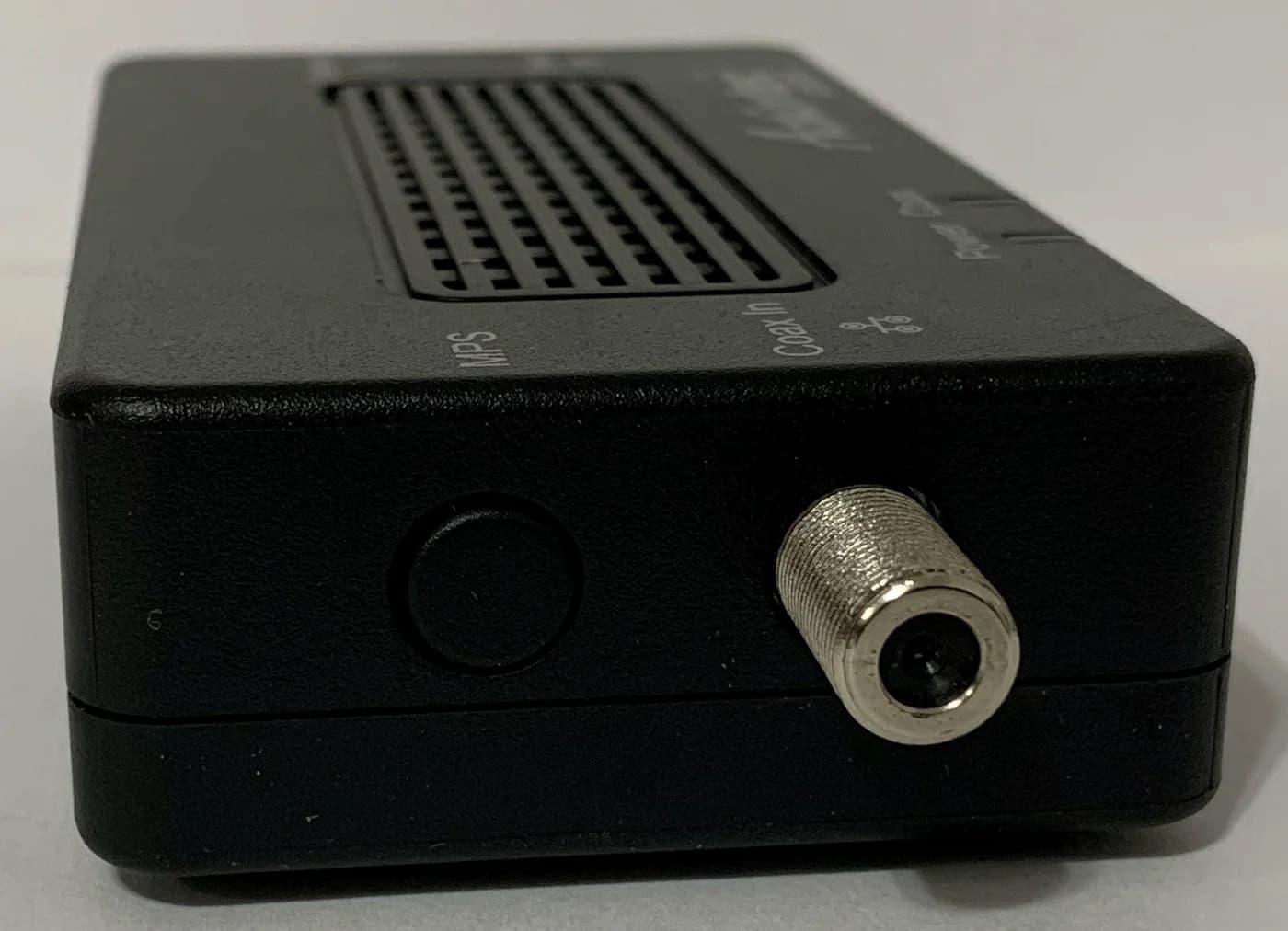
ScreenBeam ECB7250 Bonded MoCA 2.5 Network Adapter (2.5GbE)
A bonded MoCA 2.5 network adapter with a 2.5 Gbps Ethernet port that turns coax wiring into a wired backbone.
Comes in 3 versions: see which to buy
- 2.5 Gbps port
The ECB7250 is a bonded MoCA 2.5 adapter with a 2.5 Gbps Ethernet port (10/100/2500BASE-T), backward compatible with MoCA 1.0, 1.1 and 2.0, according to ScreenBeam's product page and datasheet. One MoCA network can hold up to 16 devices, and ScreenBeam publishes a link delay of 3.6 ms typical and 6.3 ms maximum. It uses the extended D-band (1125-1675 MHz) on a standard F-type connector.
The trade-offs: ScreenBeam says actual speeds depend on the coax wiring and noise, encryption is off until you enable it, and it's not for satellite TV coax. ScreenBeam also documents a two-adapter kit; you need at least two adapters unless your modem, router or gateway has MoCA built in, so check what the listing includes.
Also good: goCoax MA2500D
The MA2500D is a MoCA 2.5 adapter with one coax port and one 2.5GbE port, rated for up to 2.5 Gbps of throughput, for wall or desk mounting (goCoax). goCoax says it supports up to 16 nodes on one network. Its own pages disagree on PoE filters for DOCSIS 3.1 service, as above, so read the newer installation guide before you set it up.
Best powerline kit: TP-Link TL-PA9020P KIT
The TL-PA9020P KIT is two HomePlug AV2 (IEEE 1901) adapters, each with two gigabit Ethernet ports and a pass-through power outlet, so the wall socket stays usable (TP-Link). TP-Link says the built-in noise filter "helps to eliminate electrical signal noise that might otherwise affect powerline transmission performance." The kit includes two 2 m Ethernet cables, uses 128-bit AES encryption with a Pair button, and works with older AV2000, AV1200, AV1000, AV600, AV500 and AV200 adapters.
The trade-offs: "AV2000" is a physical-layer rate, not real-world speed; the ports are gigabit, not multi-gig; and at 5.2 x 2.8 x 1.7 inches, each adapter is bulky for a wall outlet. TP-Link's range figure is up to 300 m (1000 ft) over existing electrical wiring.
Powerline rules that matter
TP-Link also lists electrical devices with motors, such as air conditioners, washing machines and fans, and phone and laptop chargers among the things that can interfere with powerline signals (TP-Link). Keep adapters away from them where you can.
How we choose
We haven't lab-tested these adapters. Picks come from the makers' product pages, datasheets and installation guides (ScreenBeam, goCoax, TP-Link), the MoCA Alliance's MoCA 2.5 specification summary and TP-Link's powerline setup and troubleshooting guidance, checked November 1, 2026. Where makers disagree, as on PoE filters, we show both positions. Our method: How we choose.
Verdict
If you have coax where you need a connection, MoCA is the better wire: a pair of ScreenBeam ECB7250 adapters gives you 2.5 Gbps Ethernet and backward compatibility, with the goCoax MA2500D as an alternative. With no coax, the TP-Link TL-PA9020P KIT is the powerline kit to get; plug it straight into the wall and keep it on one circuit. Either way, ask your cable provider about PoE filters before you install MoCA on a cable-internet line.
Frequently asked questions
Is MoCA faster than powerline?
On paper, yes. MoCA 2.5 is specified at 2.5 Gbps MAC throughput, and the MoCA adapters here have 2.5 Gbps Ethernet ports. Powerline's 'AV2000' is a physical-layer rate over your home's electrical wiring, and TP-Link's adapters have gigabit ports. ScreenBeam and TP-Link both say real speed depends on the wiring, and TP-Link adds that electrical noise affects powerline.
Do I need a MoCA PoE filter?
It depends on your cable service, and the makers disagree. ScreenBeam's guide says cable subscribers should install a MoCA PoE filter at the internet service entry point. goCoax's June 2026 guide says not to install one yourself with DOCSIS 3.1 or 4.0 service because it can degrade your internet. Ask your cable provider before adding one.
Can I use MoCA with satellite TV?
Not on the same coax. ScreenBeam says its adapters aren't compatible with DirecTV, Dish or other satellite TV coax networks, nor with AT&T internet or U-verse coax, and goCoax lists homes that share coax with DirecTV or Dish as not working. If your coax is satellite-only, use powerline or Ethernet instead.