

Comparison
ASUS GT-AXE16000 vs GT-BE98 Pro
Keep or Upgrade?
Keep the GT-AXE16000 or buy the GT-BE98 Pro? Compare US radios, every Ethernet port, NAS wiring, firmware and the GT-BE19000AI alternative before buying.
By thisPING EditorialUpdated November 3, 20269 min read1 pick
On this page · Our picks at a glance
Our picks at a glance
- 1
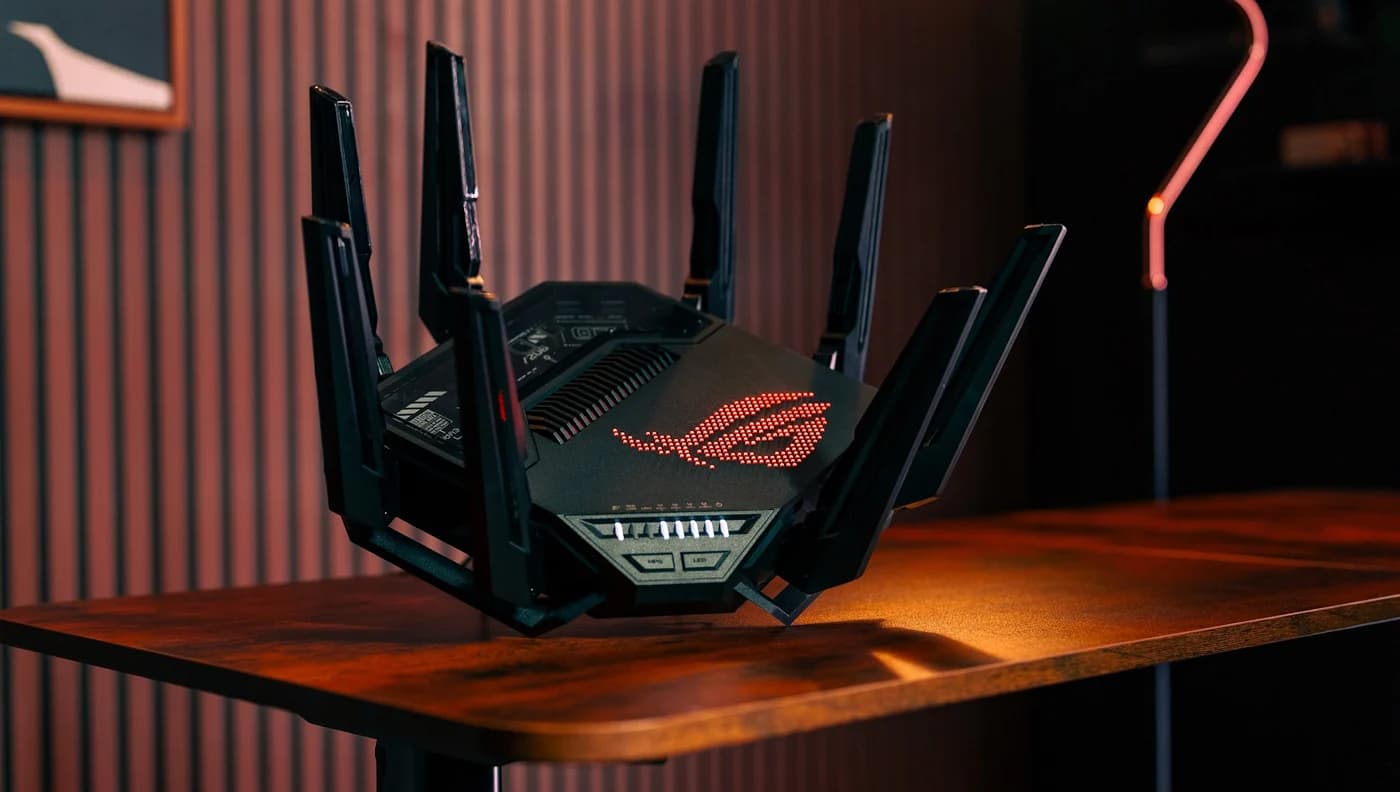
Choose for: Best new purchase
Check before buying: The trade-off is losing the AXE16000's second 5 GHz radio.
Keep your US ASUS ROG Rapture GT-AXE16000 if its Wi-Fi 6E coverage and wired connections already meet your needs; buy the GT-BE98 Pro when compatible Wi-Fi 7 clients or more multi-gig LAN connections justify replacing it. The Pro exchanges the AXE16000's second 5 GHz radio for a second 6 GHz radio and adds 320 MHz channels. Consider the GT-BE19000AI specifically for its AI Core and Docker platform, accepting its single 6 GHz radio.
Quick picks
- Keep: GT-AXE16000. Our choice for an existing owner who can use its two 10G ports and does not need Wi-Fi 7 client features.
- Buy: GT-BE98 Pro. Our new-purchase pick for compatible Wi-Fi 7 devices and its four 2.5G ports.
- Specialist alternative: GT-BE19000AI. Our choice when running Docker applications on the router is part of the plan.
This comparison uses US specifications. The non-Pro GT-BE98 is addressed separately below. All recommendations are based on documented capabilities, not speed measurements.
Compare the exact US hardware
GT-AXE16000
- Wi-Fi generation; class
- Wi-Fi 6E; AXE16000
- Radio layout
- 2.4 GHz, two 5 GHz, one 6 GHz
- Maximum 6 GHz channel width
- 160 MHz
All specifications
- Radios
- 4x4 on each band
- 10 Gbps Ethernet
- Two WAN/LAN
- 2.5 Gbps Ethernet
- One WAN
- Dedicated gigabit LAN
- Four
- Total Ethernet sockets, including WAN
- Seven
- Memory
- 2 GB RAM
- Per-band maximum rates, Mbps
- 1148 + 4804 + 4804 + 4804
GT-BE98 Pro
- Wi-Fi generation; class
- Wi-Fi 7; BE30000
- Radio layout
- 2.4 GHz, one 5 GHz, two 6 GHz
- Maximum 6 GHz channel width
- 320 MHz
All specifications
- Radios
- 4x4 on each band
- 10 Gbps Ethernet
- One WAN/LAN, one LAN
- 2.5 Gbps Ethernet
- One WAN/LAN, three LAN
- Dedicated gigabit LAN
- One
- Total Ethernet sockets, including WAN
- Seven
- Memory
- 2 GB RAM
- Per-band maximum rates, Mbps
- 1376 + 5764 + 11529 + 11529
GT-BE19000AI
- Wi-Fi generation; class
- Wi-Fi 7; BE19000
- Radio layout
- 2.4 GHz, one 5 GHz, one 6 GHz
- Maximum 6 GHz channel width
- 320 MHz
All specifications
- Radios
- 4x4 on each band
- 10 Gbps Ethernet
- One WAN/LAN, one LAN
- 2.5 Gbps Ethernet
- One WAN/LAN, three LAN
- Dedicated gigabit LAN
- One
- Total Ethernet sockets, including WAN
- Seven
- Memory
- Router: 4 GB RAM; separate AI Core: 4 GB RAM
- Per-band maximum rates, Mbps
- 1376 + 5764 + 11529
Full comparison table
Swipe to compare. Row labels stay visible.
| Specification | GT-AXE16000 | GT-BE98 Pro | GT-BE19000AI |
|---|---|---|---|
| Wi-Fi generation; class | Wi-Fi 6E; AXE16000 | Wi-Fi 7; BE30000 | Wi-Fi 7; BE19000 |
| Radio layout | 2.4 GHz, two 5 GHz, one 6 GHz | 2.4 GHz, one 5 GHz, two 6 GHz | 2.4 GHz, one 5 GHz, one 6 GHz |
| Maximum 6 GHz channel width | 160 MHz | 320 MHz | 320 MHz |
| Radios | 4x4 on each band | 4x4 on each band | 4x4 on each band |
| 10 Gbps Ethernet | Two WAN/LAN | One WAN/LAN, one LAN | One WAN/LAN, one LAN |
| 2.5 Gbps Ethernet | One WAN | One WAN/LAN, three LAN | One WAN/LAN, three LAN |
| Dedicated gigabit LAN | Four | One | One |
| Total Ethernet sockets, including WAN | Seven | Seven | Seven |
| Memory | 2 GB RAM | 2 GB RAM | Router: 4 GB RAM; separate AI Core: 4 GB RAM |
| Per-band maximum rates, Mbps | 1148 + 4804 + 4804 + 4804 | 1376 + 5764 + 11529 + 11529 | 1376 + 5764 + 11529 |
Scroll horizontally to see every column
| Specification | GT-AXE16000 | GT-BE98 Pro | GT-BE19000AI |
|---|---|---|---|
| Wi-Fi generation; class | Wi-Fi 6E; AXE16000 | Wi-Fi 7; BE30000 | Wi-Fi 7; BE19000 |
| Radio layout | 2.4 GHz, two 5 GHz, one 6 GHz | 2.4 GHz, one 5 GHz, two 6 GHz | 2.4 GHz, one 5 GHz, one 6 GHz |
| Maximum 6 GHz channel width | 160 MHz | 320 MHz | 320 MHz |
| Radios | 4x4 on each band | 4x4 on each band | 4x4 on each band |
| 10 Gbps Ethernet | Two WAN/LAN | One WAN/LAN, one LAN | One WAN/LAN, one LAN |
| 2.5 Gbps Ethernet | One WAN | One WAN/LAN, three LAN | One WAN/LAN, three LAN |
| Dedicated gigabit LAN | Four | One | One |
| Total Ethernet sockets, including WAN | Seven | Seven | Seven |
| Memory | 2 GB RAM | 2 GB RAM | Router: 4 GB RAM; separate AI Core: 4 GB RAM |
| Per-band maximum rates, Mbps | 1148 + 4804 + 4804 + 4804 | 1376 + 5764 + 11529 + 11529 | 1376 + 5764 + 11529 |
Sources: ASUS's US specifications for GT-AXE16000, GT-BE98 Pro and GT-BE19000AI. The AI model's English manual confirms the gigabit socket alongside the multi-gig ports; diagram labels are component references, not port counts.
AXE and BE class names represent sums of theoretical radio rates, rounded into marketing classes. They do not describe the throughput of one phone, an internet connection or a NAS transfer. ASUS explicitly warns that actual throughput falls with network conditions and overhead. Adding the table's radio rates is a capacity comparison, not a speed forecast.
Keep: ASUS ROG Rapture GT-AXE16000
The strongest reason to keep this wireless Ethernet router is its existing wired capability. ASUS documents dual 10 Gbps WAN/LAN ports, a separate 2.5 Gbps WAN port and four gigabit LAN ports. An owner whose desktop, NAS and console fit that arrangement has no port-speed reason to replace it merely for a newer Wi-Fi label.
Its radio layout also deserves consideration: two 5 GHz radios plus a 6 GHz radio, with channels up to 160 MHz. For a household concentrated on 5 GHz, we would weigh that second radio before moving to the Pro's dual 6 GHz arrangement. More radios on a useful band can matter more to this decision than a higher aggregate class.
Our keep condition: satisfactory coverage, suitable client capabilities, enough wired ports and continued attention to firmware. We would favor the newer pick for a fresh purchase unless there is a specific reason to buy this older layout.
Check the GT-AXE16000's official specifications.
Best new purchase: ASUS ROG Rapture GT-BE98 Pro
ASUS
A quad-band Wi-Fi 7 gaming router with two 6 GHz bands, two 10G ports and seven Ethernet ports in all.
Check package and model options
- Wi-Fi 7
- BE30000
- 4 bands
- 10 Gbps port
Buy the Pro for the combination of dual 6 GHz radios, 320 MHz channels and more intermediate-speed wired connections. ASUS lists dual 10G ports and four 2.5G ports, plus a gigabit LAN socket. That is a more flexible fit for a collection of multi-gig devices than the AXE16000's four gigabit LAN sockets.
The second 6 GHz radio also offers a mesh planning option: ASUS describes dedicating one to wireless backhaul while leaving the other for clients. Backhaul is the link between routers; fronthaul serves devices. Confirm the node and firmware arrangement before ordering a second unit, especially if MLO is the reason for buying.
The trade-off is losing the AXE16000's second 5 GHz radio. A mostly older-client household should identify a concrete wired or wireless benefit before upgrading. For broader alternatives, see our Wi-Fi 7 router picks.
Specialist alternative: ASUS ROG Rapture GT-BE19000AI
The AI model is tri-band, not a Pro with another radio added. Its US sheet lists one radio each on 2.4, 5 and 6 GHz, with 320 MHz on 6 GHz. Its Ethernet inventory matches the Pro's listed port speeds and roles, including the gigabit LAN socket confirmed in the manual.
The distinguishing feature is a separate AI Core and integrated Docker support. ASUS lists 4 GB RAM for the router and another 4 GB for the AI Core; treat those as separate systems, not a shared memory pool. ASUS names Home Assistant and Frigate as applications for the built-in Docker platform. Those are reasons to investigate it for a particular project, not evidence of faster game downloads or NAS transfers.
Our pick only if those applications matter. For a conventional router purchase, we prefer the Pro's extra 6 GHz radio. ASUS also labels AFC as a future-firmware feature on the AI product page, so exclude that promise from today's coverage decision unless the current US release notes confirm it.
Explore the GT-BE19000AI platform and requirements.
Wire the desktop, console and NAS before choosing
These are our port-allocation calculations from the documented roles, assuming a single internet connection and no link aggregation:
AXE16000: 2.5G WAN
- Local ports left for devices
- Two 10G WAN/LAN used as LAN, four gigabit LAN
AXE16000: one 10G WAN/LAN used as WAN
- Local ports left for devices
- One 10G WAN/LAN used as LAN, four gigabit LAN; separate 2.5G WAN not counted as LAN
BE98 Pro or BE19000AI: 2.5G WAN/LAN used as WAN
- Local ports left for devices
- Two 10G ports used as LAN, three 2.5G LAN, one gigabit LAN
BE98 Pro or BE19000AI: 10G WAN/LAN used as WAN
- Local ports left for devices
- One 10G LAN, four 2.5G ports used as LAN, one gigabit LAN
Full comparison table
Swipe to compare. Row labels stay visible.
| Router and selected internet port | Local ports left for devices |
|---|---|
| AXE16000: 2.5G WAN | Two 10G WAN/LAN used as LAN, four gigabit LAN |
| AXE16000: one 10G WAN/LAN used as WAN | One 10G WAN/LAN used as LAN, four gigabit LAN; separate 2.5G WAN not counted as LAN |
| BE98 Pro or BE19000AI: 2.5G WAN/LAN used as WAN | Two 10G ports used as LAN, three 2.5G LAN, one gigabit LAN |
| BE98 Pro or BE19000AI: 10G WAN/LAN used as WAN | One 10G LAN, four 2.5G ports used as LAN, one gigabit LAN |
Scroll horizontally to see every column
| Router and selected internet port | Local ports left for devices |
|---|---|
| AXE16000: 2.5G WAN | Two 10G WAN/LAN used as LAN, four gigabit LAN |
| AXE16000: one 10G WAN/LAN used as WAN | One 10G WAN/LAN used as LAN, four gigabit LAN; separate 2.5G WAN not counted as LAN |
| BE98 Pro or BE19000AI: 2.5G WAN/LAN used as WAN | Two 10G ports used as LAN, three 2.5G LAN, one gigabit LAN |
| BE98 Pro or BE19000AI: 10G WAN/LAN used as WAN | One 10G LAN, four 2.5G ports used as LAN, one gigabit LAN |
Worked basket: with internet on the AXE16000's 2.5G WAN, put a compatible desktop and NAS on its two 10G ports, and the console on gigabit. That is a compelling keep result. The newer models retain that allocation and add more 2.5G connections for other devices.
If the WAN, desktop and NAS each need their own 10G connection, budget a compatible multi-gig switch: none of these routers has a third 10G socket. Connect the switch to the remaining 10G LAN port and attach the desktop and NAS there. Check the NIC, NAS Ethernet port and cable at each end; the router's label alone cannot establish the complete path's performance.
Match the upgrade to the client radios
The AXE16000 already provides 6 GHz Wi-Fi 6E at up to 160 MHz. The Pro and AI model raise their documented 6 GHz channel ceiling to 320 MHz. ASUS says Wi-Fi 7 features require both compatible router and client operating-system support; it also cautions that 320 MHz availability depends on the region. A client specification saying Wi-Fi 7 is the start of the check, not its conclusion.
- Partly: Existing Wi-Fi 6E clients: check whether the AXE16000 already meets their 6 GHz and 160 MHz needs
- Yes: Wi-Fi 7 upgrade: verify client, operating system and regional support for the desired 320 MHz or MLO feature
- Partly: Mostly 5 GHz clients: weigh the AXE16000's second 5 GHz radio against the Pro's second 6 GHz radio
For mesh, ASUS says dedicated wireless backhaul and shared backhaul have different uses, with configuration varying by model. If Ethernet backhaul is available, decide which ports it consumes before allocating the NAS and desktop. Our mesh buying guide helps frame that expansion decision.
Firmware, support and subscriptions
The US support pages checked for this guide list these releases, all dated October 20, 2026, each with a DNSSEC-related loss-of-internet fix:
GT-AXE16000
- Listed firmware
- 3.0.0.6.102_37548
- Official release notes
- US support
GT-BE98 Pro
- Listed firmware
- 3.0.0.6.102_39442
- Official release notes
- US support
GT-BE19000AI
- Listed firmware
- 3.0.0.6.102_40771
- Official release notes
- US support
Full comparison table
Swipe to compare. Row labels stay visible.
| Model | Listed firmware | Official release notes |
|---|---|---|
| GT-AXE16000 | 3.0.0.6.102_37548 | US support |
| GT-BE98 Pro | 3.0.0.6.102_39442 | US support |
| GT-BE19000AI | 3.0.0.6.102_40771 | US support |
Scroll horizontally to see every column
| Model | Listed firmware | Official release notes |
|---|---|---|
| GT-AXE16000 | 3.0.0.6.102_37548 | US support |
| GT-BE98 Pro | 3.0.0.6.102_39442 | US support |
| GT-BE19000AI | 3.0.0.6.102_40771 | US support |
There is a material launch-page mismatch: the Pro's feature page still describes MLO as in development, but its release notes explicitly add MLO backhaul in 3.0.0.6.102_37812, dated March 13, 2025. Those notes restrict that backhaul to the same model. Use the release notes and current configuration for the exact feature, rather than treating the old footnote as its present status.
ASUS's EOL list explicitly marks GT-AXE16000 only EU. Do not turn that into a US discontinuation claim. The list says EOL models stop receiving firmware and documentation updates; a recent US release is evidence of current maintenance, not a dated promise of future updates.
ASUS describes the Pro's AiProtection security as subscription-free. Its gaming-network service is different: both the Pro and AXE16000 feature pages describe a limited GPN trial and a subscription for advanced features. Check those terms rather than assuming every gaming extra is included indefinitely.
Buying guide: order the complete, correct kit
Check the Pro suffix: ASUS's UK GT-BE98 sheet describes two 5 GHz radios and one 6 GHz radio, whereas this US Pro has the opposite split. The AI suffix identifies the separate Docker-capable platform discussed above. Confirm the country, full model name and hardware label against the corresponding support page.
Identify the job
List client bands, internet handoff, desktop, console, NAS and any planned mesh node.
Allocate every port
Reserve the WAN and any wired backhaul before assigning device connections; add a switch if the plan requires it.
Check the complete order
Confirm the exact regional router, suitable endpoint adapters and cables, and any switch or compatible mesh node the plan needs.
Update before migration
Read the exact model's firmware notes, save existing settings and check the available backhaul options before moving devices.
The router packages list an RJ-45 cable and power adapter. Inventory the rest of your required cables and endpoint adapters separately; a router bundle's name does not establish their inclusion or compatibility. Treat a holiday offer as a reason to recheck the complete basket, rather than changing the technical requirements.
How we choose
We compared ASUS's US specifications, English documentation, firmware histories and regional EOL list. The non-Pro comparison is explicitly from the UK sheet. Port allocations are our deductions from those roles; the picks follow usable client bands, simultaneous wired connections and the specific software job. We have not performed speed or coverage measurements. Read our selection method for the site's approach.
Verdict
Keep the AXE16000 when the connection plan already works. Buy the GT-BE98 Pro for compatible Wi-Fi 7 clients and its more flexible multi-gig LAN. Choose GT-BE19000AI for a defined AI Core or Docker project. Settle the port allocation and regional firmware checks before choosing the model.
Frequently asked questions
Is the ASUS GT-AXE16000 discontinued?
ASUS's end-of-life list explicitly says GT-AXE16000 only EU; that is a regional restriction, not a worldwide declaration. Its US support page lists firmware 3.0.0.6.102_37548 dated October 20, 2026. Check the region and hardware label before buying older stock. A recent download establishes an update record, not a guaranteed future support term.
Can the GT-AXE16000 connect a 10GbE desktop and NAS together?
Yes, on paper: use the 2.5 Gbps WAN port for internet and assign both 10 Gbps WAN/LAN ports to local devices. If internet instead occupies a 10G port, only one 10G socket remains. Budget a compatible switch when the internet connection, desktop and NAS all need separate 10G connections; those allocations are deductions from ASUS's port list.
What is the difference between GT-BE98 and GT-BE98 Pro?
The exact regional model matters. ASUS's UK GT-BE98 specification lists two 5 GHz radios and one 6 GHz radio, alongside 2.4 GHz. The US GT-BE98 Pro lists one 5 GHz radio and two 6 GHz radios. Choose by client bands and the regional support page, and check that the order includes the Pro suffix.
Is GT-BE19000AI better than GT-BE98 Pro?
Choose the AI model for its separate AI Core and integrated Docker support, if you intend to use them. It is tri-band with one 6 GHz radio; the Pro has two. Both list dual 10G and four 2.5G ports. Our preference for the Pro as a conventional router purchase follows that radio layout, rather than a measured performance comparison.
Related guides
Comparison · Wi-Fi Routers
GL.iNet Slate 7 vs Beryl 7: Which Should You Pack?
Choose between GL.iNet Slate 7 and Beryl 7 by hotel uplink, screen, phone tethering and your complete power kit. Includes exact-model and US buying checks.
Comparison · Wi-Fi Routers
UniFi Dream Router 7 vs Express 7: Choose the Complete Kit
Compare UniFi Dream Router 7 and Express 7 by ports, security speed and applications, then build a complete home kit with the right PoE, cameras and cables.
Best picks · Wi-Fi Routers
Best Routers for Apartments: Pick by Connection, Rooms and Control
Choose an apartment router by who controls your internet, the rooms and devices you use, and the wired ports left over. Compare three picks and setup limits.