

Best picks
Best Routers for Apartments
Pick by Connection, Rooms and Control
Choose an apartment router by who controls your internet, the rooms and devices you use, and the wired ports left over. Compare three picks and setup limits.
By thisPING EditorialUpdated November 3, 20268 min read1 pick
On this page · Our picks at a glance
Our picks at a glance
- 1
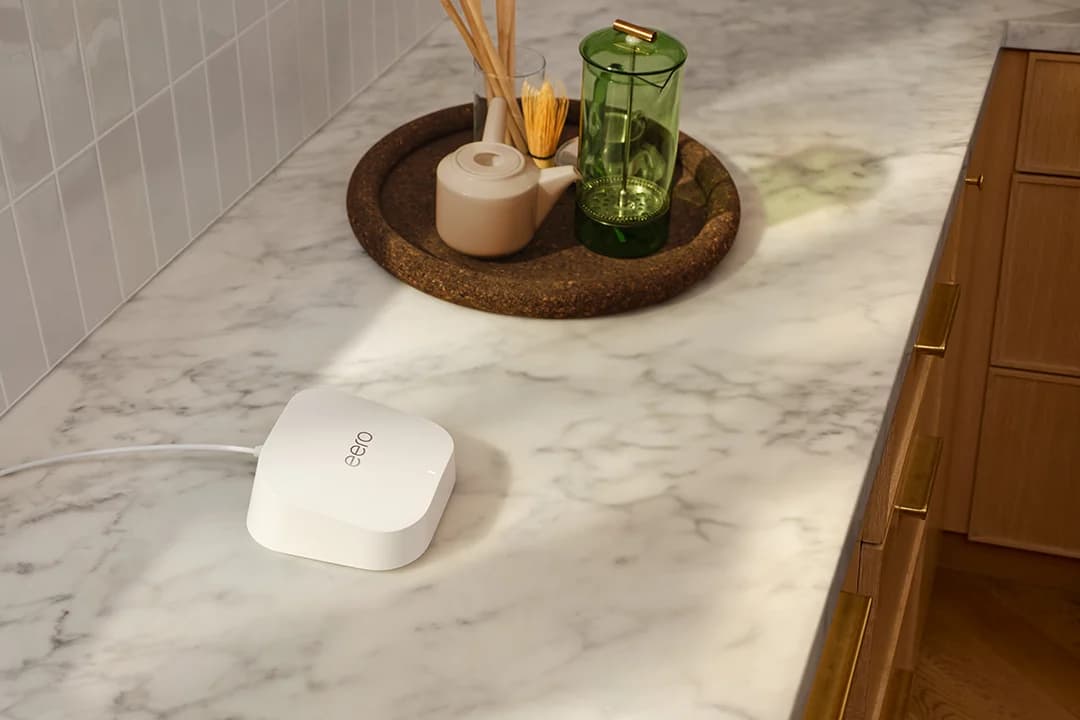
Choose for: Best for simple app management
Check before buying: No 6 GHz band, so channels top out at 240 MHz
For an apartment with its own internet connection, the Netgear Nighthawk RS300 is our best starting point: it pairs a 6 GHz band with four LAN ports. Choose the eero 7 for simple app management, or the ASUS RT-BE92U for more multi-gig wired connections and configuration options. If your landlord supplies the internet, confirm the permitted connection and operating mode before buying.
Quick picks: compare the ports you can actually use
These are single-router recommendations. The table counts LAN ports after the indicated internet uplink is connected, in router mode; port rates are interface specifications, not promised internet throughput.
Compare specifications and all conditions
Netgear RS300 — best overall
- Wi-Fi bands
- 2.4, 5 and 6 GHz
- Internet uplink used here
- 2.5 Gbps WAN
- LAN ports left
- Two 2.5 Gbps + two 1 Gbps
All specifications
- Management and apartment fit
- Browser or Nighthawk app; several wired devices
eero 7 — simplest management
- Wi-Fi bands
- 2.4 and 5 GHz; no 6 GHz
- Internet uplink used here
- One auto-sensing 2.5 GbE port
- LAN ports left
- One 2.5 GbE
All specifications
- Management and apartment fit
- eero app required; little Ethernet wiring
ASUS RT-BE92U — wired devices and control
- Wi-Fi bands
- 2.4, 5 and 6 GHz
- Internet uplink used here
- 10 Gbps WAN/LAN
- LAN ports left
- Four 2.5 Gbps, including the configurable WAN/LAN port
All specifications
- Management and apartment fit
- ASUSWRT browser interface or ASUS Router app
Full comparison table
Swipe to compare. Row labels stay visible.
| Pick | Wi-Fi bands | Internet uplink used here | LAN ports left | Management and apartment fit |
|---|---|---|---|---|
| Netgear RS300 — best overall | 2.4, 5 and 6 GHz | 2.5 Gbps WAN | Two 2.5 Gbps + two 1 Gbps | Browser or Nighthawk app; several wired devices |
| eero 7 — simplest management | 2.4 and 5 GHz; no 6 GHz | One auto-sensing 2.5 GbE port | One 2.5 GbE | eero app required; little Ethernet wiring |
| ASUS RT-BE92U — wired devices and control | 2.4, 5 and 6 GHz | 10 Gbps WAN/LAN | Four 2.5 Gbps, including the configurable WAN/LAN port | ASUSWRT browser interface or ASUS Router app |
Scroll horizontally to see every column
| Pick | Wi-Fi bands | Internet uplink used here | LAN ports left | Management and apartment fit |
|---|---|---|---|---|
| Netgear RS300 — best overall | 2.4, 5 and 6 GHz | 2.5 Gbps WAN | Two 2.5 Gbps + two 1 Gbps | Browser or Nighthawk app; several wired devices |
| eero 7 — simplest management | 2.4 and 5 GHz; no 6 GHz | One auto-sensing 2.5 GbE port | One 2.5 GbE | eero app required; little Ethernet wiring |
| ASUS RT-BE92U — wired devices and control | 2.4, 5 and 6 GHz | 10 Gbps WAN/LAN | Four 2.5 Gbps, including the configurable WAN/LAN port | ASUSWRT browser interface or ASUS Router app |
Identify who controls your connection
Your own modem or fiber ONT: connect its Ethernet output to your router's internet port, following your provider's requirements. The router does not replace a cable modem. eero's connection guide also documents apartments with an Ethernet wall handoff that needs no separate modem; our modem vs router guide explains the boxes.
A provider gateway that must stay: ask whether it can use bridge mode while your new router handles routing. For example, Xfinity's bridge mode retains the modem function but disables routing; network personalization and its Wi-Fi extenders become unavailable. Check bundled TV, phone and other provider features with your provider before changing modes.
If the gateway must keep routing, use the RS300's documented AP mode, ASUS access-point mode, or eero bridge mode. ASUS disables NAT, IP sharing and its firewall in AP mode by default. Bridged eero still supplies Wi-Fi but loses features including Advanced Security, Ad Blocking and Content Filters. eero's opening generic definition says bridge mode disables Wi-Fi, while its eero-specific section explicitly says bridged units continue providing Wi-Fi. Choose the mode for the job before comparing extras.
Landlord-managed internet: ask the operator whether the handoff is Ethernet or Wi-Fi only, whether your own router is allowed, and whether tenants are isolated. Do not bridge or reconfigure a shared gateway. For Wi-Fi-only service or a browser-login portal, get an explicitly supported setup before ordering; eero's gateway setup requires Ethernet. AP mode is not a promise of a private tenant network.
Size one router from rooms and clients
Complete this worksheet before picking a model. Netgear's RS300 manual identifies wall thickness, placement and nearby access points as range factors; room count alone cannot establish coverage.
Available router position
- What to record
- Ethernet handoff, power outlet and an open shelf
- How it changes the purchase
- Try a longer Ethernet lead if the handoff forces a corner position
Hardest room
- What to record
- Actual desk or bed location; walls and their material
- How it changes the purchase
- Plan a connection to that room rather than buying by advertised floor area
Important wireless clients
- What to record
- Phone/laptop model and supported bands
- How it changes the purchase
- Pay for 6 GHz when the devices and their location can use it
Wired clients
- What to record
- Desktop, console, NAS and any future wired node
- How it changes the purchase
- Count free LAN sockets and the speed each device needs
Full comparison table
Swipe to compare. Row labels stay visible.
| Write down | What to record | How it changes the purchase |
|---|---|---|
| Available router position | Ethernet handoff, power outlet and an open shelf | Try a longer Ethernet lead if the handoff forces a corner position |
| Hardest room | Actual desk or bed location; walls and their material | Plan a connection to that room rather than buying by advertised floor area |
| Important wireless clients | Phone/laptop model and supported bands | Pay for 6 GHz when the devices and their location can use it |
| Wired clients | Desktop, console, NAS and any future wired node | Count free LAN sockets and the speed each device needs |
Scroll horizontally to see every column
| Write down | What to record | How it changes the purchase |
|---|---|---|
| Available router position | Ethernet handoff, power outlet and an open shelf | Try a longer Ethernet lead if the handoff forces a corner position |
| Hardest room | Actual desk or bed location; walls and their material | Plan a connection to that room rather than buying by advertised floor area |
| Important wireless clients | Phone/laptop model and supported bands | Pay for 6 GHz when the devices and their location can use it |
| Wired clients | Desktop, console, NAS and any future wired node | Count free LAN sockets and the speed each device needs |
Worked example: a desk computer, console and NAS need three LAN connections if all are wired. The RS300 and ASUS have enough sockets without adding a switch; the eero needs extra Ethernet ports. If the NAS and desktop both need 2.5 Gbps connections, reserve the RS300's two fast LAN ports for them. These are port-budget examples, not measured transfer speeds; see multi-gig switches if you run out.
Best overall for a private connection: Netgear Nighthawk RS300
The RS300 balances a 6 GHz radio with useful wired connections: its model-specific specifications list a 2.5 Gbps internet port, two 2.5 Gbps LAN ports and two gigabit LAN ports. Choose it when those connections match your apartment, especially with a compatible wireless client near the router.
Control: Netgear promotes Nighthawk-app setup, while the manual also documents browser setup, channel selection and AP mode. You have a documented alternative to phone-only administration.
Limits and variants: the product page includes generic 10 Gig marketing, but its RS300 port table and the manual specify a 2.5 Gbps internet port. Do not buy it expecting a 10 Gbps uplink. Order the exact RS300 package: BE9300 is its speed class and also a separately named model in the shared manual, so the class alone does not identify your purchase.
NETGEAR Armor is an optional subscription. Netgear's support policy generally ends firmware updates three years after the last sale date, rather than three years after your purchase.
Best for simple app management: eero 7, single unit
eero
A dual-band Wi-Fi 7 router with two 2.5 GbE ports that works on its own or as one node of an eero mesh.
Check package and model options
- Wi-Fi 7
- BE5000
- 2 bands
- 2.5 Gbps port
The eero 7 works alone as a router and requires the iOS or Android eero app for setup and management. Its two auto-sensing 2.5 GbE ports leave one for a wired client after connecting the upstream cable. It suits someone who wants the app to handle the network and has little Ethernet wiring.
The apartment trade-off: this is dual-band Wi-Fi 7 on 2.4 and 5 GHz, with no 6 GHz radio. eero selects channels automatically; you cannot manually change channel or bandwidth. Choose another pick if manual radio controls are a priority.
Variants: select the single-unit package for this recommendation; a multipack adds routers you may not need. Pro 7 is different hardware, adding a 6 GHz band and two 5 GbE ports. Extra eero 7 units do not add a 6 GHz radio to the base model. Our eero model comparison covers the upgrade decision.
eero Plus adds subscription features such as ad blocking. eero's security policy promises updates through at least October 31, 2031, or five years after purchase new directly from eero or Amazon, whichever is later.
Best for wired devices and configuration: ASUS RT-BE92U
The RT-BE92U specifications list a 10 Gbps WAN/LAN port, a 2.5 Gbps WAN/LAN port and three 2.5 Gbps LAN ports. Using the 10 Gbps port upstream leaves four multi-gig LAN connections. It is our choice for more wired devices or a faster upstream interface, rather than a promise of better reception through apartment walls.
ASUS lists 2.4, 5 and 6 GHz radios, browser and app management, and access-point mode. That makes it a flexible choice behind a gateway that retains routing, provided its AP-mode feature limits fit your needs.
Limits and variants: four external antennas need placement space; choose an open shelf before ordering. Buy the full RT-BE92U model name, not simply a listing headed BE9700: that is the published aggregate speed class. ASUS's EOL list identifies models no longer receiving firmware updates; check support status rather than assuming lifetime updates.
Check placement before buying another node
Microsoft recommends recording baseline results in different rooms and repeating them after changes. eero's placement advice favors a central, elevated, open position and warns about dense walls, metal and enclosed cabinets.
Record the problem
Check the same laptop near the router and in the difficult room; note calls, dropouts and a speed-test baseline.
Move the existing box
Try an open, raised location closer to the rooms you use, with a suitable Ethernet lead if needed.
Repeat the same checks
Keep the router if the change solves the problem and it still receives security updates; buy against the remaining limitation.
For congestion, Apple's router guidance recommends automatic channel selection and 20 MHz width on 2.4 GHz. Wider channels are more susceptible to interference; do not force the widest setting as a universal apartment fix. On eero, channel and bandwidth selection remain automatic.
Treat 6 GHz as an option for compatible nearby clients: Microsoft documents shorter range and poorer wall penetration than the other bands. Likewise, eero says wireless links share airwaves and are more prone to interference than wired links. Our recommendation is to add a node only for a remaining coverage problem, with Ethernet backhaul where practical; put a wireless node where it still receives a good signal. See mesh Wi-Fi systems for that different buying job.
Rental-friendly connection checklist
Before ordering, measure a cable route, confirm permission for any mounts or cable fixings, and write down how to restore the existing setup. For cable selection, see Cat6 vs Cat6A vs Cat8.
- Yes: Connection method and personal-router permission confirmed with the provider or building operator
- Yes: Gateway routing role and required TV or phone features checked
- Yes: Exact model, single-unit pack and regional package checked
- Yes: Free LAN sockets counted after the upstream connection
- Partly: Shared service or login portal: obtain the operator's supported configuration first
How we choose
These are editorial picks based on official specifications, manuals, connection requirements and published support policies, checked November 2, 2026. There are no original speed or coverage measurements behind these rankings. We prioritize control of the connection, usable LAN ports, supported client bands and placement; advertised coverage is a maker's claim, not an apartment-specific guarantee. Read our selection method.
Verdict
Choose the RS300 for a private connection needing a 6 GHz option and several LAN sockets, eero 7 for app-led simplicity with little wiring, or RT-BE92U for more multi-gig wired connections and configuration choices. If placement solves the problem, keep the current supported router. If the building controls the service, settle the allowed setup before spending.
Frequently asked questions
What is the best router for a small apartment?
Our default is the Netgear RS300 when you control the internet connection and want a 6 GHz band plus several wired connections. The eero 7 suits someone who prefers app management and has little Ethernet wiring; it lacks 6 GHz. If your current router already covers your rooms reliably and still receives security updates, try repositioning it before replacing it.
Do I need mesh Wi-Fi in an apartment?
Start with a single router and check the rooms you actually use. Wall material and router position matter: a long apartment can be harder to cover than its floor area suggests. If repositioning leaves a dead zone, consider another node with a good link back to the router, preferably Ethernet. A wireless node placed inside the dead zone is a poor starting point.
Will a 6 GHz router fix interference from my neighbors?
It can offer compatible devices another band to use, but it is not a guaranteed fix. Microsoft describes 6 GHz as less congested, with shorter range and weaker wall penetration than other bands. Devices without 6 GHz support cannot move onto it. Check the actual phone or laptop specifications and the room where you need the connection before paying for that feature.
Can I use my own router with apartment-provided internet?
Confirm the building operator's requirements first, including whether personal routers are allowed and how the connection authenticates. An Ethernet wall socket can be a usable handoff, but do not change shared equipment. Access-point mode adds Wi-Fi to an existing network; ASUS says it disables NAT, IP sharing and the firewall by default, so do not assume it creates a private network isolated from other tenants.
Related guides
Buying guide · Wi-Fi Routers
Home Network Setup Checklist: Router, Switch, Wi-Fi and NAS
Plan your home network setup with a connection diagram, usable port counts, router and Wi-Fi choices, setup order, and internet and NAS recovery checks.
Comparison · Wi-Fi Routers
UniFi Dream Router 7 vs Express 7: Choose the Complete Kit
Compare UniFi Dream Router 7 and Express 7 by ports, security speed and applications, then build a complete home kit with the right PoE, cameras and cables.
Comparison · Wi-Fi Routers
GL.iNet Slate 7 vs Beryl 7: Which Should You Pack?
Choose between GL.iNet Slate 7 and Beryl 7 by hotel uplink, screen, phone tethering and your complete power kit. Includes exact-model and US buying checks.