

Best picks
Best 2.5Gb Switches for Home
Choose Five or Eight Ports
Choose a 2.5Gb switch for your NAS, PC and mesh: compare usable ports, fanless picks, exact revisions, warranty conflicts and the cables your upgrade needs.
By thisPING EditorialUpdated November 3, 20268 min read
On this page · Quick picks: compare the sockets you can actually use
For most homes connecting a 2.5G NAS and desktop, the TP-Link TL-SG108S-M2 V2 is our best 2.5Gb switch: eight multi-gig RJ45 ports, fanless cooling and plug-and-play operation. Choose the NETGEAR MS305-100NAS when five ports cover your finished layout, or the QNAP QSW-1108-8T-R2 when you prefer rear-facing connections. For mesh backhaul, check the compatibility caveat below before buying a switch with automatic loop prevention.
Manufacturer specifications and support documents checked November 2, 2026; these are research-based recommendations, without physical testing.
Quick picks: compare the sockets you can actually use
Reserve one switch port for the router's LAN cable (NETGEAR setup instructions). From the documented five-port MS305 and eight-port TP-Link counts, that leaves four or seven endpoint sockets respectively. These are our calculations, with no dedicated extra uplink assumed.
- 4 devicesFive-port switch after reserving the router connection
- 7 devicesEight-port switch after reserving the router connection
Compare specifications and all conditions
TP-Link TL-SG108S-M2 V2
- Documented data ports
- 8 × 2.5G RJ45
- Left after one RJ45 router uplink*
- 7 × 2.5G
- Cooling / control
- Fanless / unmanaged
All specifications
- Choose it for
- Default home LAN; desktop or wall mounting
NETGEAR MS305-100NAS
- Documented data ports
- 5 × 2.5G RJ45
- Left after one RJ45 router uplink*
- 4 × 2.5G
- Cooling / control
- Fanless / unmanaged
All specifications
- Choose it for
- A small, fully counted network
QNAP QSW-1108-8T-R2
- Documented data ports
- 8 × 2.5G RJ45
- Left after one RJ45 router uplink*
- 7 × 2.5G
- Cooling / control
- Fanless / unmanaged
All specifications
- Choose it for
- Front LEDs with rear cabling
Zyxel XMG1915-10EP
- Documented data ports
- 8 × 2.5G RJ45 + 2 × 10G SFP+
- Left after one RJ45 router uplink*
- 7 × 2.5G + 2 SFP+ slots
- Cooling / control
- Fanless / smart managed
All specifications
- Choose it for
- VLAN configuration and PoE power
Full comparison table
Swipe to compare. Row labels stay visible.
| Pick | Documented data ports | Left after one RJ45 router uplink* | Cooling / control | Choose it for |
|---|---|---|---|---|
| TP-Link TL-SG108S-M2 V2 | 8 × 2.5G RJ45 | 7 × 2.5G | Fanless / unmanaged | Default home LAN; desktop or wall mounting |
| NETGEAR MS305-100NAS | 5 × 2.5G RJ45 | 4 × 2.5G | Fanless / unmanaged | A small, fully counted network |
| QNAP QSW-1108-8T-R2 | 8 × 2.5G RJ45 | 7 × 2.5G | Fanless / unmanaged | Front LEDs with rear cabling |
| Zyxel XMG1915-10EP | 8 × 2.5G RJ45 + 2 × 10G SFP+ | 7 × 2.5G + 2 SFP+ slots | Fanless / smart managed | VLAN configuration and PoE power |
Scroll horizontally to see every column
| Pick | Documented data ports | Left after one RJ45 router uplink* | Cooling / control | Choose it for |
|---|---|---|---|---|
| TP-Link TL-SG108S-M2 V2 | 8 × 2.5G RJ45 | 7 × 2.5G | Fanless / unmanaged | Default home LAN; desktop or wall mounting |
| NETGEAR MS305-100NAS | 5 × 2.5G RJ45 | 4 × 2.5G | Fanless / unmanaged | A small, fully counted network |
| QNAP QSW-1108-8T-R2 | 8 × 2.5G RJ45 | 7 × 2.5G | Fanless / unmanaged | Front LEDs with rear cabling |
| Zyxel XMG1915-10EP | 8 × 2.5G RJ45 + 2 × 10G SFP+ | 7 × 2.5G + 2 SFP+ slots | Fanless / smart managed | VLAN configuration and PoE power |
Calculated by subtracting the copper uplink from each maker's port count. Zyxel's SFP+ slots require compatible connection hardware; they are not additional RJ45 sockets. Port rates describe links, not guaranteed file-transfer throughput.
Fill in this port-allocation worksheet first
Count cables terminating at this switch, including slower devices. Here is an example with a separate cable from each mesh satellite:
Router LAN to switch
- Sockets to reserve
- 1
NAS
- Sockets to reserve
- 1
Desktop
- Sockets to reserve
- 1
Two wired mesh satellites
- Sockets to reserve
- 2
Console
- Sockets to reserve
- 1
Active connections in this example
- Sockets to reserve
- 6
Recommended spare allowance
- Sockets to reserve
- 1
Minimum size with that allowance
- Sockets to reserve
- 7
Full comparison table
Swipe to compare. Row labels stay visible.
| Connection | Sockets to reserve |
|---|---|
| Router LAN to switch | 1 |
| NAS | 1 |
| Desktop | 1 |
| Two wired mesh satellites | 2 |
| Console | 1 |
| Active connections in this example | 6 |
| Recommended spare allowance | 1 |
| Minimum size with that allowance | 7 |
Scroll horizontally to see every column
| Connection | Sockets to reserve |
|---|---|
| Router LAN to switch | 1 |
| NAS | 1 |
| Desktop | 1 |
| Two wired mesh satellites | 2 |
| Console | 1 |
| Active connections in this example | 6 |
| Recommended spare allowance | 1 |
| Minimum size with that allowance | 7 |
These are layout assumptions and arithmetic, not a device-capacity claim. An eight-port switch accommodates this example with two physically empty sockets; a five-port switch cannot. Router, NAS and desktop alone occupy three sockets and leave two on the MS305. Adding both satellites fills it.
Place a mesh switch on the correct side of the gateway. For example, Deco's Router-mode instructions put satellites behind the main Deco's LAN port, directly or through a switch; Access Point mode has different wiring rules. Other mesh systems need their own topology check. See our mesh-system guide for choosing the nodes.
Best overall: TP-Link TL-SG108S-M2 V2
The V2 specification gives every socket 100 Mbps/1G/2.5G auto-negotiation, with a fanless metal case and desktop or wall placement. We favor its eight ports for a NAS, desktop and growing wired network because the worksheet can outgrow five without a large device collection.
Automatic loop prevention, QoS and IGMP snooping are documented features. TP-Link's general managed-switch article says unmanaged switches have no QoS, which conflicts with this exact model's feature list; use the model-specific specification. Automatic features still do not give you configurable VLANs.
Limits: no 10G connection and no user-configurable network segmentation. TP-Link's 40 Gbps switching capacity is an aggregate figure, not the speed of one socket or NAS transfer.
Match the revision: this recommendation covers V2. The download selector separately offers V2 and V2.60, plus older entries; match the delivered unit to its documentation rather than assuming every revision is identical.
Best five-port option: NETGEAR MS305-100NAS
Choose the MS305 when your final cable count fits. NETGEAR documents five auto-negotiating 100M/1G/2.5G copper ports, fanless operation, a metal enclosure and an included wall-mount kit. No software installation or configuration is required. The datasheet's ordering table identifies MS305-100NAS as North America; the US product page's embedded SKU agrees.
The trade-off is capacity for devices: four endpoint sockets after the router. There is no separate faster uplink and the datasheet explicitly identifies it as non-PoE, so a powered access point needs another power source.
Warranty conflict: the current product page says limited lifetime hardware warranty, but the linked datasheet says three years. NETGEAR's Enterprise warranty policy also puts the Essentials range in the three-year category. Confirm coverage for the exact SKU before using warranty length as a reason to choose it; the policy requires registration within 90 days and purchase from an authorized reseller, subject to applicable law.
Best rear-port alternative: QNAP QSW-1108-8T-R2
The R2 product page confirms eight 2.5G/1G/100M RJ45 ports, fanless cooling, unmanaged operation and automatic loop detection/blocking. Its useful distinction is physical: LEDs at the front, cable connections at the back. Choose it if that arrangement suits a NAS shelf better than your alternative's layout.
This is an alternative eight-port layout, not a claim of faster NAS transfers. Its documented 40 Gbps switching capacity is aggregate, and it has no 10G port. Keep the R2 suffix when ordering; this guide does not transfer older hardware specifications to it. QNAP states an included two-year hardware warranty, with optional extension; check the terms for your region.
When VLANs or powered APs matter: Zyxel XMG1915-10EP
Move to this conditional pick when you need configurable VLANs or PoE. The 10EP specification lists eight 2.5G copper ports, two 1G/10G SFP+ slots, fanless cooling and up to 60 W per powered port within a shared 130 W budget. That budget cannot supply every port at its maximum simultaneously.
NebulaFlex supports standalone management or optional Nebula cloud management. VLANs need appropriate configuration across the router and access points too; buying the switch does not establish an isolation policy. Our managed vs unmanaged explainer covers that decision, while PoE switch picks explain power sizing.
Variant trap: XMG1915-10E lacks PoE; XMG1915-18EP has a different port count, power budget and cooling specification. Use the 10EP column, not another model's numbers.
Similar model names: what changes?
TP-Link TL-SG105S-M2
- What to check before ordering
- Five 2.5G ports; it is not the eight-port TL-SG108S-M2
TP-Link TL-SG108-M2
- What to check before ordering
- A separate eight-port 2.5G model; the missing S matters when matching documentation
NETGEAR MS105
- What to check before ordering
- Also five 2.5G ports, but a separate model; do not assume an MS305 document covers it
NETGEAR MS308
- What to check before ordering
- Eight 2.5G ports; a port-count alternative to the five-port MS305
QNAP QSW-1108-8T-R2
- What to check before ordering
- Require the full R2 model name on the unit and paperwork
Full comparison table
Swipe to compare. Row labels stay visible.
| Model or suffix | What to check before ordering |
|---|---|
| TP-Link TL-SG105S-M2 | Five 2.5G ports; it is not the eight-port TL-SG108S-M2 |
| TP-Link TL-SG108-M2 | A separate eight-port 2.5G model; the missing S matters when matching documentation |
| NETGEAR MS105 | Also five 2.5G ports, but a separate model; do not assume an MS305 document covers it |
| NETGEAR MS308 | Eight 2.5G ports; a port-count alternative to the five-port MS305 |
| QNAP QSW-1108-8T-R2 | Require the full R2 model name on the unit and paperwork |
Scroll horizontally to see every column
| Model or suffix | What to check before ordering |
|---|---|
| TP-Link TL-SG105S-M2 | Five 2.5G ports; it is not the eight-port TL-SG108S-M2 |
| TP-Link TL-SG108-M2 | A separate eight-port 2.5G model; the missing S matters when matching documentation |
| NETGEAR MS105 | Also five 2.5G ports, but a separate model; do not assume an MS305 document covers it |
| NETGEAR MS308 | Eight 2.5G ports; a port-count alternative to the five-port MS305 |
| QNAP QSW-1108-8T-R2 | Require the full R2 model name on the unit and paperwork |
Build a complete NAS-and-desktop upgrade basket
For an existing 2.5G NAS and desktop, the small upgrade is one switch with its supplied power adapter and three Ethernet links: router, NAS and PC. Add each satellite's cable and socket separately. The selected TP-Link and NETGEAR package lists include their power adapters; count an available outlet too.
Keep compliant existing cabling: the TP-Link V2 datasheet specifies Cat5e or better, maximum 100 m, for 2.5GBASE-T. For replacement indoor leads, Cable Matters 160001 is a documented unshielded Cat6 patch cable with bare-copper conductors. Measure the actual route and select the length and pack quantity. Our Ethernet cable guide covers longer-term wiring choices.
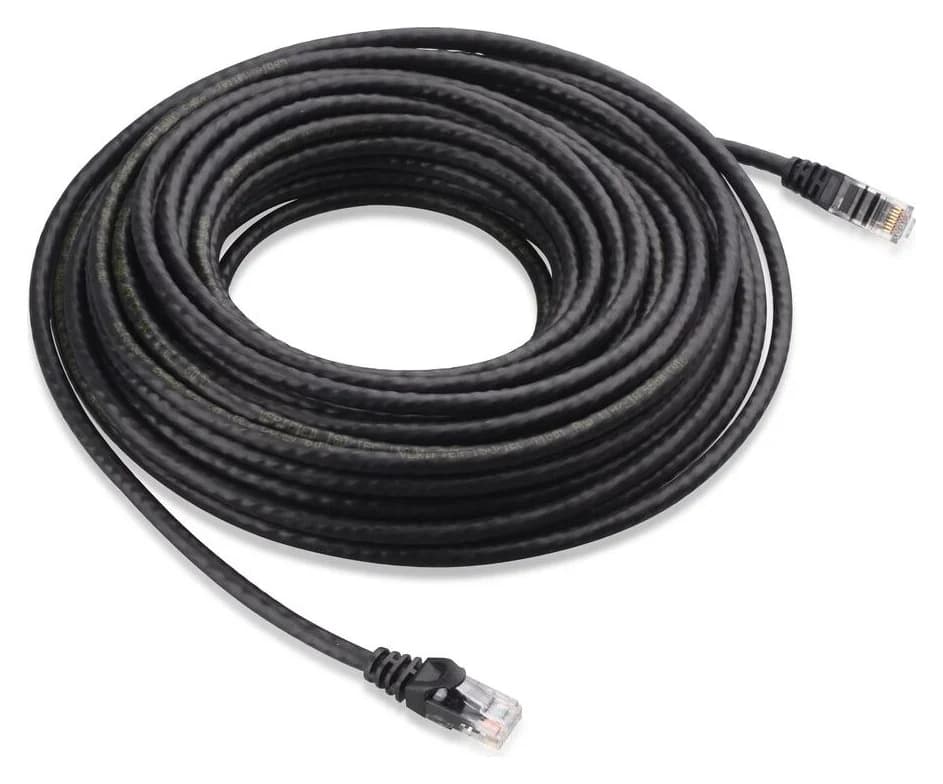
Cable Matters
An indoor unshielded Cat6 Ethernet patch cable with bare-copper conductors and snagless boots.
Check package and model options
The existing verified cable offer is the black, 7 ft, single-pack variant; buy that only if its length suits the route. Check price on Amazon, or choose another length on the maker's page.
A gigabit-only PC also needs an appropriate adapter. For a concrete desktop route, the existing TP-Link TX401 record covers a PCIe 3.0 x4 card that supports 2.5G as well as 10G and includes a 1.5 m Cat6A cable. It can be more capability than this upgrade needs; confirm slot clearance and the revision-specific Windows or Linux driver. If that cable reaches the PC, it supplies one of the three links in the basket. For a laptop, check a USB adapter's port and OS requirements instead.
Inventory the endpoints
Confirm the NAS and desktop Ethernet rates before choosing the switch.
Reserve every socket
Include the router, each backhaul cable and a spare allowance.
Finish the basket
Check supplied power, cable lengths, any required adapter and its OS support.
Verify after connecting
Check the negotiated Ethernet rate at both endpoints before judging file-copy speed.
Will 2.5G help your network?
With gigabit internet: a 2.5G NAS and PC on the same LAN can exchange local traffic through the switch without crossing the router uplink. Internet-bound traffic still crosses that uplink. This follows the switch/router distinction and same-VLAN forwarding; it does not require a faster internet subscription.
With gigabit endpoints: auto-negotiation keeps those connections at their supported speed. Upgrade the endpoints that exchange large files first. TP-Link also qualifies its wired rates: actual throughput depends on cabling and computer performance. A link-rate label is not a promised file-copy result.
With a 10G NAS or PC: these unmanaged picks stop at 2.5G per socket. Revisit the switch architecture guide if your actual requirement is a faster uplink, configurable VLANs or link aggregation.
How we choose
We compare official model pages, datasheets, installation instructions and support selectors. Our recommendations prioritize usable sockets, documented link rates, cooling, physical layout and configuration needs. Port-allocation totals are explicitly calculated examples. We name conflicting maker statements and avoid ranking latency, transfer speed, reliability or energy use without measurements. No physical testing informs these picks. Full editorial method: How we choose.
Verdict
Buy the TP-Link TL-SG108S-M2 V2 for a straightforward eight-port home LAN, the MS305-100NAS for a finished layout that fits five ports, or the QNAP R2 for rear-facing cabling. Choose the Zyxel 10EP when VLAN configuration or PoE is a requirement. Count the router and backhaul sockets first, and resolve mesh compatibility before ordering.
Frequently asked questions
Is a 2.5Gb switch worth it with gigabit internet?
Yes, when a NAS and PC both have 2.5G connections and exchange files on the same LAN. That local traffic can stay on the switch, so a gigabit router connection need not cap it. Internet traffic still crosses the router uplink. If the endpoints remain gigabit, changing the switch alone leaves those individual links at gigabit; check the NAS and desktop adapters first.
Should I buy a five-port or eight-port 2.5G switch?
Reserve a socket for the router before counting devices: five ports leave four endpoint connections; eight leave seven. Router, NAS and desktop occupy three sockets. Two mesh satellites bring that example to five, filling a five-port switch before adding a console or spare. Choose eight if that resembles your layout, and check your mesh maker's wiring and switch-compatibility instructions before ordering.
Do I need Cat6 or Cat8 for a 2.5GbE switch?
No. The TP-Link TL-SG108S-M2 V2 datasheet specifies Cat5e or better for 2.5GBASE-T over a maximum 100 m channel. Keep suitable existing cables and verify the negotiated link speed before replacing them. For new indoor patch leads, a documented bare-copper Cat6 cable is a practical choice. Buying a higher cable category does not make a 2.5G port negotiate at 10G.
Will a 2.5G switch work for Deco Ethernet backhaul?
Check the exact combination. TP-Link says most switches support Deco Ethernet backhaul, but warns that the transition from wireless backhaul can briefly create a loop and trigger a switch's loop detection. Its troubleshooting advice includes disabling that function. An unmanaged model may not expose such a control. Follow the wiring rules for Router or Access Point mode and confirm compatibility rather than treating loop prevention as a guarantee.
Related guides
Comparison · Network Switches
QNAP QSW-1108-8T-R2 vs TP-Link TL-SG108S-M2: Which 2.5G Switch?
Choose your eight-port 2.5G switch: QNAP R2 vs TP-Link V2, with a port plan, power-adapter checks, loop-prevention setup, cable advice and warranty guidance.
Best picks · Network Switches
Best 10GbE Switches for a Home NAS: Copper, SFP+ and Usable Ports
Choose a 10GbE switch for your NAS and PC: compare usable copper and SFP+ ports, check NETGEAR revisions, and match cables, adapters, cooling and storage.
Comparison · Network Switches
Managed vs Unmanaged Switch: What Your Home Network Needs
Choose managed or unmanaged by the controls you need. Compare VLANs, monitoring and PoE, with clear picks and a complete router-to-AP segmentation example.