

Comparison
ASUS ZenWiFi BT10 vs TP-Link Deco BE63
Which Wi-Fi 7 Mesh Should You Buy?
Compare ASUS ZenWiFi BT10 and TP-Link Deco BE63 Wi-Fi 7 mesh: ports, radios, packs, expansion rules and update policies, so you order the right kit for your wiring.
By thisPING EditorialUpdated November 5, 20268 min read4 picks
On this page · Our picks at a glance
Our picks at a glance
- 1
Ethernet between rooms, or a plan above 2.5 Gbps
ASUS ZenWiFi BT10 2-pack, BT10(W-2-PK)
Choose for: Ethernet between rooms, or a plan above 2.5 Gbps
Check before buying: with internet on one 10G port and wired backhaul on the other, the main unit's only remaining socket is the 1G WAN/LAN.
- 2
No wiring between nodes, many wired devices
TP-Link Deco BE63 2-pack (US V3.6)
Choose for: No wiring between nodes, many wired devices
Check before buying: no port is faster than 2.5 Gbps, so the system caps plans above 2.5 Gbps at the WAN port — see our guide to multi-gig internet equipment.
- 3
One dead zone in an existing ASUS network
Choose for: One dead zone in an existing ASUS network
Show all 4 picks
- 4
One dead zone in an existing Deco network
Choose for: One dead zone in an existing Deco network
Buy the ASUS ZenWiFi BT10 two-pack if your nodes are wired together or your internet plan is above 2.5 Gbps; buy the TP-Link Deco BE63 two-pack if you want more wired sockets per node and simpler mixed-model expansion. Both are tri-band Wi-Fi 7 mesh systems, but the BT10 has two 10G ports per unit while every BE63 port is 2.5 Gbps — that single difference decides most of this comparison.
Official documentation checked November 3, 2026. Recommendations are based on specifications and connection planning, not measured performance.
Quick picks
Compare specifications and all conditions
Ethernet between rooms, or a plan above 2.5 Gbps
- Our pick
- ASUS ZenWiFi BT10 2-pack, BT10(W-2-PK)
- Why
- Two 10G ports per unit carry 10 Gbps internet and 10 Gbps wired backhaul.
No wiring between nodes, many wired devices
- Our pick
- TP-Link Deco BE63 2-pack (US V3.6)
- Why
- Four 2.5 Gbps auto-sensing ports per unit leave more sockets after backhaul.
One dead zone in an existing ASUS network
- Our pick
- BT10 1-pack, BT10(W-1-PK)
- Why
- A single unit joins an AiMesh network as router or node.
One dead zone in an existing Deco network
- Our pick
- Deco BE63 1-pack
- Why
- All Deco models can work together as one mesh.
Full comparison table
Swipe to compare. Row labels stay visible.
| Your situation | Our pick | Why |
|---|---|---|
| Ethernet between rooms, or a plan above 2.5 Gbps | ASUS ZenWiFi BT10 2-pack, BT10(W-2-PK) | Two 10G ports per unit carry 10 Gbps internet and 10 Gbps wired backhaul. |
| No wiring between nodes, many wired devices | TP-Link Deco BE63 2-pack (US V3.6) | Four 2.5 Gbps auto-sensing ports per unit leave more sockets after backhaul. |
| One dead zone in an existing ASUS network | BT10 1-pack, BT10(W-1-PK) | A single unit joins an AiMesh network as router or node. |
| One dead zone in an existing Deco network | Deco BE63 1-pack | All Deco models can work together as one mesh. |
Scroll horizontally to see every column
| Your situation | Our pick | Why |
|---|---|---|
| Ethernet between rooms, or a plan above 2.5 Gbps | ASUS ZenWiFi BT10 2-pack, BT10(W-2-PK) | Two 10G ports per unit carry 10 Gbps internet and 10 Gbps wired backhaul. |
| No wiring between nodes, many wired devices | TP-Link Deco BE63 2-pack (US V3.6) | Four 2.5 Gbps auto-sensing ports per unit leave more sockets after backhaul. |
| One dead zone in an existing ASUS network | BT10 1-pack, BT10(W-1-PK) | A single unit joins an AiMesh network as router or node. |
| One dead zone in an existing Deco network | Deco BE63 1-pack | All Deco models can work together as one mesh. |
For the wider field, start with our best mesh Wi-Fi systems roundup.
- 210G Ethernet sockets on every BT10 unit
- 42.5 Gbps auto-sensing sockets on every BE63 unit
- 6,000sq ft ASUS 2-pack coverage claim, per ASUS
- 5,800sq ft TP-Link 2-pack coverage claim, per TP-Link
Compare the exact hardware
Hardware is per unit, from ASUS's BT10 US specifications and TP-Link's Deco BE63 pages. Coverage is each maker's claim for its two-pack, dependent on construction and network conditions.
ASUS ZenWiFi BT10
- Wi-Fi class
- BE18000, tri-band Wi-Fi 7
- Bands
- 2.4 GHz + 5 GHz + 6 GHz
- Max signal rates
- 688 + 5,764 + 11,529 Mbps
All specifications
- Radio configuration
- 4x4 on 5 and 6 GHz, 2x2 on 2.4 GHz
- Channel width
- Up to 320 MHz on 6 GHz
- Ethernet per unit
- 1x 10G WAN/LAN, 1x 10G LAN, 1x 1G WAN/LAN
- USB
- 1x USB 3.0
- Processor, memory
- 2.0 GHz quad-core, 2 GB RAM
- Maker 2-pack coverage claim
- Up to 6,000 sq ft
- Maker device-count claim
- Not stated in the cited pages
TP-Link Deco BE63
- Wi-Fi class
- BE10000, tri-band Wi-Fi 7
- Bands
- 2.4 GHz + 5 GHz + 6 GHz
- Max signal rates
- 574 + 4,324 + 5,188 Mbps
All specifications
- Radio configuration
- 2x2 MU-MIMO, 6 streams total
- Channel width
- Up to 320 MHz on 6 GHz (6 GHz only)
- Ethernet per unit
- 4x 2.5 Gbps WAN/LAN, all auto-sensing
- USB
- 1x USB port
- Processor, memory
- Not itemized in the cited US pages
- Maker 2-pack coverage claim
- Up to 5,800 sq ft
- Maker device-count claim
- Up to 200 devices
Full comparison table
Swipe to compare. Row labels stay visible.
| Specification | ASUS ZenWiFi BT10 | TP-Link Deco BE63 |
|---|---|---|
| Wi-Fi class | BE18000, tri-band Wi-Fi 7 | BE10000, tri-band Wi-Fi 7 |
| Bands | 2.4 GHz + 5 GHz + 6 GHz | 2.4 GHz + 5 GHz + 6 GHz |
| Max signal rates | 688 + 5,764 + 11,529 Mbps | 574 + 4,324 + 5,188 Mbps |
| Radio configuration | 4x4 on 5 and 6 GHz, 2x2 on 2.4 GHz | 2x2 MU-MIMO, 6 streams total |
| Channel width | Up to 320 MHz on 6 GHz | Up to 320 MHz on 6 GHz (6 GHz only) |
| Ethernet per unit | 1x 10G WAN/LAN, 1x 10G LAN, 1x 1G WAN/LAN | 4x 2.5 Gbps WAN/LAN, all auto-sensing |
| USB | 1x USB 3.0 | 1x USB port |
| Processor, memory | 2.0 GHz quad-core, 2 GB RAM | Not itemized in the cited US pages |
| Maker 2-pack coverage claim | Up to 6,000 sq ft | Up to 5,800 sq ft |
| Maker device-count claim | Not stated in the cited pages | Up to 200 devices |
Scroll horizontally to see every column
| Specification | ASUS ZenWiFi BT10 | TP-Link Deco BE63 |
|---|---|---|
| Wi-Fi class | BE18000, tri-band Wi-Fi 7 | BE10000, tri-band Wi-Fi 7 |
| Bands | 2.4 GHz + 5 GHz + 6 GHz | 2.4 GHz + 5 GHz + 6 GHz |
| Max signal rates | 688 + 5,764 + 11,529 Mbps | 574 + 4,324 + 5,188 Mbps |
| Radio configuration | 4x4 on 5 and 6 GHz, 2x2 on 2.4 GHz | 2x2 MU-MIMO, 6 streams total |
| Channel width | Up to 320 MHz on 6 GHz | Up to 320 MHz on 6 GHz (6 GHz only) |
| Ethernet per unit | 1x 10G WAN/LAN, 1x 10G LAN, 1x 1G WAN/LAN | 4x 2.5 Gbps WAN/LAN, all auto-sensing |
| USB | 1x USB 3.0 | 1x USB port |
| Processor, memory | 2.0 GHz quad-core, 2 GB RAM | Not itemized in the cited US pages |
| Maker 2-pack coverage claim | Up to 6,000 sq ft | Up to 5,800 sq ft |
| Maker device-count claim | Not stated in the cited pages | Up to 200 devices |
The BE classes add each band's maximum theoretical rate — BT10's "BE18000" is 688 + 5,764 + 11,529 Mbps — and no single device reaches the sum. Wi-Fi 7 features such as MLO and 4K-QAM also need clients that support them, and TP-Link notes its Deco may not support all mandatory features of the ratified IEEE 802.11be specification.
Source: ASUS BT10 and TP-Link BE63 spec sheets (linked in the product sections)
Best for wired backhaul: ASUS ZenWiFi BT10
Order BT10(W-2-PK) for a two-location installation with Ethernet between the rooms. Each unit has one 10G WAN/LAN port and one 10G LAN port, so the main unit can take internet on one 10G port and send 10 Gbps wired backhaul through the other; ASUS positions the BT10 as its mesh for homes with wired Ethernet. The node's second 10G port stays free for a fast wired device.
- Tri-band Wi-Fi 7, 4x4 radios on 5 and 6 GHz, up to 320 MHz channels
- 2.0 GHz quad-core processor, 2 GB RAM, 8 internal antennas
- AiMesh router, AiMesh node or access point modes
- AiProtection Pro, subscription-free parental controls, WireGuard and VPN Fusion
The trade-offs: with internet on one 10G port and wired backhaul on the other, the main unit's only remaining socket is the 1G WAN/LAN. A fast NAS or additional multi-gig branches need a multi-gig switch after the router. ASUS's package-content list names a power adapter, RJ45 cable and documentation without itemizing quantities per pack, so confirm a matching adapter for every unit. ASUS's BT10 firmware page lists an update dated October 21, 2026 — current support evidence, not a future-support promise.
Best port count per node: TP-Link Deco BE63
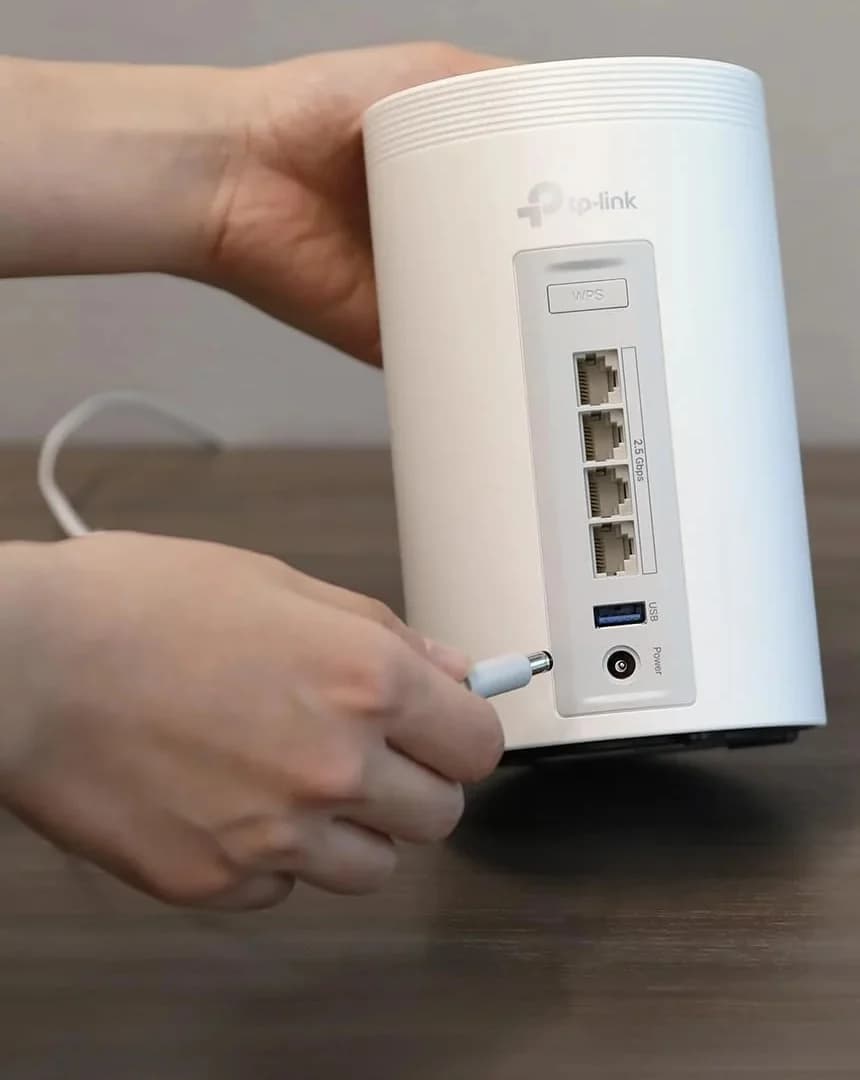
Order the Deco BE63 US V3.6 2-pack when you want the most wired sockets per location. Every unit has four 2.5 Gbps ports that auto-sense WAN or LAN, so after one WAN connection and one wired backhaul link, each node still serves three 2.5 Gbps devices — more usable sockets than a wired BT10 pair leaves.
TP-Link
A tri-band Wi-Fi 7 mesh kit with four 2.5 Gbps ports on every unit and optional Ethernet backhaul.
Check package and model options
- Wi-Fi 7
- BE10000
- 3 bands
- 2.5 Gbps port
- Tri-band Wi-Fi 7 with MLO, 320 MHz channels on 6 GHz, 4K-QAM and Multi-RU
- Up to 200 devices and up to 5,800 sq ft (2-pack), TP-Link's claims
- Router or access point modes; set up and manage in the Deco app
- HomeShield basic plan included; advanced features need a paid subscription
- Expansion: any Deco model can join the mesh
The trade-offs: no port is faster than 2.5 Gbps, so the system caps plans above 2.5 Gbps at the WAN port — see our guide to multi-gig internet equipment. TP-Link's US End of Sales list gives January 26, 2027 for the V2.6 packs and June 28, 2025 for the V1.6 packs, and its End-of-Life policy usually ends maintenance three years after End of Sales; buy the current V3.6 revision. Its security tools beyond HomeShield Basic sit behind the Pro subscription, while ASUS's equivalents are subscription-free.
Port arithmetic after WAN and backhaul
Counts assume one port serves WAN, one carries backhaul between units, and the rest serve wired clients. This is inventory arithmetic on the makers' port lists, not a performance claim.
Wireless backhaul, main unit
- Free BT10 sockets per unit
- 1x 10G + 1x 1G
- Free BE63 sockets per unit
- 3x 2.5 Gbps
Wireless backhaul, node
- Free BT10 sockets per unit
- 2x 10G + 1x 1G
- Free BE63 sockets per unit
- 3x 2.5 Gbps
Wired backhaul, main unit
- Free BT10 sockets per unit
- 1x 1G
- Free BE63 sockets per unit
- 2x 2.5 Gbps
Wired backhaul, node
- Free BT10 sockets per unit
- 1x 10G + 1x 1G
- Free BE63 sockets per unit
- 3x 2.5 Gbps
Full comparison table
Swipe to compare. Row labels stay visible.
| Layout | Free BT10 sockets per unit | Free BE63 sockets per unit |
|---|---|---|
| Wireless backhaul, main unit | 1x 10G + 1x 1G | 3x 2.5 Gbps |
| Wireless backhaul, node | 2x 10G + 1x 1G | 3x 2.5 Gbps |
| Wired backhaul, main unit | 1x 1G | 2x 2.5 Gbps |
| Wired backhaul, node | 1x 10G + 1x 1G | 3x 2.5 Gbps |
Scroll horizontally to see every column
| Layout | Free BT10 sockets per unit | Free BE63 sockets per unit |
|---|---|---|
| Wireless backhaul, main unit | 1x 10G + 1x 1G | 3x 2.5 Gbps |
| Wireless backhaul, node | 2x 10G + 1x 1G | 3x 2.5 Gbps |
| Wired backhaul, main unit | 1x 1G | 2x 2.5 Gbps |
| Wired backhaul, node | 1x 10G + 1x 1G | 3x 2.5 Gbps |
On a gigabit internet handoff, the BT10's main unit can instead use its 1G WAN/LAN port for WAN, freeing a 10G socket for LAN — at the cost of capping the internet link at gigabit.
Expansion: AiMesh versus the Deco ecosystem
The BT10 expands through ASUS's AiMesh: any AiMesh-compatible ASUS router can join, but ASUS's MLO FAQ says MLO backhaul supports only the same model and only the first node, and a node without MLO will not broadcast 6 GHz while MLO is enabled on the primary. Put the highest-specification router in charge, and prefer matching BT10 units when you buy nodes for MLO backhaul.
The BE63 expands through the Deco app: TP-Link says all Deco models can work together as one mesh, and a mixed network's feature set follows the main Deco. That is broader same-brand mixing than AiMesh's MLO restrictions, though still not cross-brand.
- Yes: Same-model BT10 node as the first node: MLO backhaul supported
- No: A second or third BT10 node: no MLO backhaul beyond the first node
- Yes: Any AiMesh-compatible ASUS router: joins the mesh, without MLO backhaul
- Partly: Older AiMesh node: joins, but will not broadcast 6 GHz while MLO is enabled on the primary
- Yes: Any Deco model: joins the same mesh in the Deco app
- No: An ASUS unit in a Deco network, or a Deco in an AiMesh network: not possible
For a deeper look at mixing ASUS models, see our ZenWiFi BQ16 Pro vs BT10 comparison; for TP-Link's flagship tier, eero Max 7 vs Deco BE85 covers the step-up class.
Cabling, packs and ordering
TP-Link itemizes its US packs: the 2-pack is 2 Deco units, 2 power adapters, 1 RJ45 Ethernet cable and 1 quick-installation guide — so a wired two-node install needs at least one more Ethernet cable than the box includes. ASUS lists the BT10's contents (unit, RJ45 cable, adapter, warranty card, quick start guide) without per-pack quantities; match one adapter per unit. Wall sockets and cable routes are your constraint either way: see how to set up mesh Wi-Fi.
Match the exact kit
Confirm the region and pack: BT10(W-2-PK), or the Deco BE63 US V3.6 2-pack with the revision on the hardware label.
Plan the wiring
Allow one outlet and adapter per unit, the WAN lead, and the full cable route between nodes, including patch leads.
Count your sockets
Check the port arithmetic table against your wired devices; add a switch where the free sockets run out.
Check expansion
Confirm matching-model rules for MLO backhaul, or Deco app rules, before adding nodes later.
How we choose
We compare official US specifications, pack contents, port arithmetic, expansion rules and support documents from ASUS and TP-Link, linked throughout. We have not tested either system: BE classes are summed theoretical rates, coverage and device counts are maker claims, and conflicting manufacturer documentation is called out rather than resolved. Full method: How we choose.
Verdict
For a home with Ethernet between rooms — or any plan faster than 2.5 Gbps — the ASUS ZenWiFi BT10 two-pack is the stronger system: 10G ports on every unit, larger 6 GHz radios, and subscription-free security and parental-control software. For wireless nodes with many wired devices per room, the TP-Link Deco BE63 two-pack gives you four 2.5 Gbps sockets on every unit, the largest maker device-count claim here, and the simplest same-brand expansion. Choose the ecosystem you will keep, then the pack size; see best mesh Wi-Fi systems if neither is final.
Frequently asked questions
Is the ASUS ZenWiFi BT10 faster than the TP-Link Deco BE63?
On paper the BT10's radios are larger: its 6 GHz band is 4x4 at up to 11,529 Mbps, versus the BE63's 5,188 Mbps, and its BE18000 class sums to 18 Gbps against the BE63's BE10000. Those are summed theoretical band rates, not a device's speed. If your nodes are wired together, the BT10's 10G ports are the bigger difference; on a fully wireless link the BT10's extra 6 GHz capacity matters more.
Can I mix ASUS ZenWiFi and TP-Link Deco units in one mesh?
No. The two ecosystems do not mesh with each other. Deco units mix only with other Deco models under TP-Link's app-managed rules, and ASUS meshes only with AiMesh-compatible ASUS routers. An older ASUS router can join the BT10's AiMesh network, but ASUS limits MLO backhaul to the first node and the same model. Pick one ecosystem and expand within it.
Are Deco BE63 and Deco 7 Pro the same product?
Deco 7 Pro is TP-Link's current US branding for the Deco BE63, but the branding does not identify a hardware revision. US packs exist in at least V1.6, V2.6 and V3.6 revisions, each with its own firmware track, and TP-Link lists End of Sales for the V1.6 and V2.6 packs. Match the label on the box or unit to the revision on the US download page before installing firmware.
Do both systems support Ethernet backhaul?
Yes. ASUS's instructions wire the main unit's LAN port to the node's WAN port and recommend Ethernet backhaul for far or obstructed nodes. TP-Link says to set the Decos up wirelessly first, then connect cables; the Wi-Fi backhaul between two wired units disconnects automatically, and you can mix wired and wireless nodes. Count the sockets each layout leaves free, listed in the port arithmetic table above.
Ethernet between rooms, or a plan above 2.5 Gbps
ASUS ZenWiFi BT10 2-pack, BT10(W-2-PK)
Related guides
Comparison · Mesh Wi-Fi Systems
ASUS ZenWiFi BQ16 Pro vs Netgear Orbi 770: Which Mesh Kit Should You Buy?
Choose between ASUS ZenWiFi BQ16 Pro and Orbi 770 by your wiring: 10G vs 2.5G ports, wireless backhaul design, node expansion and the exact pack to order.
Comparison · Mesh Wi-Fi Systems
ASUS ZenWiFi BQ16 Pro vs BT10: Which Mesh Pack Fits Your Wiring?
Choose ASUS ZenWiFi BQ16 Pro or BT10 for your wiring: compare US packs, radio bands, ports left after backhaul, AiMesh limits and the kit you need to order.
Comparison · Mesh Wi-Fi Systems
Orbi 770 vs 970: Which Mesh Kit Fits Your Wiring and Internet Plan?
Choose Orbi 770 or 970 by your internet plan, spare Ethernet ports and backhaul. Compare exact packs, compatible satellites and subscriptions before buying.