

Best picks
Best Wi-Fi 6 Routers
The Models Still Worth Buying
Choose a Wi-Fi 6 router by ports, mesh compatibility and support. Compare eero 6+, ASUS RT-AX57 and RT-AX86U Pro, stock warnings and a Wi-Fi 7 alternative.
By thisPING EditorialUpdated November 3, 20268 min read
On this page · Quick picks: compare the exact setup
The eero 6+ router 2-pack is our Wi-Fi 6 pick for a new eero mesh network if its complete setup costs less than the Wi-Fi 7 alternative. For a single router, compare eero 7 first; the ASUS RT-AX57 and RT-AX86U Pro remain conditional AiMesh options because ASUS's US purchase feeds currently mark their listed seller “Not In Stock.”
US specifications, purchase feeds and firmware pages checked November 2, 2026. Availability can change; these are research-based recommendations.
Quick picks: compare the exact setup
Compare specifications and all conditions
eero 6+ router, US 2-pack: available Wi-Fi 6 mesh pick
- Official purchase check
- Store data marks 2-pack available for sale
- Internet port used
- 1 Gbps
- LAN left with that connection
- 1x 1 Gbps on gateway
All specifications
- Bands and mesh
- 2.4 GHz and 5 GHz; eero
ASUS RT-AX57: conditional gigabit AiMesh option
- Official purchase check
- Listed seller: Not In Stock
- Internet port used
- 1 Gbps
- LAN left with that connection
- 4x 1 Gbps
All specifications
- Bands and mesh
- 2.4 GHz and 5 GHz; AiMesh
ASUS RT-AX86U Pro: conditional AiMesh option with faster uplink
- Official purchase check
- Listed seller: Not In Stock
- Internet port used
- 2.5 Gbps, configurable WAN/LAN
- LAN left with that connection
- 4x 1 Gbps
All specifications
- Bands and mesh
- 2.4 GHz and 5 GHz; AiMesh
eero 7, single router: Wi-Fi 7 alternative
- Official purchase check
- Maker offers Buy now
- Internet port used
- 2.5 Gbps, auto-sensing
- LAN left with that connection
- 1x 2.5 Gbps
All specifications
- Bands and mesh
- 2.4 GHz and 5 GHz; eero
Full comparison table
Swipe to compare. Row labels stay visible.
| Model and role | Official purchase check | Internet port used | LAN left with that connection | Bands and mesh |
|---|---|---|---|---|
| eero 6+ router, US 2-pack: available Wi-Fi 6 mesh pick | Store data marks 2-pack available for sale | 1 Gbps | 1x 1 Gbps on gateway | 2.4 GHz and 5 GHz; eero |
| ASUS RT-AX57: conditional gigabit AiMesh option | Listed seller: Not In Stock | 1 Gbps | 4x 1 Gbps | 2.4 GHz and 5 GHz; AiMesh |
| ASUS RT-AX86U Pro: conditional AiMesh option with faster uplink | Listed seller: Not In Stock | 2.5 Gbps, configurable WAN/LAN | 4x 1 Gbps | 2.4 GHz and 5 GHz; AiMesh |
| eero 7, single router: Wi-Fi 7 alternative | Maker offers Buy now | 2.5 Gbps, auto-sensing | 1x 2.5 Gbps | 2.4 GHz and 5 GHz; eero |
Scroll horizontally to see every column
| Model and role | Official purchase check | Internet port used | LAN left with that connection | Bands and mesh |
|---|---|---|---|---|
| eero 6+ router, US 2-pack: available Wi-Fi 6 mesh pick | Store data marks 2-pack available for sale | 1 Gbps | 1x 1 Gbps on gateway | 2.4 GHz and 5 GHz; eero |
| ASUS RT-AX57: conditional gigabit AiMesh option | Listed seller: Not In Stock | 1 Gbps | 4x 1 Gbps | 2.4 GHz and 5 GHz; AiMesh |
| ASUS RT-AX86U Pro: conditional AiMesh option with faster uplink | Listed seller: Not In Stock | 2.5 Gbps, configurable WAN/LAN | 4x 1 Gbps | 2.4 GHz and 5 GHz; AiMesh |
| eero 7, single router: Wi-Fi 7 alternative | Maker offers Buy now | 2.5 Gbps, auto-sensing | 1x 2.5 Gbps | 2.4 GHz and 5 GHz; eero |
Port counts above are per router, after allocating the indicated internet connection. They describe link rates, not measured throughput. Specifications: eero 6+, the linked ASUS sheets, and eero 7. ASUS stock results come from its RT-AX57 US purchase feed and RT-AX86U Pro US purchase feed.
Available Wi-Fi 6 mesh pick: eero 6+ router 2-pack
Choose this for a new eero mesh network when gigabit Ethernet meets your needs and the complete basket makes sense against eero 7. The US shop page lists a router 2-pack and 3-pack; its embedded store data marks both available for sale. Our recommendation covers the 2-pack of routers, rather than assuming every similarly named package contains the same hardware.
According to eero's hardware documentation, the router has dual-band Wi-Fi 6, an AX3000 rating, channels up to 160 MHz and two auto-sensing 1 GbE ports. One port goes to the internet connection, leaving one for a wired device, switch or wired node. A direct wired node connection therefore uses the gateway's remaining port; include a switch in your basket if you need more connections.
The important variant trap is the eero 6+ Extender: it has no Ethernet ports and cannot connect directly to your modem. Buy router units for a gateway or wired backhaul. eero requires its Android or iOS app for setup and network management.
Compare with eero 7 if faster Ethernet matters: its two 2.5 GbE ports remove the gigabit-only wired limit. Buying a larger Wi-Fi 6 pack just to obtain one router is also a reason to reconsider the basket.
Check the router pack on eero's official store.
Conditional gigabit AiMesh option: ASUS RT-AX57
The RT-AX57 makes the most sense as an addition to compatible ASUS equipment, provided you can confirm US stock and the complete package. Its US specifications list AX3000 dual-band Wi-Fi 6, 2x2 radios on both bands, support for 160 MHz channels, a gigabit WAN port and four gigabit LAN ports. ASUS explicitly supports both primary AiMesh router and AiMesh node roles.
Those extra LAN ports are the practical attraction if you have several wired devices. Skip it for a multi-gig wired connection: every listed Ethernet port is gigabit. The AX3000 label does not change that port limit.
ASUS's US purchase feed identifies 90IG06Z0-MA1C0V, but marks its listed seller out of stock. Its US product-page metadata separately says “InStock”; that conflict is why we do not call it a confirmed buy-now choice. The linked US spec sheet does not enumerate package contents, so confirm the original power adapter and included cable before ordering.
Choose eero 7 instead if you are starting fresh and need faster Ethernet; retaining an existing compatible AiMesh network is the stronger reason to keep shopping for this ASUS model.
Recheck ASUS's US purchase options.
Conditional AiMesh option with faster uplink: ASUS RT-AX86U Pro
The Pro suffix matters. The US spec sheet lists AX5700 dual-band Wi-Fi 6, 3x3 on 2.4 GHz and 4x4 on 5 GHz, plus primary-router and node support for AiMesh. That makes it the more capable radio configuration on paper among these ASUS candidates; it does not establish a speed advantage for your particular client.
Its decisive limitation is one configurable 2.5 Gbps WAN/LAN port, alongside a gigabit WAN port and four gigabit LAN ports. Use the fast port for internet and the dedicated LAN ports remain gigabit. Alternatively, use gigabit WAN and keep the fast port for a local device. You cannot allocate that same physical port to both connections. Our recommendation is to choose another model if you require separate multi-gig WAN and LAN ports.
The US purchase feed identifies 90IG07N0-MA1B0V, with its listed seller out of stock, while product-page metadata again says “InStock.” ASUS confirms the package includes the router, RJ-45 cable, power adapter, quick-start guide and warranty card. Do not substitute the older RT-AX86U or RT-AX86S, which appear separately on the EOL list.
Consider eero 7 for its separate fast wired connections if you can change ecosystems. If retaining AiMesh is essential, compare a current ASUS option in our Wi-Fi 7 router guide before hunting Pro clearance stock.
Recheck ASUS's US purchase options.
Wi-Fi 7 alternative: eero 7
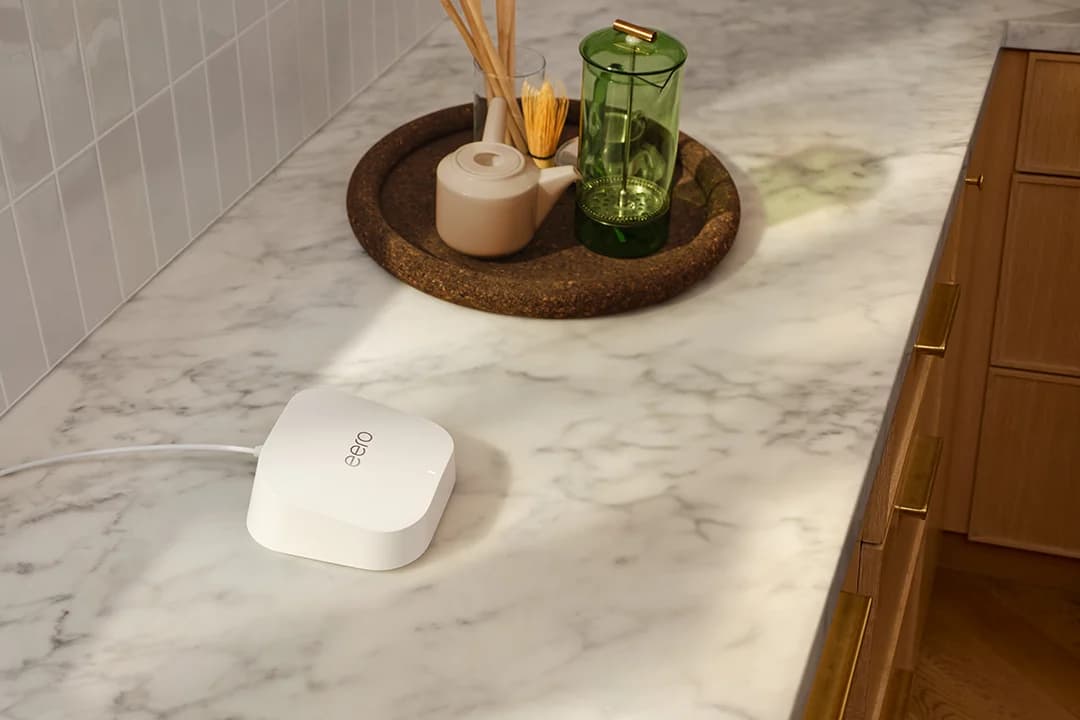
eero
A dual-band Wi-Fi 7 router with two 2.5 GbE ports that works on its own or as one node of an eero mesh.
Check package and model options
- Wi-Fi 7
- BE5000
- 2 bands
- 2.5 Gbps port
eero 7 is the alternative to compare against every Wi-Fi 6 basket here. Its hardware documentation lists two auto-sensing 2.5 GbE ports, dual-band 2.4 GHz and 5 GHz radios, and compatibility with previous eero hardware. It still requires the eero app. It has no 6 GHz radio: check actual bands rather than assuming the generation supplies one.
The individually sold package includes the router, a 15W USB-C power adapter and a Cat5e Ethernet cable. With internet connected, one fast port remains; count any switch and extra node you need. eero's shop page places advanced security and other extras in an optional eero Plus subscription, so include that only if you want those features.
Check price on Amazon. For more candidates, see our budget Wi-Fi 7 buying guide.
Buying guide: keep the equipment that actually fits
For AiMesh expansion, ASUS instructs buyers to check exact-model compatibility and update outdated firmware. Both ASUS candidates explicitly support router and node roles; that does not make every ASUS router an eligible node. For eero expansion, both eero 6+ and eero 7 document compatibility with existing eero hardware.
- Yes: RT-AX57 and RT-AX86U Pro: maker lists primary AiMesh router and node roles
- Yes: eero 6+ router and eero 7: maker documents compatibility with existing eero hardware
- Partly: An older ASUS router: verify exact-model AiMesh support and firmware first
- No: eero 6+ Extender: no Ethernet ports; unsuitable as the modem-connected gateway
Prefer a wired connection where you can install it. ASUS's Ethernet-backhaul instructions connect the main router's LAN port to the node's WAN port; eero's setup guide also permits Ethernet backhaul on units with Ethernet ports. ASUS says to cable all nodes before enabling Ethernet Backhaul Mode, or nodes may lose their uplink; use per-node backhaul priority for a mixed wired/wireless system.
For wireless eero expansion, the maker advises placing a node between the dead spot and another eero, in the open. Do not choose a pack solely by a coverage claim. Our mesh buying guide helps with layout; the standards background handles the generation comparison.
Match the exact unit
Confirm router versus extender, US part number, region and hardware label.
Draw the wired connections
Allocate internet, local devices and wired nodes; count any switch and extra cables.
Check the included parts
Confirm power adapters and cable quantities for that exact pack.
Compare the alternative
Compare the same node count, required ports and optional subscriptions with a Wi-Fi 7 setup.
Firmware, lifecycle and clearance checks
The latest entries visible on the linked support pages were:
RT-AX57
- Firmware entry
- 3.0.0.4.386_53370
- Published date
- September 4, 2026
RT-AX86U Pro
- Firmware entry
- 3.0.0.6.102_37544
- Published date
- October 22, 2026
eero release notes
- Firmware entry
- eeroOS 7.17.3
- Published date
- October 23, 2026
Full comparison table
Swipe to compare. Row labels stay visible.
| Hardware | Firmware entry | Published date |
|---|---|---|
| RT-AX57 | 3.0.0.4.386_53370 | September 4, 2026 |
| RT-AX86U Pro | 3.0.0.6.102_37544 | October 22, 2026 |
| eero release notes | eeroOS 7.17.3 | October 23, 2026 |
Scroll horizontally to see every column
| Hardware | Firmware entry | Published date |
|---|---|---|
| RT-AX57 | 3.0.0.4.386_53370 | September 4, 2026 |
| RT-AX86U Pro | 3.0.0.6.102_37544 | October 22, 2026 |
| eero release notes | eeroOS 7.17.3 | October 23, 2026 |
eero says releases roll out over several weeks, so the release entry is not proof your unit has installed it. Its security-update policy lists eero 6+ and eero 7 through at least October 31, 2031, or at least five years after purchase new on eero.com or Amazon if later. For other purchase channels, the listed date applies.
The linked ASUS firmware/EOL pages do not give a dated US support commitment for these candidates. Recent downloads show maintenance history, not a promised remaining lifespan. ASUS says listed EOL models are no longer manufactured or updated with firmware and documentation, and warns that region and hardware version matter. Recheck every old AiMesh node too; preserving an unsupported node is a poor reason to buy into the same setup.
How we choose
We researched official US product sheets, maker purchase data, support pages and release notes; we have not physically tested these routers. Picks reflect port allocation, mesh compatibility, package identity, documented support and purchase availability. ASUS's conflicting stock labels and EU lifecycle restrictions remain visible. AX ratings are combined theoretical wireless rates, not measured internet speeds; ASUS also warns actual throughput and coverage vary with network and building conditions. Read our full selection method.
Verdict
Choose the eero 6+ router 2-pack when you need an eero mesh setup and its complete basket is preferable to eero 7. Treat the RT-AX57 and RT-AX86U Pro as conditional US AiMesh options requiring a fresh stock and region check. For a single router or separate multi-gig wired connections, start with eero 7 instead of assuming older Wi-Fi means better value.
Frequently asked questions
What is the best Wi-Fi 6 router to buy now?
For a new eero mesh network, our pick is the eero 6+ router 2-pack, which the official US store data marks available for sale. Its gigabit Ethernet ports suit a gigabit-or-slower wired connection. If you need only one router or faster Ethernet, compare the complete setup with eero 7 before ordering.
Can I add a Wi-Fi 6 ASUS router to an existing AiMesh network?
Check the exact existing router for AiMesh support and install its latest firmware first. ASUS lists both RT-AX57 and RT-AX86U Pro as primary AiMesh routers and nodes. Their EU versions appear on ASUS's end-of-life list, so region and hardware labels matter when considering an imported or clearance unit.
Can the RT-AX86U Pro give a desktop multi-gig internet?
It has only one configurable 2.5 Gbps WAN/LAN port. Using that port for the internet leaves the four dedicated gigabit LAN ports, so there is no separate 2.5 Gbps desktop connection in that arrangement. For a simple multi-gig wired path, eero 7 has two 2.5 GbE ports, leaving one after the internet connection.
Related guides
Buying guide · Wi-Fi Routers
Home Network Setup Checklist: Router, Switch, Wi-Fi and NAS
Plan your home network setup with a connection diagram, usable port counts, router and Wi-Fi choices, setup order, and internet and NAS recovery checks.
Comparison · Wi-Fi Routers
UniFi Dream Router 7 vs Express 7: Choose the Complete Kit
Compare UniFi Dream Router 7 and Express 7 by ports, security speed and applications, then build a complete home kit with the right PoE, cameras and cables.
Comparison · Wi-Fi Routers
GL.iNet Slate 7 vs Beryl 7: Which Should You Pack?
Choose between GL.iNet Slate 7 and Beryl 7 by hotel uplink, screen, phone tethering and your complete power kit. Includes exact-model and US buying checks.