

Comparison
NAS vs DAS: Which Storage Setup Should You Buy for Home?
Choose NAS or DAS by who needs your files and which computer stays on. Compare complete setups, exact enclosure modes, connection limits and separate backups.
By thisPING EditorialUpdated November 2, 20269 min read1 pick
Our recommendation: UGREEN NASync DXP2800 2-Bay NAS
The standard DXP2800 has 8 GB DDR5, two SATA bays, two M.2 NVMe slots and a 2.5GbE port.
Limit: Single 2.5GbE port

On this page · Our picks at a glance
Our picks at a glance
- 1
UGREEN NASync DXP2800 2-Bay NAS
Choose for: The standard DXP2800 has 8 GB DDR5, two SATA bays, two M.2 NVMe slots and a 2.5GbE port.
Limit: Single 2.5GbE port
- Fastest wired port
- 2.5 Gbps
- Drive bays
- 2 bays
Buy NAS when household devices need shared files without depending on your everyday computer; our starting pick is the Synology DS225+. Buy DAS for storage beside one computer, or choose the TerraMaster D4-320 for a computer you deliberately keep available to serve files. A USB enclosure supplies disks; the attached computer supplies network sharing, so choose that responsibility before choosing drive capacity.
Quick decision: who needs the files, and when?
Backups and shared files while the desktop is off
- Host availability you accept
- A dedicated storage appliance stays available
- Our pick
- Synology DS225+ NAS
Shared storage with more memory and separate SSD storage options
- Host availability you accept
- A dedicated storage appliance stays available
- Our pick
- Standard UGREEN DXP2800 NAS
Local projects or backups used at one computer
- Host availability you accept
- Only that computer needs access
- Our pick
- TerraMaster D4-320 DAS
Shared files from a computer you already keep running
- Host availability you accept
- You maintain that host and its file-sharing service
- Our pick
- D4-320 attached to that host
Full comparison table
Swipe to compare. Row labels stay visible.
| Your household workflow | Host availability you accept | Our pick |
|---|---|---|
| Backups and shared files while the desktop is off | A dedicated storage appliance stays available | Synology DS225+ NAS |
| Shared storage with more memory and separate SSD storage options | A dedicated storage appliance stays available | Standard UGREEN DXP2800 NAS |
| Local projects or backups used at one computer | Only that computer needs access | TerraMaster D4-320 DAS |
| Shared files from a computer you already keep running | You maintain that host and its file-sharing service | D4-320 attached to that host |
| Your household workflow | Host availability you accept | Our pick |
|---|---|---|
| Backups and shared files while the desktop is off | A dedicated storage appliance stays available | Synology DS225+ NAS |
| Shared storage with more memory and separate SSD storage options | A dedicated storage appliance stays available | Standard UGREEN DXP2800 NAS |
| Local projects or backups used at one computer | Only that computer needs access | TerraMaster D4-320 DAS |
| Shared files from a computer you already keep running | You maintain that host and its file-sharing service | D4-320 attached to that host |
Recommendations follow IBM's definitions and Apple's sharing example. After choosing the architecture, see our home NAS picks.
NAS vs DAS at a glance
Storage connection
- NAS appliance
- NAS to local network
- DAS at your desk
- Enclosure to computer by USB
- DAS on a sharing host
- Enclosure to host by USB; host to network
File server
- NAS appliance
- Built into the NAS
- DAS at your desk
- No network server unless configured on the computer
- DAS on a sharing host
- Software on the host
What must remain available?
- NAS appliance
- NAS and the clients' network path
- DAS at your desk
- Enclosure and attached computer
- DAS on a sharing host
- Enclosure, host, sharing service and network path
Who manages storage?
- NAS appliance
- NAS operating system
- DAS at your desk
- Attached computer; enclosure features vary
- DAS on a sharing host
- Host software; enclosure features vary
Separate recovery copy needed?
- NAS appliance
- Yes
- DAS at your desk
- Yes
- DAS on a sharing host
- Yes
Full comparison table
Swipe to compare. Row labels stay visible.
| Decision | NAS appliance | DAS at your desk | DAS on a sharing host |
|---|---|---|---|
| Storage connection | NAS to local network | Enclosure to computer by USB | Enclosure to host by USB; host to network |
| File server | Built into the NAS | No network server unless configured on the computer | Software on the host |
| What must remain available? | NAS and the clients' network path | Enclosure and attached computer | Enclosure, host, sharing service and network path |
| Who manages storage? | NAS operating system | Attached computer; enclosure features vary | Host software; enclosure features vary |
| Separate recovery copy needed? | Yes | Yes | Yes |
| Decision | NAS appliance | DAS at your desk | DAS on a sharing host |
|---|---|---|---|
| Storage connection | NAS to local network | Enclosure to computer by USB | Enclosure to host by USB; host to network |
| File server | Built into the NAS | No network server unless configured on the computer | Software on the host |
| What must remain available? | NAS and the clients' network path | Enclosure and attached computer | Enclosure, host, sharing service and network path |
| Who manages storage? | NAS operating system | Attached computer; enclosure features vary | Host software; enclosure features vary |
| Separate recovery copy needed? | Yes | Yes | Yes |
Shared DAS is our topology inference: the computer supplies the server.
Follow the file path
NAS: the appliance is the host
The NAS runs the file server, as IBM explains.
Tap a label to explore. You can also hover or use your keyboard.
NAS and disks
The NAS runs storage and file services.
Sources: 1: NAS serves authorized devices over a local network., 2: NAS runs a storage operating system.- Ethernet
Home LAN
Connect the NAS to the local network.
Sources: 1: NAS serves authorized devices over a local network. - Ethernet or Wi-Fi
Home devices
Authorized devices access the NAS over the network.
Sources: 1: NAS serves authorized devices over a local network.
Source notes2 references
NAS serves authorized devices over a local network.
www.ibm.com — source for NAS serves authorized devices over a local network.It operates on a local area network (LAN), making stored files accessible to any authorized device on that network.
NAS runs a storage operating system.
www.ibm.com — source for NAS runs a storage operating system.NAS relies on a specialized, lightweight operating system (OS) designed to facilitate data storage and file sharing.
Desk DAS: the attached computer is the host
The D4-320 has no network interface; sharing requires a host.
Tap a label to explore. You can also hover or use your keyboard.
D4-320 and disks
Four independent disks; no hardware RAID.
Sources: 1: D4-320 exposes four independent disks without hardware RAID.- USB, up to 10 Gbps
Your computer
The computer physically connects to access the disks.
Sources: 2: D4-320 uses a USB interface rated up to 10 Gbps., 3: DAS access requires a physical connection to the computer.
Source notes3 references
D4-320 exposes four independent disks without hardware RAID.
www.terra-master.com — source for D4-320 exposes four independent disks without hardware RAID.supports 4 individual disks (NO RAID function)
D4-320 uses a USB interface rated up to 10 Gbps.
www.terra-master.com — source for D4-320 uses a USB interface rated up to 10 Gbps.USB3.2 Type-C gen2 10Gbps
DAS access requires a physical connection to the computer.
www.ibm.com — source for DAS access requires a physical connection to the computer.the user’s computer must physically connect with the storage device to access the data it holds.
Shared DAS: keep the sharing computer available
Configure host permissions and availability. Apple's sleep settings offer network wake on applicable Macs; verify it works with your clients.
Tap a label to explore. You can also hover or use your keyboard.
D4-320 and disks
Independent disks remain USB storage.
Sources: 1: D4-320 exposes independent disks to its host.- USB
Sharing computer
Example: a Mac shares its attached external storage.
Sources: 2: A Mac can share attached external storage as a network backup destination. - Ethernet
Home LAN
Clients reach the sharing computer over the network.
Sources: 2: A Mac can share attached external storage as a network backup destination. - Ethernet or Wi-Fi
Other devices
Host folder permissions control network access.
Sources: 3: The sharing host can restrict access to specific users and folders.
Source notes3 references
D4-320 exposes independent disks to its host.
www.terra-master.com — source for D4-320 exposes independent disks to its host.supports 4 individual disks (NO RAID function)
A Mac can share attached external storage as a network backup destination.
support.apple.com — source for A Mac can share attached external storage as a network backup destination.Time Machine can back up to the built-in disk of another Mac on your network, or to an external storage device connected to that Mac.
The sharing host can restrict access to specific users and folders.
support.apple.com — source for The sharing host can restrict access to specific users and folders.allow specific users access to only certain folders.
NAS for household backups and files: Synology DS225+
The DS225+'s specifications list two SATA bays, one 2.5GbE port, one 1GbE port and SMB file services. A mirrored pair fills both bays; plan capacity before buying.
Check the installed DSM version before buying disks. Synology's DSM 7.3 announcement permits third-party drive installation and storage-pool creation on its 2025 DiskStation Plus models running DSM 7.3. Its product page guarantees full functionality only for compatible drives; check the exact model.
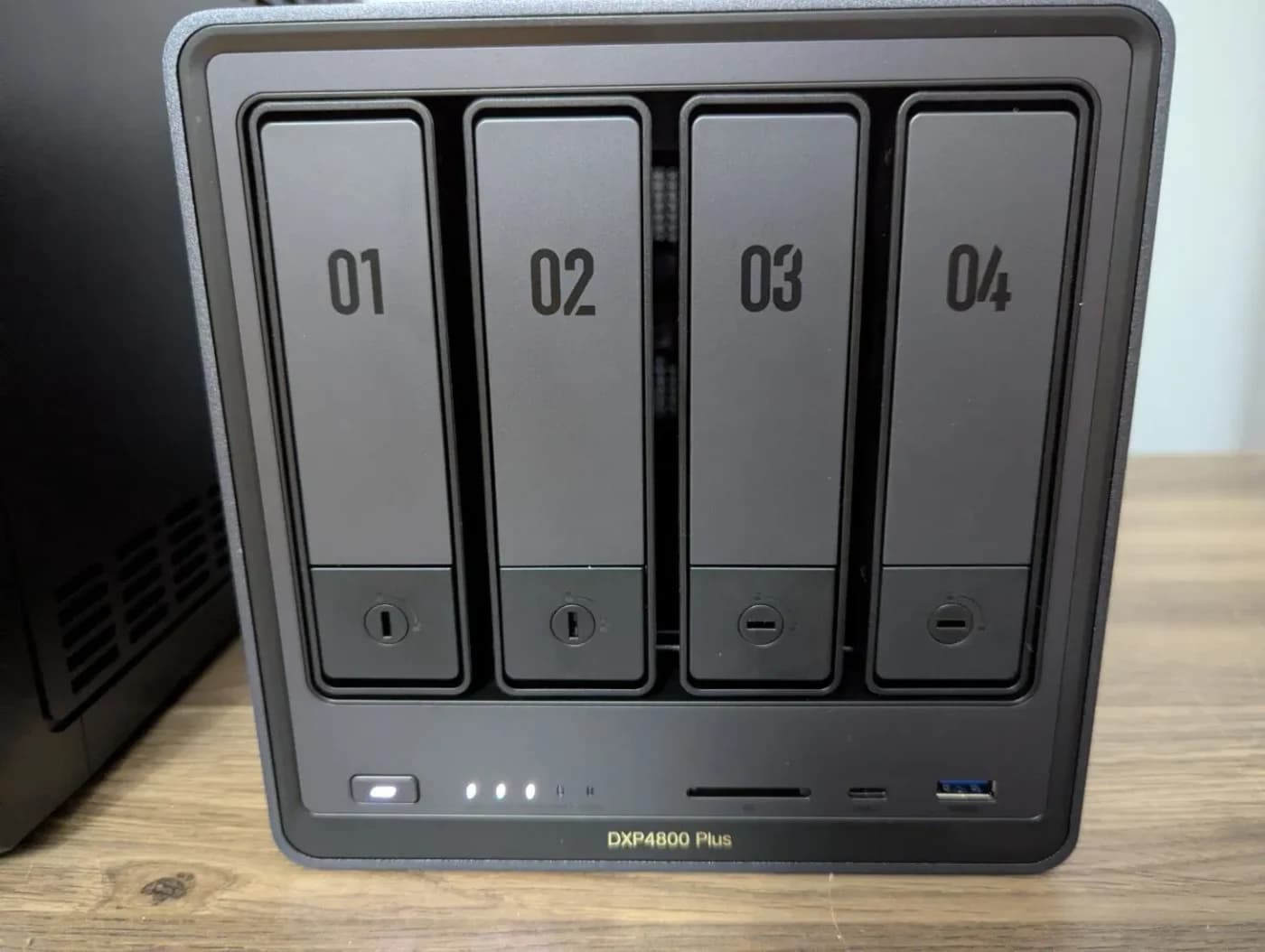
NAS with more memory and SSD slots: UGREEN NASync DXP2800
UGREEN
A two-bay NAS with an Intel N100, 8 GB DDR5, a 2.5GbE port, two M.2 NVMe slots and 4K HDMI output.
Check package and model options
- 2.5 Gbps port
- 2 bays
UGREEN's standard DXP2800 table lists an Intel N100, 8 GB DDR5, two SATA bays, two M.2 SSD slots and one 2.5GbE port. Its FAQ confirms separate SSD storage pools; drives are sold separately.
It supports Basic, JBOD, RAID 0 and RAID 1. Match the complete name: DXP2800GT is listed separately.
DAS for your own host: TerraMaster D4-320
TerraMaster's D4-320 page lists four independent disks, a USB 3.2 Gen 2 Type-C interface rated up to 10 Gbps, and Windows, Mac and Linux support without a device driver. All disks share that USB connection; the enclosure does not supply hardware RAID or standalone network sharing.
It accepts 3.5-inch SATA HDDs, 2.5-inch SATA HDDs and 2.5-inch SATA SSDs. Check the DAS compatibility list for the exact drive. Confirm your pool software supports USB disks and document its recovery procedure.
Maker-document conflicts: the current page advertises 128 TB raw, while an official product PDF advertises 88 TB. The current page also describes a 1-meter cable but lists 0.8 meters in the package table. Confirm exact drive compatibility and included cabling before ordering.
See the D4-320 on TerraMaster's official store
Companion drive: WD Red Plus 8 TB, WD80EFPX
The WD datasheet identifies WD80EFPX as an 8 TB, 3.5-inch SATA CMR drive. TerraMaster recommends that exact model for D4-320; check a different NAS's own list separately. WD also lists another 8 TB model, WD80EFZZ: match the suffix.
Independent disks, JBOD, hardware RAID or host-managed storage?
Buy the exact disk mode, not just the bay count:
- D4-320: independent disks. TerraMaster explicitly says single-disk mode and no RAID. Its page directs buyers wanting an array to third-party software RAID tools.
- D2-320: hardware RAID sibling. This is a different, two-bay enclosure. Its own specification table lists hardware RAID and Single Disk, JBOD, RAID 0 and RAID 1 modes. These modes do not apply to D4-320.
- JBOD is not a redundancy promise. UGREEN lists JBOD separately from Basic and RAID modes and says Basic and JBOD do not provide drive-failure redundancy. Confirm whether your intended mode exposes individual disks or combines capacity before formatting.
Record the filesystem, pool software and restore instructions. Make an independent copy before changing disk modes.
Audit the complete USB or Ethernet path
DAS: trace disk → enclosure → cable → any hub/dock → host port. USB-IF's connector guidance distinguishes USB-C's connector shape from data capability and says a USB 2.0 cable makes a faster host/device run at USB 2.0 speed. Specify a 10 Gbps USB path for D4-320; a Thunderbolt socket does not change its USB interface.
NAS: trace disks → NAS Ethernet port → switch/router LAN ports → client adapter or Wi-Fi link. A gigabit segment remains a limit even with a 2.5GbE NAS; hosted DAS adds that same network constraint after USB. These are interface-path deductions. Audit adapters and LAN ports; our Ethernet cable guide helps with the wiring decision.
Synology explicitly says actual performance varies with environment, usage and configuration.
Size usable capacity, expansion and recovery separately
For a worked example, two 8 TB drives provide about 8 TB in RAID 1 before filesystem overhead, because mirroring uses the capacity of the smaller drive. This is a calculation from UGREEN's RAID explanation. Budget separately for growth and retained versions.
Empty D4-320 bays give you places for additional independent disks. Verify software expansion rules before assuming an existing volume will grow. Synology lists larger-drive expansion for SHR and RAID 1 on the DS225+; check the upgrade procedure before buying replacements.
RAID is not a backup. Keep the primary files and a recovery copy on separate storage; for irreplaceable files, plan an off-site copy too. Hyper Backup supports external devices, other Synology systems, rsync servers and cloud destinations, plus retained versions and integrity checks. A second disk in the same enclosure is not a separate enclosure or off-site recovery plan.
On a Mac, Apple supports direct external disks, another Mac sharing an external disk, and a NAS configured for Time Machine over SMB. Verify the destination's specific support; do not infer Time Machine readiness from a USB connector alone.
Complete parts checklist
NAS
- Put on your shopping and setup list
- Appliance; compatible internal drives; power; Ethernet to a LAN port; client network access; NAS setup, accounts and shared folders; separate backup destination
Desk DAS
- Put on your shopping and setup list
- Enclosure; compatible SATA drives; its external power adapter; suitable USB data cable and host port; host filesystem and backup software; separate recovery copy
Shared DAS
- Put on your shopping and setup list
- Everything for desk DAS; a host you keep available; host network connection; file-sharing service, permissions and sleep/wake configuration; separate backup destination
Full comparison table
Swipe to compare. Row labels stay visible.
| Setup | Put on your shopping and setup list |
|---|---|
| NAS | Appliance; compatible internal drives; power; Ethernet to a LAN port; client network access; NAS setup, accounts and shared folders; separate backup destination |
| Desk DAS | Enclosure; compatible SATA drives; its external power adapter; suitable USB data cable and host port; host filesystem and backup software; separate recovery copy |
| Shared DAS | Everything for desk DAS; a host you keep available; host network connection; file-sharing service, permissions and sleep/wake configuration; separate backup destination |
| Setup | Put on your shopping and setup list |
|---|---|
| NAS | Appliance; compatible internal drives; power; Ethernet to a LAN port; client network access; NAS setup, accounts and shared folders; separate backup destination |
| Desk DAS | Enclosure; compatible SATA drives; its external power adapter; suitable USB data cable and host port; host filesystem and backup software; separate recovery copy |
| Shared DAS | Everything for desk DAS; a host you keep available; host network connection; file-sharing service, permissions and sleep/wake configuration; separate backup destination |
Compare the whole bill of materials: host, drives, network upgrades, backup storage and any chosen software licenses.
Choose availability
Decide whether the NAS or an existing computer will serve other devices.
Check the path and disk mode
Confirm the ports, cable, exact disk model and who manages any array.
Prove recovery
Make the separate backup, then restore a sample file before relying on the setup.
How we choose
We compared official specifications, compatibility lists and operating-system documentation, checked November 2, 2026. Picks prioritize host availability, exact disk exposure and the complete connection path. Recommendations and the labeled capacity calculation are our deductions; no physical performance testing informs these picks.
thisPING is reader-supported: when you buy through our links, we may earn a commission at no extra cost to you. As an Amazon Associate, thisPING earns from qualifying purchases.
Verdict
Choose the DS225+ for household sharing, the standard DXP2800 for its memory and SSD slots, or the D4-320 for disks managed by your own computer. Shared DAS also needs an available, configured host. Reserve room in the budget for the separate backup.
Frequently asked questions
Can DAS be used as a NAS?
A computer can share files from attached storage over the network, but that computer supplies the file server. Apple explicitly supports a Mac sharing an external drive as a network Time Machine destination. Plan to keep the host available whenever other devices need the files. The D4-320 itself has no network interface.
Is DAS faster than NAS?
Compare the whole connection path. The D4-320 has a shared 10 Gbps USB interface, while the DS225+ and standard DXP2800 have 2.5GbE network ports. Those are interface rates, not guaranteed file-copy speeds. Disk performance, the USB host or network client, and intermediate connections still matter; network sharing adds the host's network path to a DAS setup.
Can I use NAS or DAS for Time Machine?
Yes, with the right destination configuration. Apple supports an external drive connected to the Mac, an external drive shared by another Mac, and a third-party NAS supporting Time Machine over SMB. Check the NAS documentation for Time Machine support before buying. A generic SMB share or a USB enclosure by itself does not establish that configuration.
Do I still need a backup with RAID 1?
Yes. RAID 1 mirrors data so the array can survive a drive failure; UGREEN explicitly says RAID is not a backup. Keep a separate copy of important files, preferably with retained versions and an off-site destination for irreplaceable data. Synology Hyper Backup supports external devices, other systems and cloud destinations, as well as multiple backup versions.
Related guides
Best NAS Hard Drives: Choose the Exact Disk, Capacity and Drive Set
Choose WD Red Plus, IronWolf or Red Pro by exact model, check your NAS and DSM version, and calculate drive orders with room for growth and a separate backup.
Updated November 2, 2026Read
Jellyfin vs Plex: Choose the Server Hardware Your Screens Need
Choose Jellyfin or Plex by your TVs, phones, subtitles and remote viewing. Match requirements to a NAS, separate server or the hardware you already own.
Updated November 2, 2026Read
Synology vs UGREEN NAS: Backup, Photos and Media Compared
Choose Synology or UGREEN by your backup, photo and media workflow. Compare matched NAS sizes, restore options, account needs and third-party drive rules.
Updated November 2, 2026Read