

Comparison
Jellyfin vs Plex: Choose the Server Hardware Your Screens Need
Choose Jellyfin or Plex by your TVs, phones, subtitles and remote viewing. Match requirements to a NAS, separate server or the hardware you already own.
By thisPING EditorialUpdated November 2, 20269 min read2 picks
Our recommendation: UGREEN NASync DXP2800
Best new two-bay host
Limit: The DXP2800 GT uses AMD Ryzen Embedded R2514; its Intel Quick Sync path does not carry over.

On this page · Our picks at a glance
Our picks at a glance
- 1
Choose for: Best new two-bay host
Limit: The DXP2800 GT uses AMD Ryzen Embedded R2514; its Intel Quick Sync path does not carry over.
- Fastest wired port
- 2.5 Gbps
- Drive bays
- 2 bays
- 2
Choose for: Best four-bay Intel option
Limit: It is our storage-growth option; these specs do not establish a higher verified transcode count.
- Fastest wired port
- 10 Gbps
- Drive bays
- 4 bays
Choose Jellyfin for free official clients and hardware acceleration; choose Plex for Plex Pass features such as downloads and intro skipping. Our new combined server/storage pick is the UGREEN NASync DXP2800, if two bays fit and you can manage apps or containers. When required files already Direct Play, keep your hardware.
Official documentation checked November 2, 2026; recommendations based on published requirements.
Quick picks
Playback already works
- Pick
- Keep your current server
- Documented hardware
- Direct Play sends compatible files unchanged
- Buying limit
- Confirm capacity and remote playback before spending
New combined media host
- Pick
- UGREEN DXP2800
- Documented hardware
- N100; 8 GB RAM; two SATA bays; one 2.5GbE
- Buying limit
- GPU access still needs configuration
More drive bays
- Documented hardware
- Pentium Gold 8505; 8 GB RAM; four SATA bays; 10GbE + 2.5GbE
- Buying limit
- Extra ports do not fix internet upload
Synology, compatible local playback
- Pick
- Synology DS225+
- Documented hardware
- J4125; 2 GB RAM; two SATA bays; 2.5GbE + 1GbE
- Buying limit
- Plex lists hardware transcoding: No
NAS storage with separate compute
- Pick
- Synology DS925+
- Documented hardware
- V1500B; 4 GB ECC RAM; four SATA bays; dual 2.5GbE
- Buying limit
- No integrated GPU
Full comparison table
Swipe to compare. Row labels stay visible.
| Your situation | Pick | Documented hardware | Buying limit |
|---|---|---|---|
| Playback already works | Keep your current server | Direct Play sends compatible files unchanged | Confirm capacity and remote playback before spending |
| New combined media host | UGREEN DXP2800 | N100; 8 GB RAM; two SATA bays; one 2.5GbE | GPU access still needs configuration |
| More drive bays | UGREEN DXP4800 Plus | Pentium Gold 8505; 8 GB RAM; four SATA bays; 10GbE + 2.5GbE | Extra ports do not fix internet upload |
| Synology, compatible local playback | Synology DS225+ | J4125; 2 GB RAM; two SATA bays; 2.5GbE + 1GbE | Plex lists hardware transcoding: No |
| NAS storage with separate compute | Synology DS925+ | V1500B; 4 GB ECC RAM; four SATA bays; dual 2.5GbE | No integrated GPU |
| Your situation | Pick | Documented hardware | Buying limit |
|---|---|---|---|
| Playback already works | Keep your current server | Direct Play sends compatible files unchanged | Confirm capacity and remote playback before spending |
| New combined media host | UGREEN DXP2800 | N100; 8 GB RAM; two SATA bays; one 2.5GbE | GPU access still needs configuration |
| More drive bays | UGREEN DXP4800 Plus | Pentium Gold 8505; 8 GB RAM; four SATA bays; 10GbE + 2.5GbE | Extra ports do not fix internet upload |
| Synology, compatible local playback | Synology DS225+ | J4125; 2 GB RAM; two SATA bays; 2.5GbE + 1GbE | Plex lists hardware transcoding: No |
| NAS storage with separate compute | Synology DS925+ | V1500B; 4 GB ECC RAM; four SATA bays; dual 2.5GbE | No integrated GPU |
Jellyfin vs Plex: what changes the purchase
Local personal-library playback
- Jellyfin
- Free official server and clients
- Plex
- Free local playback
Hardware video conversion
- Jellyfin
- No paid subscription; configure GPU access
- Plex
- Plex Pass for these NAS/computer paths
Remote personal video
- Jellyfin
- You configure network access, such as VPN or reverse proxy
- Plex
- Affected apps: owner Plex Pass, or viewer Plex Pass/Remote Watch Pass
HDR source to SDR screen
- Jellyfin
- Intel hardware tone mapping requires HEVC 10-bit decoding support
- Plex
- Plex Pass plus the supported OS/GPU combination
Full comparison table
Swipe to compare. Row labels stay visible.
| Decision | Jellyfin | Plex |
|---|---|---|
| Local personal-library playback | Free official server and clients | Free local playback |
| Hardware video conversion | No paid subscription; configure GPU access | Plex Pass for these NAS/computer paths |
| Remote personal video | You configure network access, such as VPN or reverse proxy | Affected apps: owner Plex Pass, or viewer Plex Pass/Remote Watch Pass |
| HDR source to SDR screen | Intel hardware tone mapping requires HEVC 10-bit decoding support | Plex Pass plus the supported OS/GPU combination |
| Decision | Jellyfin | Plex |
|---|---|---|
| Local personal-library playback | Free official server and clients | Free local playback |
| Hardware video conversion | No paid subscription; configure GPU access | Plex Pass for these NAS/computer paths |
| Remote personal video | You configure network access, such as VPN or reverse proxy | Affected apps: owner Plex Pass, or viewer Plex Pass/Remote Watch Pass |
| HDR source to SDR screen | Intel hardware tone mapping requires HEVC 10-bit decoding support | Plex Pass plus the supported OS/GPU combination |
Plex’s affected-app list includes mobile Android/iOS, Roku, supported smart TVs, desktop, web and listed consoles. Remote Watch Pass excludes hardware acceleration. Check your exact app.
Jellyfin can run without internet, although online metadata stops working. Choose it if you accept managing the server and remote-access route; choose Plex if its clients and Pass features justify the subscription.
Fill in an exact-device worksheet
Write the full model, generation, operating-system version and playback app for every screen. Start with the Jellyfin client directory: Android TV/Fire TV has an official app, while Swiftfin is marked beta. An available app does not establish that your particular file will Direct Play.
Living-room TV
- Record before choosing a server
- TV and attached streamer model; app; receiver/soundbar; selected audio track
- Try your hardest required file
- HEVC/HDR video with your usual audio and subtitles
Phone away from home
- Record before choosing a server
- Exact phone, OS and app; cellular quality setting
- Try your hardest required file
- The same file over cellular, with subtitles enabled
Computer/browser
- Record before choosing a server
- OS and browser versions; compare a native player
- Try your hardest required file
- Record codec, bit depth, HDR format and container
Full comparison table
Swipe to compare. Row labels stay visible.
| Screen | Record before choosing a server | Try your hardest required file |
|---|---|---|
| Living-room TV | TV and attached streamer model; app; receiver/soundbar; selected audio track | HEVC/HDR video with your usual audio and subtitles |
| Phone away from home | Exact phone, OS and app; cellular quality setting | The same file over cellular, with subtitles enabled |
| Computer/browser | OS and browser versions; compare a native player | Record codec, bit depth, HDR format and container |
| Screen | Record before choosing a server | Try your hardest required file |
|---|---|---|
| Living-room TV | TV and attached streamer model; app; receiver/soundbar; selected audio track | HEVC/HDR video with your usual audio and subtitles |
| Phone away from home | Exact phone, OS and app; cellular quality setting | The same file over cellular, with subtitles enabled |
| Computer/browser | OS and browser versions; compare a native player | Record codec, bit depth, HDR format and container |
Log Direct Play, remux/audio conversion, video transcode, or tone mapping. Plex says remuxing uses little processing power; unsupported subtitles can force full video conversion. Jellyfin likewise makes support depend on the video, audio, container and subtitles. Mark an unverified combination unknown, including its simultaneous-stream capacity. See the NAS guide’s playback explanation for the underlying distinction.
Requirements selector: keep, separate or replace
First retry failures with a compatible app, audio track or subtitle option. Only a remaining video-conversion requirement should drive a GPU purchase; a low remote-quality setting or insufficient upload can also cause conversion.
Tap a label to explore. You can also hover or use your keyboard.
Does your worksheet pass?
Include subtitles and remote use.
Sources: 1: Direct Play sends the file unchanged., 2: Unsupported video or subtitle burn-in can require transcoding.Keep your current hardware
Does existing storage fit?
Resolve client/network issues first; then verify GPU access for remaining video conversion.
Sources: 2: Unsupported video or subtitle burn-in can require transcoding., 6: Docker needs the host render group and configuration.Keep storage; verify compute
Keep compatible compute or add Intel/Linux. Mount NAS media; database stays local.
Outcome
Sources: 3: Mount NAS media; keep the Jellyfin database local., 6: Docker needs the host render group and configuration.Choose an Intel NAS
DXP2800: two bays. DXP4800 Plus: four. Verify GPU access.
Outcome
Sources: 4: DXP2800 has two bays and N100 Quick Sync., 5: DXP4800 Plus has four SATA bays and Intel Quick Sync., 6: Docker needs the host render group and configuration.Verify unknown results before buying.
Source notes6 references
Direct Play sends the file unchanged.
support.plex.tv — source for Direct Play sends the file unchanged.the file is sent directly to the device without being changed.
Unsupported video or subtitle burn-in can require transcoding.
jellyfin.org — source for Unsupported video or subtitle burn-in can require transcoding.If the video codec is unsupported, this will result in video transcoding. Subtitles can be tricky because they can cause Direct Stream (subtitles are remuxed) or video transcoding (burning in subtitles) to occur.
Mount NAS media; keep the Jellyfin database local.
jellyfin.org — source for Mount NAS media; keep the Jellyfin database local.A network storage device that is using samba or NFS must be directly mounted to the OS. The Jellyfin database should also be stored locally and not on a network storage device.
DXP2800 has two bays and N100 Quick Sync.
ai.ugreen.com — source for DXP2800 has two bays and N100 Quick Sync.DXP2800 for a two-bay Plex server The UGREEN NASync DXP2800 uses an Intel N100 processor with Quick Sync
DXP4800 Plus has four SATA bays and Intel Quick Sync.
ai.ugreen.com — source for DXP4800 Plus has four SATA bays and Intel Quick Sync.The UGREEN NASync DXP4800 Plus combines four SATA bays with an Intel Pentium Gold 8505 processor, Intel Quick Sync
Docker needs the host render group and configuration.
jellyfin.org — source for Docker needs the host render group and configuration.What you need to do is pass the host's render group id to Docker and modify the configurations to meet your requirements.
Best new two-bay host: UGREEN NASync DXP2800
The DXP2800 pairs Intel N100 Quick Sync, 8 GB DDR5 and two SATA bays. That matches Jellyfin’s recommended CPU class on paper, making it our starting pick when buying both storage and compute.
UGREEN
A two-bay NAS with an Intel N100, 8 GB DDR5, a 2.5GbE port, two M.2 NVMe slots and 4K HDMI output.
Check package and model options
- 2.5 Gbps port
- 2 bays
UGREEN documents Plex through Docker and Jellyfin through App Center or Docker. Enable graphics access. Jellyfin warns that prebuilt NAS environments can obstruct installation; verify your configuration. Buy the standard diskless DXP2800: drives are separate. The DXP2800 GT uses AMD Ryzen Embedded R2514; its Intel Quick Sync path does not carry over.
Best four-bay Intel option: UGREEN NASync DXP4800 Plus
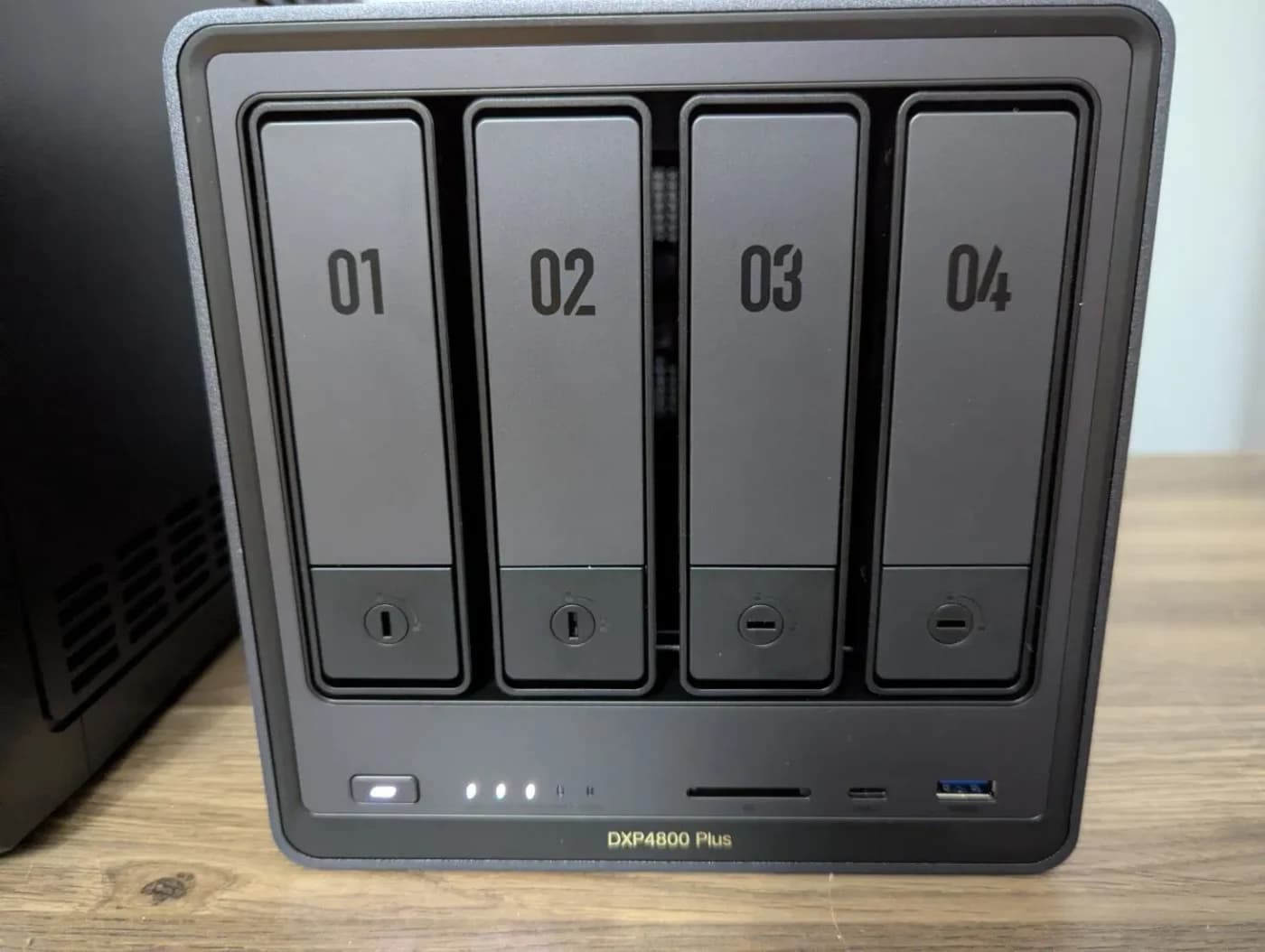
Choose the DXP4800 Plus for four SATA bays, a Pentium Gold 8505 with Quick Sync, 8 GB RAM and 10GbE plus 2.5GbE. It is our storage-growth option; these specs do not establish a higher verified transcode count.
UGREEN
A four-bay NAS with an Intel Pentium Gold 8505, 8 GB DDR5, one 10GbE and one 2.5GbE port, and two M.2 NVMe slots.
Check package and model options
- 10 Gbps port
- 4 bays
Keep Plus in the model name: the DXP4800 GT uses AMD and dual 10GbE. UPS and portable-SSD bundles add different accessories; they do not identify the processor or supply an installed HDD library.
Synology for Direct Play: DiskStation DS225+
The DS225+ has a Celeron J4125 and 2 GB RAM. Choose it for compatible playback within a Synology storage setup, with the following limitation.
Plex’s NAS compatibility sheet currently marks its hardware-transcoding columns No, retaining an investigation note despite expected hardware capability. Treat application support as unresolved. Jellyfin also advises against buying this older low-power Intel class; it is not our new Jellyfin-host pick.
Storage beside separate compute: DiskStation DS925+
The DS925+ supplies four SATA bays, 4 GB ECC memory and dual 2.5GbE. AMD’s V1000 family brief gives its V1500B zero GPU compute units: choose it as storage beside a separate transcoding host, or for compatible playback.
The similarly named DS925neo+ has non-ECC memory. Synology’s shared table places the DS925+ ECC column first; matching memory capacity does not make them the same variant.
Buying advice: separate compute and the network
For a separate Jellyfin host, use its published starting recommendations: Intel N100 or another listed CPU, 8 GB RAM, a 100 GB SSD for OS/application/cache, and gigabit Ethernet or faster. Allow more SSD space for your library and temporary files. Check its Linux kernel/driver requirements, then verify the render device and permissions inside the container. Jellyfin does not support hardware-accelerated Docker deployments on Windows or macOS.
Mount NAS media in the host OS; keep Jellyfin’s database local. This is a logical media path: wire both boxes to LAN equipment.
Tap a label to explore. You can also hover or use your keyboard.
NAS: media files
Stores the media.
Sources: 1: Mount NAS media; keep the Jellyfin database local.- Mounted SMB/NFS share
Server: Jellyfin app
OS-mounted media; local Jellyfin database.
Sources: 1: Mount NAS media; keep the Jellyfin database local. - Wired LAN
Router or LAN switch
Server recommendation: gigabit Ethernet or faster.
Sources: 2: Jellyfin recommends gigabit Ethernet or faster for server networking. - Wi-Fi or Ethernet
TV, phone or computer
Direct Play delivers the original file.
Sources: 3: Direct Play delivers the file unchanged., 4: Local clients can use Wi-Fi or wired networking.
Logical shared-LAN flow; a NAS/server combines the first roles.
Source notes4 references
Mount NAS media; keep the Jellyfin database local.
jellyfin.org — source for Mount NAS media; keep the Jellyfin database local.A network storage device that is using samba or NFS must be directly mounted to the OS. The Jellyfin database should also be stored locally and not on a network storage device.
Jellyfin recommends gigabit Ethernet or faster for server networking.
jellyfin.org — source for Jellyfin recommends gigabit Ethernet or faster for server networking.Networking: Gigabit Ethernet Adapter or faster, WiFi or Powerline not recommended.
Direct Play delivers the file unchanged.
support.plex.tv — source for Direct Play delivers the file unchanged.the file is sent directly to the device without being changed.
Local clients can use Wi-Fi or wired networking.
support.plex.tv — source for Local clients can use Wi-Fi or wired networking.Generally speaking, it means being on the same WiFi or wired local network.
For remote viewing, Jellyfin recommends at least 20 Mbps upload; that is not a promise that every HDR file fits. Compare upload with your source bitrate and remote quality setting. A faster NAS port cannot remove that bottleneck. Plan Jellyfin’s VPN or HTTPS reverse proxy before sharing access.
Plan wiring with Cat6 vs Cat6a vs Cat8 or MoCA vs powerline; storage with our NAS guide.
Verify before buying more hardware
Plex’s hardware guide uses (hw) in Dashboard playback details to confirm acceleration. Jellyfin’s Intel guide checks GPU-engine activity during a forced transcode. Repeat your worksheet with the required subtitles and concurrent viewers.
- Yes: Direct Play succeeds: keep hardware when capacity fits
- Partly: Remux/audio conversion: establish whether video is actually being converted
- Partly: HDR-to-SDR: validate tone mapping for the exact OS and GPU
- No: Unknown stream capacity: do not turn CPU specs into a stream-count promise
Plex’s tone-mapping matrix separates Windows from Linux/NAS; verify the exact OS. UGREEN’s Jellyfin tutorial calls for an official image but includes nyanmisaka/jellyfin. Use Jellyfin’s current official jellyfin/jellyfin instructions for that route.
How we choose
We matched official platform requirements to maker specifications on November 2, 2026, without physical testing. Undocumented combinations remain unknown. Plex’s NAS sheet estimates software-transcode capability, not household stream capacity. Method: How we choose.
Verdict
Keep a working Direct Play setup. Buy the DXP2800 when you need a new two-bay Intel media host, or the DXP4800 Plus for more bays. Choose DS225+ for compatible Synology playback; pair DS925+ storage with separate compute when transcoding is required. Decide between Jellyfin’s self-hosting commitment and Plex’s subscription features after checking your exact screens.
Frequently asked questions
Does Jellyfin need more powerful hardware than Plex?
Neither platform has one universal hardware requirement. Compatible files can Direct Play without video conversion; an unsupported video format or burned-in subtitles changes the workload. Start by checking the exact client app and file, then verify the server’s GPU access. A more expensive NAS is not a substitute for that compatibility check.
Is Plex free for local and remote viewing?
Local playback of your personal library is free. For affected remote video apps, the server owner needs Plex Pass, or the viewer needs their own Plex Pass or Remote Watch Pass. Remote Watch Pass only unlocks remote viewing; it does not unlock hardware transcoding. Jellyfin’s official server and clients have no subscription requirement.
Can the Synology DS225+ hardware-transcode Plex?
Do not buy it as a confirmed Plex hardware-transcoding option. Plex’s compatibility sheet marks the DS225+ hardware columns No and retains a note that it should be compatible but is under investigation. Its Celeron model alone does not establish application support. Use it for compatible playback or put transcoding on a separate server.
Can I keep my NAS and run Jellyfin on another computer?
Yes. Mount the NAS media share in the server computer’s operating system, then give Jellyfin access to that mounted path. Jellyfin says its database should stay on local storage. Check that the share is available before library maintenance runs, and confirm that the separate computer exposes its GPU to the application or container.
Related guides
Best NAS Hard Drives: Choose the Exact Disk, Capacity and Drive Set
Choose WD Red Plus, IronWolf or Red Pro by exact model, check your NAS and DSM version, and calculate drive orders with room for growth and a separate backup.
Updated November 2, 2026Read
NAS vs DAS: Which Storage Setup Should You Buy for Home?
Choose NAS or DAS by who needs your files and which computer stays on. Compare complete setups, exact enclosure modes, connection limits and separate backups.
Updated November 2, 2026Read
Synology vs UGREEN NAS: Backup, Photos and Media Compared
Choose Synology or UGREEN by your backup, photo and media workflow. Compare matched NAS sizes, restore options, account needs and third-party drive rules.
Updated November 2, 2026Read