

Comparison
Synology vs UGREEN NAS
Backup, Photos and Media Compared
Choose Synology or UGREEN by your backup, photo and media workflow. Compare matched NAS sizes, restore options, account needs and third-party drive rules.
By thisPING EditorialUpdated November 2, 20268 min read5 picks
Our recommendation: Synology DS225+ — family backup
Synology DS225+ — family backup
Limit: RAM: installed / maximum: 2 / 6 GB
On this page · Our picks at a glance
Our picks at a glance
- 1
Synology DS225+ — family backup
Choose for: Synology DS225+ — family backup
Limit: RAM: installed / maximum: 2 / 6 GB
See the guide for availability.
- 2
UGREEN DXP2800 — small media server
Choose for: UGREEN DXP2800 — small media server
Limit: RAM: installed / maximum: 8 / 16 GB
See the guide for availability.
- 3
Synology DS425+ — four-bay DSM
Choose for: Synology DS425+ — four-bay DSM
Limit: RAM: installed / maximum: 2 / 6 GB
See the guide for availability.
- 4
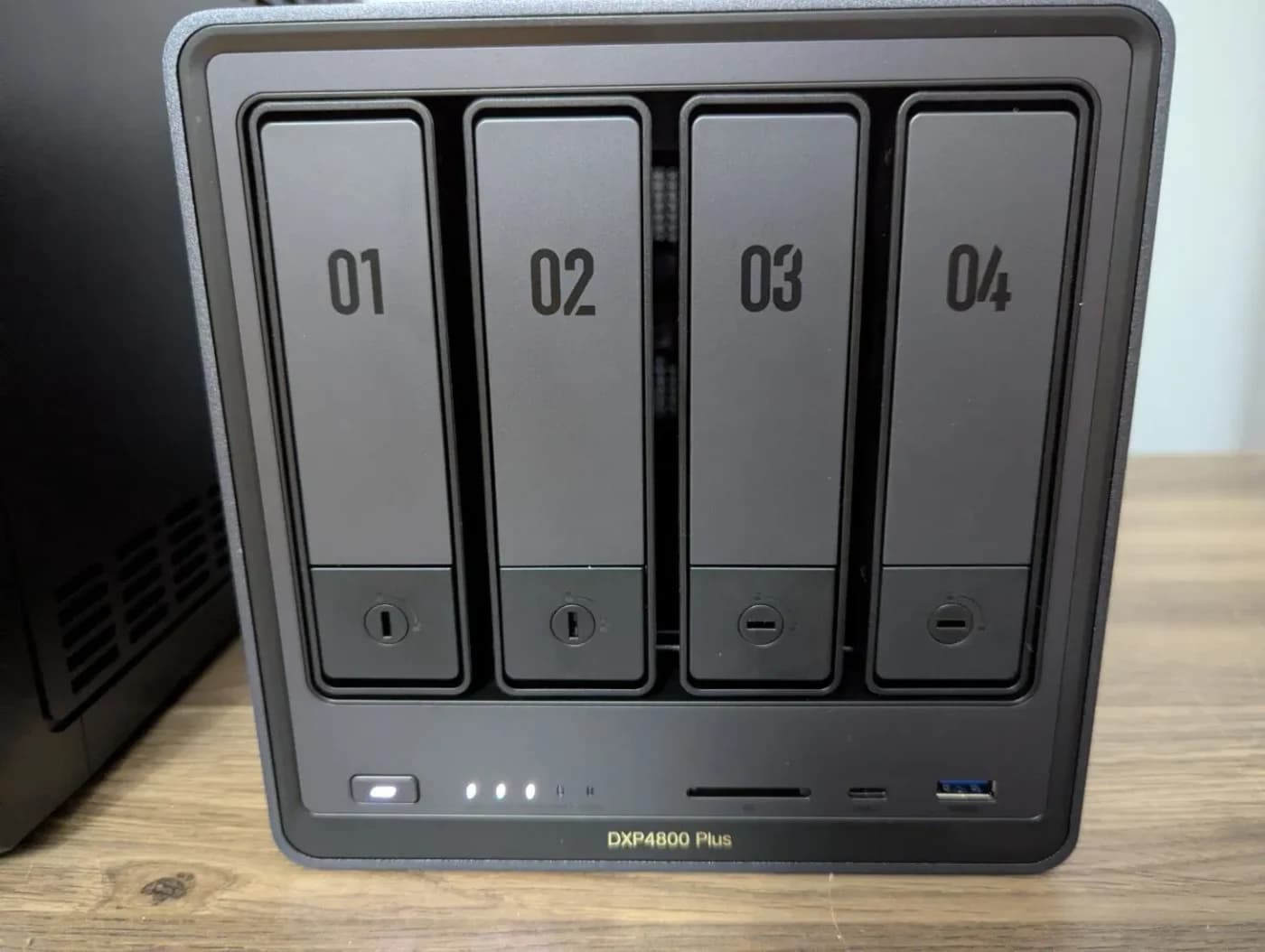
UGREEN DXP4800 Plus — media workstation
Choose for: UGREEN DXP4800 Plus — media workstation
Limit: RAM: installed / maximum: 8 / 64 GB
See the guide for availability.
- 5
Synology DS925+ — ECC and expansion
Choose for: Synology DS925+ — ECC and expansion
Limit: RAM: installed / maximum: 4 GB ECC / 32 GB
See the guide for availability.
Choose the Synology DS225+ for a family focused on recovering photos and computer files: DSM documents photo-library restoration and versioned file backup. Choose the UGREEN DXP2800 for a media household willing to configure apps, or the DXP4800 Plus for a four-bay media workstation with 10GbE.
Documentation checked November 2, 2026.
thisPING is reader-supported: when you buy through our links, we may earn a commission at no extra cost to you. As an Amazon Associate, thisPING earns from qualifying purchases.
Quick picks: compare equal bay counts
Synology DS225+ — family backup
- SATA bays / M.2 slots
- 2 / none
- CPU
- Celeron J4125
- RAM: installed / maximum
- 2 / 6 GB
All specifications
- Ethernet ports
- 1 × 2.5GbE + 1 × 1GbE
UGREEN DXP2800 — small media server
- SATA bays / M.2 slots
- 2 / 2
- CPU
- Intel N100
- RAM: installed / maximum
- 8 / 16 GB
All specifications
- Ethernet ports
- 1 × 2.5GbE
Synology DS425+ — four-bay DSM
- SATA bays / M.2 slots
- 4 / 2
- CPU
- Celeron J4125
- RAM: installed / maximum
- 2 / 6 GB
All specifications
- Ethernet ports
- 1 × 2.5GbE + 1 × 1GbE
UGREEN DXP4800 Plus — media workstation
- SATA bays / M.2 slots
- 4 / 2
- CPU
- Pentium Gold 8505
- RAM: installed / maximum
- 8 / 64 GB
All specifications
- Ethernet ports
- 1 × 10GbE + 1 × 2.5GbE
Synology DS925+ — ECC and expansion
- SATA bays / M.2 slots
- 4 / 2
- CPU
- Ryzen V1500B
- RAM: installed / maximum
- 4 GB ECC / 32 GB
All specifications
- Ethernet ports
- 2 × 2.5GbE
Full comparison table
Swipe to compare. Row labels stay visible.
| Model and job | SATA bays / M.2 slots | CPU | RAM: installed / maximum | Ethernet ports |
|---|---|---|---|---|
| Synology DS225+ — family backup | 2 / none | Celeron J4125 | 2 / 6 GB | 1 × 2.5GbE + 1 × 1GbE |
| UGREEN DXP2800 — small media server | 2 / 2 | Intel N100 | 8 / 16 GB | 1 × 2.5GbE |
| Synology DS425+ — four-bay DSM | 4 / 2 | Celeron J4125 | 2 / 6 GB | 1 × 2.5GbE + 1 × 1GbE |
| UGREEN DXP4800 Plus — media workstation | 4 / 2 | Pentium Gold 8505 | 8 / 64 GB | 1 × 10GbE + 1 × 2.5GbE |
| Synology DS925+ — ECC and expansion | 4 / 2 | Ryzen V1500B | 4 GB ECC / 32 GB | 2 × 2.5GbE |
| Model and job | SATA bays / M.2 slots | CPU | RAM: installed / maximum | Ethernet ports |
|---|---|---|---|---|
| Synology DS225+ — family backup | 2 / none | Celeron J4125 | 2 / 6 GB | 1 × 2.5GbE + 1 × 1GbE |
| UGREEN DXP2800 — small media server | 2 / 2 | Intel N100 | 8 / 16 GB | 1 × 2.5GbE |
| Synology DS425+ — four-bay DSM | 4 / 2 | Celeron J4125 | 2 / 6 GB | 1 × 2.5GbE + 1 × 1GbE |
| UGREEN DXP4800 Plus — media workstation | 4 / 2 | Pentium Gold 8505 | 8 / 64 GB | 1 × 10GbE + 1 × 2.5GbE |
| Synology DS925+ — ECC and expansion | 4 / 2 | Ryzen V1500B | 4 GB ECC / 32 GB | 2 × 2.5GbE |
These are manufacturer specifications, with Ethernet link rates rather than measured file-copy speeds. Compare the two-bay pair or the four-bay pair before weighing the software differences. UGREEN supplies more memory in these pairs; the DXP4800 Plus also has the fastest individual port.
Follow the workflow, including recovery
Phone photos
- Synology DSM
- Synology Photos: mobile uploads, Personal Space and Shared Space.
- UGREEN UGOS Pro
- Photos backup: install Photos and Sync & Backup; choose a personal or shared destination.
Accounts
- Synology DSM
- DSM credentials for local Photos access; Synology Account for QuickConnect and Active Backup activation.
- UGREEN UGOS Pro
- Local NAS credentials for LAN access; UGREEN Account for UGREENlink.
Computer files
- Synology DSM
- Drive Client backs up folders; Drive retains up to 32 historical versions.
- UGREEN UGOS Pro
- Sync & Backup documents computer file backup with incremental and mirror modes.
Mac backup
- Synology DSM
- Time Machine over SMB; set a backup user and quota.
- UGREEN UGOS Pro
- Time Machine over SMB; enable Bonjour and set a folder quota.
Windows device recovery
- Synology DSM
- Active Backup for Business: image backup and entire-device recovery for supported PCs; Btrfs destination required.
- UGREEN UGOS Pro
- The cited computer-backup guide establishes file backup; it does not establish equivalent bootable whole-PC recovery.
Versioned NAS backup
- Synology DSM
- Hyper Backup: folders and packages with earlier recovery points; USB, remote NAS and cloud destinations.
- UGREEN UGOS Pro
- Sync & Backup: NAS-to-remote-server backups support configurable retained versions.
NAS lost or broken
- Synology DSM
- Hyper Backup Explorer reads .hbk backups on a computer; Photos package backup also preserves library information.
- UGREEN UGOS Pro
- Native USB .ubk packages restore through UGOS; plan another UGREEN NAS or maintain an additional plain-file copy.
Full comparison table
Swipe to compare. Row labels stay visible.
| Job | Synology DSM | UGREEN UGOS Pro |
|---|---|---|
| Phone photos | Synology Photos: mobile uploads, Personal Space and Shared Space. | Photos backup: install Photos and Sync & Backup; choose a personal or shared destination. |
| Accounts | DSM credentials for local Photos access; Synology Account for QuickConnect and Active Backup activation. | Local NAS credentials for LAN access; UGREEN Account for UGREENlink. |
| Computer files | Drive Client backs up folders; Drive retains up to 32 historical versions. | Sync & Backup documents computer file backup with incremental and mirror modes. |
| Mac backup | Time Machine over SMB; set a backup user and quota. | Time Machine over SMB; enable Bonjour and set a folder quota. |
| Windows device recovery | Active Backup for Business: image backup and entire-device recovery for supported PCs; Btrfs destination required. | The cited computer-backup guide establishes file backup; it does not establish equivalent bootable whole-PC recovery. |
| Versioned NAS backup | Hyper Backup: folders and packages with earlier recovery points; USB, remote NAS and cloud destinations. | Sync & Backup: NAS-to-remote-server backups support configurable retained versions. |
| NAS lost or broken | Hyper Backup Explorer reads .hbk backups on a computer; Photos package backup also preserves library information. | Native USB .ubk packages restore through UGOS; plan another UGREEN NAS or maintain an additional plain-file copy. |
| Job | Synology DSM | UGREEN UGOS Pro |
|---|---|---|
| Phone photos | Synology Photos: mobile uploads, Personal Space and Shared Space. | Photos backup: install Photos and Sync & Backup; choose a personal or shared destination. |
| Accounts | DSM credentials for local Photos access; Synology Account for QuickConnect and Active Backup activation. | Local NAS credentials for LAN access; UGREEN Account for UGREENlink. |
| Computer files | Drive Client backs up folders; Drive retains up to 32 historical versions. | Sync & Backup documents computer file backup with incremental and mirror modes. |
| Mac backup | Time Machine over SMB; set a backup user and quota. | Time Machine over SMB; enable Bonjour and set a folder quota. |
| Windows device recovery | Active Backup for Business: image backup and entire-device recovery for supported PCs; Btrfs destination required. | The cited computer-backup guide establishes file backup; it does not establish equivalent bootable whole-PC recovery. |
| Versioned NAS backup | Hyper Backup: folders and packages with earlier recovery points; USB, remote NAS and cloud destinations. | Sync & Backup: NAS-to-remote-server backups support configurable retained versions. |
| NAS lost or broken | Hyper Backup Explorer reads .hbk backups on a computer; Photos package backup also preserves library information. | Native USB .ubk packages restore through UGOS; plan another UGREEN NAS or maintain an additional plain-file copy. |
The UGREEN phone guide applies to firmware 1.18.1.0098 or later; its computer-backup reference was verified on 1.21.0.0133. Check installed versions before following menu paths. Do not confuse UGOS migration “Image Backup,” which mirrors files, with a bootable Windows disk image.
Separate file recovery from application recovery: Hyper Backup Explorer downloads files, while the Photos package restore recovers albums and recognition results.
Family photos and recovery
Start with DS225+; choose DS425+ when you need more SATA bays.
Media and containers
Start with DXP2800; choose DXP4800 Plus when the workstation path supports 10GbE.
ECC and expansion
Choose DS925+ when its memory and expansion features are the reason to upgrade.
Synology DS225+: the family backup pick
Start here when the smaller enclosure fits your storage plan. Its decisive advantage for this recommendation is the documented Photos restore: Hyper Backup preserves photos, videos, created albums, recognition results, package settings and sharing settings.
Budget for memory if you want object recognition: the DS225+ ships with 2 GB, while that feature needs at least 4 GB. The official maximum is 6 GB, and its storage specification lists SATA bays without M.2 slots. Buy it for the recovery workflow; use the larger enclosure below if the drive count is the constraint.
Official specifications · Check price on Amazon
UGREEN DXP2800: the small media-household pick

UGREEN
A two-bay NAS with an Intel N100, 8 GB DDR5, a 2.5GbE port, two M.2 NVMe slots and 4K HDMI output.
Check package and model options
- 2.5 Gbps port
- 2 bays
The N100, 8 GB installed memory and two M.2 slots give this recommendation its hardware basis. UGREEN documents both SSD caching and a separate SSD pool, plus Docker and Plex deployment. Its official memory ceiling is 16 GB.
Follow the maker’s Plex container guide: compatible Quick Sync graphics need container access and an active Plex Pass for hardware transcoding. Confirm (hw) in playback details during a transcode. Compatible Direct Play files do not need video conversion.
Official specifications · Check price on Amazon
Synology DS425+: the four-bay DSM pick
Choose this to keep the DSM workflow while moving to four SATA bays and two M.2 slots. It retains the DS225+’s J4125, 2 GB starting memory and mixed 2.5GbE/1GbE ports, so the extra bays do not establish a processor upgrade.
Read past the overview: Synology’s headline describes M.2 caching, while its detailed specifications also support M.2 storage pools using Synology-verified SSDs. Object recognition still requires a memory upgrade to at least 4 GB.
Official specifications · Check price on Amazon
UGREEN DXP4800 Plus: the 10GbE media pick
UGREEN
A four-bay NAS with an Intel Pentium Gold 8505, 8 GB DDR5, one 10GbE and one 2.5GbE port, and two M.2 NVMe slots.
Check package and model options
- 10 Gbps port
- 4 bays
Choose the Plus for a wired workstation: Pentium Gold 8505, 8 GB DDR5 expandable to 64 GB, and 10GbE plus 2.5GbE. Its M.2 slots can host a separate SSD pool. Plex’s configuration folder contains the database and watch history; include it in your backup plan.
The faster port needs a matching computer connection, suitable cabling, a compatible switch or direct link, and storage that can keep up. Check that path before choosing this over the smaller media pick.
Official specifications · Check price on Amazon
Synology DS925+: the ECC and expansion alternative
The DS925+ starts with 4 GB ECC, supports 32 GB, has dual 2.5GbE, and expands to nine SATA drives with a separately purchased DX525. Choose it when those are actual requirements. Its Ryzen V1500B has no integrated GPU: AMD’s model-specific row lists zero graphics compute units. For a hardware-transcoding priority, our Intel UGREEN picks are the more appropriate starting point.
Official specifications · Check price on Amazon
How we choose
Selection is based on official product specifications, support procedures and documented recovery paths, without physical testing or speed measurements. We compare matching SATA bay counts and distinguish supported procedures from unverified feature parity. A faster port is a reason to check the rest of the network; a documented restore is a reason to rehearse it. Our research method explains the wider process.
Buying guide: drives, variants and a recovery rehearsal
Third-party drives: read the model and OS together
Synology’s policy FAQ explicitly covers DSM 7.3 and above. That is the compatibility threshold, not the latest release: the DS225+ release feed also lists DSM 7.4.1.
DS225+, DS425+, DS925+ on DSM 7.3 and above
- HDD / 2.5-inch SATA SSD
- Third-party installation and pools allowed; incompatibility-listed drives excluded. Listed drives remain the maker’s recommendation.
- M.2 NVMe
- DS425+/DS925+: compatibility-listed drives required for new pools and cache. DS225+: no M.2 slots.
Those models on DSM 7.2.2
- HDD / 2.5-inch SATA SSD
- Outside the cited relaxation: verify or update the installed OS before relying on it.
- M.2 NVMe
- Do not infer a relaxed M.2 policy from the HDD change.
DXP2800 / DXP4800 Plus on UGOS
- HDD / 2.5-inch SATA SSD
- Third-party drives supported; check the exact drive against UGREEN’s compatibility reference.
- M.2 NVMe
- Cache or separate SSD pool documented; check the exact SSD model.
Full comparison table
Swipe to compare. Row labels stay visible.
| Exact scope | HDD / 2.5-inch SATA SSD | M.2 NVMe |
|---|---|---|
| DS225+, DS425+, DS925+ on DSM 7.3 and above | Third-party installation and pools allowed; incompatibility-listed drives excluded. Listed drives remain the maker’s recommendation. | DS425+/DS925+: compatibility-listed drives required for new pools and cache. DS225+: no M.2 slots. |
| Those models on DSM 7.2.2 | Outside the cited relaxation: verify or update the installed OS before relying on it. | Do not infer a relaxed M.2 policy from the HDD change. |
| DXP2800 / DXP4800 Plus on UGOS | Third-party drives supported; check the exact drive against UGREEN’s compatibility reference. | Cache or separate SSD pool documented; check the exact SSD model. |
| Exact scope | HDD / 2.5-inch SATA SSD | M.2 NVMe |
|---|---|---|
| DS225+, DS425+, DS925+ on DSM 7.3 and above | Third-party installation and pools allowed; incompatibility-listed drives excluded. Listed drives remain the maker’s recommendation. | DS425+/DS925+: compatibility-listed drives required for new pools and cache. DS225+: no M.2 slots. |
| Those models on DSM 7.2.2 | Outside the cited relaxation: verify or update the installed OS before relying on it. | Do not infer a relaxed M.2 policy from the HDD change. |
| DXP2800 / DXP4800 Plus on UGOS | Third-party drives supported; check the exact drive against UGREEN’s compatibility reference. | Cache or separate SSD pool documented; check the exact SSD model. |
- Yes: Third-party SATA support on the covered Synology models requires the stated DSM policy scope.
- Partly: M.2 support is a separate compatibility check, even when third-party HDDs are permitted.
- No: Cross-brand migration is not a disk swap: copy files before repurposing the source drives.
Similar names are different hardware
DS925+ vs DS925neo+
- What changes
- The shared Synology page gives the DS925+ ECC memory and the neo non-ECC memory. Confirm the full name.
DXP2800 vs DXP2800 GT
- What changes
- The standard model uses Intel N100 and 2.5GbE; GT uses AMD R2514 and 10GbE, without Intel Quick Sync.
DXP4800 Plus vs Pro
- What changes
- Pro uses Core i3-1315U and supports up to 96 GB; both have four SATA bays. Extra compute does not add bays.
Full comparison table
Swipe to compare. Row labels stay visible.
| Variant trap | What changes |
|---|---|
| DS925+ vs DS925neo+ | The shared Synology page gives the DS925+ ECC memory and the neo non-ECC memory. Confirm the full name. |
| DXP2800 vs DXP2800 GT | The standard model uses Intel N100 and 2.5GbE; GT uses AMD R2514 and 10GbE, without Intel Quick Sync. |
| DXP4800 Plus vs Pro | Pro uses Core i3-1315U and supports up to 96 GB; both have four SATA bays. Extra compute does not add bays. |
| Variant trap | What changes |
|---|---|
| DS925+ vs DS925neo+ | The shared Synology page gives the DS925+ ECC memory and the neo non-ECC memory. Confirm the full name. |
| DXP2800 vs DXP2800 GT | The standard model uses Intel N100 and 2.5GbE; GT uses AMD R2514 and 10GbE, without Intel Quick Sync. |
| DXP4800 Plus vs Pro | Pro uses Core i3-1315U and supports up to 96 GB; both have four SATA bays. Extra compute does not add bays. |
Budget separately for storage drives in the diskless UGREEN picks. For enclosure alternatives and RAID capacity planning, use our home NAS hub; for the network path, see Cat6 vs Cat6a vs Cat8.
Rehearse the failure you need to survive
For phone uploads, grant photo permissions and enable the relevant background options; Synology recommends charging during backup. For UGREEN, confirm originals exist on the phone: its guide warns that locally optimized files may not be originals. Synology may require Image Assistant for HEIC previews and HEVC processing. Upload a sample photo and video, then open the NAS copies before freeing phone storage.
For Windows device recovery, set up Active Backup on Btrfs, activate it with a Synology Account, install the agent and prepare recovery media; Synology recommends at least 4 GB RAM. Active Backup does not connect through QuickConnect. Test your intended recovery connection before depending on remote backup.
For UGREEN rollback, Snapshot requires Btrfs and administrator access; restoring returns a folder to its saved state. Restore overwrites current folder contents; for a shared folder, Clone makes a separate copy you can inspect first. Snapshots and RAID still need an independent backup. For USB recovery, UGREEN’s incremental mode retains deleted source files while mirror repeats deletions; test Restore from Backup File with the .ubk package and a selected version. Its external-drive task does not expose package encryption, so treat that backup as unencrypted unless separately protected.
For migration, keep Synology disks in the source, create destination users, copy files over the network and test permissions. Original photos transfer; DSM albums and face metadata do not become UGREEN Photos metadata. Retain the old NAS until an independent backup of the destination has passed a restore test.
Verdict
Choose DS225+ for the family recovery workflow, DS425+ when that workflow needs more drive bays, or DS925+ specifically for ECC and expansion. Choose DXP2800 for the smaller media setup and DXP4800 Plus for the wired workstation path. Make the final decision by restoring a sample backup and checking the exact drives and variant before committing the household library.
Frequently asked questions
Is Synology or UGREEN better for family photos?
We prefer Synology when restoring the photo library matters most: its Photos guide documents restoring albums, recognition results, settings and files with Hyper Backup. UGREEN also documents automatic phone uploads into Photos and personal or shared destination folders. Budget a memory upgrade for object recognition on the DS225+ or DS425+, which ship with 2 GB and require at least 4 GB for that feature.
Can Synology use third-party hard drives?
Yes: the published DSM 7.3-and-above policy allows third-party HDDs and 2.5-inch SATA SSDs for installation and storage pools on the 2025 DiskStation Plus models discussed here. Drives on the incompatibility list remain excluded. Creating an M.2 pool or cache still requires compatibility-listed drives; the DS225+ has no M.2 slots. Check the exact model, drive type and installed DSM version before buying.
Which is better for Plex: Synology or UGREEN?
Our media picks are the Intel-based UGREEN DXP2800 and DXP4800 Plus. Plex hardware transcoding needs compatible graphics, container access and an active Plex Pass; verify the hardware indicator during playback. The DS925+ has no integrated GPU. For compatible files that Direct Play, the server does not convert the video, so start by checking the playback devices and files.
Can I move Synology disks straight into a UGREEN NAS?
Plan a file transfer instead. UGREEN instructs cross-brand owners to leave the old disks in place and copy over the network, with rsync as the starting point for a working Synology. Original photos can transfer, but Synology albums, faces and application data do not become UGREEN Photos metadata. Keep the source until you have verified permissions and restored files from an independent destination backup.
Synology DS225+ — family backup
Synology DS225+ — family backup
See the guide for availability.
Related guides
Best NAS Hard Drives: Choose the Exact Disk, Capacity and Drive Set
Choose WD Red Plus, IronWolf or Red Pro by exact model, check your NAS and DSM version, and calculate drive orders with room for growth and a separate backup.
Updated November 2, 2026Read
Jellyfin vs Plex: Choose the Server Hardware Your Screens Need
Choose Jellyfin or Plex by your TVs, phones, subtitles and remote viewing. Match requirements to a NAS, separate server or the hardware you already own.
Updated November 2, 2026Read
NAS vs DAS: Which Storage Setup Should You Buy for Home?
Choose NAS or DAS by who needs your files and which computer stays on. Compare complete setups, exact enclosure modes, connection limits and separate backups.
Updated November 2, 2026Read