

Comparison
Ubiquiti U7 Mesh vs TP-Link Omada EAP610-Outdoor
Which Outdoor AP Should You Buy?
Comparing the outdoor U7 Mesh and EAP610-Outdoor: Wi-Fi generation, uplink speed, weather rating, PoE power and controller needs, plus cable sealing.
By thisPING EditorialUpdated November 5, 20269 min read3 picks
On this page · Our picks at a glance
Our picks at a glance
- 1
Wi-Fi 7 phones or laptops, multi-gig wiring
Wi-Fi 7 · 2 bands
Choose for: Wi-Fi 7 phones or laptops, multi-gig wiring
Check before buying: The catch is management.
- 2
Any router, no controller, lowest fuss
Choose for: Any router, no controller, lowest fuss
- 3
Best for a sealed standalone install
Choose for: Best for a sealed standalone install
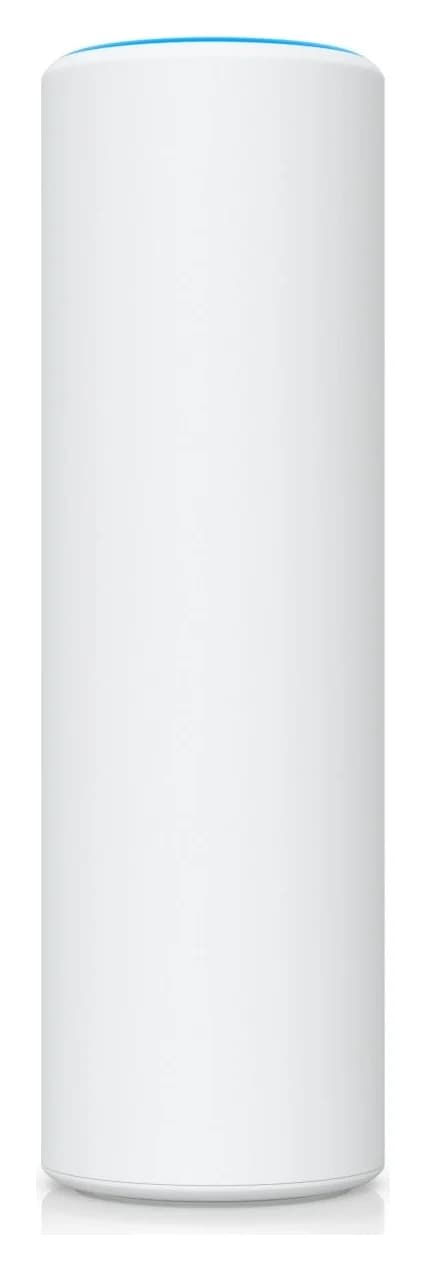
Buy the Ubiquiti U7 Mesh when your yard, garage or workshop coverage needs a 2.5 GbE uplink and Wi-Fi 7 clients, and you already run (or will run) UniFi Network. Buy the TP-Link Omada EAP610-Outdoor V1.30 when you want an AP that TP-Link rates IP68 under its weatherproof-enclosure testing, that can run standalone once installed with the included mounting and waterproof kit, and that includes a passive PoE adapter. They answer different outdoor jobs: a managed Wi-Fi 7 mesh node versus a simpler sealed Wi-Fi 6 workhorse. Neither has a 6 GHz radio, so this comparison is about uplink speed, weather sealing, power and management, not raw generation.
Both are dual-band APs from makers with full outdoor documentation, and every figure below comes from Ubiquiti's and TP-Link's own pages. For the wider shortlist, see best outdoor Wi-Fi access points; for the Wi-Fi 7 flagship pair, see U7 Pro XG vs EAP773.
- 2.5 GbEU7 Mesh uplink port, per Ubiquiti's spec page
- IP68EAP610-Outdoor V1.30 enclosure rating, per TP-Link
- 13WU7 Mesh maximum power consumption
- 200+U7 Mesh maker-claimed client count
Quick picks
Compare specifications and all conditions
Wi-Fi 7 phones or laptops, multi-gig wiring
- Our pick
- U7 Mesh
- Why
- 2.5 GbE uplink and Wi-Fi 7 radios; managed in UniFi Network.
Any router, no controller, lowest fuss
- Our pick
- EAP610-Outdoor V1.30
- Why
- Standalone web management and an included passive PoE adapter.
Fully sealed mounting, dust and long-term water
- Our pick
- EAP610-Outdoor V1.30
- Why
- IP68 enclosure beats the U7 Mesh's mount-dependent IPX6.
Already invested in one ecosystem
- Our pick
- Stay in it
- Why
- Neither AP joins the other's wireless mesh, so mixing buys nothing.
Full comparison table
Swipe to compare. Row labels stay visible.
| Your situation | Our pick | Why |
|---|---|---|
| Wi-Fi 7 phones or laptops, multi-gig wiring | U7 Mesh | 2.5 GbE uplink and Wi-Fi 7 radios; managed in UniFi Network. |
| Any router, no controller, lowest fuss | EAP610-Outdoor V1.30 | Standalone web management and an included passive PoE adapter. |
| Fully sealed mounting, dust and long-term water | EAP610-Outdoor V1.30 | IP68 enclosure beats the U7 Mesh's mount-dependent IPX6. |
| Already invested in one ecosystem | Stay in it | Neither AP joins the other's wireless mesh, so mixing buys nothing. |
Scroll horizontally to see every column
| Your situation | Our pick | Why |
|---|---|---|
| Wi-Fi 7 phones or laptops, multi-gig wiring | U7 Mesh | 2.5 GbE uplink and Wi-Fi 7 radios; managed in UniFi Network. |
| Any router, no controller, lowest fuss | EAP610-Outdoor V1.30 | Standalone web management and an included passive PoE adapter. |
| Fully sealed mounting, dust and long-term water | EAP610-Outdoor V1.30 | IP68 enclosure beats the U7 Mesh's mount-dependent IPX6. |
| Already invested in one ecosystem | Stay in it | Neither AP joins the other's wireless mesh, so mixing buys nothing. |
Exact hardware comparison
Sources: Ubiquiti U7 Mesh specifications and TP-Link EAP610-Outdoor V1.30 specifications.
U7 Mesh
- Wi-Fi generation
- Wi-Fi 7, dual-band
- Bands and radios
- 2.4 GHz and 5 GHz, 2 x 2 on each
- Maximum data rates
- 4.3 Gbps on 5 GHz; 688 Mbps on 2.4 GHz
All specifications
- Ethernet uplink
- One 2.5 GbE RJ45 port
- Power
- PoE; adapter included; 42.5-57V DC input
- Maximum power consumption
- 13W
- Weather rating
- IPX6, installed with the outdoor mount
- Operating temperature
- -30 to 60 °C
- Mounting
- Wall, pole or table stand; mounts included
- Maker-claimed clients
- 200+
- Coverage claim
- 140 m² (1,500 ft²)
EAP610-Outdoor V1.30
- Wi-Fi generation
- Wi-Fi 6 (AX1800), dual-band
- Bands and radios
- 2.4 GHz and 5 GHz
- Maximum data rates
- 1201 Mbps on 5 GHz; 574 Mbps on 2.4 GHz
All specifications
- Ethernet uplink
- One Gigabit RJ45 port
- Power
- 802.3at PoE or 48V passive PoE; adapter included
- Maximum power consumption
- 14.7W (US listing)
- Weather rating
- IP68
- Operating temperature
- -30 to 70 °C
- Mounting
- Pole or wall; kits included
- Maker-claimed clients
- 250+
- Coverage claim
- 2.4 GHz over 200 m and 5 GHz over 300 m
Full comparison table
Swipe to compare. Row labels stay visible.
| Specification | U7 Mesh | EAP610-Outdoor V1.30 |
|---|---|---|
| Wi-Fi generation | Wi-Fi 7, dual-band | Wi-Fi 6 (AX1800), dual-band |
| Bands and radios | 2.4 GHz and 5 GHz, 2 x 2 on each | 2.4 GHz and 5 GHz |
| Maximum data rates | 4.3 Gbps on 5 GHz; 688 Mbps on 2.4 GHz | 1201 Mbps on 5 GHz; 574 Mbps on 2.4 GHz |
| Ethernet uplink | One 2.5 GbE RJ45 port | One Gigabit RJ45 port |
| Power | PoE; adapter included; 42.5-57V DC input | 802.3at PoE or 48V passive PoE; adapter included |
| Maximum power consumption | 13W | 14.7W (US listing) |
| Weather rating | IPX6, installed with the outdoor mount | IP68 |
| Operating temperature | -30 to 60 °C | -30 to 70 °C |
| Mounting | Wall, pole or table stand; mounts included | Pole or wall; kits included |
| Maker-claimed clients | 200+ | 250+ |
| Coverage claim | 140 m² (1,500 ft²) | 2.4 GHz over 200 m and 5 GHz over 300 m |
Scroll horizontally to see every column
| Specification | U7 Mesh | EAP610-Outdoor V1.30 |
|---|---|---|
| Wi-Fi generation | Wi-Fi 7, dual-band | Wi-Fi 6 (AX1800), dual-band |
| Bands and radios | 2.4 GHz and 5 GHz, 2 x 2 on each | 2.4 GHz and 5 GHz |
| Maximum data rates | 4.3 Gbps on 5 GHz; 688 Mbps on 2.4 GHz | 1201 Mbps on 5 GHz; 574 Mbps on 2.4 GHz |
| Ethernet uplink | One 2.5 GbE RJ45 port | One Gigabit RJ45 port |
| Power | PoE; adapter included; 42.5-57V DC input | 802.3at PoE or 48V passive PoE; adapter included |
| Maximum power consumption | 13W | 14.7W (US listing) |
| Weather rating | IPX6, installed with the outdoor mount | IP68 |
| Operating temperature | -30 to 60 °C | -30 to 70 °C |
| Mounting | Wall, pole or table stand; mounts included | Pole or wall; kits included |
| Maker-claimed clients | 200+ | 250+ |
| Coverage claim | 140 m² (1,500 ft²) | 2.4 GHz over 200 m and 5 GHz over 300 m |
The table's rate and coverage figures are the makers' physical and test-condition claims, not guaranteed throughput. The U7 Mesh's headline advantage is the 2.5 GbE uplink: a Gigabit port caps what any AP can pass, whatever the radio says. The EAP610's advantage is sealing: TP-Link lists IP68, while Ubiquiti lists the U7 Mesh's IPX6 only with the outdoor mount fitted.
Best for Wi-Fi 7 and a faster uplink: Ubiquiti U7 Mesh
The U7 Mesh is the Wi-Fi 7 pick here: 2 x 2 radios on 2.4 and 5 GHz, channel bandwidths up to 240 MHz on EHT, and a 2.5 GbE uplink that matches its 5 GHz signal rate headroom. Ubiquiti lists a coverage area of 140 m² (1,500 ft²) and a client count of 200+, and includes wall, pole and table mounts plus a PoE adapter. Its antenna system is omnidirectional 6 dBi and directional 10 dBi on 5 GHz.
The catch is management. The U7 Mesh requires UniFi Network version 10.1.85 or later (mobile apps: UniFi iOS 10.32.1+, Android 10.35.1+). Wireless meshing to other UniFi APs is a managed feature; the store page's own placement tip is to point the U logos of two U7 Mesh units toward each other for the best mesh signal. Ubiquiti's store also sells an outdoor Ethernet surge protector alongside it; treat it as an optional accessory for exposed Ethernet runs, not a stated requirement.
See U7 Mesh at Ubiquiti · See U7 Mesh specifications
Best for a sealed standalone install: TP-Link Omada EAP610-Outdoor
The EAP610-Outdoor V1.30 is the simpler purchase: a Wi-Fi 6 AP with an IP68 enclosure, 1024-QAM, OFDMA and MU-MIMO, and a documented operating range of -30 to 70 ℃. TP-Link includes the passive PoE adapter, power cord, pole/wall mounting kits, installation guide and a waterproof kit, and the AP runs in standalone mode through its web interface or the Omada app with no controller at all.
Two documentation points decide your install. First, the included adapter is for dry indoor use only, so the power must live inside and only the Ethernet runs outdoors; the installation guide allows up to 100 m of cable between adapter and AP. Second, for waterproofing you must choose the proper cable seal for your cable's type and diameter, and connect the EAP's grounding terminal to grounding facilities for lightning and ESD protection. TP-Link's page marks Omada Mesh, seamless roaming, cloud access, captive portal and zero-touch provisioning as controller-dependent.
See EAP610-Outdoor V1.30 at TP-Link
UniFi versus Omada controller requirements
Neither AP is a plug-in repeater. Decide the management path before the cable:
- U7 Mesh must be adopted into UniFi Network 10.1.85 or later. The platform expects a controller application, with the required app versions listed above.
- EAP610-Outdoor configures standalone in a browser: set the SSID and security locally and it keeps working without anything else running. Add an Omada hardware, software or cloud controller only when you want mesh, seamless roaming, cloud access, zero-touch provisioning or a captive portal.
For one AP on a household router, the EAP610's standalone path is the shorter road. For a planned multi-AP property with one management pane, UniFi's single-application model is the U7 Mesh's whole reason to exist. Our UniFi vs Omada Wi-Fi 7 comparison works through the controller hardware choices in detail, and best PoE switches covers the powered-switch side.
PoE, injectors and surge protection
Both APs take power on their Ethernet port, so the outdoor run carries one cable. The U7 Mesh accepts PoE at 42.5-57V DC with a 13W maximum draw and an included adapter; Ubiquiti names no IEEE PoE class on its spec page. The EAP610-Outdoor accepts 802.3at PoE from a switch or 48V passive PoE from the included adapter, with a 14.7W maximum (US listing), so 802.3at switch sourcing covers the EAP610-Outdoor.
Keep the power indoors
The EAP610's passive adapter is rated for dry indoor use only; the U7's included adapter is not part of its outdoor rating either.
Run one Ethernet outdoors
Power and data share the AP's single RJ45 port; the EAP610 manual allows up to 100 m between adapter and AP.
Seal at the AP
TP-Link's waterproof kit needs the seal matched to your cable type and diameter; Ubiquiti's IPX6 rating needs the outdoor mount fitted.
Ground the outdoor hardware
The EAP610's grounding terminal connects to grounding facilities for lightning and ESD protection; Ubiquiti's outdoor Ethernet surge protector is an optional accessory.
Winter, moisture and cable sealing
Cold is not the differentiator: both APs start at -30 °C, and the EAP610's ceiling is 70 °C against the U7 Mesh's 60 °C. The difference is ingress protection. TP-Link lists the EAP610-Outdoor V1.30 at IP68; Ubiquiti ties the U7 Mesh's IPX6 to the outdoor mount. Neither page rates a specific sheltered eave or soffit install, so follow each maker's mounting instructions there; for a fully exposed pole or wall, TP-Link's higher printed rating is the stronger claim.
Humidity ranges differ slightly too: Ubiquiti lists 5 to 95% noncondensing for the U7 Mesh, and TP-Link lists 10-90% RH non-condensing for the EAP610. Both are operating-condition figures, not guarantees in condensing weather; keep the cable entries sealed and drip loops formed.
Source: each maker's spec page, linked in the sections above
Both are the makers' own maximum-connection claims under their test conditions, and TP-Link notes actual capacity is generally less than the maximum; treat them as planning ceilings, not performance promises.
Parent router and switch compatibility
Both APs sit behind whatever router you already own, connected by Ethernet, with routing and DHCP staying on the router. Compatibility questions are about the port and the power, not the brand:
- Yes: Any router with a spare Ethernet port: both APs attach as wired access points
- Yes: A compatible PoE source: 802.3at switch for the EAP610; a 42.5-57V PoE source for the U7 Mesh
- Yes: Wi-Fi 7 clients: use the U7 Mesh's 2.4 and 5 GHz radios; Wi-Fi 6 and older devices connect to both APs
- Partly: Multi-AP wireless mesh: U7 Mesh needs UniFi management; EAP610 needs an Omada controller
- No: Cross-ecosystem mesh: a U7 Mesh will not mesh with Omada APs, or the reverse
- No: Multi-gig wired backhaul on the EAP610: its uplink port is Gigabit
The practical wiring check is on the switch side: the U7 Mesh's 2.5 GbE uplink wants a switch or injector that also runs 2.5 GbE, or the AP settles to the source's speed. The EAP610's Gigabit port needs no such planning. Our outdoor access point guide covers placement and the Wi-Fi 7 access point shortlist covers the generation upgrade.
Decision table and installation checklist
Wi-Fi generation
- Choose U7 Mesh
- Wi-Fi 7 clients now or soon
- Choose EAP610-Outdoor V1.30
- Wi-Fi 6 is enough
Wired uplink
- Choose U7 Mesh
- 2.5 GbE path available
- Choose EAP610-Outdoor V1.30
- Gigabit is fine
Weather exposure
- Choose U7 Mesh
- Install per Ubiquiti's outdoor-mount instructions
- Choose EAP610-Outdoor V1.30
- Fully exposed pole or wall
Controller
- Choose U7 Mesh
- You want UniFi management
- Choose EAP610-Outdoor V1.30
- Standalone, or Omada later
Power
- Choose U7 Mesh
- PoE adapter or PoE switch
- Choose EAP610-Outdoor V1.30
- Included passive adapter indoors, or 802.3at
Revision to order
- Choose U7 Mesh
- U7-Mesh
- Choose EAP610-Outdoor V1.30
- EAP610-Outdoor V1.30 (V1 is IP67)
Full comparison table
Swipe to compare. Row labels stay visible.
| Decision point | Choose U7 Mesh | Choose EAP610-Outdoor V1.30 |
|---|---|---|
| Wi-Fi generation | Wi-Fi 7 clients now or soon | Wi-Fi 6 is enough |
| Wired uplink | 2.5 GbE path available | Gigabit is fine |
| Weather exposure | Install per Ubiquiti's outdoor-mount instructions | Fully exposed pole or wall |
| Controller | You want UniFi management | Standalone, or Omada later |
| Power | PoE adapter or PoE switch | Included passive adapter indoors, or 802.3at |
| Revision to order | U7-Mesh | EAP610-Outdoor V1.30 (V1 is IP67) |
Scroll horizontally to see every column
| Decision point | Choose U7 Mesh | Choose EAP610-Outdoor V1.30 |
|---|---|---|
| Wi-Fi generation | Wi-Fi 7 clients now or soon | Wi-Fi 6 is enough |
| Wired uplink | 2.5 GbE path available | Gigabit is fine |
| Weather exposure | Install per Ubiquiti's outdoor-mount instructions | Fully exposed pole or wall |
| Controller | You want UniFi management | Standalone, or Omada later |
| Power | PoE adapter or PoE switch | Included passive adapter indoors, or 802.3at |
| Revision to order | U7-Mesh | EAP610-Outdoor V1.30 (V1 is IP67) |
Before mounting day: confirm the exact model label on delivery, measure the Ethernet run against the 100 m allowance, pick the seal that matches your cable diameter, and place the PoE adapter or powered switch indoors near the router.
How we choose
This comparison is built from official documentation only: Ubiquiti's U7 Mesh spec page and store listing, and TP-Link's EAP610-Outdoor V1.30 product page, installation guide and business end-of-life policy, checked November 2026. We have not physically tested either AP. Rate, coverage and client-count figures are the makers' claims and are labeled as such; conflicting documentation between TP-Link's own V1 and V1.30 pages is reported rather than resolved. Read our research method.
On support duration, one asymmetry is documented: TP-Link's business end-of-life policy ends regular maintenance for non-Campus APs 3 years after the End of Sales date. Ubiquiti's page for the U7 Mesh states no fixed end date, so we infer none.
Verdict
Choose the Ubiquiti U7 Mesh for a UniFi-managed yard network with Wi-Fi 7 clients and a 2.5 GbE uplink, and accept that its IPX6 rating depends on the outdoor mount and its management on UniFi Network 10.1.85 or later. Choose the TP-Link Omada EAP610-Outdoor V1.30 for the simpler sealed install: IP68, standalone web management, an included indoor passive PoE adapter and a Gigabit uplink that is enough for AX1800 radios. Buyers who later want 6 GHz outdoors should look at the Wi-Fi 7 outdoor picks in our outdoor access point roundup, because neither model here has a 6 GHz radio.
Frequently asked questions
Do I need a controller for either outdoor access point?
The EAP610-Outdoor can run without one: TP-Link's compatibility list covers the EAP610-Outdoor V1.20 and higher hardware versions in controller and standalone modes, and its installation guide documents standalone mode. The U7 Mesh is managed in the UniFi Network application, version 10.1.85 and later. TP-Link's page marks Omada Mesh, seamless roaming, cloud access, captive portal and zero-touch provisioning as controller-dependent features, so plan for an Omada controller if you want those.
Can these two access points mesh with each other?
No. Wireless meshing stays inside each ecosystem: the U7 Mesh meshes with other UniFi access points under UniFi management, and the EAP610-Outdoor meshes with other supported Omada APs under an Omada controller. The two can coexist on one router as separate wired access points, but they never form one wireless mesh between each other.
Can I leave the included PoE adapter outside?
Not on the TP-Link side: the EAP610-Outdoor's passive PoE adapter is for dry indoor use only, and its safety information says it should be used indoors where the ambient temperature is no higher than 40 ℃. Ubiquiti lists an included PoE adapter for the U7 Mesh but keeps the outdoor rating on the AP itself, fitted with the outdoor mount. In both cases the safe plan is power indoors and Ethernet to the AP.
Which one survives winter and rain better?
The EAP610-Outdoor V1.30 carries an IP68 enclosure rating and an operating range of -30 to 70 ℃. The U7 Mesh is rated IPX6 only when installed with the outdoor mount and operates from -30 to 60 ℃. Both share the same lower limit, so cold itself is not the difference; sealing against dust and long-term water is. Confirm the EAP610 hardware revision before ordering, because the earlier V1 page lists IP67 instead of IP68.
Is the U7 Mesh a Wi-Fi 7 access point with a 6 GHz radio?
No. It is dual-band Wi-Fi 7 on 2.4 and 5 GHz with 2 x 2 radios on each band; there is no 6 GHz radio. Its 5 GHz maximum data rate is listed at 4.3 Gbps with 240 MHz channels, which needs Wi-Fi 7 clients to matter. The EAP610-Outdoor is Wi-Fi 6, so if 6 GHz outdoor coverage is the goal, neither model here provides it.
Related guides
Comparison · Access Points
Netgear WBE710 vs Ubiquiti U7 Pro: Which Wi-Fi 7 Access Point Should You Buy?
WBE710 vs U7 Pro compared from the makers' own sheets: radios, PoE needs, uplinks, mounts and the controller question, plus the complete kit each one needs.
Best picks · Access Points
Buy the Best Wi-Fi Extender: One Dead Zone, No Speed Loss
Pick the right Wi-Fi extender for one weak room: match the backhaul, ports and router mesh system, and know when an access point or MoCA beats a repeater.
Best picks · Access Points
Best Wi-Fi 7 Access Points for Older Homes in 2026: Cable-First Picks
Wi-Fi 7 access points for older homes with thick walls: the APs, PoE power and Cat6A cable to pull, plus the mesh fallback when a cable run fails.