

Best picks
Buy the Best Wi-Fi Extender
One Dead Zone, No Speed Loss
Pick the right Wi-Fi extender for one weak room: match the backhaul, ports and router mesh system, and know when an access point or MoCA beats a repeater.
By thisPING EditorialUpdated November 5, 202611 min read4 picks
On this page · Our picks at a glance
Our picks at a glance
- 1
The one stubborn room, without halving its speed
Choose for: The one stubborn room, without halving its speed
Check before buying: TP-Link labels the product BE11000, although that class figure does not equal the sum of these three table values.
- 2
A bedroom on a budget
Choose for: A bedroom on a budget
Check before buying: no 6 GHz radio, no multi-gig port, and mesh coordination only inside TP-Link's OneMesh family.
- 3
ASUS AiMesh households
Choose for: ASUS AiMesh households
Check before buying: no 6 GHz radio, and the 2,200 sq ft figure is the maker's claim.
Show all 4 picks
- 4
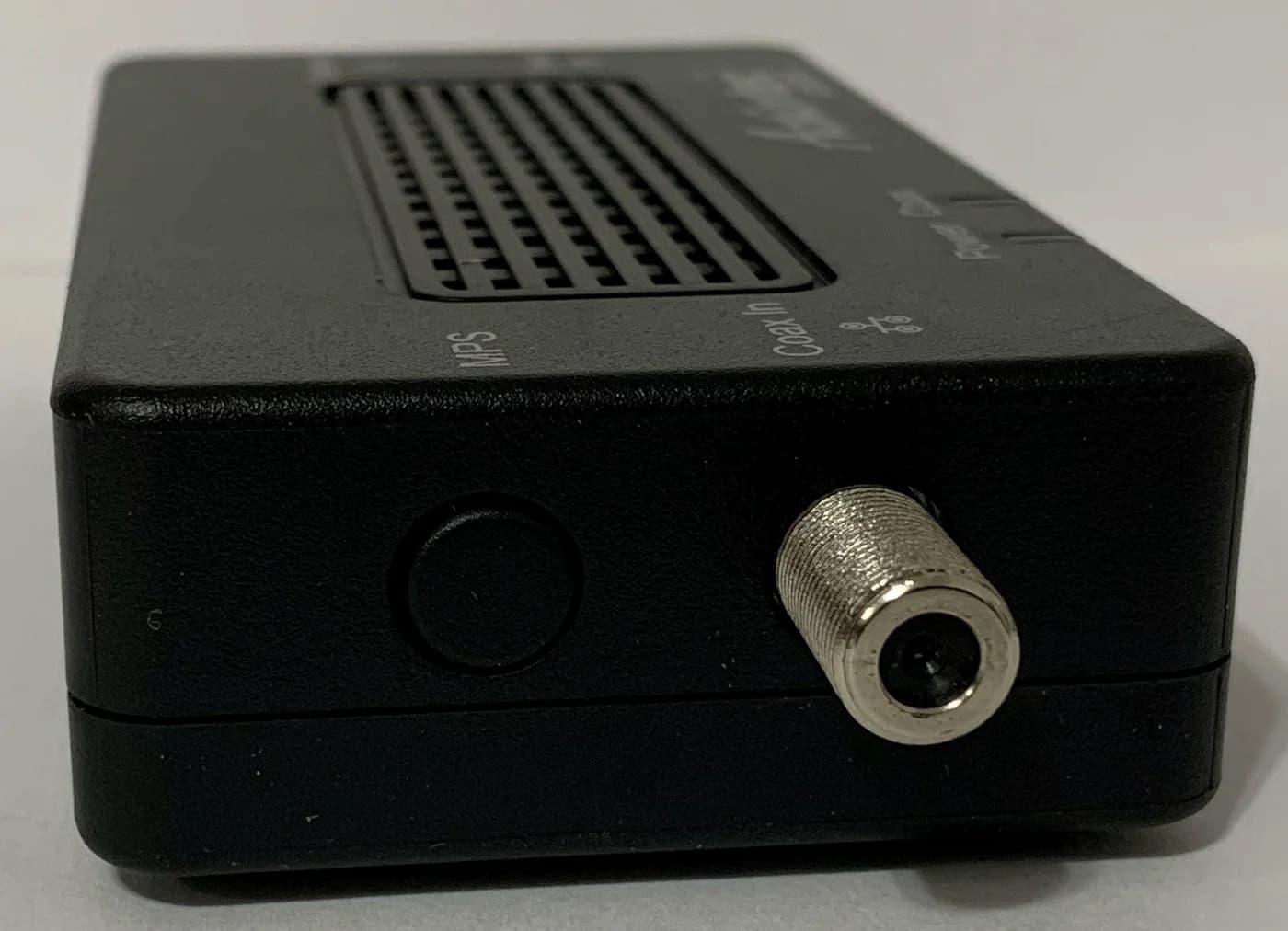
Getting the backhaul off the air
2.5 Gbps port
Choose for: Getting the backhaul off the air
Check before buying: When the dead zone has a coax outlet, the strongest fix on this page is not a better radio but removing the relay from the air.
For one room where Wi-Fi drops or crawls, buy a plug-in extender whose backhaul matches your situation: our overall pick is the TP-Link RE655BE, a tri-band Wi-Fi 7 extender with 6, 5 and 2.4 GHz radios plus a 2.5 Gbps port for a wired device. For a basic bedroom, the TP-Link RE605X covers the same job at a Wi-Fi 6 price tier. If coverage is weak across several rooms or floors, an extender is the wrong tool: our extender vs mesh guide routes that problem to a mesh. For outdoor dead zones, start from our outdoor access point picks instead. Specs checked on the makers' official pages November 5, 2026.
Every number in this guide comes from TP-Link's, ASUS's and ScreenBeam's own pages, linked throughout. Speed classes like AX1800 are the maker's sum of every band's maximum theoretical rate, not the speed you get in the dead zone.
Quick picks
Compare specifications and all conditions
TP-Link RE655BE
- Best for
- The one stubborn room, without halving its speed
- Wi-Fi
- Wi-Fi 7, tri-band
- Bands
- 2.4, 5 and 6 GHz
All specifications
- Ethernet port
- 1x 2.5 Gbps
- Router mesh system required
- EasyMesh (optional)
TP-Link RE605X
- Best for
- A bedroom on a budget
- Wi-Fi
- Wi-Fi 6, dual-band
- Bands
- 2.4 and 5 GHz
All specifications
- Ethernet port
- 1x gigabit
- Router mesh system required
- OneMesh (optional)
ASUS RP-BE58
- Best for
- ASUS AiMesh households
- Wi-Fi
- Wi-Fi 7, dual-band
- Bands
- 2.4 and 5 GHz
All specifications
- Ethernet port
- 1x gigabit
- Router mesh system required
- AiMesh
ScreenBeam ECB7250 kit
- Best for
- Getting the backhaul off the air
- Wi-Fi
- None (wired)
- Bands
- Coax, MoCA 2.5
All specifications
- Ethernet port
- 1x 2.5 GbE per adapter
- Router mesh system required
- None
Full comparison table
Swipe to compare. Row labels stay visible.
| Pick | Best for | Wi-Fi | Bands | Ethernet port | Router mesh system required |
|---|---|---|---|---|---|
| TP-Link RE655BE | The one stubborn room, without halving its speed | Wi-Fi 7, tri-band | 2.4, 5 and 6 GHz | 1x 2.5 Gbps | EasyMesh (optional) |
| TP-Link RE605X | A bedroom on a budget | Wi-Fi 6, dual-band | 2.4 and 5 GHz | 1x gigabit | OneMesh (optional) |
| ASUS RP-BE58 | ASUS AiMesh households | Wi-Fi 7, dual-band | 2.4 and 5 GHz | 1x gigabit | AiMesh |
| ScreenBeam ECB7250 kit | Getting the backhaul off the air | None (wired) | Coax, MoCA 2.5 | 1x 2.5 GbE per adapter | None |
Scroll horizontally to see every column
| Pick | Best for | Wi-Fi | Bands | Ethernet port | Router mesh system required |
|---|---|---|---|---|---|
| TP-Link RE655BE | The one stubborn room, without halving its speed | Wi-Fi 7, tri-band | 2.4, 5 and 6 GHz | 1x 2.5 Gbps | EasyMesh (optional) |
| TP-Link RE605X | A bedroom on a budget | Wi-Fi 6, dual-band | 2.4 and 5 GHz | 1x gigabit | OneMesh (optional) |
| ASUS RP-BE58 | ASUS AiMesh households | Wi-Fi 7, dual-band | 2.4 and 5 GHz | 1x gigabit | AiMesh |
| ScreenBeam ECB7250 kit | Getting the backhaul off the air | None (wired) | Coax, MoCA 2.5 | 1x 2.5 GbE per adapter | None |
First, confirm an extender is the right purchase
An extender relays your router's Wi-Fi, so it needs a strong signal to relay: it fixes one room just past the router's reach, not a whole floor. Ask three questions before buying.
1. How many rooms are actually weak? One room, or a couple sharing one wall: an extender fits. Several rooms, more than one floor, or calls that drop as you walk around: buy a coordinated mesh Wi-Fi system instead, because a chain of extenders repeats the airtime problem at every hop.
2. Can you run a wire to the dead zone? Ethernet, powerline or MoCA over coax feeding an access point can avoid a wireless relay hop; the RE655BE, RE605X and RP-BE58 each also have an access-point mode. If coax reaches the room, the ECB7250 pick below is a strong upgrade candidate.
3. Is the problem actually coverage? If Wi-Fi is slow everywhere, the router or the internet plan is the bottleneck, not the signal: see how to choose a Wi-Fi 7 router.
- Yes: Exactly one room or zone has weak Wi-Fi, and the router is in another room
- Yes: The room has an outlet roughly between it and the router, in the open
- Partly: The room already has coax: also compare MoCA to an access point (our coax pick below)
- No: Several rooms or floors are weak: buy a mesh system instead
- No: Wi-Fi is slow everywhere: fix the router or plan, not the signal
Why a dual-band extender can halve your speed
A repeating extender does two jobs with its radio: talk to your router, and talk to your devices. A dual-band model relaying over 5 GHz shares that band between both hops, so the room's devices can end up with far less than half of the router's speed. This is an airtime fact, not a brand defect, and it is the single most common reason buyers report a "slow extender."
The two ways around it:
- More radio capacity. The tri-band RE655BE adds a 6 GHz band that TP-Link says serves compatible devices; TP-Link does not document a fixed 6 GHz-backhaul/5 GHz-client split. ASUS documents a clearer wired case for the RP-BE58: Ethernet backhaul in AiMesh or AP mode "reserves the entire 2.4 GHz and 5 GHz band to your wireless devices."
- A wired backhaul. Ethernet, powerline or MoCA between the router and the far unit removes the upstream hop from the air entirely. See the ECB7250 pick below and our powerline adapter guide.
TP-Link also warns that the 6 GHz band and features like 320 MHz channels need clients that support them. These are theoretical radio capacities, not a speed guarantee; TP-Link states actual throughput and coverage are never guaranteed and vary with environment.
Best overall: TP-Link RE655BE
The RE655BE is the most capable extender here because it gives the relay three radios to work with. TP-Link's US product page lists Wi-Fi 7 on 6 GHz, 5 GHz and 2.4 GHz, with signal rates of 5764 Mbps at 6 GHz, 4323 Mbps at 5 GHz and 688 Mbps at 2.4 GHz, Multi-Link Operation, 320 MHz channels on 6 GHz, and 4K-QAM. TP-Link labels the product BE11000, although that class figure does not equal the sum of these three table values. Four external antennas and beamforming support the link.
Its single port ties the fastest port on this page with the ECB7250’s 2.5 GbE port: it works for a wired client in the dead room or for the router connection in standalone access-point mode. It works with all Wi-Fi generations, sets up by WPS or the Tether app, and is EasyMesh-compatible, so a matching EasyMesh router adds smart roaming and one network name.
The honest trade-offs: it is one plug with one port. TP-Link’s US page gives 4320 Mbps at 5 GHz in its headline, 4230 Mbps in a diagram and 4323 Mbps in its specification table, so treat the US band rates as approximate; the checked global page was not used for these figures, the maker's footnote also warns the extender may not support every mandatory 802.11be feature. EasyMesh is "compatible" but not Wi-Fi EasyMesh certified, and TP-Link warns that cross-vendor EasyMesh firmware can conflict. Check the TP-Link update-status note below before ordering.
Best for one bedroom: TP-Link RE605X
For a bedroom or office with ordinary needs, the RE605X does the same job as the picks above at the basic price tier. TP-Link's product page lists Wi-Fi 6 (AX1800) on 2.4 and 5 GHz, with signal rates of 574 Mbps and 1201 Mbps, WPA3 support, two external antennas, one gigabit Ethernet port, and both extender and access-point modes. Maximum power consumption is 10 W.
It is a dual-band repeater, so expect the shared-band behavior above when it relays wirelessly; its Ethernet port lets you wire a TV, console or PC directly, or wire the extender itself in access-point mode. With a TP-Link OneMesh router it forms a mesh network with a single Wi-Fi name.
The trade-offs: no 6 GHz radio, no multi-gig port, and mesh coordination only inside TP-Link's OneMesh family. Its US download page lists hardware versions including V1, V2, V3, V4 and V4.60, so match the label on the device before firmware updates. TP-Link’s US EOS list shows RE605X hardware version 1.0 reached end of sales on 5/27/2024, so read the status note below.
Best for ASUS AiMesh households: ASUS RP-BE58
If your router is an AiMesh-compatible ASUS, the RP-BE58 is the natural add-on, because it joins as a proper mesh node rather than a bolt-on repeater. ASUS's product page lists dual-band Wi-Fi 7 (BE3600) with 688 Mbps at 2.4 GHz and 2882 Mbps at 5 GHz, up to 160 MHz channels, Multi-Link Operation, and an extended coverage claim of up to 2,200 sq ft, which is the maker's best case, not a measurement. It also works with non-ASUS routers as an ordinary extender, with one gigabit port and access-point and media-bridge modes. Its tech spec page lists the port as one gigabit RJ45.
The wired-backhaul option matters most: ASUS says that in AiMesh-node or access-point mode you connect it to the router with an Ethernet cable, which "reserves the entire 2.4 GHz and 5 GHz band to your wireless devices." Without a wire, it is a dual-band repeater with the airtime trade-off above.
The trade-offs: no 6 GHz radio, and the 2,200 sq ft figure is the maker's claim. In AiMesh mode, WPS and the ASUS Extender app are unavailable; ASUS says AiMesh setup uses the ASUS Router app. The port is gigabit, not multi-gig.
Best wired backhaul for a stubborn room: ScreenBeam ECB7250
When the dead zone has a coax outlet, the strongest fix on this page is not a better radio but removing the relay from the air. ScreenBeam's ECB7250 page describes a bonded MoCA 2.5 adapter that "transforms your existing coax wiring into an extremely fast Ethernet backbone," with a 2.5 GbE port per adapter, auto-detection with MoCA Protected Setup, and compatibility with most MoCA-enabled routers and cable modems; up to 16 MoCA nodes can share one coax network. Pair the adapters with any extender or access point above in AP mode, or plug the room’s devices straight in.
The compatibility limits are real and worth more than any speed figure: ScreenBeam states the adapters are not compatible with satellite TV (DirecTV, Dish), AT&T internet or U-verse coax networks, and warns that DOCSIS 3.1 modems might conflict through frequency overlap. Coax outlets must be on the same coax system, and actual speeds vary with wiring noise.
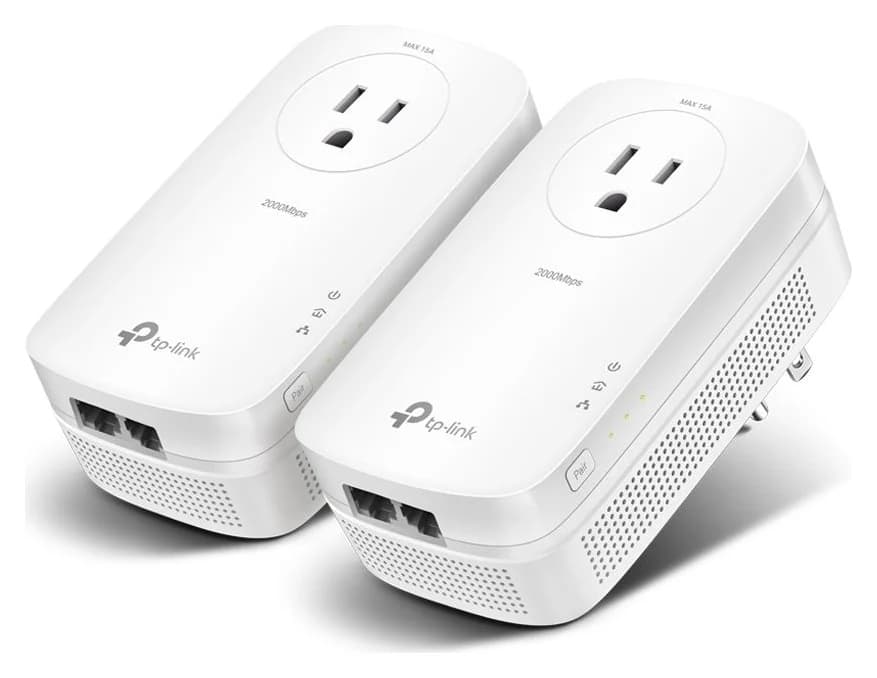
TP-Link
Two HomePlug AV2 powerline adapters with two gigabit Ethernet ports each and a pass-through power outlet.
Check package and model options
- 1 Gbps port
Which backhaul does your dead zone allow?
- 3 radiosBands on the RE655BE: 6, 5 and 2.4 GHz, per TP-Link's spec page
- 1Ethernet port on every extender in this guide, usable for access-point mode
- 2.5 GbpsMaximum MoCA 2.5 network throughput, per ScreenBeam; actual speed varies with coax wiring
- Strong router signal mid-way to the room: the tri-band RE655BE gives the link three radio bands to work with.
- Coax reaches the room: ECB7250 MoCA plus an access point can avoid the wireless relay; see our MoCA vs powerline guide.
- No coax, no Ethernet, indifferent wiring: compare our powerline adapter picks and keep the receipt.
- Ethernet already in the wall: skip the extenders and buy an access point (or use any pick above in AP mode).
The TP-Link picks: update status
What matters here is the support trail. TP-Link’s US EOS list shows the RE605X (hardware version 1.0) reached end of sales on 5/27/2024, so match the hardware version before buying and check the EOS list for the exact version. The same list gives the TL-PA7017P kit version-specific dates: version 4.6 ends sales 1/16/2027 and version 4.0 ended sales 2/26/2026, which is a useful reminder to check versions rather than model names. ASUS’s networking end-of-life list likewise determines when firmware stops arriving for the RP-BE58; check that list for the current model status.
Router compatibility and setup mode
Every extender here repeats an ordinary router’s Wi-Fi. TP-Link’s RE655BE and RE605X pages exclude routers with altered, open-source, non-standard or outdated firmware; ASUS says the RP-BE58 works with a wide variety of Wi-Fi routers, modems and gateways. The difference is in what "compatible" buys you:
Ordinary extender
- What it needs
- Nearly any Wi-Fi router
- What you get
- Extra coverage, usually a second network name unless the extender copies the first
Coordinated mesh
- What it needs
- EasyMesh (RE655BE), OneMesh (RE605X) or AiMesh (RP-BE58)
- What you get
- One network name, smart roaming, one management app
Access point
- What it needs
- Ethernet, powerline or MoCA to the router
- What you get
- The strongest option: Wi-Fi from a wired source, no relay hop
Media bridge (RP-BE58)
- What it needs
- The extender near wired devices
- What you get
- Ethernet ports fed over the wireless relay
Full comparison table
Swipe to compare. Row labels stay visible.
| Mode | What it needs | What you get |
|---|---|---|
| Ordinary extender | Nearly any Wi-Fi router | Extra coverage, usually a second network name unless the extender copies the first |
| Coordinated mesh | EasyMesh (RE655BE), OneMesh (RE605X) or AiMesh (RP-BE58) | One network name, smart roaming, one management app |
| Access point | Ethernet, powerline or MoCA to the router | The strongest option: Wi-Fi from a wired source, no relay hop |
| Media bridge (RP-BE58) | The extender near wired devices | Ethernet ports fed over the wireless relay |
Scroll horizontally to see every column
| Mode | What it needs | What you get |
|---|---|---|
| Ordinary extender | Nearly any Wi-Fi router | Extra coverage, usually a second network name unless the extender copies the first |
| Coordinated mesh | EasyMesh (RE655BE), OneMesh (RE605X) or AiMesh (RP-BE58) | One network name, smart roaming, one management app |
| Access point | Ethernet, powerline or MoCA to the router | The strongest option: Wi-Fi from a wired source, no relay hop |
| Media bridge (RP-BE58) | The extender near wired devices | Ethernet ports fed over the wireless relay |
TP-Link's FAQ is explicit that the three mesh systems do not mix arbitrarily: OneMesh and EasyMesh devices can mesh with each other, but not with Deco Mesh units. Match the system before adding a second unit later.
Placement, naming and verification
Find the halfway outlet
Plug the extender between the router and the dead room, where it still receives a strong router signal; use its signal indicator and move it closer to the router if the link is weak.
Set it up
Press WPS on both boxes, or use the Tether (TP-Link) or ASUS Router / Extender app. In AiMesh mode, ASUS says to use the ASUS Router app.
Name the network
In ordinary extender mode, keep the copied name for phones that should roam and a distinct name for devices you will pin to the extender. In mesh mode, one name covers both.
Verify with a wired device
Connect a laptop to the extender's Ethernet port and repeat your normal tasks in the dead room. Wired numbers isolate the relay from the phone's own Wi-Fi. If the room still fails, move the extender or switch to a wired backhaul.
Complete purchase checklist
- Count the weak rooms. One room: this guide. Several: mesh systems. Outdoor: our outdoor access point picks.
- Choose the backhaul before the badge. Radio capacity (RE655BE), coax (ECB7250), Ethernet, or shared-band (RE605X, RP-BE58) sets your speed ceiling more than any BE or AX number.
- Match your router's mesh system. EasyMesh, OneMesh or AiMesh, per the table above.
- Check the wired port. 2.5 Gbps on the RE655BE, gigabit on the RE605X and RP-BE58, 2.5 GbE on the ECB7250. A wired TV or console in the dead room bypasses the relay entirely.
- Confirm the maker's support trail. Firmware pages, EOL lists and, for TP-Link, the EOS dates; the picks above were checked November 5, 2026.
- Keep a return window. Extenders are placement-sensitive, and the makers themselves say actual throughput and coverage vary with environment.
How we choose
We have not lab-tested or speed-tested any product on this site. Every spec here comes from the makers' own US product and specification pages, linked in each section and captured in our evidence files: TP-Link's RE655BE, RE605X and powerline pages, ASUS's RP-BE58 overview and tech-spec pages, and ScreenBeam's ECB7250 page. Speed classes are quoted as the makers' theoretical maximum signal rates, never as expected throughput. Compatibility claims, mesh system requirements, mode lists and update policies come from the same pages plus TP-Link's EasyMesh FAQ. Pick ordering reflects backhaul quality, wired ports and router-mesh fit for a one-room dead zone. Full method: How we choose.
Verdict
For one stubborn room, the TP-Link RE655BE is the best extender here: its tri-band Wi-Fi 7 radios provide extra capacity, its 2.5 Gbps port serves a wired device or access-point duty, and EasyMesh adds roaming if your router matches. For a basic bedroom, the TP-Link RE605X is the cheap, honest pick. In an ASUS household, the RP-BE58 is the right box. And whenever coax reaches the dead zone, buy the ScreenBeam ECB7250 pair first: a wired MoCA backbone avoids the wireless relay problem entirely.
Frequently asked questions
Is a Wi-Fi extender as good as mesh?
For one weak room, an extender is usually the cheaper and sufficient fix, because a mesh replaces coverage everywhere while an extender targets a single dead zone. For weak coverage across several rooms or floors, a coordinated mesh with wired backhaul is the better purchase. Our wifi extender vs mesh guide covers the decision, and the main trap is shared: a dual-band extender repeating on the same band spends wireless airtime on both hops, so buy a tri-band or Ethernet-backhauled model when speed matters.
Why is my Wi-Fi extender so slow?
Check where it plugs in before blaming the hardware. TP-Link's setup instructions say to relocate the extender to the best place using its smart signal indicator, and every maker here warns that maximum signal rates are theoretical and drop with obstacles and traffic. A dual-band extender repeating on the same band roughly shares that band between the router link and your devices. Move it closer to the router, put a wired device on its Ethernet port, or switch to Ethernet, powerline or MoCA backhaul.
Can a Wi-Fi extender work with any router?
TP-Link says its extenders work with nearly any Wi-Fi router but excludes routers with altered, open-source, non-standard or outdated firmware; ASUS says the RP-BE58 works with a wide variety of Wi-Fi routers, modems and gateways. Coordinated mesh is stricter: the RE655BE needs an EasyMesh router, the RP-BE58 needs an AiMesh-compatible ASUS router, and the RE605X needs a TP-Link OneMesh router. A shared network name alone does not make different systems mesh together.
Should I buy a Wi-Fi 7 extender if my devices are Wi-Fi 6?
You can, but you will not get the Wi-Fi 7 benefits. TP-Link states that features such as Multi-Link Operation, 320 MHz channels and 4K-QAM require clients that also support them, and 320 MHz applies only to the 6 GHz band. A tri-band Wi-Fi 7 extender still has three radios to work with, but TP-Link does not promise a fixed 6 GHz backhaul/5 GHz client split, and the Wi-Fi 6 RE605X is the cheaper fit when nothing in the room uses 6 GHz.
What is the best place to plug in a Wi-Fi extender?
Roughly between the router and the dead room, but still within a strong router signal; not inside the dead zone itself. Use the extender's signal indicator while choosing, keep it in the open and away from large metal objects and appliances, then check the room with the speeds you actually get. If no position reaches both ends reliably, Ethernet, powerline or MoCA to an access point in that room is the fix.
The one stubborn room, without halving its speed
TP-Link RE655BE
Related guides
Best picks · Access Points
Best Wi-Fi 7 Access Points for Older Homes in 2026: Cable-First Picks
Wi-Fi 7 access points for older homes with thick walls: the APs, PoE power and Cat6A cable to pull, plus the mesh fallback when a cable run fails.
Buying guide · Access Points
Best Outdoor Wi-Fi Access Points: Extend Coverage With the Right Kit
Extend Wi-Fi outdoors with a wired access point or compatible mesh node. Compare exact models, winter limits, mounting, controllers and the complete power kit.
Comparison · Access Points
UniFi U7 Pro vs U7 Pro XG: Keep 2.5G or Build a 10G Path?
Choose between UniFi U7 Pro and U7 Pro XG from your existing switch: compare uplinks, PoE, radios, mounts, controller versions and complete installation kits.