

Best picks
Best Powerline Adapters
Choose a US Kit and Check Your Outlets
Choose the right US powerline kit for a TV, console or office. Compare ports, pass-through sockets, hardware revisions and support, then run an outlet trial.
By thisPING EditorialUpdated November 3, 20268 min read1 pick
On this page · Our picks at a glance
Our picks at a glance
- 1
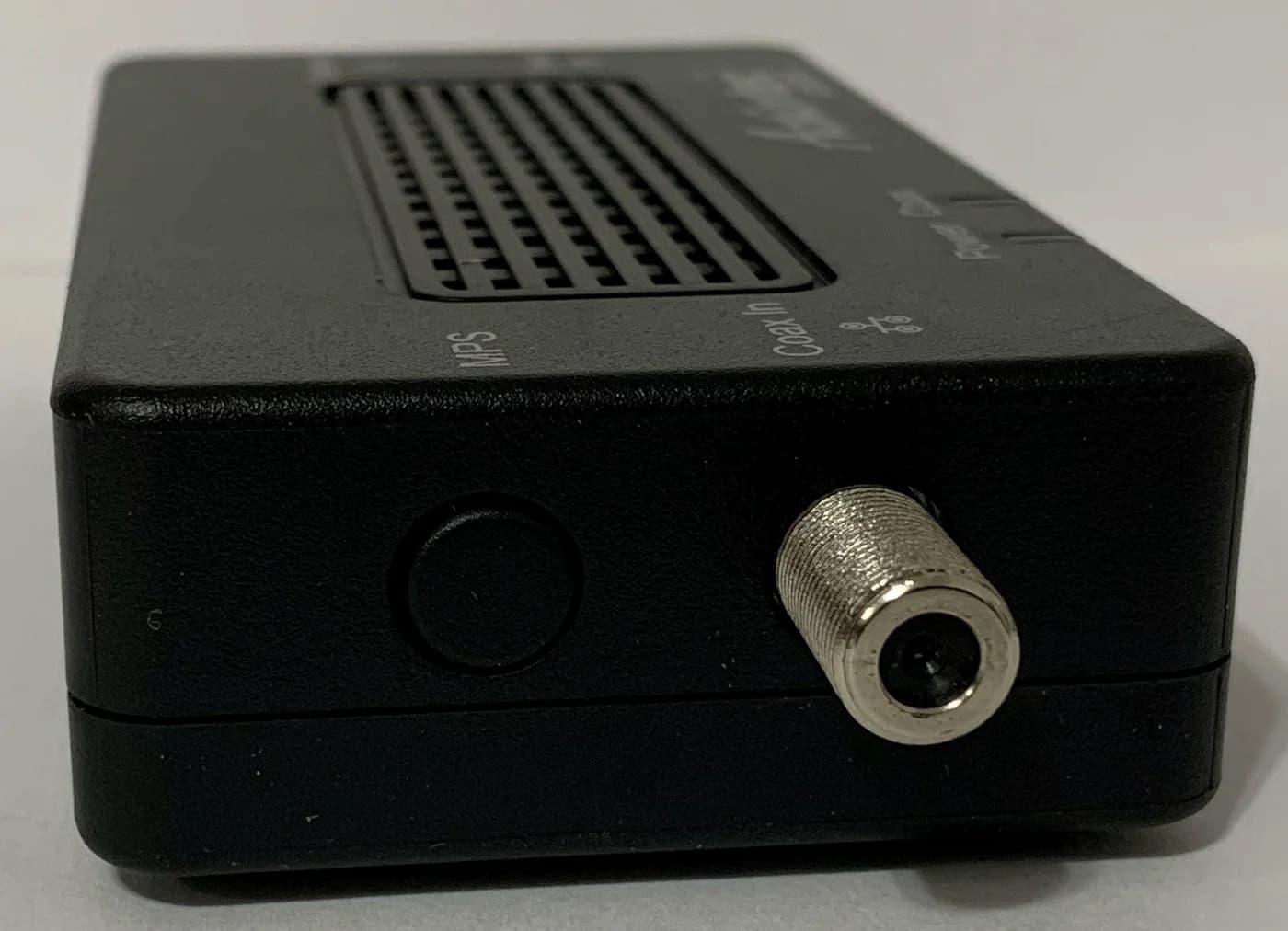
Choose for: Alternative for connected coax
Check before buying: Its advertised speed is also a maker claim, not an independent measurement.
For a TV and console sharing a room, our powerline pick is the TP-Link TL-PA9020P KIT (US), V4.6, with two gigabit Ethernet ports on each adapter. Choose the TL-PA7017P KIT (US), V4.6 for one wired device, but check the revision: both US V4.6 kits have an announced January 16, 2027 end-of-sales date. Buy only with an outlet trial and a workable return window; these are conditional recommendations for existing electrical wiring, not promises of gigabit performance. (US specifications, US lifecycle list)
Quick picks: match the ports to the room
TV plus console: choose the TL-PA9020P KIT. One TV, desktop or console: consider the TL-PA7017P KIT. Connected coax outlets: first consider the ScreenBeam alternative below.
Compare specifications and all conditions
TP-Link TL-PA9020P KIT (US), V4.6
- Ethernet on each adapter
- Two gigabit ports
- Usable ports at destination
- Two
- Included in starter kit
- Two adapters, two Ethernet cables
All specifications
- AC pass-through
- Yes, each adapter
- Powerline standard and maker rate
- HomePlug AV2; up to 2000 Mbps PHY
TP-Link TL-PA7017P KIT (US), V4.6
- Ethernet on each adapter
- One gigabit port
- Usable ports at destination
- One
- Included in starter kit
- Two adapters, two Ethernet cables
All specifications
- AC pass-through
- Yes, each adapter
- Powerline standard and maker rate
- HomePlug AV2; up to 1000 Mbps PHY
Full comparison table
Swipe to compare. Row labels stay visible.
| Exact powerline kit to request | Ethernet on each adapter | Usable ports at destination | Included in starter kit | AC pass-through | Powerline standard and maker rate |
|---|---|---|---|---|---|
| TP-Link TL-PA9020P KIT (US), V4.6 | Two gigabit ports | Two | Two adapters, two Ethernet cables | Yes, each adapter | HomePlug AV2; up to 2000 Mbps PHY |
| TP-Link TL-PA7017P KIT (US), V4.6 | One gigabit port | One | Two adapters, two Ethernet cables | Yes, each adapter | HomePlug AV2; up to 1000 Mbps PHY |
Scroll horizontally to see every column
| Exact powerline kit to request | Ethernet on each adapter | Usable ports at destination | Included in starter kit | AC pass-through | Powerline standard and maker rate |
|---|---|---|---|---|---|
| TP-Link TL-PA9020P KIT (US), V4.6 | Two gigabit ports | Two | Two adapters, two Ethernet cables | Yes, each adapter | HomePlug AV2; up to 2000 Mbps PHY |
| TP-Link TL-PA7017P KIT (US), V4.6 | One gigabit port | One | Two adapters, two Ethernet cables | Yes, each adapter | HomePlug AV2; up to 1000 Mbps PHY |
Package contents and ports come from the 9020P US datasheet and 7017P US datasheet. PHY means physical-layer signal rate. AV2000 and AV1000 are not measured download speeds; TP-Link says actual throughput depends on wiring, interference and traffic. A higher AV number alone cannot establish which kit works better in your home.
Best for a TV and console: TP-Link TL-PA9020P KIT
Choose this kit for its port layout. The destination adapter can connect a TV and console without a separate switch. At the router end, one Ethernet port connects to the router, leaving the other available. These connections still share the powerline link; they are not independent gigabit paths through the walls. TP-Link documents two gigabit ports, US plugs, pass-through sockets and HomePlug AV2, and its FAQ confirms shared bandwidth.
The manufacturer specifies 2×2 MIMO with beamforming. That feature does not establish how much your downloads or gaming latency will improve. Its pass-through outlet includes a noise filter, but placement and household interference still matter.
Request US V4.6. The download page calls it V4.60 and lists firmware published April 1, 2025. That is evidence of a revision-specific firmware release, not a commitment to future releases. The existing purchase link identifies the US starter kit; confirm the shipped hardware version separately.
Best for one wired device: TP-Link TL-PA7017P KIT
The US kit supplies two adapters and two Ethernet cables. Each adapter has one gigabit Ethernet port and a pass-through socket. That suits a lone television, desktop or console; the router-side adapter uses its only Ethernet port to connect to the router. If you need several destination devices, compare the 9020P with this kit plus a separate switch.
Order the KIT with US plugs, specifically V4.6, rather than accepting the already-ended V4.0 revision. TP-Link's US support page groups downloads under V4 and says Vx.0 and Vx.6 share a support version. Its listed firmware, published April 14, 2020, explicitly names US V4.0. Confirm firmware applicability for your label with TP-Link before updating; the grouped download page does not erase the separate lifecycle dates.
Both recommendations are wired-only. TP-Link's setup guidance distinguishes TL-PA Ethernet adapters from TL-WPA wireless models. An AV label does not tell you that Wi-Fi is included.
Check the exact kit with TP-Link
Alternative for connected coax: ScreenBeam ECB7250
ScreenBeam
A bonded MoCA 2.5 network adapter with a 2.5 Gbps Ethernet port that turns coax wiring into a wired backbone.
Check package and model options
- 2.5 Gbps port
If both locations have connected coax, consider this route before buying powerline. The ECB7250 uses MoCA 2.5, with one 2.5 Gbps Ethernet port per adapter. Its starter-kit guide lists two adapters, power supplies, coax cables, Ethernet cables and splitters. A single add-on is a different order; ScreenBeam says a new network needs two adapters unless a compatible MoCA gateway is already present.
Check the coax route first: ScreenBeam excludes satellite TV and AT&T internet/U-verse coax networks, and warns of possible DOCSIS 3.1 frequency conflicts. Its advertised speed is also a maker claim, not an independent measurement. Use our MoCA vs powerline guide for that wiring decision.
Check compatibility before adding adapters
The 7017P page broadly says it works with “any powerline adapters,” but its footnote limits compatibility to HomePlug AV and AV2. Use the narrower statement. TP-Link explicitly says G.hn cannot interoperate with HomePlug AV/AV2; an adapter from that family cannot extend either kit here. Its mixed-adapter guidance recommends matching series and cautions about mixed-brand pairing and limitations.
- Yes: HomePlug AV/AV2: documented compatibility with both TP-Link picks
- Partly: Mixed series or brands: check pairing instructions and limitations; prefer matching adapters
- No: G.hn: cannot join these HomePlug links
We have omitted a G.hn shopping pick: the NexusLink maker store marks its listed powerline kits out of stock. That is a dated availability check, not a claim that G.hn is unavailable everywhere.
Choose outlets and pair securely
Follow the model instructions: connect one adapter to a router LAN port and plug both adapters directly into wall outlets. Avoid extension cords, surge protectors and power strips upstream of the adapters. For a pass-through model, TP-Link's quick guide places an appliance or power strip in the adapter's integrated socket instead.
Pair the adapters near each other before moving the remote unit. Press Pair for 1 second, then press the other unit's Pair button for 1 second within 2 minutes. Wait for the Powerline LED. Pairing creates a secured network, rather than relying on shared factory settings. These instructions appear in the 7017P manual and 9020P quick guide.
Same home does not establish a usable route. The manuals specify the same electrical circuit, while TP-Link's general FAQ says links can generally cross breakers but some breakers filter the signal. Its datasheets also identify AFCI breakers and separate circuits as performance factors. Treat these qualifications as reasons to trial the actual outlets. A UPS can also filter out the connection; keep the powerline adapter off its protected outputs.
TP-Link identifies motors and AC power adapters as interference sources. Try a different wall outlet and move chargers away before deciding the kit cannot work. A pass-through noise filter is not a substitute for that trial.
Run an outlet trial before the return deadline
The following is our suggested comparison procedure, not a report of measured results. Set a pass condition first: uninterrupted work calls, acceptable console play or reliable TV streaming in the intended room. Do not adopt the box's PHY rate as your target.
Establish a baseline
Connect a laptop directly to the router by Ethernet, disable its Wi-Fi and record download, upload, idle ping and ping during a busy transfer.
Verify the kit nearby
Pair on nearby wall outlets and repeat the same tasks with the same laptop and cables.
Try the destination
Move the remote adapter to its intended wall outlet, then try another accessible outlet and record the same results.
Recreate normal use
Repeat with household appliances running normally, concurrent downloads and the actual TV, console or work call.
Keep or return
Keep the kit only if the destination passes your task requirements consistently; return it if useful outlets remain unreliable.
For a local comparison, copy the same large file between wired computers on opposite ends of the link, then compare with a direct-cable connection. Record transfer results separately from an internet speed test. TP-Link notes that ISP, cabling and port limits also affect speed; do not attribute every slow internet result to powerline.
Direct Ethernet baseline
- Record throughput
- Download/upload and local copy
- Record responsiveness
- Idle/loaded ping, packet loss
- Record task outcome
- Call, game or stream
Intended powerline outlet
- Record throughput
- Same measurements
- Record responsiveness
- Spikes, loss and disconnects
- Record task outcome
- Pass or fail your requirement
Alternate powerline outlet
- Record throughput
- Same measurements
- Record responsiveness
- Spikes, loss and disconnects
- Record task outcome
- Better, worse or still unsuitable
Full comparison table
Swipe to compare. Row labels stay visible.
| Connection to compare | Record throughput | Record responsiveness | Record task outcome |
|---|---|---|---|
| Direct Ethernet baseline | Download/upload and local copy | Idle/loaded ping, packet loss | Call, game or stream |
| Intended powerline outlet | Same measurements | Spikes, loss and disconnects | Pass or fail your requirement |
| Alternate powerline outlet | Same measurements | Spikes, loss and disconnects | Better, worse or still unsuitable |
Scroll horizontally to see every column
| Connection to compare | Record throughput | Record responsiveness | Record task outcome |
|---|---|---|---|
| Direct Ethernet baseline | Download/upload and local copy | Idle/loaded ping, packet loss | Call, game or stream |
| Intended powerline outlet | Same measurements | Spikes, loss and disconnects | Pass or fail your requirement |
| Alternate powerline outlet | Same measurements | Spikes, loss and disconnects | Better, worse or still unsuitable |
Also check recovery after the endpoint sleeps and wakes. For intermittent connections, TP-Link's troubleshooting advice includes checking firmware and disabling power-saving mode. Change one thing at a time and keep the return deadline visible. If none of the usable outlets passes, switch routes rather than buying more adapters on the assumption that a higher AV class fixes the wiring.
Check support and the complete order
End of sales is different from end of maintenance. TP-Link's policy says maintenance, including security updates, usually ends 3 years after end of sales, subject to its qualifications. That does not establish a fixed support deadline for your particular unit. Match firmware to the region, model and hardware version; TP-Link's update instructions describe the computer-based tpPLC utility for these wired adapters.
For a holiday or gift order, confirm the US plug, photographed revision label, complete two-adapter kit, included Ethernet cables, free router LAN port and accessible wall outlets. Choose a return window that allows use in the recipient's home. Avoid a single add-on when starting from scratch.
If the job is wireless coverage across several rooms, continue with mesh Wi-Fi systems and their backhaul choices. For a single room, our extender vs mesh guide helps reconsider the route before ordering more hardware.
How we choose
This is document-based research, without physical product testing. We checked official US product pages, revision-specific downloads, manuals, compatibility guidance and lifecycle documents on November 2, 2026. Recommendations prioritize destination ports, kit contents, outlet access and support transparency. The AV rates are manufacturer PHY claims; we publish no invented throughput or latency ranking. The announced sales sunsets are why both powerline picks require revision checks. See How we choose for the site's method.
Verdict
Choose TL-PA9020P KIT US V4.6 for a TV and console, or TL-PA7017P KIT US V4.6 for one wired device. Check their announced sales sunset, secure the pair, and keep the kit only after its intended outlets pass your trial. If connected coax is available, evaluate the ECB7250 starter kit before committing to powerline.
Frequently asked questions
How fast are powerline adapters in real use?
The AV number is a maximum physical-layer signal rate, not your usable download speed. Both powerline kits here have gigabit Ethernet ports, and electrical noise, wiring, traffic and circuit protection can reduce throughput. We do not assign either kit a predicted speed for your home. Compare it with a direct Ethernet baseline and keep it only if your actual tasks work reliably.
Are powerline adapters better than Wi-Fi for gaming?
Treat that as an outlet trial, not a universal ranking. The kits here provide Ethernet connections, but TP-Link documents electrical interference and wiring limits. Compare your present Wi-Fi with powerline at the console's location, including a busy download and normal household appliance use. Choose by gameplay, latency variation, packet loss and disconnects, rather than the AV number or an isolated download result.
Will powerline work across different breakers?
Do not assume it will. TP-Link's model instructions specify the same electrical circuit. Its general FAQ also says communication can cross circuit breakers, while some breakers filter or weaken the signal. Those statements do not establish compatibility with your outlet pair. Pair nearby, move the remote unit to its intended outlet, and return the kit if that route cannot meet your needs.
Can I mix HomePlug AV2 and G.hn powerline adapters?
No: TP-Link explicitly says G.hn powerline adapters are not compatible with HomePlug AV or AV2 adapters. Both TP-Link picks here are HomePlug AV2. Older HomePlug units may interoperate, but TP-Link recommends matching series and cautions that mixed brands have different pairing methods and possible limitations. Buy a matched kit when creating a new link.
Do I need two powerline adapters, and do these kits add Wi-Fi?
A new powerline link needs at least two compatible devices: one connected to your router and another at the destination. Both recommended starter kits include two adapters and two Ethernet cables. These TL-PA models provide Ethernet only; they do not broadcast Wi-Fi. If the room needs wireless coverage, choose that equipment separately or reconsider a mesh system.
Related guides
Buying guide · Network Adapters
Wi-Fi 7 Devices: Check Your Laptop, Adapter and Router
Check Wi-Fi 7 devices before buying: match your exact laptop or phone, operating system, adapter and router, then decide what to keep and what to upgrade.
Best picks · Network Adapters
Best USB 2.5Gb Ethernet Adapters: Match Your Port and OS
Choose a USB 2.5Gb Ethernet adapter by connector, host speed and OS. Compare Plugable and D-Link, avoid revision traps, and build a laptop-to-NAS upgrade.
Comparison · Network Adapters
ScreenBeam ECB7250 vs goCoax MA2500D: Which MoCA Kit to Buy
Compare ScreenBeam ECB7250 and goCoax MA2500D MoCA adapters: choose the right kit, count room connections and check splitters, power supplies and ISP conflicts.