

Comparison
ScreenBeam ECB7250 vs goCoax MA2500D
Which MoCA Kit to Buy
Compare ScreenBeam ECB7250 and goCoax MA2500D MoCA adapters: choose the right kit, count room connections and check splitters, power supplies and ISP conflicts.
By thisPING EditorialUpdated November 3, 20268 min read1 pick
Our recommendation: ScreenBeam ECB7250
Starting with no MoCA devices
Limit: Do not confuse the starter kit with the single add-on.
On this page · Our picks at a glance
Our picks at a glance
- 1
Choose for: Starting with no MoCA devices
Check before buying: Do not confuse the starter kit with the single add-on.
For a new router-to-gaming-room connection, choose the ScreenBeam ECB7250 two-adapter starter kit: its guide documents the adapters, power supplies and patch leads for both ends. Choose goCoax MA2500D when extending compatible goCoax equipment or assembling your own pair after confirming the box contents; both models have one 2.5GbE port per adapter. Keep compatible installed MoCA equipment where possible, and settle provider/coax compatibility before ordering either.
Manufacturer documents checked November 2, 2026. This comparison uses published specifications, without a measured gaming winner.
Quick picks
Compare specifications and all conditions
Starting with no MoCA devices
- Choose
- ScreenBeam ECB7250 starter kit
- Why
- Documented two-ended package with power, Ethernet, coax and splitters
Adding to working MA2500D equipment
- Choose
- Another MA2500D
- Why
- Keep the working endpoint; confirm the additional unit's supply and cables
Gateway already supplies compatible MoCA LAN
- Choose
- One compatible add-on
- Why
- The gateway can supply the router end; a pair may be unnecessary
Full comparison table
Swipe to compare. Row labels stay visible.
| Your situation | Choose | Why |
|---|---|---|
| Starting with no MoCA devices | ScreenBeam ECB7250 starter kit | Documented two-ended package with power, Ethernet, coax and splitters |
| Adding to working MA2500D equipment | Another MA2500D | Keep the working endpoint; confirm the additional unit's supply and cables |
| Gateway already supplies compatible MoCA LAN | One compatible add-on | The gateway can supply the router end; a pair may be unnecessary |
Scroll horizontally to see every column
| Your situation | Choose | Why |
|---|---|---|
| Starting with no MoCA devices | ScreenBeam ECB7250 starter kit | Documented two-ended package with power, Ethernet, coax and splitters |
| Adding to working MA2500D equipment | Another MA2500D | Keep the working endpoint; confirm the additional unit's supply and cables |
| Gateway already supplies compatible MoCA LAN | One compatible add-on | The gateway can supply the router end; a pair may be unnecessary |
The ScreenBeam starter guide establishes the kit inventory. The goCoax product page allows existing MoCA equipment to supply another endpoint, while warning about older-device compatibility.
Both makers specify up to 16 MoCA devices; goCoax explicitly says they share 2.5 Gbps of network capacity in its quick-start guide. Those figures describe the network, rather than a separate allocation for every room.
- 2 devicesMinimum for a new MoCA connection; a compatible gateway can be one
- 2.5GbEOne Ethernet port on each adapter in this comparison
- 16 devicesPublished maximum on the shared MoCA network
ScreenBeam ECB7250 vs goCoax MA2500D: the differences
MoCA generation
- ScreenBeam ECB7250
- MoCA 2.5
- goCoax MA2500D
- MoCA 2.5
Ethernet per adapter
- ScreenBeam ECB7250
- One 2.5GbE RJ45 port
- goCoax MA2500D
- One 2.5GbE RJ45 port
Package being compared
- ScreenBeam ECB7250
- Documented two-adapter starter kit
- goCoax MA2500D
- Two MA2500D units; confirm the offer's quantity
Power
- ScreenBeam ECB7250
- Two included power adapters; ECB7250 uses 5V DC, 2A
- goCoax MA2500D
- Guide specifies 12V DC at each endpoint; box inventory not established here
Included Ethernet / coax leads
- ScreenBeam ECB7250
- Two Ethernet and two coax cables in the starter kit
- goCoax MA2500D
- Maker product page and linked guide do not give a retail-box inventory
Included splitters
- ScreenBeam ECB7250
- Two in the starter kit; none in the single-adapter guide's inventory
- goCoax MA2500D
- Inclusion not established by those documents
Management / security
- ScreenBeam ECB7250
- Browser interface and MPS; encryption initially disabled
- goCoax MA2500D
- Browser interface and MPS; encryption initially disabled
Expansion
- ScreenBeam ECB7250
- Up to 16 MoCA nodes
- goCoax MA2500D
- Up to 16 MoCA devices sharing 2.5 Gbps
Full comparison table
Swipe to compare. Row labels stay visible.
| Buying detail | ScreenBeam ECB7250 | goCoax MA2500D |
|---|---|---|
| MoCA generation | MoCA 2.5 | MoCA 2.5 |
| Ethernet per adapter | One 2.5GbE RJ45 port | One 2.5GbE RJ45 port |
| Package being compared | Documented two-adapter starter kit | Two MA2500D units; confirm the offer's quantity |
| Power | Two included power adapters; ECB7250 uses 5V DC, 2A | Guide specifies 12V DC at each endpoint; box inventory not established here |
| Included Ethernet / coax leads | Two Ethernet and two coax cables in the starter kit | Maker product page and linked guide do not give a retail-box inventory |
| Included splitters | Two in the starter kit; none in the single-adapter guide's inventory | Inclusion not established by those documents |
| Management / security | Browser interface and MPS; encryption initially disabled | Browser interface and MPS; encryption initially disabled |
| Expansion | Up to 16 MoCA nodes | Up to 16 MoCA devices sharing 2.5 Gbps |
Scroll horizontally to see every column
| Buying detail | ScreenBeam ECB7250 | goCoax MA2500D |
|---|---|---|
| MoCA generation | MoCA 2.5 | MoCA 2.5 |
| Ethernet per adapter | One 2.5GbE RJ45 port | One 2.5GbE RJ45 port |
| Package being compared | Documented two-adapter starter kit | Two MA2500D units; confirm the offer's quantity |
| Power | Two included power adapters; ECB7250 uses 5V DC, 2A | Guide specifies 12V DC at each endpoint; box inventory not established here |
| Included Ethernet / coax leads | Two Ethernet and two coax cables in the starter kit | Maker product page and linked guide do not give a retail-box inventory |
| Included splitters | Two in the starter kit; none in the single-adapter guide's inventory | Inclusion not established by those documents |
| Management / security | Browser interface and MPS; encryption initially disabled | Browser interface and MPS; encryption initially disabled |
| Expansion | Up to 16 MoCA nodes | Up to 16 MoCA devices sharing 2.5 Gbps |
Sources: ScreenBeam's kit guide, single guide and user manual; goCoax's model page and linked quick-start PDF.
ScreenBeam ECB7250: our pick for a fresh connection
ScreenBeam
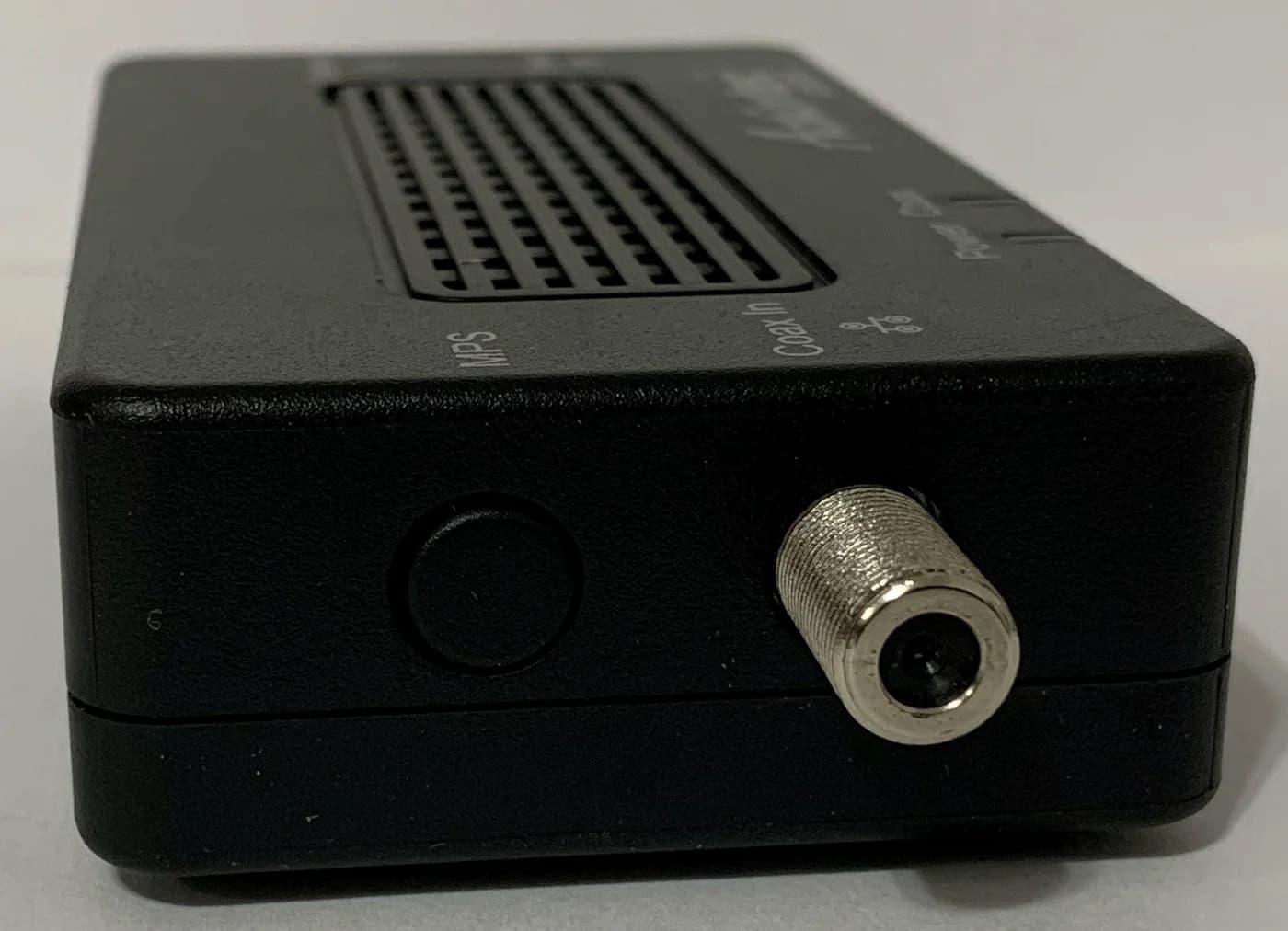
A bonded MoCA 2.5 network adapter with a 2.5 Gbps Ethernet port that turns coax wiring into a wired backbone.
Check package and model options
- 2.5 Gbps port
The reason to choose ScreenBeam is the documented starter package. It supplies two adapters, two power adapters, two Ethernet cables, two coax cables and two coax splitters. That covers the basic connection between unused coax outlets; check lead lengths against your furniture and sockets.
Do not confuse the starter kit with the single add-on. ScreenBeam's separate add-on guide lists one adapter, one power adapter, one Ethernet cable and one coax cable, and explicitly excludes the splitter. Its user manual also describes a single adapter and a separately obtained splitter; that is a package difference from the kit guide, not evidence that the kit lacks splitters.
Also check the model: ScreenBeam's ECB6250 uses MoCA 2.5 too, but its Ethernet port is limited to 1 Gbps, according to the ECB7250 page's related-products section. “MoCA 2.5” alone does not identify the Ethernet port you want.
Check price on Amazon. Select the two-adapter starter package and verify its included-parts list before checkout.
goCoax MA2500D: choose it for an existing setup or a carefully counted pair
The MA2500D has one coax input, one 2.5GbE port, an MPS pairing button and wall/desk mounting options. goCoax distinguishes it from the older WF-803M, whose Ethernet port was gigabit. The MA2500D page supports the hardware comparison, without establishing the contents of every seller's package.
For a new link, order two MA2500D units, whether sold separately or explicitly bundled together. Confirm matching power supplies and included leads before adding extras: the quick-start guide calls for a 12V DC supply at each endpoint. ScreenBeam documents 5V DC, 2A, so keep each model with its own specified supply.
Availability affects the pick: goCoax's direct shop showed MA2500D out of stock when checked. Confirm availability before committing to this basket.
How many adapters and cables should you order?
These are calculated baskets for unused, connected coax outlets, with one Ethernet device per remote room. Counts include the router endpoint; each external adapter needs power, a coax lead and an Ethernet lead. ScreenBeam's connection guides and goCoax's network diagram establish that layout.
Router plus one remote room, no existing MoCA
- External adapters / matching supplies
- 2 / 2
- Ethernet leads / coax leads
- 2 / 2
Router plus two remote rooms, no existing MoCA
- External adapters / matching supplies
- 3 / 3
- Ethernet leads / coax leads
- 3 / 3
Compatible, enabled gateway MoCA LAN plus one remote room
- External adapters / matching supplies
- 1 / 1
- Ethernet leads / coax leads
- 1 / 1 at the new endpoint
Full comparison table
Swipe to compare. Row labels stay visible.
| Layout | External adapters / matching supplies | Ethernet leads / coax leads |
|---|---|---|
| Router plus one remote room, no existing MoCA | 2 / 2 | 2 / 2 |
| Router plus two remote rooms, no existing MoCA | 3 / 3 | 3 / 3 |
| Compatible, enabled gateway MoCA LAN plus one remote room | 1 / 1 | 1 / 1 at the new endpoint |
Scroll horizontally to see every column
| Layout | External adapters / matching supplies | Ethernet leads / coax leads |
|---|---|---|
| Router plus one remote room, no existing MoCA | 2 / 2 | 2 / 2 |
| Router plus two remote rooms, no existing MoCA | 3 / 3 | 3 / 3 |
| Compatible, enabled gateway MoCA LAN plus one remote room | 1 / 1 | 1 / 1 at the new endpoint |
For the second row, buy the ScreenBeam starter kit plus one single add-on, or three MA2500D units. The router-side adapter serves the shared coax network; the additional room gets another endpoint. Reuse supplied or suitable installed leads before buying more.
A gateway's coax socket is insufficient evidence of a usable MoCA LAN bridge. goCoax's guide distinguishes Fios/Frontier MoCA WAN, which can conflict with its defaults, from a router's built-in MoCA LAN bridge. Check the exact gateway and service arrangement before subtracting the router-side adapter.
The gaming-PC and TV-room path
For this example, internet reaches the router separately and the connected home coax is private, without a live provider or television feed. The makers' guides connect router LAN to the source adapter and the destination adapter to an Ethernet device.
Router LAN → adapter A
Connect Ethernet to the source adapter and power it with its specified supply.
Adapter A → connected coax → adapter B
Connect each adapter to its room's coax outlet. The outlets must join the same coax system.
Adapter B → gaming PC or TV
Connect the destination device by Ethernet and power the remote adapter.
PC and TV together → Ethernet switch
Put a switch after adapter B, then connect both devices to the switch.
Both adapters have only one Ethernet port. For a wired PC and smart TV, our switch layout needs four Ethernet leads total: router-to-adapter, adapter-to-switch, switch-to-PC and switch-to-TV. The TP-Link TL-SG108S-M2 is an optional eight-port 2.5GbE switch with a supplied power adapter; reuse a suitable switch you already own.
The 2.5GbE port does not guarantee that speed through the whole connection. goCoax says the devices share MoCA capacity, and ScreenBeam says wiring condition, noise and attached Ethernet hardware affect throughput. We therefore give neither model a lower-ping award. For installation detail, see Ethernet backhaul setup; for alternatives to coax, see MoCA vs powerline.
Check the coax before buying accessories
Both models use the 1125–1675 MHz MoCA band. goCoax requires splitters that cover that band and warns about old 5–1002 MHz splitters. A cable-TV socket and a working television picture alone do not establish this path's suitability.
- Yes: Connected private coax with outlets in both rooms: the basic layout above
- Partly: Cable internet or cable TV on the same wiring: verify frequencies, splitters and provider topology
- Partly: Fios or Frontier with coax from ONT to router: check MoCA WAN conflicts before connecting
- No: DirecTV, Dish or other satellite TV on the same coax network
- Partly: Building-managed or shared apartment coax: get the wiring and isolation assessed first
goCoax allows a separate non-satellite coax network only if it shares no splitter or run with satellite TV. ScreenBeam also specifically excludes AT&T internet and U-verse coax networks; ask ScreenBeam about your specific service before choosing it.
Splitters and the complete accessory basket
If a coax outlet already feeds a set-top box, ScreenBeam calls for a two-way splitter. Its starter kit includes splitters, while its add-on does not. For a separately needed splitter, the Antronix MMC1002H-B is a two-way horizontal option: the current manufacturer datasheet explicitly supports MoCA 2.0 and 2.5 across 975–1675 MHz. Keep compatible installed splitters instead of replacing them automatically.
Sharing an outlet also changes the cable count. Wall-to-splitter, splitter-to-adapter and splitter-to-set-top-box means three coax leads at that outlet, including the existing television lead. The basic room-count table assumes no such sharing. ScreenBeam says a three-way splitter, excluded from the kit, is needed when two existing coax devices also occupy that outlet.
With an unused router-side outlet and one TV-shared remote outlet, that means four coax leads total. If the existing TV lead fits the new layout, keep it: the starter kit's two coax leads plus one additional coax jumper complete this example.
For longer Ethernet patch leads, the Cable Matters 160001 Cat6 pick uses bare-copper conductors and standard RJ45 connectors (maker specifications). Cable Matters' own variant table identifies the linked version as one black 7 ft cable; measure each route before choosing it. Check price on Amazon.
Management, encryption and keeping older adapters
Both makers document browser management and initially disabled MoCA encryption. Enable security using the exact model's instructions before relying on MPS pairing: ScreenBeam manual, goCoax guide. goCoax's interface can show link rates; these are diagnostic information, not an internet speed guarantee.
ScreenBeam lists backward compatibility with MoCA 2.0, 1.1 and 1.0. goCoax lists 2.0 and 1.1, with a warning about some older chipsets. Keep functioning compatible endpoints, but confirm mixed-model operation rather than assuming a replacement adapter upgrades every older endpoint's performance.
How we choose
We compared official product pages, package inventories, manuals and the current Antronix datasheet, and kept existing site product identities. The ScreenBeam recommendation follows from its documented kit contents; the goCoax alternative follows from its port specification and expansion guidance. Cable counts are arithmetic from the illustrated connections, not manufacturer bundle promises. Where the makers' pages conflict on filters, we show the disagreement. We have not physically evaluated either adapter. Our selection method explains the research approach.
Verdict
Buy the ScreenBeam ECB7250 starter kit for a fresh basic link. Add a MA2500D to a compatible existing goCoax setup, or build a confirmed two-unit order when available. Count endpoints, supplies and leads first; add splitters only where the wiring requires them, and settle shared-service compatibility before buying a filter.
Frequently asked questions
Is ScreenBeam ECB7250 or goCoax MA2500D better for gaming?
For a new gaming-room connection, our pick is the ScreenBeam ECB7250 starter kit because its documented contents cover both ends of a basic link. Both models have one 2.5GbE port per adapter. This is a package recommendation, with no measured latency winner: we have no head-to-head benchmark. If compatible MoCA already exists, keeping it and adding one endpoint can avoid buying a whole starter kit.
Do I need one MoCA adapter or two?
A new connection needs two compatible MoCA devices: one at the router and one at the destination. A compatible, enabled MoCA LAN bridge inside a gateway can supply the router end, leaving one external adapter to buy. For a router and two separate remote rooms, our example uses three external adapters. Confirm the gateway's LAN function and compatibility; a coax socket alone does not establish either.
Can I mix ScreenBeam and goCoax MoCA adapters?
Their published backward-compatibility guidance supports considering an existing MoCA network before replacing it. ScreenBeam lists MoCA 2.0, 1.1 and 1.0 compatibility; goCoax lists MoCA 2.0 and 1.1 but warns that some older chipsets may not interoperate reliably. A mixed network therefore needs a model-specific check. Retain working endpoints where suitable, and do not assume an older gateway gains the newer adapters' performance.
Do these MoCA adapters work with DOCSIS 3.1 or satellite TV?
Cable-internet compatibility depends on frequency use and topology. ScreenBeam warns of DOCSIS 3.1 overlap; goCoax's linked guide calls for support advice with conflicting DOCSIS 3.1 or 4.0 service and warns against installing a filter yourself. Neither adapter can share its coax network with satellite TV. goCoax permits a separate non-satellite coax network only when it shares no splitter or cable run with the satellite system.
ScreenBeam ECB7250
AmazonRelated guides
Buying guide · Network Adapters
Wi-Fi 7 Devices: Check Your Laptop, Adapter and Router
Check Wi-Fi 7 devices before buying: match your exact laptop or phone, operating system, adapter and router, then decide what to keep and what to upgrade.
Best picks · Network Adapters
Best Powerline Adapters: Choose a US Kit and Check Your Outlets
Choose the right US powerline kit for a TV, console or office. Compare ports, pass-through sockets, hardware revisions and support, then run an outlet trial.
Best picks · Network Adapters
Best USB 2.5Gb Ethernet Adapters: Match Your Port and OS
Choose a USB 2.5Gb Ethernet adapter by connector, host speed and OS. Compare Plugable and D-Link, avoid revision traps, and build a laptop-to-NAS upgrade.