

Best picks
Best Modems for Optimum
Cable Picks, Fiber and Phone Rules
Choose an Optimum modem by cable, fiber or phone service. Compare CM3000, S34 and CODA56, check eligibility, and plan your router, activation and total basket.
By thisPING EditorialUpdated November 3, 20268 min read1 pick
Our recommendation: Hitron CODA56
Cable, internet only, buying a separate modem
Limit: Only one Ethernet port
On this page · Our picks at a glance
Our picks at a glance
- 1
Choose for: Cable, internet only, buying a separate modem
Check before buying: Only one Ethernet port
For Optimum cable internet without phone service, the Hitron CODA56 is our pick for a single-port setup only after Optimum confirms the exact model and both speed tiers. It has DOCSIS 3.1 and one 2.5 Gbps connection for a separate router, but Hitron's published provider list omits Optimum. The NETGEAR Nighthawk CM3000 has stronger published Optimum-specific compatibility evidence, and the ARRIS S34 has a two-year limited warranty; their specifications remain below for comparison. For Optimum Fiber or Optimum Phone, keep your working provider equipment while arranging the appropriate replacement path. Official pages checked November 3, 2026.
Quick picks: start with your service
Compare specifications and all conditions
Cable, internet only, buying a separate modem
- Our choice
- CODA56 after exact-model confirmation
- Before spending anything
- Confirm exact model and download/upload provisioning with Optimum; Hitron's list omits Optimum
Cable, internet only, requiring explicit compatibility evidence or a particular warranty
- Our choice
- Resolve those requirements before ordering
- Before spending anything
- CM3000 has an explicit maker compatibility listing; S34 lists a two-year warranty; CODA56 does not inherit either distinction
Fiber
- Our choice
- Keep Optimum's fiber equipment
- Before spending anything
- Ask about adding your own router if Wi-Fi is the problem
Optimum Phone
- Our choice
- Keep working voice equipment
- Before spending anything
- Optimum's phone table names TM3402; the three retail modems here lack voice support
Working gateway, no equipment charge to remove
- Our choice
- Keep it unless you need a specific change
- Before spending anything
- Check your bill and account terms before assuming ownership saves money
Full comparison table
Swipe to compare. Row labels stay visible.
| Your situation | Our choice | Before spending anything |
|---|---|---|
| Cable, internet only, buying a separate modem | CODA56 after exact-model confirmation | Confirm exact model and download/upload provisioning with Optimum; Hitron's list omits Optimum |
| Cable, internet only, requiring explicit compatibility evidence or a particular warranty | Resolve those requirements before ordering | CM3000 has an explicit maker compatibility listing; S34 lists a two-year warranty; CODA56 does not inherit either distinction |
| Fiber | Keep Optimum's fiber equipment | Ask about adding your own router if Wi-Fi is the problem |
| Optimum Phone | Keep working voice equipment | Optimum's phone table names TM3402; the three retail modems here lack voice support |
| Working gateway, no equipment charge to remove | Keep it unless you need a specific change | Check your bill and account terms before assuming ownership saves money |
Scroll horizontally to see every column
| Your situation | Our choice | Before spending anything |
|---|---|---|
| Cable, internet only, buying a separate modem | CODA56 after exact-model confirmation | Confirm exact model and download/upload provisioning with Optimum; Hitron's list omits Optimum |
| Cable, internet only, requiring explicit compatibility evidence or a particular warranty | Resolve those requirements before ordering | CM3000 has an explicit maker compatibility listing; S34 lists a two-year warranty; CODA56 does not inherit either distinction |
| Fiber | Keep Optimum's fiber equipment | Ask about adding your own router if Wi-Fi is the problem |
| Optimum Phone | Keep working voice equipment | Optimum's phone table names TM3402; the three retail modems here lack voice support |
| Working gateway, no equipment charge to remove | Keep it unless you need a specific change | Check your bill and account terms before assuming ownership saves money |
What Optimum actually allows
Optimum's compatible modem page says internet-only customers can use a DOCSIS-certified DOCSIS 3.1 modem or gateway for all internet speeds. It also explicitly excludes DOCSIS 3.0 and 2.0. Its phone table is separate: ARRIS TM3402, DOCSIS 3.1, two voice lines, all speeds, no Wi-Fi.
That page does not give a model-by-model download/upload table for CM3000, S34 and CODA56. Treat the general criterion as the starting point; ask support to confirm provisioning for your account. A maker's compatibility claim and an ISP's certification are different evidence: NETGEAR explains that distinction and marks Optimum/Altice as compatible, with its certified column blank, for CM3000.
For fiber, Optimum explains that an ONT converts the optical signal and its technician installs the gateway. Keep that equipment. For identifying the boxes you already have, see modem vs router; ask Optimum to confirm the access technology rather than choosing from the plan's headline speed.
- Yes: Cable, internet only: check Optimum's DOCSIS 3.1 criterion and the exact model
- Partly: Optimum Phone: use the separate voice-equipment path
- No: Fiber: a DOCSIS cable modem does not replace the optical equipment
Compare the exact cable modems
All three are DOCSIS 3.1 standalone modems requiring a separate router for Wi-Fi. The Ethernet rates below describe hardware, not an Optimum service promise. Manufacturer sources: CM3000, S34, CODA56.
NETGEAR CM3000
- Optimum evidence, checked November 3
- Maker explicitly lists Optimum/Altice compatible; provider publishes general criteria
- Ethernet ports
- One 2.5 Gbps + two 1 Gbps
- Upload evidence and limitation
- Maker specifies mid/high-split; confirm deployment and provisioning with Optimum
ARRIS S34
- Optimum evidence, checked November 3
- General provider criteria; ARRIS says to confirm model support with the ISP
- Ethernet ports
- One 2.5 Gbps + one 1 Gbps
- Upload evidence and limitation
- ARRIS specifies switchable low to mid support; no Optimum upload figure supplied
Hitron CODA56
- Optimum evidence, checked November 3
- General provider criteria; Hitron's published provider list omits Optimum
- Ethernet ports
- One 2.5 Gbps
- Upload evidence and limitation
- Datasheet specifies switchable 5–42/5–85 MHz upstream; no Optimum upload figure supplied
Full comparison table
Swipe to compare. Row labels stay visible.
| Model | Optimum evidence, checked November 3 | Ethernet ports | Upload evidence and limitation |
|---|---|---|---|
| NETGEAR CM3000 | Maker explicitly lists Optimum/Altice compatible; provider publishes general criteria | One 2.5 Gbps + two 1 Gbps | Maker specifies mid/high-split; confirm deployment and provisioning with Optimum |
| ARRIS S34 | General provider criteria; ARRIS says to confirm model support with the ISP | One 2.5 Gbps + one 1 Gbps | ARRIS specifies switchable low to mid support; no Optimum upload figure supplied |
| Hitron CODA56 | General provider criteria; Hitron's published provider list omits Optimum | One 2.5 Gbps | Datasheet specifies switchable 5–42/5–85 MHz upstream; no Optimum upload figure supplied |
Scroll horizontally to see every column
| Model | Optimum evidence, checked November 3 | Ethernet ports | Upload evidence and limitation |
|---|---|---|---|
| NETGEAR CM3000 | Maker explicitly lists Optimum/Altice compatible; provider publishes general criteria | One 2.5 Gbps + two 1 Gbps | Maker specifies mid/high-split; confirm deployment and provisioning with Optimum |
| ARRIS S34 | General provider criteria; ARRIS says to confirm model support with the ISP | One 2.5 Gbps + one 1 Gbps | ARRIS specifies switchable low to mid support; no Optimum upload figure supplied |
| Hitron CODA56 | General provider criteria; Hitron's published provider list omits Optimum | One 2.5 Gbps | Datasheet specifies switchable 5–42/5–85 MHz upstream; no Optimum upload figure supplied |
Send support this before buying: “I have cable internet without phone service at my account address. Can you provision [exact model] on my current download and upload tiers? Will either tier change with this modem? Is any required firmware supported?” Save the answer with your order details.
Optimum compatibility evidence: NETGEAR Nighthawk CM3000
For comparison, CM3000 has the strongest published model-specific compatibility evidence among these three. NETGEAR's compatibility table names the exact model and Optimum/Altice. Its specification sheet lists a 2.5 Gbps port, two gigabit ports and mid/high-split support. It has no wireless router or telephone capability. That compatibility listing does not extend to CODA56, which needs its own account confirmation.
Limitations: high-split capability does not establish that Optimum enables it at your address; NETGEAR tells buyers to check split compatibility with their ISP. NETGEAR's direct product page showed out of stock on the check date, so check availability and condition before committing.
Variant trap: CM2500 is a different modem. NETGEAR's comparison lists two gigabit ports and requires link aggregation for its advertised 2 Gbps download. For CM3000 aggregation, NETGEAR's page conflicts internally: one feature line says 2.5 Gbps, while another and the specification sheet say 2 Gbps. Prefer the single 2.5 Gbps connection for a suitable router.
CM3000 manufacturer specifications
Warranty and port comparison: ARRIS SURFboard S34
The S34 supplies a warranty and port comparison: its two-year limited warranty is specific to that model. ARRIS lists one 2.5 Gbps port, one gigabit port, no Wi-Fi and no digital voice capability. ARRIS also says its SURFboard modems are CableLabs-certified, while warning that compatibility varies by model and provider. Do not assume CODA56 has the same warranty or second port.
Limitations: the page names Cox, Spectrum and Xfinity, then other major providers; it does not explicitly name Optimum. ARRIS describes next-generation upload tiers with “switchable low to mid support”; confirm the Optimum upload tier for your account. Do not transfer another provider's upload approval to this account.
Variant trap: S33 and S34 have the same listed Ethernet port arrangement. ARRIS's comparison marks next-generation upstream on S34; the model number matters more than a rear-panel photo. S34 is a modem, so include a separate router in the basket.
S34 manufacturer specifications
Cable pick after exact-model confirmation: Hitron CODA56
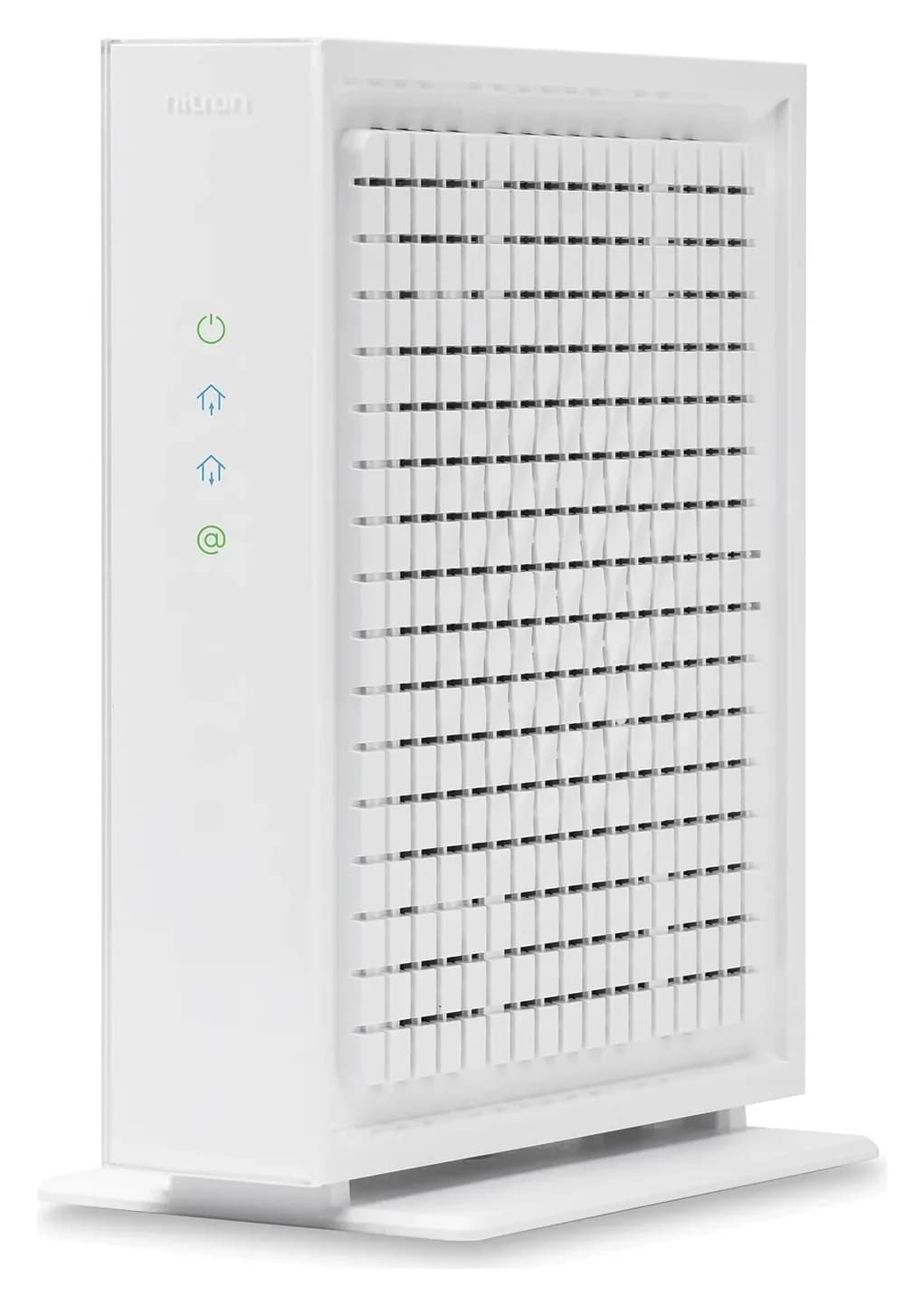
Hitron
A DOCSIS 3.1 cable modem with one 2.5 Gbps Ethernet port, made for cable plans up to 2.5 Gbps.
Check package and model options
- 2.5 Gbps port
The consumer CODA56 offers one 2.5 Gbps Ethernet port and no built-in Wi-Fi. Choose it only after Optimum confirms the exact device: Hitron's retail page lists several cable providers but omits Optimum, and excludes bundled voice service. Its appearance in our broader cable modem guide does not establish Optimum approval.
Limitations: Hitron's datasheet specifies switchable 5–42/5–85 MHz upstream. Do not assume CM3000's high-split capability applies here. There is also a wording mismatch: the product page advertises upload up to 1 Gbps, while the datasheet separately lists up to 700 Mbps for DOCSIS 3.1 OFDMA and up to 320 Mbps for bonded DOCSIS 3.0 upstream. Neither establishes an Optimum upload speed.
Variant trap: order against the full CODA56 model name on the US consumer page and the unit's label. A different listing, finish or bundle is not evidence of a newer hardware revision or Optimum eligibility. Ask for the revision when confirming support.
CODA56 manufacturer specifications
Match download, upload and the router separately
All three have a 2.5 Gbps Ethernet connection. For a plan above gigabit, pair it with a router whose internet/WAN port also supports 2.5 Gbps or faster. NETGEAR explicitly describes connecting CM3000's multi-gig port to a router's multi-gig internet port. For a wired computer, check the router's LAN port and the computer's network adapter too; Hitron's datasheet explains that end-device capabilities and connection quality also limit speeds.
Ask about upload independently of download. NETGEAR's own footnotes make throughput dependent on the subscribed service, and its split-compatibility warning is explicit. Paying for modem capability cannot itself change the account's upload provisioning.
For a new router, use our Wi-Fi router picks. If your objective is better Wi-Fi, first investigate the router and its placement rather than automatically replacing the modem.
What about an Optimum modem router combo?
For a single box, start by checking the supplied gateway's suitability and your account's equipment charge. A retail combo still needs confirmation for the exact cable model and both speed tiers.
Two existing options illustrate the tradeoff. NETGEAR CAX80 combines DOCSIS 3.1 and Wi-Fi 6; NETGEAR's model table marks it Optimum/Altice compatible, rather than certified. ARRIS G54 combines DOCSIS 3.1 and Wi-Fi 7, but its product page does not name Optimum. Neither is a substitute for a confirmed Optimum Phone setup.
Our preference is a separate modem and router when buying both, because you can select and replace the Wi-Fi equipment independently. Compare the arrangements in best modem router combos.
Activate it with a rollback plan
Optimum's own-modem instructions say to call 877.694.9474 for activation. The CM3000 manual asks for account details, model, serial number and MAC address. Prepare those details before disconnecting anything.
Confirm and prepare
Save the eligibility answer, photograph the cable MAC and serial label, and keep the old equipment available during the swap.
Connect and activate
Follow the exact modem's manual and call Optimum for activation; do not follow another ISP's app instructions.
Verify and finish
Check download and upload over Ethernet, then Wi-Fi. If activation fails, ask support to restore the previous modem. Arrange any required equipment return after service works.
Do not treat an illuminated Online indicator as proof of activation: NETGEAR's manual explicitly says activation is still required. Optimum's self-setup page says replaced provider equipment must be returned to avoid an unreturned-equipment charge. Retain the return receipt and check the equipment entry on your account; keeping a rollback option is not permission to keep loaned equipment indefinitely.
Check the whole Black Friday or Cyber Monday basket
Before comparing offers, write down modem + router or mesh + any needed Ethernet connections. For a combo, check that you are buying the exact gateway rather than a modem-only model. Confirm condition, accessories, warranty eligibility and the return deadline before ordering.
Optimum says customer-owned modems do not include its equipment technical support or malfunction/upgrade replacements. Ownership makes most sense when you have a confirmed equipment benefit, an eligible model and a complete router plan. Skip a promotional bundle that solves none of those needs.
How we choose
This is a document-based comparison, without physical product testing. We checked Optimum's published equipment criteria, phone table and activation guidance against the exact manufacturers' pages, NETGEAR's model-specific compatibility table and official manuals/datasheets. CODA56 serves the buyer who needs a standalone DOCSIS 3.1 modem with one 2.5 Gbps router connection and has obtained exact-model account confirmation. CM3000 still leads on explicit published Optimum compatibility evidence; S34's warranty remains a separate comparison point. Our conditional CODA56 pick does not establish either that compatibility listing or a high-split upgrade. We name conflicting maker claims and leave address-specific activation, firmware and upload provisioning for account confirmation. Method: How we choose.
Verdict
For cable internet-only accounts, choose CODA56 only after explicit support confirmation of the exact model and both speed tiers, and pair it with a separate router. If Optimum cannot confirm it for your address, keep the working gateway. Keep the fiber or voice equipment until the appropriate replacement is arranged. If the current gateway meets your needs and there is no charge to remove, keeping it is our default recommendation.
Frequently asked questions
Which modems does Optimum support?
Optimum's published internet-only criteria permit DOCSIS-certified DOCSIS 3.1 modems and gateways and exclude DOCSIS 3.0 and 2.0. That is a technology requirement, rather than a model-specific speed guarantee. NETGEAR separately lists CM3000 as compatible with Optimum/Altice. Before ordering, ask Optimum to confirm your exact model, service address, download tier and upload tier.
Can I replace my Optimum Fiber gateway with a cable modem?
Keep the supplied fiber equipment. Optimum explains that fiber needs an optical network terminal, or ONT, instead of a traditional modem, and its technician installs the gateway. A DOCSIS cable modem is the wrong replacement. If you want your own Wi-Fi router, ask Optimum about the connection and operating mode supported by your particular gateway.
Will CM3000, S34 or CODA56 work with Optimum Phone?
These are internet-only choices: their manufacturers exclude bundled voice or specify no digital voice capability. Optimum's separate phone-certified table lists ARRIS TM3402, with two voice lines and no Wi-Fi. Keep your existing voice equipment until Optimum confirms a replacement arrangement. Do not assume another modem with phone sockets is certified for Optimum Phone.
How do I activate my own Optimum modem?
Optimum directs customers activating their own modem to call 877.694.9474. Have your account details and the modem's model, serial number and cable MAC address ready; NETGEAR's CM3000 manual identifies these as activation information. After activation, check both download and upload performance before completing the return of any provider-owned equipment.
Hitron CODA56
AmazonRelated guides
Best picks · Cable Modems
Best Modems for Sparklight: Compatible Picks, Voice and Setup
Choose a Sparklight-compatible modem with the right approval, upload limit and Ethernet port. Compare picks, phone equipment, the complete kit and activation.
Best picks · Cable Modems
Best Modems for Midco: Check Approval Before You Buy
Find the right Midco modem by address and plan. Compare CODA56, CM3000 and S34 candidates, separate fiber from cable, and prepare your router and activation.
Comparison · Cable Modems
ARRIS S33 vs S34: Which Cable Modem Fits Your Upload Tier?
Keep your ARRIS S33 or choose S34 for a confirmed upload upgrade. Compare ports, provider approval, model revisions, voice limits and the kit you actually need.