

Comparison
UGREEN DXP2800 vs DXP4800 Plus
Two Bays or Four, 2.5G or 10G?
Choose the right UGREEN NAS with equal-capacity drive baskets, independent backup, laptop-to-NAS network checks, and clear advice on memory, Plex and bundles.
By thisPING EditorialUpdated November 3, 20268 min read2 picks
Our recommendation: UGREEN DXP2800
Best for a household mirror
Limit: Memory tops out at 16 GB
On this page · Our picks at a glance
Our picks at a glance
- 1

- 2
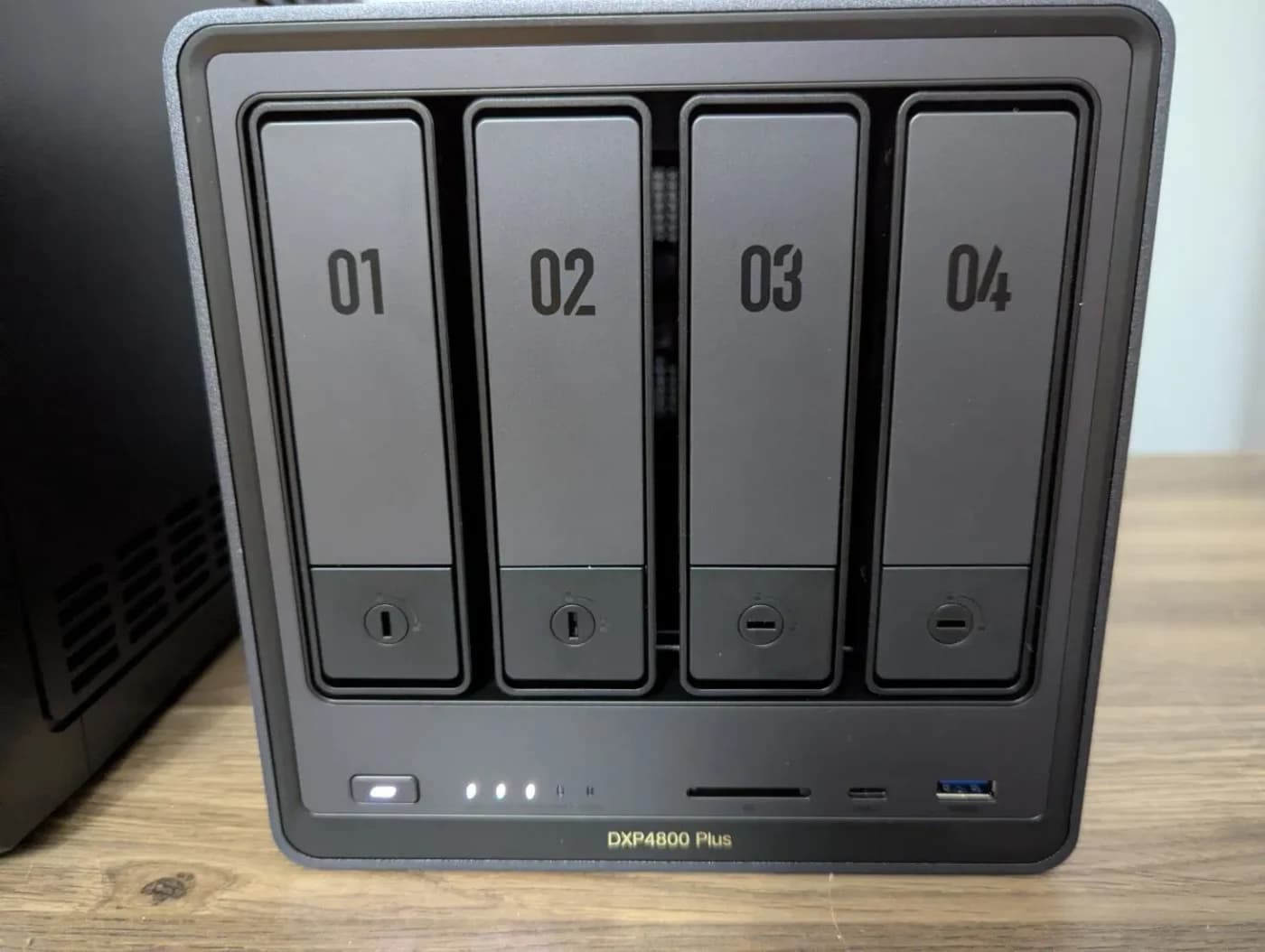
Choose for: Best for expansion and faster networking
Check before buying: The 10GbE port needs 10G gear on the other end to pay off
Choose the UGREEN DXP2800 for a household file store built around a mirrored pair of drives and a 2.5GbE connection. Choose the DXP4800 Plus if you expect to add SATA drives, need RAID 5 or RAID 6, or have a computer and network ready to use its 10GbE port. Our default is the DXP2800 for a settled storage plan; the Plus earns its place through expansion you can actually use.
Official hardware and software documentation checked November 2, 2026. Capacity examples are calculations, and recommendations are based on published specifications.
Quick choice and exact specifications
The DXP2800 has two SATA bays and one 2.5GbE port; the Plus has four SATA bays, one 10GbE port and one 2.5GbE port. Hardware rows below follow UGREEN's model-specific DXP2800 specifications and DXP4800 Plus specifications; storage modes follow its RAID documentation.
- 2 baysDXP2800 SATA positions
- 4 baysDXP4800 Plus SATA positions
- 2.5GbEDXP2800 Ethernet connection
- 10GbEPlus's fastest Ethernet connection
Our pick for
- DXP2800
- A mirrored household file store
- DXP4800 Plus
- Growing storage and a planned faster network
Processor
- DXP2800
- Intel N100; four cores, four threads
- DXP4800 Plus
- Intel Pentium Gold 8505; five cores, six threads
Installed memory
- DXP2800
- 8GB DDR5
- DXP4800 Plus
- 8GB DDR5
Memory expansion
- DXP2800
- One slot; 16GB maximum
- DXP4800 Plus
- Two slots; 64GB maximum
SATA bays
- DXP2800
- Two, for 2.5/3.5-inch drives
- DXP4800 Plus
- Four, for 2.5/3.5-inch drives
Additional SSD positions
- DXP2800
- Two M.2 2280 NVMe
- DXP4800 Plus
- Two M.2 2280 NVMe
Ethernet
- DXP2800
- One 2.5GbE
- DXP4800 Plus
- One 10GbE plus one 2.5GbE
Storage modes
- DXP2800
- Basic, JBOD, RAID 0 and 1
- DXP4800 Plus
- Basic, JBOD, RAID 0, 1, 5, 6 and 10
USB storage connection
- DXP2800
- Front USB-A and USB-C Gen 2; rear USB Gen 1
- DXP4800 Plus
- Front USB-A and USB-C Gen 2; rear USB Gen 1
Full comparison table
Swipe to compare. Row labels stay visible.
| What changes | DXP2800 | DXP4800 Plus |
|---|---|---|
| Our pick for | A mirrored household file store | Growing storage and a planned faster network |
| Processor | Intel N100; four cores, four threads | Intel Pentium Gold 8505; five cores, six threads |
| Installed memory | 8GB DDR5 | 8GB DDR5 |
| Memory expansion | One slot; 16GB maximum | Two slots; 64GB maximum |
| SATA bays | Two, for 2.5/3.5-inch drives | Four, for 2.5/3.5-inch drives |
| Additional SSD positions | Two M.2 2280 NVMe | Two M.2 2280 NVMe |
| Ethernet | One 2.5GbE | One 10GbE plus one 2.5GbE |
| Storage modes | Basic, JBOD, RAID 0 and 1 | Basic, JBOD, RAID 0, 1, 5, 6 and 10 |
| USB storage connection | Front USB-A and USB-C Gen 2; rear USB Gen 1 | Front USB-A and USB-C Gen 2; rear USB Gen 1 |
Scroll horizontally to see every column
| What changes | DXP2800 | DXP4800 Plus |
|---|---|---|
| Our pick for | A mirrored household file store | Growing storage and a planned faster network |
| Processor | Intel N100; four cores, four threads | Intel Pentium Gold 8505; five cores, six threads |
| Installed memory | 8GB DDR5 | 8GB DDR5 |
| Memory expansion | One slot; 16GB maximum | Two slots; 64GB maximum |
| SATA bays | Two, for 2.5/3.5-inch drives | Four, for 2.5/3.5-inch drives |
| Additional SSD positions | Two M.2 2280 NVMe | Two M.2 2280 NVMe |
| Ethernet | One 2.5GbE | One 10GbE plus one 2.5GbE |
| Storage modes | Basic, JBOD, RAID 0 and 1 | Basic, JBOD, RAID 0, 1, 5, 6 and 10 |
| USB storage connection | Front USB-A and USB-C Gen 2; rear USB Gen 1 | Front USB-A and USB-C Gen 2; rear USB Gen 1 |
Read the full model name. UGREEN's shared DXP4800-series overview includes a dual-2.5GbE paragraph explicitly describing the non-Plus DXP4800. The Plus-specific specifications list 10GbE plus 2.5GbE. Do not carry that shared overview's port description across to the Plus.
Best for a household mirror: DXP2800
UGREEN
A two-bay NAS with an Intel N100, 8 GB DDR5, a 2.5GbE port, two M.2 NVMe slots and 4K HDMI output.
Check package and model options
- 2.5 Gbps port
- 2 bays
We would choose the DXP2800 when the first drive pair can accommodate the planned collection and its growth. Its N100, supplied memory and Ethernet port are a sensible starting specification for shared files; buy the independent backup before optional memory or SSDs.
The limit is physical: populate both SATA bays and there is no bay for another SATA drive. RAID 1 provides the capacity of the smaller member, so adding up the labels on a mirrored pair overstates usable storage. UGREEN documents these RAID capacity rules.
Best for expansion and faster networking: DXP4800 Plus
UGREEN
A four-bay NAS with an Intel Pentium Gold 8505, 8 GB DDR5, one 10GbE and one 2.5GbE port, and two M.2 NVMe slots.
Check package and model options
- 10 Gbps port
- 4 bays
Choose the Plus for its extra drive positions and memory expansion before treating 10GbE as a reason by itself. Its Pentium Gold 8505 and higher memory ceiling make it our preferred candidate for a larger app plan, subject to each application's requirements.
You can also start with a mirrored pair here. UGREEN's current RAID-change procedure documents RAID 1 to RAID 5 conversion with an additional drive. It requires a normal pool and a healthy unused drive at least as large as the smallest existing member, and recommends matching brand, model and capacity. Back up first. The procedure is written for UGOS Pro 1.19.1.0126 or later; its automated summary still mentions an earlier release.
Two complete baskets at the same usable capacity
Planning target: 6 TB of live files in a nominal 8 TB protected pool, leaving a nominal 2 TB reserve. This is our example, not a UGREEN free-space requirement. Actual usable space can be lower; size against the formatted volume before filling it.
These baskets assume a diskless enclosure and an existing Windows 11 Intel/AMD laptop with a documented Thunderbolt 3 port and USB 3.0 Type-C support. Check your laptop first; the adapters below serve the computer, not the NAS.
Enclosure
- DXP2800 basket
- DXP2800
- DXP4800 Plus basket
- DXP4800 Plus
Exact internal drive order
- DXP2800 basket
- Two Seagate IronWolf 8 TB ST8000VN004
- DXP4800 Plus basket
- Three Seagate IronWolf 4 TB ST4000VN006
Storage layout
- DXP2800 basket
- RAID 1 mirror
- DXP4800 Plus basket
- RAID 5 parity
Nominal capacity calculation
- DXP2800 basket
- 8 TB: smallest drive
- DXP4800 Plus basket
- 8 TB: (three drives minus one) × 4 TB
Nominal reserve at our target
- DXP2800 basket
- 2 TB
- DXP4800 Plus basket
- 2 TB
Drive-failure tolerance
- DXP2800 basket
- One drive
- DXP4800 Plus basket
- One drive
Empty SATA bays
- DXP2800 basket
- None
- DXP4800 Plus basket
- One
Independent backup
- DXP2800 basket
- One WD Elements Desktop 12 TB WDBWLG0120HBK-NESN
- DXP4800 Plus basket
- The same independent 12 TB destination
Laptop adapter, if required
- DXP2800 basket
- TP-Link UE302C, USB-C to 2.5GbE
- DXP4800 Plus basket
- QNAP QNA-T310G1T, Thunderbolt 3 to 10GbE
Switch, if required
- DXP2800 basket
- QNAP QSW-1108-8T-R2, eight 2.5GbE ports
- DXP4800 Plus basket
- QNAP QSW-2104-2T-R2, two 10G plus four 2.5G ports
Cable requirement
- DXP2800 basket
- Three Ethernet patch leads total; reuse suitable supplied leads
- DXP4800 Plus basket
- Three Ethernet patch leads total; choose Cat6a for the 10G links
Optional RAM/NVMe order
- DXP2800 basket
- None in this starting basket
- DXP4800 Plus basket
- None in this starting basket
Full comparison table
Swipe to compare. Row labels stay visible.
| Order line | DXP2800 basket | DXP4800 Plus basket |
|---|---|---|
| Enclosure | DXP2800 | DXP4800 Plus |
| Exact internal drive order | Two Seagate IronWolf 8 TB ST8000VN004 | Three Seagate IronWolf 4 TB ST4000VN006 |
| Storage layout | RAID 1 mirror | RAID 5 parity |
| Nominal capacity calculation | 8 TB: smallest drive | 8 TB: (three drives minus one) × 4 TB |
| Nominal reserve at our target | 2 TB | 2 TB |
| Drive-failure tolerance | One drive | One drive |
| Empty SATA bays | None | One |
| Independent backup | One WD Elements Desktop 12 TB WDBWLG0120HBK-NESN | The same independent 12 TB destination |
| Laptop adapter, if required | TP-Link UE302C, USB-C to 2.5GbE | QNAP QNA-T310G1T, Thunderbolt 3 to 10GbE |
| Switch, if required | QNAP QSW-1108-8T-R2, eight 2.5GbE ports | QNAP QSW-2104-2T-R2, two 10G plus four 2.5G ports |
| Cable requirement | Three Ethernet patch leads total; reuse suitable supplied leads | Three Ethernet patch leads total; choose Cat6a for the 10G links |
| Optional RAM/NVMe order | None in this starting basket | None in this starting basket |
Scroll horizontally to see every column
| Order line | DXP2800 basket | DXP4800 Plus basket |
|---|---|---|
| Enclosure | DXP2800 | DXP4800 Plus |
| Exact internal drive order | Two Seagate IronWolf 8 TB ST8000VN004 | Three Seagate IronWolf 4 TB ST4000VN006 |
| Storage layout | RAID 1 mirror | RAID 5 parity |
| Nominal capacity calculation | 8 TB: smallest drive | 8 TB: (three drives minus one) × 4 TB |
| Nominal reserve at our target | 2 TB | 2 TB |
| Drive-failure tolerance | One drive | One drive |
| Empty SATA bays | None | One |
| Independent backup | One WD Elements Desktop 12 TB WDBWLG0120HBK-NESN | The same independent 12 TB destination |
| Laptop adapter, if required | TP-Link UE302C, USB-C to 2.5GbE | QNAP QNA-T310G1T, Thunderbolt 3 to 10GbE |
| Switch, if required | QNAP QSW-1108-8T-R2, eight 2.5GbE ports | QNAP QSW-2104-2T-R2, two 10G plus four 2.5G ports |
| Cable requirement | Three Ethernet patch leads total; reuse suitable supplied leads | Three Ethernet patch leads total; choose Cat6a for the 10G links |
| Optional RAM/NVMe order | None in this starting basket | None in this starting basket |
The exact drives appear in UGREEN's model-selected compatibility pages: ST8000VN004 for DXP2800 and ST4000VN006 for the Plus. Seagate's current IronWolf datasheet lists both exact models as CMR. Recheck compatibility before ordering: UGREEN warns hardware and software changes can affect it. Our NAS drive guide explains other drive choices.
For growth, the Plus can add a matching fourth 4 TB drive to RAID 5: (four minus one) × 4 TB = 12 TB nominal. Alternatively, start the Plus with the DXP2800 basket's mirrored 8 TB pair and leave two bays free. For two-drive fault tolerance at the original capacity target, four 4 TB drives in RAID 6 also yield 8 TB nominal, occupying every bay. These are capacity calculations using UGREEN's RAID rules, not transfer-speed predictions.
The WD 12 TB backup drive includes its USB-A cable and AC adapter. UGREEN's External Storage instructions support recognizable USB storage, including NTFS and exFAT, but exclude APFS/HFS+. This is a documented interface match, not an exact-model UGREEN certification. Confirm recognition, copy the protected folders, restore a sample file, safely eject, and disconnect the backup between jobs. Allow additional backup capacity for retained versions; no fixed history fits every workload.
Trace the laptop-to-NAS path before buying 10G
UGREEN's network troubleshooting guidance says the entire link matters: computer adapter, cables, switch and NAS. It also identifies storage and file size as performance factors. Port rates are link specifications, not promised file-copy speeds.
The UE302C uses USB 3.0 Type-C and provides 2.5GbE. TP-Link lists Windows 11 support but cautions that drivers may need updating after OS changes. The QNA-T310G1T needs Thunderbolt 3, includes its Thunderbolt cable, and requires the Marvell AQtion AQC107 driver on Windows 11. QNAP excludes Windows on ARM. A USB-C connector alone does not establish Thunderbolt compatibility.
Laptop to adapter
Use the UE302C for the 2.5GbE basket, or the QNA-T310G1T with a supported Thunderbolt 3 host for the 10GbE basket.
Adapter to switch
Connect the laptop adapter and NAS to matching-speed ports. On the Plus basket's switch, these use both 10G ports.
Switch to router
Use a 2.5G port for the router uplink in this layout. Local transfers between the two switch-connected endpoints stay on the switch.
Switch to storage
The NAS port is only one limit. The chosen drives, RAID workload and files still determine the copy result.
QNAP specifies eight 2.5GbE ports on the smaller switch and two 10G plus four 2.5G ports on the mixed switch. The router uplink therefore need not consume either 10G port. NETGEAR explains local switching and the router connection; our multi-gig switch guide covers port planning.
If your laptop stays at 2.5GbE, use the smaller basket's networking with either NAS. Choose the Plus for drive expansion now and defer the 10G adapter and switch. If a gigabit link sits between the computer and NAS, that link remains a gigabit limit; upgrading the enclosure cannot remove it.
Check Plex, containers and memory against the job
UGREEN documents Docker, virtual machines and a Plex Docker setup. Its VM guide requires sufficient CPU, memory and volume capacity. Start with the application's requirements and preserve resources for the NAS itself.
For media, Plex's NAS compatibility guidance and hardware-acceleration requirements are the checks that matter. Hardware acceleration needs Plex Pass, supported hardware and a working software path; a Docker installation needs extra device access configuration. Neither CPU name establishes a simultaneous-stream count.
- Yes: Containers | Check image parameters, persistent folders, permissions and ports in UGREEN's Docker instructions.
- Partly: Virtual machines | Allocate CPU, memory and storage for the guest while retaining resources for the host.
- Partly: Plex transcoding | Confirm the exact NAS/software path and media format; verify hardware acceleration in the Plex dashboard.
- No: Automatic upgrade list | Do not order RAM or NVMe solely because expansion slots exist; verify the exact parts and purpose first.
Our Plex versus Jellyfin hardware guide develops the playback checks. If application hosting becomes the main job, compare a separate mini PC through the home-server guide before committing all services to the NAS.
Check variants and the final order
Match DXP2800, Intel N100, or DXP4800 Plus, Pentium Gold 8505, to this comparison. UGREEN's catalog separately lists DXP2800 GT, DXP4800 GT and DXP4800 Pro; the non-Plus DXP4800 also has a different processor from the Plus. Check the complete suffix, condition, regional power supply, installed memory and drive model numbers.
For a bundled offer, write down exactly which HDDs, SSDs and accessories are included. Reconcile those against the basket before ordering duplicates. A supported-capacity headline is not the capacity calculation for your chosen RAID layout; an accessory bundle should not displace the independent backup line. Include power protection in the final plan; our NAS UPS guide covers that purchase separately.
How we choose
We compare official specifications, exact-model compatibility entries and current software procedures, with no measured performance claims. The baskets equalize nominal protected capacity and reserve; recommendations then weigh spare bays, app resources and the complete client connection. Our method is explained at How we choose.
UGREEN's security-support statement lists May 8, 2029 as the security-update support end date for both models. Its minimum commitment runs from product release, not a fresh period starting when you buy. The statement separates software security support from hardware warranty, so check each independently.
Verdict
Buy the DXP2800 for a mirrored file store with a settled growth plan. Buy the DXP4800 Plus when spare SATA capacity, the larger memory ceiling or a complete 10GbE client path solves an identified need. Compare the complete drive-and-backup orders first, then spend on networking that your computer can use.
Frequently asked questions
Is the DXP4800 Plus worth choosing over the DXP2800?
Choose the Plus when you expect to add SATA drives, want RAID 5 or RAID 6, or have a concrete 10GbE networking plan. Its four bays and 64GB memory ceiling provide more room than the DXP2800's two bays and 16GB limit. For a household staying with a mirrored pair and a 2.5GbE client, our pick is the DXP2800.
Do I need a 10GbE router for the DXP4800 Plus?
For the local layout in this guide, connect the NAS and computer to the same multi-gig switch. Put both on its 10G ports when the computer supports 10GbE; the router can use a slower port for internet access. A 2.5GbE laptop adapter still limits that laptop's link to 2.5GbE. Storage and workload also affect actual file-copy speeds.
Can the DXP2800 and DXP4800 Plus run Plex?
UGREEN documents a Docker installation route for Plex. Before choosing either NAS for transcoding, check Plex's NAS compatibility guidance, the installed software, your media formats and the playback device. Hardware-accelerated streaming requires Plex Pass and compatible hardware access; Docker needs extra device configuration. We do not assign either NAS a guaranteed simultaneous-stream count from its processor name.
Should I buy extra RAM and NVMe drives immediately?
Our starting recommendation is to keep the supplied 8GB DDR5 and omit optional NVMe drives until your application plan needs them. UGREEN specifies a 16GB memory maximum for the DXP2800 and 64GB for the Plus; both have two M.2 NVMe positions. Check the exact module or SSD against UGREEN's compatibility information before ordering an upgrade.
UGREEN DXP2800
AmazonRelated guides
Comparison · NAS
UGREEN DH4300 Plus vs DXP4800 Plus: Which Four-Bay NAS Should You Buy?
UGREEN DH4300 Plus vs DXP4800 Plus: compare apps, RAM, networking and the same drive basket, with usable capacity, backup and exact-model buying checks.
Comparison · NAS
UGREEN DXP6800 Pro vs DXP8800 Plus: Buy Six Bays or Eight?
Choose the right UGREEN NAS with equal-capacity drive plans, RAID expansion limits, exact US model checks, network advice, and a separate backup shopping list.
Best picks · NAS
Best All-Flash NVMe NAS: Choose the Enclosure, SSDs and Network Kit
Choose an all-flash NVMe NAS with compatible SSDs, realistic network limits, usable RAID capacity and a separate backup plan. Compare F8 SSD Plus and Flashstor.