

Comparison
Netgear CM2500 vs CM3000
Which Cable Modem Should You Buy in 2026?
The Netgear CM2500 and CM3000 differ mainly in one Ethernet port. We compare plan speeds on Xfinity, Spectrum and Cox, voice limits, kits and which to buy.
By thisPING EditorialUpdated November 5, 20269 min read1 pick
On this page · Our picks at a glance
Our picks at a glance
- 1
Multi-gig pick
2.5 Gbps port
Choose for: Multi-gig pick
Check before buying: No voice (phone) support
For nearly everyone comparing them, the Netgear Nighthawk CM3000 is the modem to buy: it is the same mid/high-split DOCSIS 3.1 cable modem as the CM2500 with a 2.5 Gbps Ethernet port added, so a single cable can carry the 2 Gbps-class plans Netgear lists for it. The CM2500 is the right choice when your plan tops out at 1 Gbps or below: same DOCSIS generation, same upload capability, same chassis, two gigabit ports. Neither has Wi-Fi or phone ports, so both need a separate router. Official specs checked November 4, 2026.
Quick choice
A plan faster than 1 Gbps, or one you might upgrade
- Our pick
- CM3000
- Why
- Its 2.5 Gbps port passes a 2 Gbps-class plan on one cable, no link aggregation needed.
A plan of 1 Gbps or below you'll keep
- Our pick
- CM2500
- Why
- Two gigabit ports cover a gigabit plan; Netgear lists it at 900 Mbps download with Xfinity, Spectrum and Cox.
Phone service from your cable provider
- Our pick
- Neither
- Why
- Both modems have zero voice ports and are not compatible with cable bundled voice services.
Full comparison table
Swipe to compare. Row labels stay visible.
| Your situation | Our pick | Why |
|---|---|---|
| A plan faster than 1 Gbps, or one you might upgrade | CM3000 | Its 2.5 Gbps port passes a 2 Gbps-class plan on one cable, no link aggregation needed. |
| A plan of 1 Gbps or below you'll keep | CM2500 | Two gigabit ports cover a gigabit plan; Netgear lists it at 900 Mbps download with Xfinity, Spectrum and Cox. |
| Phone service from your cable provider | Neither | Both modems have zero voice ports and are not compatible with cable bundled voice services. |
Scroll horizontally to see every column
| Your situation | Our pick | Why |
|---|---|---|
| A plan faster than 1 Gbps, or one you might upgrade | CM3000 | Its 2.5 Gbps port passes a 2 Gbps-class plan on one cable, no link aggregation needed. |
| A plan of 1 Gbps or below you'll keep | CM2500 | Two gigabit ports cover a gigabit plan; Netgear lists it at 900 Mbps download with Xfinity, Spectrum and Cox. |
| Phone service from your cable provider | Neither | Both modems have zero voice ports and are not compatible with cable bundled voice services. |
For the wider field, including 2.5 Gbps models from other brands and the providers' own lists, start with our best cable modems guide.
- 2.5 GbpsFastest Ethernet port (CM3000, per Netgear's spec sheet)
- 1 GbpsTop upload speed both modems list
- 0Voice ports on either modem
- 2Ethernet ports on the CM2500, both gigabit
The one difference that matters: the Ethernet port
Everything else about these modems is the same on paper. Both are DOCSIS 3.1 with mid-split and high-split support for faster upload tiers, both bond 32 downstream and 8 upstream SC-QAM channels plus 2 OFDM downstream and 2 OFDMA upstream channels, and both come in the same 6.8 x 3.7 x 8.2 in, 1.09 lb chassis. The CM3000 gives you one 2.5 Gbps LAN port plus two 1 Gbps LAN ports with link aggregation; the CM2500 gives you only the two 1 Gbps LAN ports with link aggregation.
Cable standard
- CM2500
- DOCSIS 3.1 mid/high-split
- CM3000
- DOCSIS 3.1 mid/high-split
Ethernet ports
- CM2500
- 2x 1 Gbps
- CM3000
- 1x 2.5 Gbps + 2x 1 Gbps
Top download, one cable
- CM2500
- 1 Gbps per gigabit port
- CM3000
- 2.5 Gbps through the 2.5 Gbps port
Top download with link aggregation
- CM2500
- 2 Gbps
- CM3000
- 2 Gbps (its two gigabit ports)
Top upload
- CM2500
- 1 Gbps
- CM3000
- 1 Gbps
Voice ports
- CM2500
- 0
- CM3000
- 0
Bonded channels
- CM2500
- 32 downstream / 8 upstream SC-QAM; 2 OFDM down / 2 OFDMA up
- CM3000
- 32 downstream / 8 upstream SC-QAM; 2 OFDM down / 2 OFDMA up
Dimensions and weight
- CM2500
- 6.8 x 3.7 x 8.2 in; 1.09 lb
- CM3000
- 6.8 x 3.7 x 8.2 in; 1.09 lb
Limited warranty
- CM2500
- See Netgear's warranty page
- CM3000
- See Netgear's warranty page
Included support
- CM2500
- 90-day complimentary technical support after purchase [US only]
- CM3000
- 90-day complimentary technical support after purchase [US only]
Full comparison table
Swipe to compare. Row labels stay visible.
| Official specification | CM2500 | CM3000 |
|---|---|---|
| Cable standard | DOCSIS 3.1 mid/high-split | DOCSIS 3.1 mid/high-split |
| Ethernet ports | 2x 1 Gbps | 1x 2.5 Gbps + 2x 1 Gbps |
| Top download, one cable | 1 Gbps per gigabit port | 2.5 Gbps through the 2.5 Gbps port |
| Top download with link aggregation | 2 Gbps | 2 Gbps (its two gigabit ports) |
| Top upload | 1 Gbps | 1 Gbps |
| Voice ports | 0 | 0 |
| Bonded channels | 32 downstream / 8 upstream SC-QAM; 2 OFDM down / 2 OFDMA up | 32 downstream / 8 upstream SC-QAM; 2 OFDM down / 2 OFDMA up |
| Dimensions and weight | 6.8 x 3.7 x 8.2 in; 1.09 lb | 6.8 x 3.7 x 8.2 in; 1.09 lb |
| Limited warranty | See Netgear's warranty page | See Netgear's warranty page |
| Included support | 90-day complimentary technical support after purchase [US only] | 90-day complimentary technical support after purchase [US only] |
Scroll horizontally to see every column
| Official specification | CM2500 | CM3000 |
|---|---|---|
| Cable standard | DOCSIS 3.1 mid/high-split | DOCSIS 3.1 mid/high-split |
| Ethernet ports | 2x 1 Gbps | 1x 2.5 Gbps + 2x 1 Gbps |
| Top download, one cable | 1 Gbps per gigabit port | 2.5 Gbps through the 2.5 Gbps port |
| Top download with link aggregation | 2 Gbps | 2 Gbps (its two gigabit ports) |
| Top upload | 1 Gbps | 1 Gbps |
| Voice ports | 0 | 0 |
| Bonded channels | 32 downstream / 8 upstream SC-QAM; 2 OFDM down / 2 OFDMA up | 32 downstream / 8 upstream SC-QAM; 2 OFDM down / 2 OFDMA up |
| Dimensions and weight | 6.8 x 3.7 x 8.2 in; 1.09 lb | 6.8 x 3.7 x 8.2 in; 1.09 lb |
| Limited warranty | See Netgear's warranty page | See Netgear's warranty page |
| Included support | 90-day complimentary technical support after purchase [US only] | 90-day complimentary technical support after purchase [US only] |
Sources: Netgear's CM2500 page, CM3000 page and the CM2500 and CM3000 technical specification sheets. These are maker-published specifications, not measured throughput.
Source: Netgear's CM2500 and CM3000 pages (linked above)
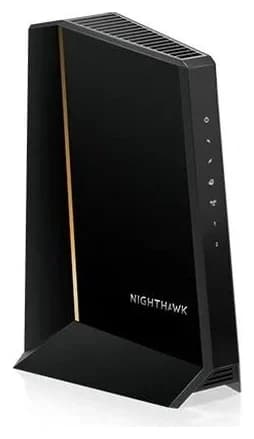
Multi-gig pick: Netgear Nighthawk CM3000
The CM3000 is the future-proofed of the pair. Netgear's page describes it as engineered for today's fastest cable speeds, "such as Xfinity's 2Gbps download speeds and 200Mbps upload speeds", and its 2.5 Gbps port is what lets a single Ethernet cable carry more than a gigabit. Netgear's End of Service policy ends firmware and security updates, in general, three years after a product's last sale date.
Netgear
A DOCSIS 3.1 cable modem with a 2.5 Gbps Ethernet port and mid/high-split support for faster upload tiers.
Check package and model options
- 2.5 Gbps port
- One 2.5 Gbps LAN port with auto-sensing plus two 1 Gbps LAN ports with link aggregation
- Up to 2.5 Gbps download and 1 Gbps upload, per Netgear
- 32x8 SC-QAM channel bonding, 2 OFDM downstream and 2 OFDMA upstream channels
- No Wi-Fi, no voice ports: pair it with a router or mesh system
- In the box: modem, one Ethernet cable, power adapter, quick start guide
The trade-offs: the CM3000 is the more expensive of the two, and its spec sheet points to Netgear's warranty page rather than stating a term. If your plan is at or below the tier your provider authorizes for the CM2500, the CM2500 below is enough modem.
Gigabit-plan pick: Netgear Nighthawk CM2500
The CM2500 is the same modem for slower plans. It carries the same mid/high-split DOCSIS 3.1 radio design, the same channel bonding, and Netgear's comparison table lists it at 900 Mbps download and 100 Mbps upload with Xfinity, 900 Mbps and 35 Mbps with Spectrum, and 900 Mbps and 100 Mbps with Cox — exactly the gigabit-and-below tier range it is built for.
- Two 1 Gbps LAN ports with link aggregation for up to 2 Gbps to a router that supports it
- Up to 1 Gbps upload, per Netgear
- Limited warranty; see Netgear's warranty page for duration and details
- Same 6.8 x 3.7 x 8.2 in, 1.09 lb chassis as the CM3000
- No Wi-Fi, no voice ports: pair it with a router or mesh system
The trade-offs: there is no 2.5 Gbps port, so a single cable tops out at gigabit and the advertised 2 Gbps depends entirely on link aggregation. Providers list it for slower tiers than the CM3000 (see the table below). Buy it only when a gigabit plan is genuinely your ceiling.
Provider compatibility today
Both modems are approved in the same places, per Netgear's ISP compatibility article: Netgear marks both as certified with Comcast/Xfinity, Cox and Spectrum/Charter, and as compatible with Astound (Grande, RCN, Wave), Breezeline, Mediacom, Optimum/Altice and SparkLight. In Netgear's terms, certified means tested by that ISP and guaranteed by the ISP to work on its networks, while compatible means the device meets that ISP's requirements and should work.
- Yes: Certified with Comcast/Xfinity, Cox and Spectrum/Charter (both modems)
- Yes: Compatible with Astound, Breezeline, Mediacom, Optimum/Altice and SparkLight (both modems)
- No: Cable bundled voice services and fiber internet (both modems)
What differs is the plan speed Netgear lists for each provider:
Xfinity
- CM2500
- 900 Mbps down / 100 Mbps up
- CM3000
- 2 Gbps down / 200 Mbps up
Spectrum
- CM2500
- 900 Mbps down / 35 Mbps up
- CM3000
- 1 Gbps down / 35 Mbps up
Cox
- CM2500
- 900 Mbps down / 100 Mbps up
- CM3000
- 1 Gbps down / 100 Mbps up
Full comparison table
Swipe to compare. Row labels stay visible.
| Maximum plan speeds Netgear lists | CM2500 | CM3000 |
|---|---|---|
| Xfinity | 900 Mbps down / 100 Mbps up | 2 Gbps down / 200 Mbps up |
| Spectrum | 900 Mbps down / 35 Mbps up | 1 Gbps down / 35 Mbps up |
| Cox | 900 Mbps down / 100 Mbps up | 1 Gbps down / 100 Mbps up |
Scroll horizontally to see every column
| Maximum plan speeds Netgear lists | CM2500 | CM3000 |
|---|---|---|
| Xfinity | 900 Mbps down / 100 Mbps up | 2 Gbps down / 200 Mbps up |
| Spectrum | 900 Mbps down / 35 Mbps up | 1 Gbps down / 35 Mbps up |
| Cox | 900 Mbps down / 100 Mbps up | 1 Gbps down / 100 Mbps up |
Those are Netgear's figures, and actual throughput varies with your subscription and network traffic. Verify the modem against your provider's own current list before buying: our best cable modems guide links each provider's list, and Xfinity's results depend on your address. Netgear also cautions that if your provider does not provide DOCSIS 3.1 service, the modem will only work as a DOCSIS 3.0 modem.
Voice service: the exclusion that decides some buyers
This is the one requirement that rules out both modems. Netgear lists zero voice ports on each, states each is "not compatible with Cable bundled voice services or fiber Internet services", and the CM3000 page adds "Not compatible with Xfinity Voice plans." If your home phone comes over your cable line, you need a telephony gateway (a modem with phone ports, such as Netgear's own CM2050V, which has two voice ports) or a provider voice solution — see our modem-router combo guide for the gateway route. On fiber, neither modem applies at all.
The complete kit
Neither modem includes Wi-Fi, so budget for a router. Our modem vs router guide explains the division of labor; the short version is that the modem talks to your provider and the router talks to your devices.
Check your provider's own modem list
Confirm the exact model is approved for your plan tier, and note the upload tiers it allows for customer-owned modems.
Match the modem to your plan
Faster than 1 Gbps now or later: CM3000. Staying at 1 Gbps or below: CM2500.
Pick a router whose WAN port fits
A 2.5 Gbps WAN port for the CM3000's fast port; for the CM2500's 2 Gbps claim, one that supports link aggregation.
Activate, then register
Activate with your provider, then register at Netgear to keep the limited warranty valid; complimentary support runs 90 days.
Ethernet quality matters at multi-gig speeds: our Wi-Fi 7 router picks pair well with the CM3000's 2.5 Gbps port, and a Cat 6 or better patch cable is enough for 2.5 Gbps over short runs.
Rental savings, warranty and replacement
Owning either modem eliminates the monthly rental fee. Netgear says owning saves up to 300 dollars a year in ISP rental fees; its technical sheets add that savings shown may vary by cable service provider. Both modems include 90-day complimentary technical support following purchase from an authorized reseller [US only]. Each technical sheet points to Netgear's warranty page and says the warranty is valid only when purchased from a NETGEAR authorized reseller, so confirm the duration and registration requirements there. For replacement planning, Netgear's End of Service policy generally ends firmware and security updates three years after a product's last sale date.
How we choose
We haven't lab-tested or speed-tested these modems. Every specification here comes from Netgear's own CM2500 and CM3000 product pages and their technical specification sheets, the compatibility claims from Netgear's ISP compatibility article, and the FCC status from the FCC's Conditional Approval public notice, all checked November 4, 2026. Where Netgear's own numbers are marketing claims — top speeds, plan-speed tables, rental savings — we label them as the maker's figures and point you to your provider's list for the final word. More on our method: How we choose.
Buying guide
Decide by plan, then by router. The plan-speed table above is the whole decision on paper: above 1 Gbps the CM2500 is not in contention, and at 1 Gbps or below the CM3000's extra port buys you nothing today. Then check the router you own or plan to buy — the CM3000 wants a 2.5 Gbps WAN port, and the CM2500's 2 Gbps rating wants link aggregation.
Upgrade triggers. Any of these point to the CM3000: your provider offers a 2 Gbps-class plan in your area; you are buying a router with a 2.5 Gbps WAN port anyway (common on current Wi-Fi 7 routers); your provider announces faster upload tiers it authorizes for customer-owned mid/high-split modems; or you are replacing a DOCSIS 3.0 modem and want one purchase to cover the next few years.
Stay-with-CM2500 triggers. Your plan is 1 Gbps or below and your router's WAN port is gigabit; or you are on Spectrum, where Netgear lists both modems at 1 Gbps download or less and 35 Mbps upload — the CM3000's port cannot help you there.
One more comparison worth making. If you are weighing the CM3000 against the ARRIS SURFboard S34, another 2.5 Gbps mid-split-era modem, our S33 vs S34 comparison covers that pair's differences.
Verdict
The Netgear Nighthawk CM3000 is the pick for anyone on or near a 2 Gbps-class cable plan: its 2.5 Gbps port is the only thing separating it from the CM2500, and it is the thing that makes multi-gig plans work on one cable. The CM2500 is the value-correct choice for gigabit-and-below plans, including anything you would run on Spectrum, as long as you accept that its advertised 2 Gbps needs a link-aggregation router and two cables. Buy neither if your cable plan includes home phone service — both have zero voice ports — and see our best cable modems guide for the full field.
Frequently asked questions
Is the Netgear CM3000 better than the CM2500?
It is the stronger modem on paper, and the key difference is its 2.5 Gbps Ethernet port. Netgear's own comparison lists the CM3000 at 2 Gbps download and 200 Mbps upload with Xfinity, against 900 Mbps and 100 Mbps for the CM2500. If your plan is at or below the tier your provider authorizes for the CM2500, it is sufficient; check the provider's current tier limits first.
Is the Netgear CM2500 or CM3000 good for Spectrum?
Both work. Netgear's compatibility article lists each modem as certified with Spectrum/Charter, and Spectrum authorizes customer-owned modems for its non-symmetrical tiers up to 1G. Netgear's comparison table lists both modems at 900 Mbps to 1 Gbps download and 35 Mbps upload on Spectrum, so on Spectrum there is no speed reason to pay for the CM3000's 2.5 Gbps port.
Does either modem support phone service?
No. Netgear lists zero voice ports on both modems and says neither is compatible with cable bundled voice services or Xfinity Voice plans. If your home phone line comes from your cable provider, keep using a provider voice gateway for the phone side, or ask your provider about its current voice options before buying either modem.
Can the CM2500 really deliver 2 Gbps?
Only through link aggregation. Netgear rates the CM2500 at up to 2 Gbps download 'with link aggregation', meaning both of its gigabit ports connected to a router that supports aggregating them. A single cable from a CM2500 carries at most the speed of one gigabit port. The CM3000's 2.5 Gbps port can carry a multi-gig plan on one cable, subject to the plan and provider authorization Netgear lists.
Will these modems work if my provider moves to faster upload speeds?
That is what their mid/high-split design is for. Netgear says mid-split technology is currently being offered by some ISPs in some regions and high-split technology may be offered by ISPs in the future, and both modems support both. The part to verify with your provider is which upload-split plan tiers it authorizes customer-owned modems for, since providers list supported modems per tier.
Related guides
Best picks · Cable Modems
Best Modems for Spectrum in 2026, by Speed Tier and Phone Service
Buying your own Spectrum modem: the four DOCSIS 3.1 models worth it by tier, which work with Spectrum phone service, and the activation checklist. Checked Nov 4.
Best picks · Cable Modems
Best Modems for Midco: Check Approval Before You Buy
Find the right Midco modem by address and plan. Compare CODA56, CM3000 and S34 candidates, separate fiber from cable, and prepare your router and activation.
Best picks · Cable Modems
Best Modems for Sparklight: Compatible Picks, Voice and Setup
Choose a Sparklight-compatible modem with the right approval, upload limit and Ethernet port. Compare picks, phone equipment, the complete kit and activation.