

Best picks
Best Modems for Spectrum in 2026, by Speed Tier and Phone Service
Buying your own Spectrum modem: the four DOCSIS 3.1 models worth it by tier, which work with Spectrum phone service, and the activation checklist. Checked Nov 4.
By thisPING EditorialUpdated November 5, 20267 min read4 picks
On this page · Our picks at a glance
Our picks at a glance
- 1
Gigabit and faster plans
2.5 Gbps port
Choose for: 2.5 GbE with mid- and high-split support for compatible cable plans.
Limit: No Wi-Fi or bundled voice. Upload upgrades depend on the provider and region.
- 2
Future upload speeds
Choose for: A 2.5 GbE port, a second gigabit port and a two-year limited warranty.
Limit: No Wi-Fi or voice. The maker does not specify mid- versus high-split; check your provider’s exact-model list.
- 3
Simple multi-gig value
2.5 Gbps port
Choose for: Simple multi-gig value
Check before buying: Only one Ethernet port
Show all 4 picks
- 4
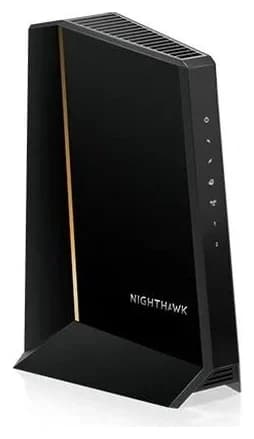
For most Spectrum homes that want to stop renting, the Netgear Nighthawk CM3000 is the strongest pick: Netgear rates it at up to 2.5 Gbps download and up to 1 Gbps upload, while its provider table lists the Spectrum maximum as 1 Gbps/35 Mbps, and its mid/high-split DOCSIS 3.1 design plus 2.5 Gbps port support higher-upstream cable technology where Spectrum offers it and certifies the modem. If you want to be first in line for upload speed upgrades, the ARRIS SURFboard S34 is rated for plans up to 2.5 Gbps with next-generation upstream. The Hitron CODA56 is a straightforward multi-gig pick Hitron says is approved by Charter Spectrum, and the ARRIS SURFboard G54 replaces both your modem and your router with one DOCSIS 3.1 plus Wi-Fi 7 box. None of these support Spectrum phone service, so confirm your voice needs first. Provider policy and maker pages checked November 4, 2026.
Confirm two things before you buy
Spectrum requires subscribers to use an authorized modem on its network, and its policy splits approved devices into two groups: Recommended Modems, which passed Charter's full performance certification testing, and Minimally Qualified Modems, which passed only minimal testing to confirm they will not cause harm to the network and "may not have the capability of delivering the purchased Internet service speed." Spectrum says a modem must pass CableLabs certification, FCC certification, and Charter's certification process to be authorized. Both lists live at spectrum.net/modems.
So before spending anything: check your exact Spectrum speed tier in your account, and check whether you have Spectrum phone service. Every modem in this guide is data-only, and both Netgear and Hitron state plainly that their modems are not compatible with bundled cable voice services. If you have Spectrum phone, ask Spectrum which voice-capable equipment they support before replacing your rented box, or keep their phone equipment and pair it with your own data modem.
Quick picks
Compare specifications and all conditions
Netgear Nighthawk CM3000
- Best for
- Gigabit and faster plans
- Spectrum max (maker's table)
- 1 Gbps / 35 Mbps
- Ethernet ports
- 1x 2.5 Gbps + 2x 1 Gbps
All specifications
- Built-in Wi-Fi
- No
ARRIS SURFboard S34
- Best for
- Future upload speeds
- Spectrum max (maker's table)
- Up to 2.5 Gbps (next-gen upstream)
- Ethernet ports
- 1x 2.5 GB + 1x 1 GB
All specifications
- Built-in Wi-Fi
- No
Hitron CODA56
- Best for
- Simple multi-gig value
- Spectrum max (maker's table)
- Plans up to 2.5 Gbps
- Ethernet ports
- 1x 2.5 Gigabit
All specifications
- Built-in Wi-Fi
- No
ARRIS SURFboard G54
- Best for
- One-box replacement
- Spectrum max (maker's table)
- Up to 2.5 Gbps
- Ethernet ports
- 1x 10 Gbps + 4x 1 Gigabit
All specifications
- Built-in Wi-Fi
- BE18000 Wi-Fi 7
Full comparison table
Swipe to compare. Row labels stay visible.
| Pick | Best for | Spectrum max (maker's table) | Ethernet ports | Built-in Wi-Fi |
|---|---|---|---|---|
| Netgear Nighthawk CM3000 | Gigabit and faster plans | 1 Gbps / 35 Mbps | 1x 2.5 Gbps + 2x 1 Gbps | No |
| ARRIS SURFboard S34 | Future upload speeds | Up to 2.5 Gbps (next-gen upstream) | 1x 2.5 GB + 1x 1 GB | No |
| Hitron CODA56 | Simple multi-gig value | Plans up to 2.5 Gbps | 1x 2.5 Gigabit | No |
| ARRIS SURFboard G54 | One-box replacement | Up to 2.5 Gbps | 1x 10 Gbps + 4x 1 Gigabit | BE18000 Wi-Fi 7 |
Scroll horizontally to see every column
| Pick | Best for | Spectrum max (maker's table) | Ethernet ports | Built-in Wi-Fi |
|---|---|---|---|---|
| Netgear Nighthawk CM3000 | Gigabit and faster plans | 1 Gbps / 35 Mbps | 1x 2.5 Gbps + 2x 1 Gbps | No |
| ARRIS SURFboard S34 | Future upload speeds | Up to 2.5 Gbps (next-gen upstream) | 1x 2.5 GB + 1x 1 GB | No |
| Hitron CODA56 | Simple multi-gig value | Plans up to 2.5 Gbps | 1x 2.5 Gigabit | No |
| ARRIS SURFboard G54 | One-box replacement | Up to 2.5 Gbps | 1x 10 Gbps + 4x 1 Gigabit | BE18000 Wi-Fi 7 |
Netgear Nighthawk CM3000: best overall
Netgear
A DOCSIS 3.1 cable modem with a 2.5 Gbps Ethernet port and mid/high-split support for faster upload tiers.
Check package and model options
- 2.5 Gbps port
The CM3000 is a mid/high-split DOCSIS 3.1 modem engineered for the fastest current cable plans: Netgear specs it at up to 2.5 Gbps download and up to 1 Gbps upload, and its provider comparison table lists the Spectrum maximum as 1 Gbps download, 35 Mbps upload. Mid/high-split is the technology behind the newest high-upload cable tiers, so the hardware will not be the thing holding you back if Spectrum upgrades your area.
Around back are one 2.5 Gbps Ethernet port and two 1 Gbps ports, so you can run your router's multi-gig internet port straight into the 2.5 Gig port, or use the two Gigabit ports with link aggregation for up to 2 Gbps. Netgear notes it works with Xfinity from Comcast, Spectrum, Cox and other US cable providers, and is not compatible with cable bundled voice services or fiber internet. Warranty coverage applies only when the CM3000 is purchased from a NETGEAR authorized reseller and registered at NETGEAR's site; see Netgear's warranty page for duration and details.
ARRIS SURFboard S34: best for future upload speeds
ARRIS rates the S34 for cable internet speed plans up to 2.5 Gbps with Next Gen Upstream — the S34's headline feature is its 2 downstream x 2 upstream OFDM DOCSIS 3.1 channels, aimed at the higher upload speeds cable operators are rolling out. If your area gets a mid-split or high-split upgrade, this is the modem already built for it.
The S34 has one 2.5 GB and one 1 GB Ethernet port and no built-in Wi-Fi or digital voice, so it pairs with a separate router. ARRIS says all SURFboard modems are CableLabs certified and that its products are tested and qualified by Cox, Comcast Xfinity and Charter Spectrum, with a 2 Year Limited Warranty. Compatibility can still vary by model and provider, so confirm the S34 is on Spectrum's Recommended list for your tier before buying.
Hitron CODA56: simple multi-gig value
Hitron
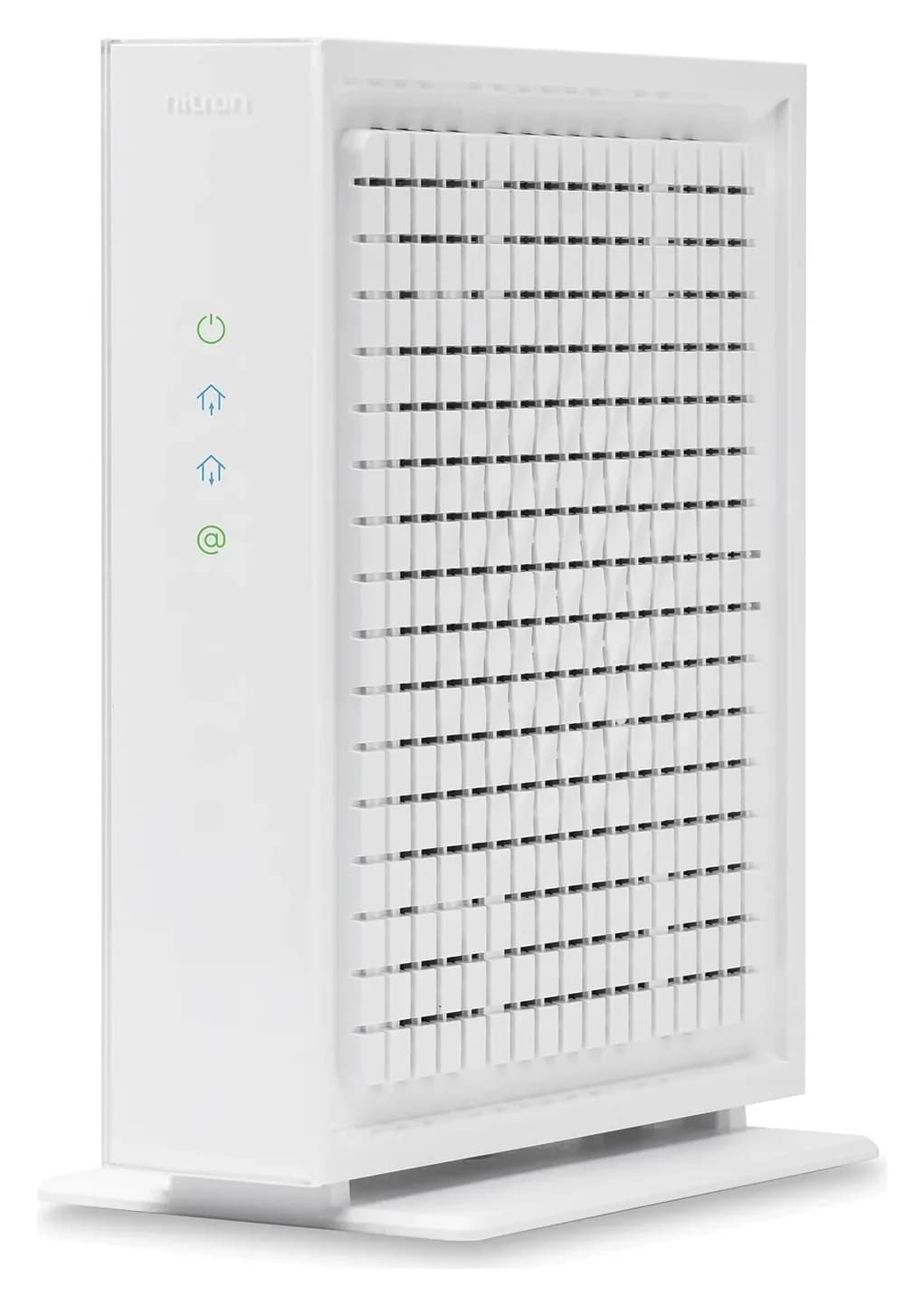
A DOCSIS 3.1 cable modem with one 2.5 Gbps Ethernet port, made for cable plans up to 2.5 Gbps.
Check package and model options
- 2.5 Gbps port
The CODA56 is the no-frills option: a 2.5 Gigabit DOCSIS 3.1 modem that Hitron says supports internet plans up to 2.5 Gbps and is approved by Comcast Xfinity, Charter Spectrum, Cox and several other cable providers. It does not include built-in Wi-Fi — the single 2.5 Gigabit Ethernet port is meant for your router, mesh system or a wired device.
DOCSIS 3.1 also brings lower latency and stronger security than DOCSIS 3.0, which Hitron calls 10x faster than the older standard. Like every pick here, it is not compatible with bundled voice service, so it is a data-only replacement.
- Yes: Data-only Spectrum internet
- No: Spectrum phone service (no modem here supports voice)
- No: Fiber internet (these are cable DOCSIS modems)
- Partly: Speeds above 1 Gbps: only on plans and modems Spectrum certifies for them
ARRIS SURFboard G54: best one-box replacement
If you would rather not buy a modem and a router, the G54 puts a DOCSIS 3.1 cable modem and BE18000 Wi-Fi 7 in one chassis: one 10 Gigabit Ethernet port, four 1 Gigabit ports, and a maker coverage claim of up to 5,000 sq ft. Like the S34, ARRIS rates its cable modem side for plans up to 2.5 Gbps and says it is tested and qualified by Charter Spectrum, with a 1 Year Limited Warranty.
Two cautions. First, BE18000 is the sum of every band's maximum theoretical rate, not real-world throughput. Second, ARRIS's own pages disagree on the G54's ceiling — the feature copy says plans up to 2.5 Gbps while the spec table lists up to 10 Gbps — so treat 2.5 Gbps as the conservative number and confirm on Spectrum's list. A combo box also means one component failing takes down both jobs; see our modem versus router explainer for the trade-offs.
How we choose
We read each maker's official product pages and spec tables, and Spectrum's published DOCSIS modem policy, and we recommend only modems their makers explicitly list as compatible with or approved by Charter Spectrum. We favor current-generation DOCSIS 3.1 hardware with multi-gig Ethernet ports, next-generation upstream support, and multi-year warranties. We have not tested anything here; every claim is sourced to the maker's page or the provider's policy, and we name conflicts between a maker's own pages instead of quietly picking one side.
Buying checklist
Confirm your tier and phone needs
Check your Spectrum speed tier and whether you have Spectrum phone service before choosing a model.
Check the Recommended list
Look the model up at spectrum.net/modems and prefer Recommended over Minimally Qualified for your tier.
Match your ports
A 2.5 Gbps Ethernet port future-proofs multi-gig plans; a 10 Gbps port only matters on the fastest tiers.
Plan activation
Connect the coax, power and router, then activate through Spectrum before returning your rented modem.
Spectrum activation: connect coax, power and your router, then let Spectrum activate the new modem (online or by phone) before you return the rental, so you are never offline. Keep the box and receipt until service is confirmed working. For placement and wiring tips once it is running, see where to put your router, and for the full cable-modem field beyond Spectrum, see best cable modems.
Rent versus buy
We do not quote prices because Spectrum's rental fee and modem pricing change; compare the purchase price of the model you choose against Spectrum's current monthly equipment charge for the months you expect to stay. A modem you own is also portable: all four picks are compatible with other major US cable providers, so it moves with you to Xfinity or Cox territory. The counterweights are phone service (rented equipment may be required for voice) and a modem that is only Minimally Qualified for your tier, which may not deliver the speed you pay for. If you are also replacing your router, our best routers for Spectrum and best modem-router combos guides cover that side.
- Up to 2.5 GbpsHighest maker-rated plan speed among the picks
- 1 Gbps / 35 MbpsNetgear's listed Spectrum maximum for the CM3000
- 2 yearsS34 warranty length (G54 is 1 year)
Verdict
For most Spectrum homes on a gigabit-class plan, buy the Netgear CM3000 and pair it with the router you already have. If upload upgrades are coming to your area, the ARRIS S34 is the forward-looking choice with the longest warranty. The CODA56 is the easy multi-gig value pick, and the G54 is the tidy one-box answer for a full equipment refresh. Whichever you choose: confirm your tier, check the Recommended Modem list at spectrum.net/modems, and skip any of these if you have Spectrum phone service.
Frequently asked questions
Can I use my own modem with Spectrum phone service?
None of the data-only modems here support voice, and Netgear and Hitron both say their modems are not compatible with bundled cable voice services. Spectrum requires an authorized modem on its network, so before buying, ask Spectrum which voice-capable equipment they support on your plan, or keep the Spectrum phone equipment and use your own modem for data only.
How do I know a modem is approved for Spectrum?
Spectrum requires subscribers to use an authorized modem, and it distinguishes Recommended Modems, which passed full performance certification testing, from Minimally Qualified Modems, which may not deliver the speed you pay for. Both lists are at spectrum.net/modems. A model named on the Recommended list for your speed tier is the safest choice; check it before you buy, since the list changes.
Is DOCSIS 3.0 enough for Spectrum?
For a slower legacy plan it may work, but every pick here is DOCSIS 3.1 for a reason: Spectrum certifies current modems through CableLabs, FCC and its own process, and makers aim their newest models at the faster tiers. Hitron calls DOCSIS 3.1 10x faster than DOCSIS 3.0. A DOCSIS 3.1 modem also handles the higher upload speeds of mid/high-split and next-generation upstream networks.
Will a 2.5 Gbps port make my Spectrum internet faster?
Not by itself. A 2.5 Gigabit Ethernet port removes the port as a bottleneck on multi-gig and fast gigabit plans, but your actual speed is set by your Spectrum plan and the modem's certified capability. Netgear lists the CM3000's Spectrum maximum as 1 Gbps download and 35 Mbps upload, so pair the port with the right plan and router.
Related guides
Best picks · Cable Modems
Best Modems for Midco: Check Approval Before You Buy
Find the right Midco modem by address and plan. Compare CODA56, CM3000 and S34 candidates, separate fiber from cable, and prepare your router and activation.
Best picks · Cable Modems
Best Modems for Sparklight: Compatible Picks, Voice and Setup
Choose a Sparklight-compatible modem with the right approval, upload limit and Ethernet port. Compare picks, phone equipment, the complete kit and activation.
Best picks · Cable Modems
Best Modems for Optimum: Cable Picks, Fiber and Phone Rules
Choose an Optimum modem by cable, fiber or phone service. Compare CM3000, S34 and CODA56, check eligibility, and plan your router, activation and total basket.