

Comparison
Netgear Nighthawk RS100 vs RS300
Which Wi-Fi 7 Router Should You Buy?
The RS100 and RS300 compared on bands, ports, coverage and price class: which Nighthawk fits your home size, service tier and expansion plans.
By thisPING EditorialUpdated November 5, 202610 min read1 pick
On this page · Our picks at a glance
Our picks at a glance
- 1
the tri-band pick
Wi-Fi 7 · BE9300
Choose for: the tri-band pick
Check before buying: two of the four LAN ports are gigabit, so a third and fourth wired multi-gig device needs a multi-gig switch.
The Netgear Nighthawk RS300 is the better pick for most homes comparing these two: it is tri-band Wi-Fi 7 with a 6 GHz band, keeps two 2.5 Gbps LAN ports after the internet connection, and Netgear claims coverage up to 2,500 sq. ft.. The RS100 is the budget half of the same family: dual-band Wi-Fi 7 with no 6 GHz radio, four gigabit LAN ports and a 2,000 sq. ft. coverage claim, in a much smaller chassis. Both share a 2.5 Gbps internet port, so your wired devices and your Wi-Fi 7 device plans, not your internet plan alone, decide which one to buy. Specs, port details and update policies checked November 4, 2026, from Netgear's own pages.
Both routers sit in the middle of Netgear's Nighthawk RS family, so this guide also covers where each one stops making sense, and when a different family member — or a mesh system — is the better buy.
Quick choice
Have a gigabit-class plan and a compact home or apartment
- Buy this
- RS100
- Why
- A 2.5 Gbps internet port and four gigabit LAN ports; smallest and lightest router in the family
Own Wi-Fi 7 devices, or your plan may pass 1 Gbps
- Buy this
- RS300
- Why
- Tri-band with a 6 GHz band and two 2.5 Gbps LAN ports
Want a single router for a large home
- Buy this
- Neither — see below
- Why
- The RS700S claims 3,500 sq. ft. and has 10 Gbps ports
Full comparison table
Swipe to compare. Row labels stay visible.
| If you… | Buy this | Why |
|---|---|---|
| Have a gigabit-class plan and a compact home or apartment | RS100 | A 2.5 Gbps internet port and four gigabit LAN ports; smallest and lightest router in the family |
| Own Wi-Fi 7 devices, or your plan may pass 1 Gbps | RS300 | Tri-band with a 6 GHz band and two 2.5 Gbps LAN ports |
| Want a single router for a large home | Neither — see below | The RS700S claims 3,500 sq. ft. and has 10 Gbps ports |
Scroll horizontally to see every column
| If you… | Buy this | Why |
|---|---|---|
| Have a gigabit-class plan and a compact home or apartment | RS100 | A 2.5 Gbps internet port and four gigabit LAN ports; smallest and lightest router in the family |
| Own Wi-Fi 7 devices, or your plan may pass 1 Gbps | RS300 | Tri-band with a 6 GHz band and two 2.5 Gbps LAN ports |
| Want a single router for a large home | Neither — see below | The RS700S claims 3,500 sq. ft. and has 10 Gbps ports |
The two routers at a glance
Compare specifications and all conditions
Wi-Fi
- Nighthawk RS100
- Dual-band Wi-Fi 7 (BE3600)
- Nighthawk RS300
- Tri-band Wi-Fi 7 (BE9300)
Bands
- Nighthawk RS100
- 2.4 GHz (2x2), 5 GHz (2x2); no 6 GHz
- Nighthawk RS300
- 2.4 GHz, 5 GHz, 6 GHz
Maximum wireless signal rate
- Nighthawk RS100
- Up to 3.6 Gbps
- Nighthawk RS300
- Up to 9.3 Gbps
Coverage claim
- Nighthawk RS100
- Up to 2,000 sq. ft.
- Nighthawk RS300
- Up to 2,500 sq. ft.
Concurrent devices claim
- Nighthawk RS100
- Up to 50
- Nighthawk RS300
- Up to 100
Internet port
- Nighthawk RS100
- 1x 2.5 Gbps
- Nighthawk RS300
- 1x 2.5 Gbps
LAN ports
- Nighthawk RS100
- 4x 1 Gbps
- Nighthawk RS300
- 2x 2.5 Gbps, 2x 1 Gbps
USB
- Nighthawk RS100
- None
- Nighthawk RS300
- 1x USB 3.0
Processor
- Nighthawk RS100
- Quad-core 2.0 GHz
- Nighthawk RS300
- Quad-core 2.0 GHz
Internal antennas
- Nighthawk RS100
- 2
- Nighthawk RS300
- 4
Size, weight
- Nighthawk RS100
- 7.2 x 2.6 x 4.8 in, 0.4 lb (380 g)
- Nighthawk RS300
- 9.8 x 5.9 x 4 in, 2.09 lb (.95 kg)
Full comparison table
Swipe to compare. Row labels stay visible.
| Spec (Netgear's pages) | Nighthawk RS100 | Nighthawk RS300 |
|---|---|---|
| Wi-Fi | Dual-band Wi-Fi 7 (BE3600) | Tri-band Wi-Fi 7 (BE9300) |
| Bands | 2.4 GHz (2x2), 5 GHz (2x2); no 6 GHz | 2.4 GHz, 5 GHz, 6 GHz |
| Maximum wireless signal rate | Up to 3.6 Gbps | Up to 9.3 Gbps |
| Coverage claim | Up to 2,000 sq. ft. | Up to 2,500 sq. ft. |
| Concurrent devices claim | Up to 50 | Up to 100 |
| Internet port | 1x 2.5 Gbps | 1x 2.5 Gbps |
| LAN ports | 4x 1 Gbps | 2x 2.5 Gbps, 2x 1 Gbps |
| USB | None | 1x USB 3.0 |
| Processor | Quad-core 2.0 GHz | Quad-core 2.0 GHz |
| Internal antennas | 2 | 4 |
| Size, weight | 7.2 x 2.6 x 4.8 in, 0.4 lb (380 g) | 9.8 x 5.9 x 4 in, 2.09 lb (.95 kg) |
Scroll horizontally to see every column
| Spec (Netgear's pages) | Nighthawk RS100 | Nighthawk RS300 |
|---|---|---|
| Wi-Fi | Dual-band Wi-Fi 7 (BE3600) | Tri-band Wi-Fi 7 (BE9300) |
| Bands | 2.4 GHz (2x2), 5 GHz (2x2); no 6 GHz | 2.4 GHz, 5 GHz, 6 GHz |
| Maximum wireless signal rate | Up to 3.6 Gbps | Up to 9.3 Gbps |
| Coverage claim | Up to 2,000 sq. ft. | Up to 2,500 sq. ft. |
| Concurrent devices claim | Up to 50 | Up to 100 |
| Internet port | 1x 2.5 Gbps | 1x 2.5 Gbps |
| LAN ports | 4x 1 Gbps | 2x 2.5 Gbps, 2x 1 Gbps |
| USB | None | 1x USB 3.0 |
| Processor | Quad-core 2.0 GHz | Quad-core 2.0 GHz |
| Internal antennas | 2 | 4 |
| Size, weight | 7.2 x 2.6 x 4.8 in, 0.4 lb (380 g) | 9.8 x 5.9 x 4 in, 2.09 lb (.95 kg) |
- 2.5 GbpsInternet port on both routers
- 9.3 GbpsRS300 maximum wireless signal rate, per Netgear
- 3.6 GbpsRS100 maximum wireless signal rate, per Netgear
Treat every rate here as Netgear states it: a "maximum wireless signal rate derived from IEEE 802.11be specifications," with actual throughput and coverage that will "vary and be lowered by network, your country's regulation, and environmental conditions," including traffic, device limitations and building construction. No phone or laptop gets the headline number, and the BE class on the box is the sum of every band's maximum theoretical rate — not a speed any single device will see.
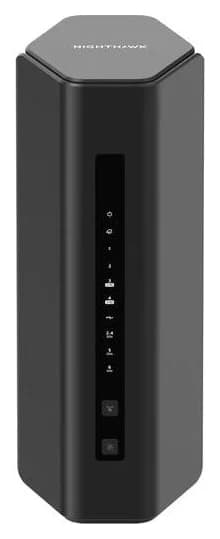
RS300: the tri-band pick
On paper the RS300 is the balanced one. The 6 GHz band is the headline: Netgear notes that clients must support 6 GHz to use it, and that the 6 GHz band is limited to indoor range — but if your phone or laptop is Wi-Fi 7, that band is where the router's widest channels and lowest contention live. Our Wi-Fi 7 router guide explains what Wi-Fi 7 devices can actually use.
Netgear
A mainstream tri-band Wi-Fi 7 router with a 2.5 Gbps internet port and two 2.5 Gbps LAN ports.
Check package and model options
- Wi-Fi 7
- BE9300
- 3 bands
- 2.5 Gbps port
- Tri-band Wi-Fi 7 (BE9300): 2.4 GHz, 5 GHz and 6 GHz, rated up to 9.3 Gbps maximum wireless signal rate
- 1x 2.5 Gbps internet port, 2x 2.5 Gbps Ethernet LAN ports, 2x 10/100/1000 Mbps Gigabit Ethernet LAN ports, 1x USB 3.0 port
- Netgear claims coverage up to 2,500 sq. ft. and up to 100 concurrent devices
- Quad-core 2.0 GHz processor, 4 internal antennas with high-power amplifiers
- WPA3, separate main/IoT/guest networks, VPN support, automatic firmware updates; Armor security trial included, terms and conditions apply, and an optional Armor subscription is available
The trade-offs: two of the four LAN ports are gigabit, so a third and fourth wired multi-gig device needs a multi-gig switch. There is no 10 Gbps port for 5 Gig or faster plans — the RS700S covers that tier. And the 9.8-inch-tall, 5.9-inch-wide body is more than five times heavier than the RS100, so it needs shelf space rather than a tuck-away spot.
Check the RS300 price on Amazon or Netgear's RS300 page.
RS100: the compact, budget pick
The RS100 is the smallest and lightest router in the RS family — 0.4 lb (380 g) and about seven inches tall — and Netgear's page pitches it at "smooth streaming, browsing, and video calls" rather than flagship specs. It is still Wi-Fi 7 on 2.4 and 5 GHz, and Netgear's page says it delivers "2.4x faster speeds and significantly lower latency than WiFi 6."
- Dual-band Wi-Fi 7 (BE3600): 2.4 GHz (2x2) and 5 GHz (2x2); no 6 GHz radio
- 1x 2.5 Gbps internet port, 4x 10/100/1000 Mbps Gigabit Ethernet LAN ports
- Netgear claims coverage up to 2,000 sq. ft. and up to 50 concurrent devices
- Quad-core 2.0 GHz processor, 2 internal antennas with high-power amplifiers
- WPA3, separate main/IoT/guest networks, VPN support, automatic firmware updates; Armor trial included, terms and conditions apply, and an optional Armor subscription is available
The trade-offs: no 6 GHz band, so Wi-Fi 7 devices connect on 5 GHz like on a Wi-Fi 6 router's best band. Every LAN port is gigabit — fine for a 1 Gbps plan, but a wired device on a 2 Gig plan tops out at gigabit. And its 2,000 sq. ft. coverage claim suits apartments and compact single-floor homes rather than large multi-story houses. Netgear sells the RS100 through its own product page; we link the maker's page because the Amazon listing for this model has not been verified.
Matching the router to your service
- Yes: Fiber with a gigabit Ethernet handoff: both routers' 2.5 Gbps internet ports accept it
- Yes: Fiber or multi-gig cable up to 2.5 Gbps at the router: RS300 also feeds wired devices at 2.5 Gbps
- Partly: Plan faster than 2.5 Gbps: neither router's internet port can pass it; look at the RS700S
- No: DSL or satellite: works, but a gigabit-class router like the RS100 is usually enough
The internet port is the ceiling for everything behind it. Both routers have exactly one 2.5 Gbps internet port, so both cap out at 2.5 Gbps of service regardless of the BE number on the box — Netgear's own footnote says gigabit and multi-gig speeds require multi-gig service plans and a compatible modem. If you have fiber, ask what your optical box's Ethernet handoff is: gigabit handoffs make the RS100's port set enough, while 2 Gig and faster handoffs favor the RS300's two 2.5 Gbps LAN ports. Our modem vs router guide explains which box does what.
For Starlink specifically, either router works — Netgear lists DSL, cable, fiber and satellite broadband among the requirements for both, with a modem that has an RJ45 connector — but satellite service speeds sit well below what either router's ports can pass, so the RS100's port set is the better match for the money.
Single router, or add a mesh node later?
Both are standalone routers, and neither ships with a mesh node. Two expansion paths exist:
- Use a dedicated mesh system. Neither router ships with a mesh node, so if whole-home coverage is the goal from day one, a dedicated mesh system is the cleaner path. See our best mesh Wi-Fi systems and Wi-Fi extender vs mesh comparisons.
- Plan for wired Ethernet runs. If you can run Ethernet between rooms, the RS300 has two 2.5 Gbps Ethernet LAN ports, while all of the RS100's LAN ports are gigabit.
Source: Netgear's RS100, RS300 and RS700S product pages (linked in each section)
These are Netgear's claims, not measured range: actual wireless coverage varies with building construction, network traffic and device limitations.
Placement, cabling and the complete kit
What ships in each box is identical in shape: the router, one Ethernet cable, a 12V power adapter (1.5A for the RS100, 3.5A for the RS300) and a quick start guide. Add what Netgear's requirements list assumes:
Set the router centrally and in the open
Netgear's 360-degree coverage language assumes antennas aren't boxed in by walls or shelving; the RS300's larger body needs the shelf space.
Confirm your modem has an RJ45 port
Both routers require a DSL/cable/fiber/satellite modem with an RJ45 connector; fiber boxes hand off over Ethernet.
Count your wired devices before choosing
More than two devices that need multi-gig means the RS300 plus a switch; gigabit-only devices work on either router's LAN ports.
Set up with the Nighthawk app or a browser
Netgear's pages say the Nighthawk app setup requires a free NETGEAR account, the iOS or Android app and its terms; each user manual also documents finishing installation through the router web interface in a web browser, which handles everyday management.
- Cabling: the included Ethernet cable covers the modem-to-router link. For longer runs to wired rooms, use Cat6 or better — see our Ethernet cable guide.
- Register the router at Netgear's site: the limited warranty applies only when the device is bought from a Netgear authorized reseller and registered.
- Accounts and subscriptions: the Nighthawk app path requires a free Netgear account; each router includes an Armor trial with terms and conditions applying, and an optional Armor subscription is available. Both product pages list automatic firmware updates.
Black Friday and Cyber Monday checklist
Discounts on the exact model are the only deals worth taking. Check these before you buy either router during the sales:
- The exact model number — Netgear's RS family is crowded (RS100, RS150, RS200, RS300, RS500, RS600, RS700S at 3.6, 5, 6.5, 9.3, 12, 18 and 19 Gbps ratings respectively), and the boxes look similar. The model number is printed on the label.
- New versus certified refurbished — Netgear sells certified refurbished units directly, and the warranty requires purchase from an authorized reseller.
- Region — this guide covers the US models; other regions use different power adapters and wireless rules.
- The included accessories — box contents are the router, one Ethernet cable, power adapter and quick start guide; a listing with fewer accessories is not the standard package.
Decision table: when the RS300 is not worth the upgrade
Apartment or compact home, plan at or under 1 Gbps, Wi-Fi 6 or older devices
- Pick
- RS100
- Why
- Its ports and 2,000 sq. ft. claim match; nothing the RS300 adds gets used
Wi-Fi 7 phone or laptop in the house
- Pick
- RS300
- Why
- The 6 GHz band serves clients that support 6 GHz and is limited to indoor range
Plan at 2 Gbps, or wired devices that merit multi-gig
- Pick
- RS300
- Why
- Two 2.5 Gbps LAN ports; the RS100's are all gigabit
More than about 50 connected devices
- Pick
- RS300
- Why
- Netgear rates it up to 100 concurrent devices versus 50
Large multi-story home, single router
- Pick
- Neither
- Why
- The RS700S claims 3,500 sq. ft.; or a mesh system
NAS or media server on the wired network
- Pick
- RS300
- Why
- A NAS shares the 2.5 Gbps LAN ports; see our NAS guide
Full comparison table
Swipe to compare. Row labels stay visible.
| Your situation | Pick | Why |
|---|---|---|
| Apartment or compact home, plan at or under 1 Gbps, Wi-Fi 6 or older devices | RS100 | Its ports and 2,000 sq. ft. claim match; nothing the RS300 adds gets used |
| Wi-Fi 7 phone or laptop in the house | RS300 | The 6 GHz band serves clients that support 6 GHz and is limited to indoor range |
| Plan at 2 Gbps, or wired devices that merit multi-gig | RS300 | Two 2.5 Gbps LAN ports; the RS100's are all gigabit |
| More than about 50 connected devices | RS300 | Netgear rates it up to 100 concurrent devices versus 50 |
| Large multi-story home, single router | Neither | The RS700S claims 3,500 sq. ft.; or a mesh system |
| NAS or media server on the wired network | RS300 | A NAS shares the 2.5 Gbps LAN ports; see our NAS guide |
Scroll horizontally to see every column
| Your situation | Pick | Why |
|---|---|---|
| Apartment or compact home, plan at or under 1 Gbps, Wi-Fi 6 or older devices | RS100 | Its ports and 2,000 sq. ft. claim match; nothing the RS300 adds gets used |
| Wi-Fi 7 phone or laptop in the house | RS300 | The 6 GHz band serves clients that support 6 GHz and is limited to indoor range |
| Plan at 2 Gbps, or wired devices that merit multi-gig | RS300 | Two 2.5 Gbps LAN ports; the RS100's are all gigabit |
| More than about 50 connected devices | RS300 | Netgear rates it up to 100 concurrent devices versus 50 |
| Large multi-story home, single router | Neither | The RS700S claims 3,500 sq. ft.; or a mesh system |
| NAS or media server on the wired network | RS300 | A NAS shares the 2.5 Gbps LAN ports; see our NAS guide |
How we choose
We have not lab-tested or speed-tested either router. Every port, band, radio, rate, coverage claim and box item here comes from Netgear's own RS100 and RS300 product pages, linked in each section; update policy from Netgear's End of Service page; and FCC Conditional Approval status from the FCC's October 21, 2026 public notice, all checked November 4, 2026. Maximum wireless signal rates are Netgear's IEEE 802.11be-derived figures, not measured throughput, and coverage figures are Netgear's claims. Full method: How we choose.
Verdict
For most buyers comparing these two, the Netgear Nighthawk RS300 is the one to get: its 6 GHz band serves Wi-Fi 7 devices, its two 2.5 Gbps LAN ports keep a 2 Gig plan from being wasted on gigabit ports, and Netgear claims 2,500 sq. ft. of coverage and up to 100 concurrent devices. Buy the RS100 when your plan and devices are gigabit-class and your home is compact — it carries the same 2.5 Gbps internet port and the same security and firmware-update support in a far smaller, lighter chassis, and its four gigabit LAN ports handle a typical wired setup. If a single router still can't cover your home, or your plan passes 2.5 Gbps, step up to a mesh system or the RS700S instead of either of these.
Frequently asked questions
Does the Netgear RS100 have a 6 GHz band?
No. The RS100 is dual-band Wi-Fi 7: 2.4 GHz and 5 GHz only, each 2x2. Wi-Fi 7 features like multi-gigabit wireless rates and wide channels in the 6 GHz band need a 6 GHz radio, which only the RS300 of the two has. Wi-Fi 7 devices still connect to the RS100 on 2.4 and 5 GHz.
Is the RS300 worth it over the RS100?
Yes if any of these apply: your internet plan is faster than 1 Gbps and you have wired devices that need more than gigabit (the RS300 has two 2.5 Gbps LAN ports), you own or plan to buy Wi-Fi 7 devices that use the 6 GHz band, or your home is larger than the RS100's 2,000 sq. ft. claim. Otherwise the RS100's ports and coverage claims match a gigabit plan and a compact home.
Can either router handle a 2 Gig fiber plan?
Both have a 2.5 Gbps internet port, and Netgear notes that gigabit or multi-gig internet speeds require compatible service plans and a compatible cable modem, so confirm your 2 Gig handoff before buying. The difference is downstream: the RS300 keeps two 2.5 Gbps LAN ports for wired devices above gigabit, while every RS100 LAN port is gigabit.
Do I need the Nighthawk app to set these up?
Netgear's pages say you set either router up with the Nighthawk app, which requires registering a free NETGEAR account and agreeing to Netgear's terms. Each product page also lists automatic firmware updates, and both user manuals document finishing setup through the router web interface in a web browser, which also handles everyday management.
How long will these routers get updates?
Netgear's End of Service policy puts end of service, in general, three years after a product's last sale date — not from your purchase date — so a currently sold model has no fixed date. Both routers fall under the FCC's Conditional Approval for Netgear's Nighthawk consumer mesh, mobile and standalone routers, which include the RS series, dated April 14, 2026 to October 1, 2027.
Related guides
Comparison · Wi-Fi Routers
GL.iNet Beryl 7 vs ASUS RT-BE58 Go: Which Travel Router Should You Buy?
Pick between the GL.iNet Beryl 7 and ASUS RT-BE58 Go by ports, power, tethering, captive portals and VPN speed. Specs from the makers.
Comparison · Wi-Fi Routers
Starlink Ethernet Adapter vs. a New Router: Which Should You Buy First?
The first Starlink wired-networking purchase, in order: which router generation you have, whether the Ethernet Adapter or bypass mode applies, and when a Nighthawk RS300 earns its place.
Comparison · Wi-Fi Routers
Netgear Nighthawk RS300 vs RS700S: Which Wi-Fi 7 Router Should You Buy?
Netgear's mainstream and flagship Nighthawk Wi-Fi 7 routers compared by internet plan, wired ports, radios and coverage — so you buy the one your home needs.