

Comparison
Netgear Nighthawk RS300 vs RS700S
Which Wi-Fi 7 Router Should You Buy?
Netgear's mainstream and flagship Nighthawk Wi-Fi 7 routers compared by internet plan, wired ports, radios and coverage — so you buy the one your home needs.
By thisPING EditorialUpdated November 5, 20268 min read2 picks
On this page · Our picks at a glance
Our picks at a glance
- 1
the pick for most homes
Wi-Fi 7 · BE9300
Choose for: the pick for most homes
Check before buying: no 10 Gbps port anywhere, so plans above 2.5 Gbps are out, and only two wired devices get multi-gig speeds.
- 2
the pick for 10 Gbps plans and big homes
Wi-Fi 7 · BE19000
Choose for: the pick for 10 Gbps plans and big homes
Check before buying: only one multi-gig LAN port, gigabit for everything else wired, and NETGEAR Armor remains an optional subscription.
For most homes, the Netgear Nighthawk RS300 is the Wi-Fi 7 router to buy: its 2.5 Gbps internet port covers gigabit and 2 Gbps plans, its two 2.5 Gbps LAN ports handle a desktop and a NAS, and Netgear claims coverage of up to 2,500 sq. ft. The Nighthawk RS700S is worth the extra spend only when you'll use what it adds: a 10 Gbps internet port for 5 Gbps or 10 Gbps fiber, a 10 Gbps LAN port for one fast wired client, 4x4 radios on all three bands, and a larger 3,500 sq. ft. coverage claim for bigger, busier homes. Ports, radios and coverage figures below come from Netgear's own product pages, checked November 2026.
Both are tri-band Wi-Fi 7 routers with 2.4, 5 and 6 GHz bands, so the real decision is wired speed and home size — start with your internet plan, not the BE number on the box.
Quick picks
- Choose the RS300 if your plan is 2.5 Gbps or slower, you have two or fewer multi-gig wired devices, and your home is around 2,500 sq. ft. or less. It's the mainstream pick that matches most US connections.
- Choose the RS700S if you have a 5 Gbps or 10 Gbps plan (or expect one), one wired device that deserves a 10 Gbps LAN port, a home closer to 3,500 sq. ft., or more than 100 concurrent devices.
- Choose neither if your current router already carries your plan, covers your rooms and still gets security updates; see our Wi-Fi 7 upgrade guide for when a new router actually pays off.
Compare specifications and all conditions
Nighthawk RS300
- Wi-Fi
- Tri-band Wi-Fi 7 (2.4, 5, 6 GHz)
- Speed class
- BE9300, up to 9.3 Gbps
- Radios
- 2.4, 5 and 6 GHz
All specifications
- Internet port
- 2.5 Gbps
- LAN ports
- Two 2.5 Gbps, two gigabit
- Devices (maker claim)
- Up to 100 concurrent
- Coverage (maker claim)
- Up to 2,500 sq. ft.
- Processor
- Quad-core 2.0 GHz
- Antennas
- 4 internal
Nighthawk RS700S
- Wi-Fi
- Tri-band Wi-Fi 7 (2.4, 5, 6 GHz)
- Speed class
- BE19000, up to 19 Gbps (1 + 6 + 12)
- Radios
- 4x4 on every band
All specifications
- Internet port
- 10 Gbps
- LAN ports
- One 10 Gbps, four gigabit
- Devices (maker claim)
- Up to 200 concurrent
- Coverage (maker claim)
- Up to 3,500 sq. ft.
- Processor
- Quad-core 2.6 GHz
- Antennas
- 8 internal
Full comparison table
Swipe to compare. Row labels stay visible.
| Specification | Nighthawk RS300 | Nighthawk RS700S |
|---|---|---|
| Wi-Fi | Tri-band Wi-Fi 7 (2.4, 5, 6 GHz) | Tri-band Wi-Fi 7 (2.4, 5, 6 GHz) |
| Speed class | BE9300, up to 9.3 Gbps | BE19000, up to 19 Gbps (1 + 6 + 12) |
| Radios | 2.4, 5 and 6 GHz | 4x4 on every band |
| Internet port | 2.5 Gbps | 10 Gbps |
| LAN ports | Two 2.5 Gbps, two gigabit | One 10 Gbps, four gigabit |
| Devices (maker claim) | Up to 100 concurrent | Up to 200 concurrent |
| Coverage (maker claim) | Up to 2,500 sq. ft. | Up to 3,500 sq. ft. |
| Processor | Quad-core 2.0 GHz | Quad-core 2.6 GHz |
| Antennas | 4 internal | 8 internal |
Scroll horizontally to see every column
| Specification | Nighthawk RS300 | Nighthawk RS700S |
|---|---|---|
| Wi-Fi | Tri-band Wi-Fi 7 (2.4, 5, 6 GHz) | Tri-band Wi-Fi 7 (2.4, 5, 6 GHz) |
| Speed class | BE9300, up to 9.3 Gbps | BE19000, up to 19 Gbps (1 + 6 + 12) |
| Radios | 2.4, 5 and 6 GHz | 4x4 on every band |
| Internet port | 2.5 Gbps | 10 Gbps |
| LAN ports | Two 2.5 Gbps, two gigabit | One 10 Gbps, four gigabit |
| Devices (maker claim) | Up to 100 concurrent | Up to 200 concurrent |
| Coverage (maker claim) | Up to 2,500 sq. ft. | Up to 3,500 sq. ft. |
| Processor | Quad-core 2.0 GHz | Quad-core 2.6 GHz |
| Antennas | 4 internal | 8 internal |
- 2.5 GbpsRS300's fastest port — its internet port
- 10 GbpsRS700S's internet and LAN ports
- 3,500 sq. ft.RS700S coverage claim (2,500 for RS300), per Netgear
What your internet plan decides
The internet (WAN) port caps everything behind it: a 2.5 Gbps port can't pass a 5 Gbps plan no matter what the BE number says. Netgear itself frames the RS300 around its "2.5 Gig internet port" and the RS700S around its "10 Gig internet port," with both footnoted as maximum wireless signal rates "derived from IEEE 802.11be specifications" — not real-world throughput.
Up to 1 Gbps
- Router that fits
- RS300 (either works)
Up to 2.5 Gbps
- Router that fits
- RS300 or RS700S
5 Gbps or 10 Gbps
- Router that fits
- RS700S
Full comparison table
Swipe to compare. Row labels stay visible.
| Your plan | Router that fits |
|---|---|
| Up to 1 Gbps | RS300 (either works) |
| Up to 2.5 Gbps | RS300 or RS700S |
| 5 Gbps or 10 Gbps | RS700S |
Scroll horizontally to see every column
| Your plan | Router that fits |
|---|---|
| Up to 1 Gbps | RS300 (either works) |
| Up to 2.5 Gbps | RS300 or RS700S |
| 5 Gbps or 10 Gbps | RS700S |
Then check the LAN side, because a wired device only goes as fast as the port it's plugged into. The RS300 gives you two 2.5 Gbps LAN ports plus two gigabit ports — enough for a gaming PC, a NAS and slower gear. The RS700S gives you one 10 Gbps LAN port plus four gigabit ports, which is a narrower multi-gig path than its price suggests: only one wired client connects above 2.5 Gbps. Our multi-gig switch guide covers adding ports when the router runs out.
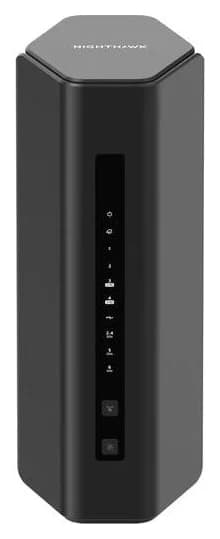
RS300: the pick for most homes
Netgear's RS300 page lists one 2.5 Gbps internet port, two 2.5 Gbps LAN ports, two gigabit LAN ports and one USB 3.0 port, driven by a quad-core 2.0 GHz processor and four internal antennas with high-power amplifiers.
Netgear
A mainstream tri-band Wi-Fi 7 router with a 2.5 Gbps internet port and two 2.5 Gbps LAN ports.
Check package and model options
- Wi-Fi 7
- BE9300
- 3 bands
- 2.5 Gbps port
- Tri-band Wi-Fi 7 (BE9300): 2.4, 5 and 6 GHz; Netgear claims up to 9.3 Gbps maximum signal rate and up to 100 concurrent devices
- Coverage claim of up to 2,500 sq. ft.; 9.8 in tall, 5.9 in wide and 4 in deep, at 2.09 lb
- WPA3, VPN support, automatic firmware updates, and separate Main, IoT and Guest networks included; NETGEAR Armor is an optional subscription after its trial
- Set up with the Nighthawk app; the 6 GHz band needs Wi-Fi 6E or Wi-Fi 7 clients and is limited to indoor range, per Netgear's footnotes
The trade-offs: no 10 Gbps port anywhere, so plans above 2.5 Gbps are out, and only two wired devices get multi-gig speeds. If you compare it against other midrange Wi-Fi 7 routers instead, our ASUS RT-BE92U vs NETGEAR RS300 comparison covers the wired-allocation differences.
RS700S: the pick for 10 Gbps plans and big homes
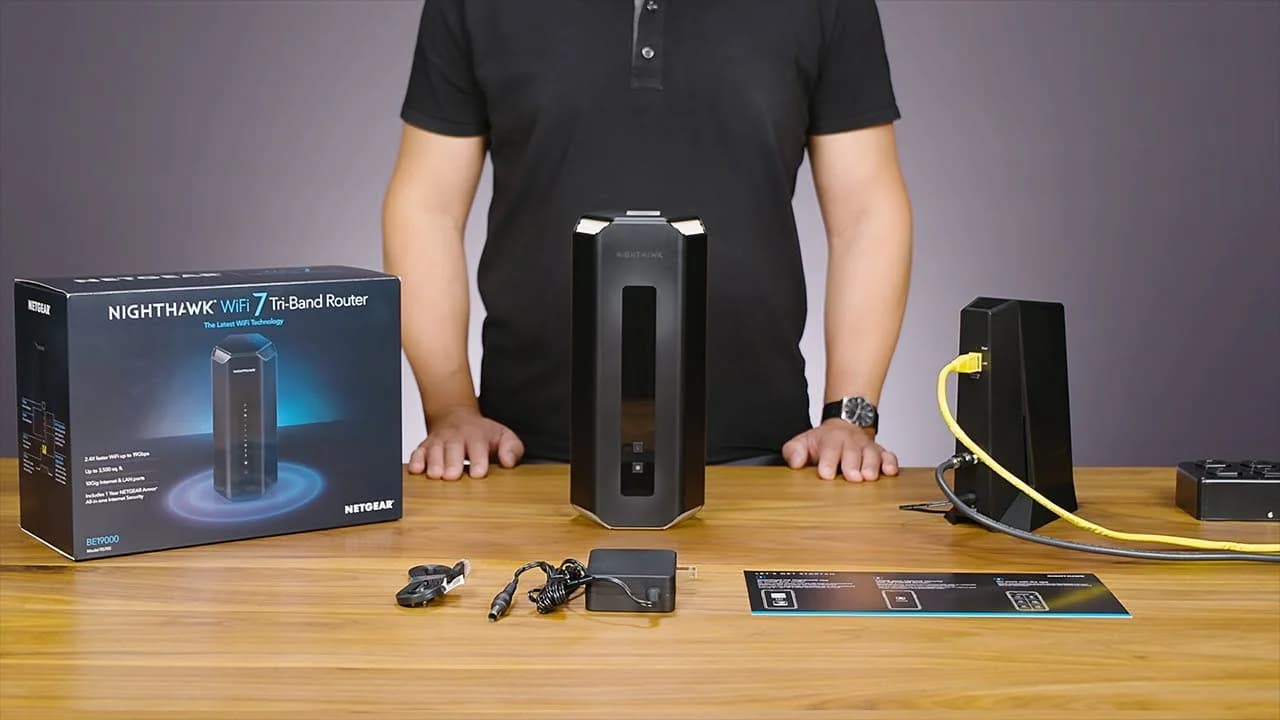
Netgear's RS700S page lists a 10 Gbps internet port, one 10 Gbps LAN port, four gigabit LAN ports and one USB 3.0 port, with a quad-core 2.6 GHz processor, eight high-performance internal antennas with high-power amplifiers and 4x4 radios on 2.4, 5 and 6 GHz.
Netgear
Netgear's flagship tri-band Wi-Fi 7 router, with a 10 Gig internet port and a 10 Gig LAN port.
Check package and model options
- Wi-Fi 7
- BE19000
- 3 bands
- 10 Gbps port
- Tri-band Wi-Fi 7 (BE19000): 19 Gbps maximum signal rate, which Netgear splits as 1 + 6 + 12 Gbps across the three bands
- Coverage claim of up to 3,500 sq. ft. and support for 200+ connected devices
- Link aggregation: the internet port plus a LAN port, or two gigabit LAN ports, each for up to 2 Gbps
- Tower chassis: 11.09 in tall, 4.88 in wide, 5.59 in deep, 3.61 lb — check shelf clearance before ordering
The trade-offs: only one multi-gig LAN port, gigabit for everything else wired, and NETGEAR Armor remains an optional subscription. Its coverage claim is the largest of any single Nighthawk router, but a claim is a maker's best case; homes with thick walls or multiple floors may still do better with a mesh Wi-Fi system than with one bigger box.
Gaming: what actually matters
Netgear's marketing promises the same thing on both pages: "2.4X faster speeds and significantly lower latency than WiFi 6," with the RS300's headline repeating "lower latency than WiFi 6 for gaming." Neither claim is a measured latency figure, and both routers apply the same Wi-Fi 7 toolkit — the Wi-Fi Alliance notes 320 MHz channels in the 6 GHz band and Multi-Link Operation spreading traffic across links for "increased throughput and enhanced reliability," which can cut latency for Wi-Fi 7 clients that support them.
What differs for a gaming setup is the wired path:
- Yes: Plan of 2.5 Gbps or less, gaming PC on a 2.5 Gbps port — RS300 covers both
- Yes: 10 Gbps fiber plan and a 10 GbE NIC in the PC — RS700S's 10 Gbps ports carry it
- Partly: Several consoles/PCs that all want multi-gig Ethernet — add a switch; each router offers at most one or two fast LAN ports
- Partly: Wi-Fi 6 phone or laptop — it connects on 2.4 GHz and 5 GHz at that device's limits, on either router
- No: 5 Gbps or 10 Gbps plan with the RS300 — its 2.5 Gbps internet port caps everything behind it
For deeper matching of router to console, ISP and budget, see best routers for gaming.
Cabling and switching for either router
Match the modem or ONT to the internet port
A cable modem's Ethernet port must carry your plan's speed into the router's WAN port; our cable modem picks list the multi-gig models providers accept.
Put the fastest device on the fastest LAN port
One 10 Gbps-capable NAS or PC on the RS700S's 10 Gbps LAN port, or your two fastest devices on the RS300's 2.5 Gbps ports.
Add a switch when you run out of fast ports
A multi-gig switch behind the router's fastest LAN port multiplies multi-gig connections; Cat6 or Cat6A patch cables keep the path honest.
Register the router at my.netgear.com
Netgear's limited warranty is valid only if the device was bought from an authorized reseller and registered.
Coverage, placement and expansion
Both coverage figures — 2,500 and 3,500 sq. ft. — are Netgear's claims for ideal conditions, and Netgear's own footnote says actual coverage "will vary and be lowered by" building construction, network traffic and device limitations. Neither router is a mesh system on its own: if signal doesn't reach a far room, moving the router centrally or adding satellite units beats a bigger BE number. Placement basics are in where to put your router, and Netgear's Orbi line is the mesh counterpart if you need whole-home coverage.
Support, security and buying on sale
Both routers support automatic firmware updates and ship with WPA3, VPN support and separate IoT and guest networks. NETGEAR Armor (powered by Bitdefender) is an optional subscription on both, with a trial included and protection Netgear says extends to up to 50 connected devices; whether it's worth it is a separate question from the router. Under Netgear's End of Service policy, products "reach EOS" and stop receiving firmware updates — including security updates — "in general, three years after the last sale date," measured from Netgear's last sale, not your purchase date. Netgear's Nighthawk consumer routers (R, RAX, RAXE, RS, MK, MR, M and MH series) hold FCC Conditional Approval from April 14, 2026 to October 1, 2027, covering both the RS300 and RS700S; see our FCC router rule explainer for what that means for buyers.
How we choose
We haven't lab-tested or speed-tested these routers. Every port, radio, processor, coverage and device-count figure here comes from Netgear's own RS300 and RS700S product pages; the Wi-Fi 7 feature descriptions from the Wi-Fi Alliance; the update policy from Netgear's End of Service page; and the FCC approval dates from the FCC's October 21, 2026 public notice (DA 26-1130), all checked November 2026. The two picks are sorted by the plan each internet port can carry and the wired devices each LAN set serves. Full method: How we choose.
Verdict
Buy the RS300 if your plan is 2.5 Gbps or slower and your wired gear fits its two 2.5 Gbps LAN ports — it's the tri-band Wi-Fi 7 router most homes actually need, in a smaller case. Buy the RS700S only for what it uniquely offers: a 10 Gbps internet port on a 5 Gbps or 10 Gbps plan, a 10 Gbps LAN port for one fast client, 4x4 radios and a larger 3,500 sq. ft. coverage claim for bigger, busier homes. Between them, the plan speed and port count decide — not the BE number.
Frequently asked questions
Is the RS700S worth it over the RS300?
Only if your internet plan, wired devices or home size use what it adds. The RS700S brings a 10 Gbps internet port, a 10 Gbps LAN port, 4x4 radios on every band and Netgear's larger 3,500 sq. ft. coverage claim. If your plan is 2.5 Gbps or slower and two multi-gig LAN ports cover your fast wired devices, the RS300 does the same job for less.
Can the RS300 handle a 5 Gbps or 10 Gbps internet plan?
No. Its fastest port is the 2.5 Gbps internet port, and a WAN port caps everything behind it, so a 5 Gbps plan would be limited to what that port can pass. Netgear positions the RS300's 2.5 Gbps internet port as its future-proofing ceiling. Plans faster than 2.5 Gbps need the RS700S's 10 Gbps internet port or another router with a matching WAN port.
Which is better for gaming?
Both are tri-band Wi-Fi 7 routers that Netgear says deliver lower latency than Wi-Fi 6, and gaming responsiveness depends more on your connection and band than on the BE number. The practical difference is wired: a gaming PC on the RS700S can use its 10 Gbps LAN port, while the RS300's fastest LAN ports are 2.5 Gbps. Latency itself is not a port speed.
What should I check when either router is on sale?
Confirm the exact model number — Netgear sells several Nighthawk Wi-Fi 7 routers (RS100 through RS700S), and listings and deals sometimes use the shared Nighthawk name loosely. Check that the box matches the port list you expect, and that any discount is on the specific RS300 or RS700S SKU, not a bundle with extras you don't need. Our Black Friday checklist covers the same steps for all network gear.
Related guides
Comparison · Wi-Fi Routers
Netgear Nighthawk RS100 vs RS300: Which Wi-Fi 7 Router Should You Buy?
The RS100 and RS300 compared on bands, ports, coverage and price class: which Nighthawk fits your home size, service tier and expansion plans.
Comparison · Wi-Fi Routers
GL.iNet Beryl 7 vs ASUS RT-BE58 Go: Which Travel Router Should You Buy?
Pick between the GL.iNet Beryl 7 and ASUS RT-BE58 Go by ports, power, tethering, captive portals and VPN speed. Specs from the makers.
Comparison · Wi-Fi Routers
Starlink Ethernet Adapter vs. a New Router: Which Should You Buy First?
The first Starlink wired-networking purchase, in order: which router generation you have, whether the Ethernet Adapter or bypass mode applies, and when a Nighthawk RS300 earns its place.