

Comparison
TerraMaster D4-320 vs Synology DS425+
Which Four-Bay Should You Buy?
The D4-320 is a USB enclosure and the DS425+ is a network NAS. Compare both at four drives: capacity, RAID, backup and recovery before you spend.
By thisPING EditorialUpdated November 5, 20268 min read1 pick
On this page · Our picks at a glance
Our picks at a glance
- 1
If household devices need the files
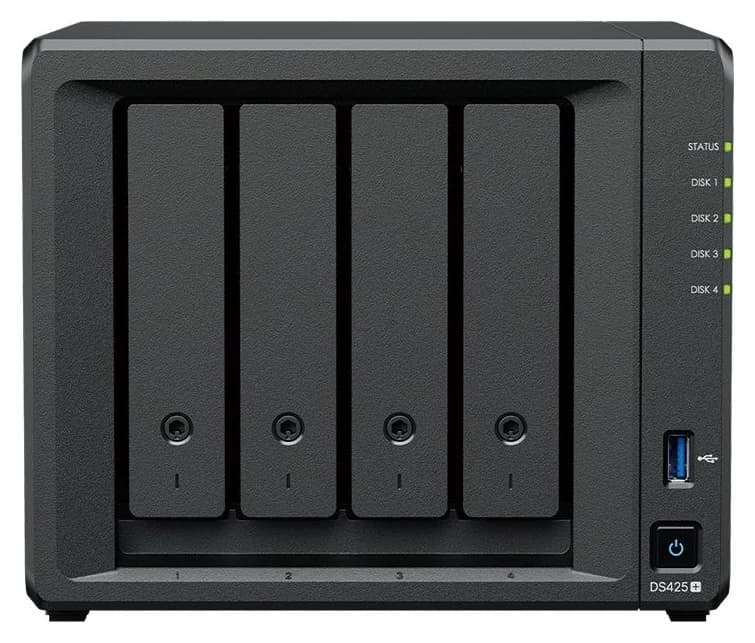
2.5 Gbps port · 4 bays
Choose for: If household devices need the files
Check before buying: Only 2 GB RAM, expandable to 6 GB
For a four-bay purchase, the Synology DS425+ is the pick when household devices need shared files, backups and media without depending on any one computer: it is a self-contained network-attached storage appliance. The TerraMaster D4-320 is the pick when the storage lives beside a single computer: it is a direct-attached USB enclosure, not a NAS, and it is the budget path to four drive bays. They share a bay count and nothing else, so the real decision is who serves the files and who rebuilds after a drive dies.
Quick choice
Family files, phone backups, media streaming to several devices
- The box that fits
- Synology DS425+
- Why
- It is the network file server itself; the DSM operating system manages disks, users and backups
Bulk storage for projects at one desktop or laptop
- The box that fits
- TerraMaster D4-320
- Why
- Four independent disks on one 10 Gbps USB link, no drivers, no network stack to manage
Cheap capacity growth for an existing TerraMaster NAS
- The box that fits
- D4-320
- Why
- TerraMaster documents attaching it to a TerraMaster NAS running TOS 5.1 or later
A self-managing array that survives a drive failure
- The box that fits
- DS425+
- Why
- SHR and RAID 5 with documented expansion; the D4-320 has no RAID at all
Full comparison table
Swipe to compare. Row labels stay visible.
| Your situation | The box that fits | Why |
|---|---|---|
| Family files, phone backups, media streaming to several devices | Synology DS425+ | It is the network file server itself; the DSM operating system manages disks, users and backups |
| Bulk storage for projects at one desktop or laptop | TerraMaster D4-320 | Four independent disks on one 10 Gbps USB link, no drivers, no network stack to manage |
| Cheap capacity growth for an existing TerraMaster NAS | D4-320 | TerraMaster documents attaching it to a TerraMaster NAS running TOS 5.1 or later |
| A self-managing array that survives a drive failure | DS425+ | SHR and RAID 5 with documented expansion; the D4-320 has no RAID at all |
Scroll horizontally to see every column
| Your situation | The box that fits | Why |
|---|---|---|
| Family files, phone backups, media streaming to several devices | Synology DS425+ | It is the network file server itself; the DSM operating system manages disks, users and backups |
| Bulk storage for projects at one desktop or laptop | TerraMaster D4-320 | Four independent disks on one 10 Gbps USB link, no drivers, no network stack to manage |
| Cheap capacity growth for an existing TerraMaster NAS | D4-320 | TerraMaster documents attaching it to a TerraMaster NAS running TOS 5.1 or later |
| A self-managing array that survives a drive failure | DS425+ | SHR and RAID 5 with documented expansion; the D4-320 has no RAID at all |
- 4drive bays in both
- 10 Gbpsshared USB 3.2 Gen 2 link on the D4-320
- 2.5GbEfastest of the DS425+'s two Ethernet ports
- 6 GBmaximum DS425+ memory, from 2 GB installed
Same bay count, different products
The DS425+ is a computer: an Intel Celeron J4125 with 2 GB DDR4 memory (expandable to 6 GB), running Synology's DSM, with a 2.5GbE port, a 1GbE port and two M.2 2280 NVMe slots alongside its four SATA bays. The D4-320 is a dumb-but-fast box: TerraMaster's own spec table lists its network interface and hardware RAID as "/" (not present), and its interface is a single USB 3.2 Gen 2 Type-C link rated up to 10 Gbps, shared by all four installed disks.
Both accept 3.5-inch SATA hard drives and 2.5-inch SATA SSDs, so the drives, not the enclosures, set your raw ceiling. TerraMaster quotes individual drives up to 32 TB for a total capacity of 128 TB; Synology quotes up to 96 TB of raw storage for the DS425+ using 24 TB drives. Neither figure is usable space: parity, filesystems and your backup copies come out of it.
- Yes: DS425+: serves files to the network by itself, with no host PC involved
- Yes: DS425+: runs its own backup jobs, photo library and surveillance for up to 40 IP cameras at 1080p
- Yes: DS425+: expands its storage pool by adding a hard drive or migrating RAID 1 to RAID 5
- No: D4-320: no network interface; a connected computer must share any files
- No: D4-320: no RAID; four independent disks with no fault tolerance
- Partly: D4-320: can act as expansion for a TerraMaster NAS running TOS 5.1 or later
For a deeper treatment of this split, see NAS vs DAS; for other four-bay options between these two extremes, see our best 4-bay NAS guide.
If household devices need the files: Synology DS425+
Synology
A four-bay Synology NAS with an Intel Celeron J4125, one 2.5GbE port and two M.2 NVMe slots.
Check package and model options
- 2.5 Gbps port
- 4 bays
The DS425+ answers the "best 4 bay NAS" question for most homes because everything after the drives is included: the operating system, the file services, the backup engine and the permission model. Its specifications, from Synology's DS425+ page:
- Intel Celeron J4125, 2 GB DDR4 non-ECC (one slot, 6 GB maximum by adding a 4 GB module)
- 4x 3.5" SATA hard-drive or 2.5" SATA SSD bays, plus 2x M.2 2280 NVMe slots for SSD cache or M.2 storage pools
- 1x 2.5GbE and 1x 1GbE Ethernet, 2x USB 3.2 Gen 1 ports
- Synology Hybrid RAID plus Basic, JBOD, RAID 0, 1, 5, 6 and 10, with migration from RAID 1 to RAID 5 and volume expansion by adding a hard drive
- Up to 278 MB/s read and 281 MB/s write, per Synology's internal testing
- 3-year hardware warranty, extendable to 5 years with Extended Warranty Plus
The four-drive order: start with two equal drives in SHR and grow. Four-drive RAID 5 arrays hold the capacity of all drives minus one, and the array survives one disk failure. Add the fifth disk's worth of money to your backup budget instead: Synology builds Hyper Backup around 3-2-1 configurations with bare-metal backups to local and remote servers, external drives or cloud destinations, and the two USB 3.2 Gen 1 ports give a destination for a rotation of external drives.
The trade-offs: 2 GB of RAM is the entry point, the second network port is 1GbE only, and M.2 storage pools and cache still require drives on Synology's compatibility list even though DSM 7.3 allows third-party SATA drives for installation and pools on 2025 model-year Plus units. Synology includes two Surveillance Station camera licenses; more cameras require paid licenses, and higher resolutions reduce the maximum channel count. Synology's own noise figure is 21.6 dB(A), measured idle with SSDs installed.
If storage lives at one computer: TerraMaster D4-320
The D4-320 is not a lesser DS425+; it is a different tool that happens to cost less. TerraMaster's product page describes it as a plug-and-play USB storage device with four individual disks, no drivers, and compatibility with Mac, Windows and Linux. Its USB Type-C interface works with USB 3.0, USB 3.1, USB 3.2, Thunderbolt 3 and Thunderbolt 4 host ports, and a 1-meter Type-C to Type-C cable is included.
- 4x 3.5"/2.5" SATA bays, single-disk mode only; no hardware RAID
- USB 3.2 Gen 2 at up to 10 Gbps, shared across the disks; TerraMaster cites up to 1,016 MB/s combined read with four drives installed
- Hot-swappable, tool-free push-lock drive trays
- 2-year warranty; noise level 17.3 dB(A) with drives in standby, per TerraMaster's test conditions
The four-drive order: four independent NAS-rated drives, one filesystem each. With four 8 TB disks you get 32 TB of total, unprotected space, and a failed disk costs you exactly that disk's contents — so the money a Synology buyer spends on parity goes instead into a second copy of anything irreplaceable. TerraMaster's own Windows backup client, TPC Backupper, can schedule folder and partition backups to the D4-320, but versioned, deduplicated backup destinations are host software's job here, not the enclosure's.
Because there is no D4-320 ASIN verified from the maker's own pages yet, we link TerraMaster's product page rather than an Amazon listing: confirm the exact model and included cable on the maker's page when ordering. TerraMaster also warns buyers to check its hard drive compatibility list before purchasing; the list marks the Seagate IronWolf ST8000VN004 and WD Red Plus WD80EFPX (both 8 TB) as recommended for the D4-320, with IronWolf models from 4 TB up to 20 TB listed. Our NAS hard drive guide covers those drive families in detail.
At four equal drives: capacity and risk side by side
Calculated usable space
- D4-320 (independent disks)
- 32 TB as four separate volumes
- DS425+ (SHR or RAID 5)
- About 24 TB in one pool, before overhead
One disk fails
- D4-320 (independent disks)
- That disk's files are gone; others keep working
- DS425+ (SHR or RAID 5)
- Pool survives; replace the disk to rebuild
Rebuild
- D4-320 (independent disks)
- None; restore from your own backup
- DS425+ (SHR or RAID 5)
- Documented array rebuild, then restore anything else
Performance ceiling
- D4-320 (independent disks)
- Up to 1,016 MB/s combined on one USB link
- DS425+ (SHR or RAID 5)
- Up to 278/281 MB/s read/write over 2.5GbE
Full comparison table
Swipe to compare. Row labels stay visible.
| Four 8 TB drives in… | D4-320 (independent disks) | DS425+ (SHR or RAID 5) |
|---|---|---|
| Calculated usable space | 32 TB as four separate volumes | About 24 TB in one pool, before overhead |
| One disk fails | That disk's files are gone; others keep working | Pool survives; replace the disk to rebuild |
| Rebuild | None; restore from your own backup | Documented array rebuild, then restore anything else |
| Performance ceiling | Up to 1,016 MB/s combined on one USB link | Up to 278/281 MB/s read/write over 2.5GbE |
Scroll horizontally to see every column
| Four 8 TB drives in… | D4-320 (independent disks) | DS425+ (SHR or RAID 5) |
|---|---|---|
| Calculated usable space | 32 TB as four separate volumes | About 24 TB in one pool, before overhead |
| One disk fails | That disk's files are gone; others keep working | Pool survives; replace the disk to rebuild |
| Rebuild | None; restore from your own backup | Documented array rebuild, then restore anything else |
| Performance ceiling | Up to 1,016 MB/s combined on one USB link | Up to 278/281 MB/s read/write over 2.5GbE |
Decide who serves the files
If any device other than one computer needs them, that decides DS425+ before capacity does.
Pick drives from official lists
Match the maker's compatibility list: ST8000VN004 or WD80EFPX for the D4-320; Synology's list plus the DSM 7.3 third-party SATA policy for the DS425+.
Budget for a second copy
Four independent disks mean four separate failure domains; parity is not a backup on either box.
Rehearse the restore
Know where the backup lives (external USB drives, another machine or cloud) and confirm the restore path before the first failure.
Support, warranties and replacement planning
Synology covers the DS425+ with a 3-year hardware warranty, extendable to 5 years with Extended Warranty Plus (available in Europe and North America, purchased within 90 days of the device purchase). TerraMaster covers the D4-320 with a 2-year warranty. On the drive side, plan replacement parts for the whole service life you expect: TerraMaster's compatibility list is enclosure-specific and the DS425+'s M.2 slots carry the strictest rules of anything in this comparison. If a drive fails in year three, the DS425+ owner rebuilds the array and restores the backup; the D4-320 owner restores from wherever that disk's second copy lives — which is why the independent-backup step above is not optional.
Source: each maker's published figures; the test setups differ, so treat this as a rough comparison
Holiday deal checklist
Sales events compress the decision; they don't change it. When either box is discounted:
- Compare complete kits, not chassis prices. A four-bay "deal" without drives is a different purchase from one bundled with disks; our capacity and risk table only holds at equal drives.
- Check the exact model and revision. TerraMaster sells the D2-320, D4-300 and D4-320 alongside each other; the D4-320 is the 10 Gbps generation.
- Confirm the warranty clock. Synology's warranty starts on the purchase date on your receipt, which matters for a gift bought in November and unwrapped in December.
- Spend the savings on a backup destination. Whatever the discount, a second copy of irreplaceable files is the part of the basket no sale includes.
Budget-focused buyers should also read our best NAS under 500 guide before committing, and our home NAS guide covers smaller two-bay alternatives.
How we choose
We have not physically tested either enclosure. Every specification here comes from the makers' own pages — Synology's DS425+ product page and DSM 7.3 announcement, TerraMaster's D4-320 product page and drive compatibility list — linked in each section and checked against the source snapshots we saved during research. Capacity and RAID arithmetic follows the makers' published modes and figures; usable-space numbers are calculated, not measured. Picks reflect the file-serving and recovery requirements each product documents, not throughput claims. Full method: How we choose.
Verdict
Buy the Synology DS425+ if the storage belongs to a household: it is the file server, the backup engine and a documented, fault-tolerant array in one box, with a 3-year warranty. Buy the TerraMaster D4-320 if the storage belongs to one computer you already keep running: four independent bays on a 10 Gbps USB link for less money, provided you accept that redundancy, versioned backups and network sharing are jobs for your host and your own backup plan. Never confuse the two: the D4-320's bay count makes it look like a budget DS425+, but only the DS425+ answers "best 4 bay NAS" — the D4-320 answers "most drive bays per dollar at my desk."
Frequently asked questions
Can the TerraMaster D4-320 be used as a NAS?
Not by itself. The D4-320 has no network interface: it is a four-bay USB enclosure that shows each disk to the computer it is plugged into. A household can still share its files by turning on file sharing on that host computer, but that computer must stay on and connected whenever other devices need the files. The one NAS-style exception TerraMaster documents is attaching it to a TerraMaster NAS running TOS 5.1 or later.
Does the D4-320 support RAID 5 or RAID 1?
No. TerraMaster's specification lists SINGLE DISK as the only supported mode and marks hardware RAID with a slash, meaning not applicable. The disks are independent, so a failed disk costs you that disk's files unless you maintain your own copies. You can build a software array with third-party host tools, but the enclosure provides no RAID management, online expansion, migration or auto-rebuilding.
Can the same hard drives go in either enclosure?
Both take 3.5-inch SATA hard drives and 2.5-inch SATA SSDs, so most drives physically fit either. TerraMaster recommends specific models for the D4-320, including the Seagate IronWolf ST8000VN004 and WD Red Plus WD80EFPX at 8 TB. On the DS425+ running DSM 7.3, Synology permits third-party SATA drives for installation and storage pools, while M.2 pools and cache still require drives on Synology's compatibility list.
Is the Synology DS425+ worth the premium over the D4-320?
It is when anyone other than one computer needs the files. The DS425+ is its own file server, runs backups and surveillance on its own schedule, offers SHR with one-disk fault tolerance, and carries a 3-year hardware warranty. If the storage will only ever sit beside a desktop that you keep running anyway, the D4-320's four bays on a 10 Gbps USB link deliver the same raw drive bays for less money, with a 2-year warranty.

Related guides
Comparison · NAS
UGREEN NASync DXP2800 vs QNAP TS-264: Which Two-Bay NAS Should You Buy?

DXP2800 vs TS-264 compared at equal drive capacity: CPU, memory revisions, dual 2.5GbE, M.2 slots, UGOS vs QTS software, backup workflow and recovery.
Comparison · NAS
Seagate IronWolf Pro 20TB vs WD Red Pro 20TB: Which NAS Drive Set?
Compare ST20000NT001 and WD202KFGX on workload, cache, warranty and enclosure support, then plan usable capacity and an independent backup.
Comparison · NAS
QNAP TS-464 vs Synology DS425+: Which Four-Bay NAS Should You Buy?
The four-bay TS-464 and DS425+ compared at equal disk capacity: memory, networking, Plex support, backup and recovery, plus a full drive order and disk-order checklist.